[PERF] Impossible frame timings and horrible performance in some games
@Zamundaaa Thanks for the trace. It seems like the high priority compute work is being delayed by pavlov's GPU work and we miss our vsync deadline.
This shouldn't be happening as our compute work is higher priority than Pavlov's render work. Can you let me know which GPU you are using? The gpu priorities might need some tweaking.
I'm on a Sapphire rx 580 Nitro+
Here is some highlights of what is going wrong:
The work should always be as short as the 'Good' case, even when Pavlov has some graphics work running.
This also affects Portal Stories: VR
disabling Async Reprojection does NOT seem to always prevent the impossible frame times from happening there. It happens only very seldomly with Async Repro off, but it happens.
This is also happening in Beat Saber, to a lesser degree. Performance isn't really good, frame times jump around and sometimes impossible frame timings are displayed, too. It is still somewhat playable though, it's not as bad as in Pavlov VR.
This is also mostly alleviated by disabling Async Reprojection, although that makes it drop some frames completely, making the experience unpleasant again (for example the Sword can just randomly jump through notes because of this...)
Tested with SteamVR 1.7.5
It is very severe in No Man's Sky. Probably due to the game having additional performance issues. I did turn down the resolution to 60% (from SteamVRs suggested 68%) but that doesn't seem to help here, and in other games also not by much. Settings are all as low as possible. VSync etc etc of course all disabled in the game settings.
With Async Reprojection enabled I see double when moving the head. It looks like it would just overlay the left and the right image right next to each other, with the distance being determined by my head turning speed. Additionally sometimes (like every 10 seconds or whatever) it completely bugs out, toggling the view to completely different orientations, apparently even when my head is (relatively) still. The frame timing graph has a lot of pink in it:

With Async Reprojection disabled it's not much better. Seeing double occurs, too, but it looks like it's toggling between the last and the current frame when moving the head. Enabling or disabling reprojection ("application throttling") alltogether doesn't seem to do too much of a difference. Frame timing graph doesn't look much better:

It shows the impossible frame timing with both enabled and disabled Async Reprojection, but with it enabled only in between, with it disabled seemingly all the time. Both options are very headache inducing and make the game completely unplayable.
Distribution: [Arch/Manjaro/Ubuntu/etc.] Manjaro Gnome
SteamVR version: [E.g. 1.7.2] 1.7.12
Steam client version: [build number or date] 1567041311
Opted into Steam client beta?: [Yes/No] Yes
Graphics driver version: [run nvidia-settings or vulkaninfo | grep driverInfo: Nvidia 430.40
Using a 1080ti but when running "The Lab" archery minigame the game suffers from heavy frametiming.
Edit: Don't know how. don't know why, but the frame timings were gone despite the OS, Steam Client version and SteamVR version not changing.
I tested 1.7.13 and it's better but still has big issues. In Pavlov in the shooting range it's pretty much fine. It drops one, maybe two frames per second and that's not comfortable whilst moving the head somewhat fast but it's really managable. The frametime graph is inconsistent and has higher frame timings than without Async Reprojection, but it's playable just fine and even feels good.
In the game however it gets worse. At some points in between it began dropping something like every 2nd or 3rd frame. When it didn't it still dropped every 30th frame or so, and compared to Async Reprojection off it had 1-3ms higher frame timings most of the time and the frame times were still less consistent than with Async Reprojection off (although that wasn't completely consistent either).
I'm now on a rx 5700 XT with Mesa-git and LLVM-git from https://pkgbuild.com/~lcarlier/ and on kernel 5.3rc7. I'm not quite sure if these issues now could be related to the bleeding edge graphics driver but I'm pretty sure it's not, seeing as games run without a problem.
I can record new traces if it helps.
I'm the developer of Ogre 2.2
We recently integrated OpenVR into Ogre 2.2
Our first sample is able to easily hit the target framerate (in fact way past 90hz, it can easily achieve 300hz in my system RADV Radeon RX 560). On Windows, it runs silky smooth.
However on Linux... With SteamVR 1.6 (I think that's what I had before today?) it would usually lock to 20hz.
Today's release to 1.7.15 improved the situation: when async reprojection is enabled we rarely can hit 90hz. It runs somewhere between 45-60hz; and we get impossible frame times.
I can trace down the problems to WaitGetPoses taking forever to return, way more than it should (yes, I know how the running start algorithm works, that's how I made it work smoothly on Windows).
Btw impossible frametimes usually mean either a race condition, or a timer went backwards in time (hence returning negative numbers, which underflow if interpreted as unsigned) due to shifts in power cycling. I can't find info on disjoint timer queries on Vulkan, it looks like a huge oversight in the API.
During these tests I made sure the CPU scheduler was set to Performance instead of powersave, and the GPU was set to:
echo high > /sys/class/drm/card1/device/power_dpm_force_performance_level
But the issue persists (when it's on auto it happens even far more frequently though)
But when async reprojection is disabled with "enableLinuxVulkanAsync" : false, we can reach the 90hz target most of the time. Not always, but it runs very, very smooth.
Our (OpenGL) sample is quite basic, and I noticed that when I disable shadows in my sample, all the problems go away. Of course the sample runs faster so perhaps it's just that, but I can't help noticing that when OpenGL switches FBOs, Mesa is forced to insert a few barriers (which are not present when rendering directly to screen).
Cheers
Here's a picture of an angle at which the sample runs at 53 fps with very uneven frame times, and just 61.67% GPU utilization.
We support moving WaitGetPoses to different places (AfterSwap, BeforeSceneGraph, AfterSceneGraph, BeforeShadowmaps, BeforeFrustumCulling, AfterFrustumCulling) dynamically and sometimes cycling these causes the framerate to go up to 90hz for a few seconds, then it goes back to either 45 or 60hz or alternating between them
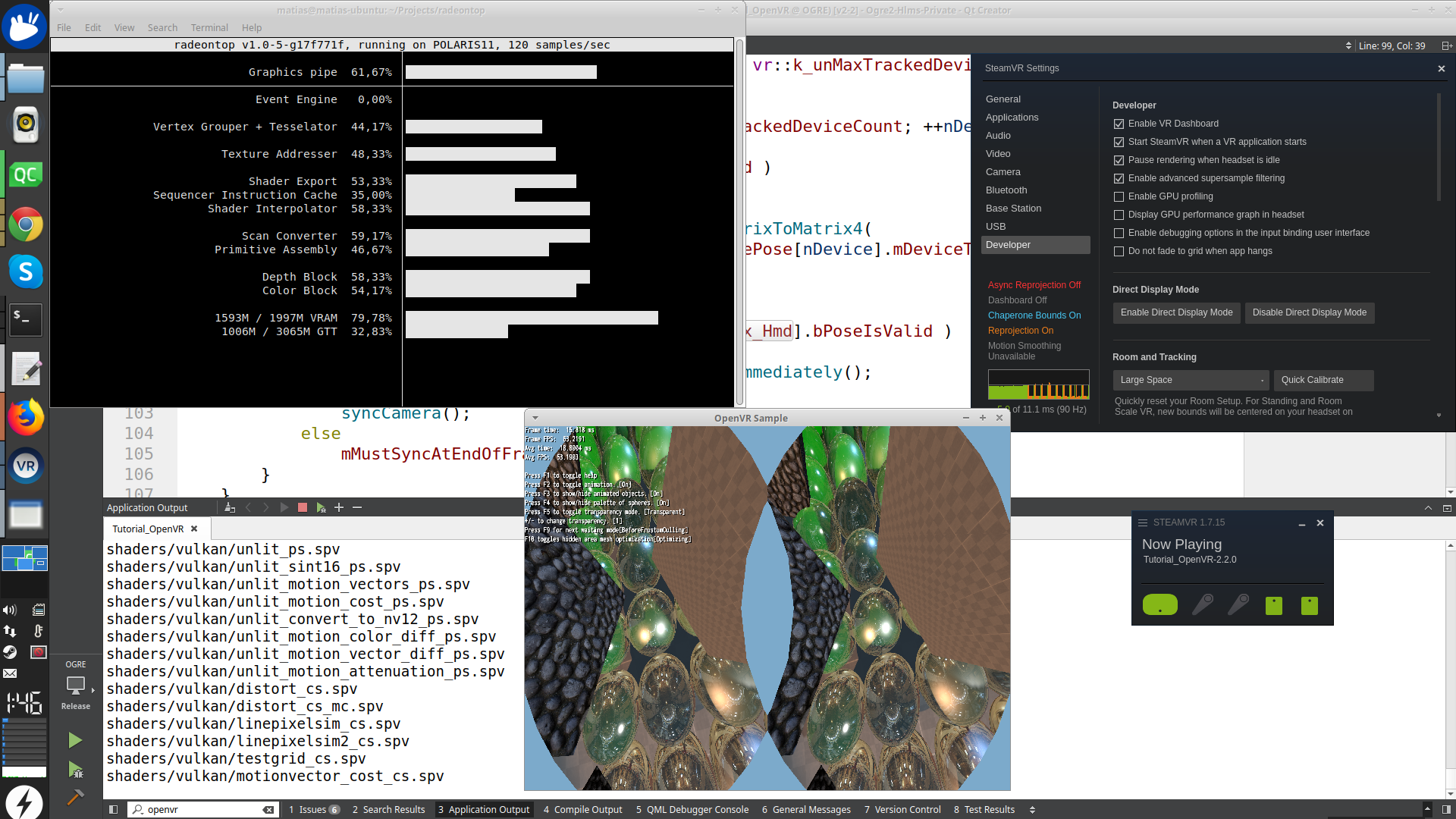
There are two issues here. One of them is that radv was returning garbage data for some timestamp queries we use to drive our frame timing logic. We've sent some patches upstream to be ported to stable:
https://gitlab.freedesktop.org/mesa/mesa/merge_requests/1510/diffs
https://gitlab.freedesktop.org/mesa/mesa/merge_requests/1735
Second, SteamVR's frame timing logic for linux async reprojection was having some trouble, and it didn't always start the work early enough to hit vblank. This is what @Zamundaaa was experiencing above. Fixes for this problem will show up in the 1.8 beta cycle.
P.S. @darksylinc on Linux we use gpuvis to help us debug timing for apps and for SteamVR itself. If you haven't tried it I would recommend giving a go with these instructions:
https://github.com/ValveSoftware/SteamVR-for-Linux/blob/master/CapturingPerfData.md
If you are developing a game it might be come in quite useful :)
Thanks!
I should probably build latest Mesa then, and wait for that other patch to be merged.
Regarding gpuviz I know about it, but I haven't yet used it with this sample (I only got to run SteamVR on Linux a few days ago, and I am mostly focusing on Windows for VR)
Regarding async reprojection, I would have to make more tests, but it does look like it takes a lot of time to perform (unreasonably so?) as it seems radeontop goes to 100% (and my framerate tanks) when it kicks in.
Thanks for the quick response! I'm glad the issues are being worked on!
SteamVR 1.8.2 includes a workaround for some of the bad timestamp query data we were getting from radv.
Make sure to update to Mesa 19.1.6 or newer so you can get a proper fix for these issues from the driver side.
@Zamundaaa can you let me know if Pavlov is working better for you with 1.8.2
Yes it is a lot better. I'm not entirely sure if it's reprojected though (playing at 144Hz), the frame timings graph in VR is broken: https://github.com/ValveSoftware/openvr/issues/1204. I also can't say too much about smaller frame drops because of that, but it definitely feels very smooth. I can finally play games in comfort again. Thank you so much for that!
There is still some issues though (not in Pavlov in particular but in other games like Blade&Sorcery, too):
When a game is loading a new asset or a new level / a new map in the case of Pavlov then it hangs for a moment. After that moment when it begins submitting frames again there's more often than not quite some flickering, most times it looks like there's patches of the screen going white. That flickering goes away after a second or so.
It still seldomly (maybe once or twice a minute, only saw it in Pavlov and B&S but not in Beat Saber) drops one or a few frames in between that one does notice. It could also be a one or few frames flickering to a bit different orientation, hard to say.
I only ran at 144Hz until now, I'll see if changing to 120 or 90Hz or disabling Async Reprojection make a difference.
I should probably make seperate issues for those problems, they don't have much to do with this (except maybe the Mesa part):
The new update crashed Steam quite some times for me (may have to do with the new library or with the vrwebhelper being enabled again, but that doesn't belong in this issue anyways).
I got an update to Mesa, git-99c186fbbe, and now SteamVR makes the whole PC hang after launch sometimes. Audio still continued but all displays were frozen. Don't know if Mesa or SteamVR is the culprit. The dashboard also seems very slow, in stable too though, so probably the 5700 XT or the new kernel or Mesa-git.
So looking at the frame timings graph whilst playing Beat Saber and I gotta say that there is some frame drops in between.
Turning Async Reprojection off makes it apparent that this is #245. Having Async Reprojection on simply seems to mitigate this to be single frame drops instead of multiple frames. In between the multiple frame drops though it did feel like it is performing better without AR, might just be because it isn't reprojecting at all then.
My frame times look a lot more inconsistent than in #245 though, fluctuating by up to about a millisecond between one frame to the next. AR on or off doesn't seem to matter much there.
I'm now on Mesa 19.3.0-devel (git-8b78cce433) (LLVM 10.0.0) if that makes a difference.
Ok the dropped frames are pretty noticable in Blade&Sorcery at 120Hz, no SuperSampling explicitly set. Sometimes physics objects just fly into the sky and it's also rather noticable when moving.
It looks like it's always reprojecting (was always that way for me in B&S) at ~13ms, same fluctuating frame timings but this time also often frames in between that are marked red. What do red bars mean? I know that green is non-reprojecting, orange is reprojecting and pink is dropped frame. What else is there?
With Mesa 19.3.0-devel (git-40087ffc5b) (LLVM 10.0.0) the frame timings appear to be more consistent overall but the singular frame drops are still there and more importantly now there's big spikes everywhere that are pretty noticable in gameplay (at least in Beat Saber).

What I find especially weird though is that those spikes don't seem to be reprojected but always the frame before.
When I enabled GPU profiling to record a trace this behaviour was gone.
Still, as the frame timing graph didn't look... healthy, it looked like some frames were not just dropped but a compeltely missing line, either way I recorded a trace in BeatSaber, about 20s in the level. Maybe it helps. If you could use more then just ask. https://drive.google.com/open?id=1oa36NS7OcZiEE6GBkQo_4jgyzNlw1PfN
What I find especially weird though is that those spikes don't seem to be reprojected but always the frame before.
I've seen this behavior too. Hopefully I can get a few minutes later today and try to record a trace of it. I believe I've managed to reproduce it with trace recording enabled, although it wasn't the issue I was attempting to debug at the time so I didn't actually record a trace of it.
As the impossible frame timings have apparently been resolved (or at least I haven't seen any in a while) and as the issue "horrible performance in some games" is horribly vague and will lead nowhere I'll close this issue now and open new ones for specific performance problems as necessary.
Upstream links
- ValveSoftware/openvr/issues/1204x1 2019-09
In Pavlov VR it shows impossibly high frame timings, and it performs almost as badly as the graph shows. This goes away if one disables Async Reprojection.
System Information (please complete the following information):
nvidia-settingsorvulkaninfo | grep driverInfo: Mesa 19.1.4 (LLVM 8.0.1)Performance Data (optional, but very helpful):