This doesn't seem to be an issue really related to SteamVR at all, but a Steam issue. I just tried starting a game from SteamVR home and a similar error appeared.
Turns out all xdg-open steam... wouldn't work, and the reason was that the steam.desktop file in ~/.local/share/applications/ was wrong. I just deleted it and now everything works, so if anyone gets the same problem, try that.
Nothing extracted yet.
System Information (please complete the following information):
When trying to use the VR button in the top right of steam this popup appears:
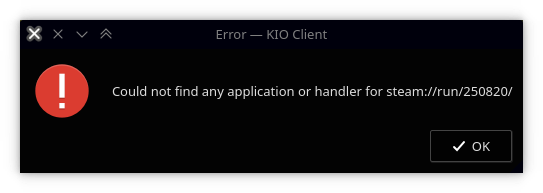
and SteamVR doesn't start. If I execute "steam steam://run/250820/" it does work.
I had this issue previously but it was resolved with the next Steam update. This time it didn't.