[BUG] Settings window clipped
Same issue here. Can't resize the window and see all settings.

@GrayBoltWolf as the screenshot looks like you're using KDE Plasma, or at least KWin, then you can assign a special window rule to force a bigger window size. It's 680,539 for me by default and does not clip anything away.
To the devs: Why is the window even fixed size (and not minimum size), anyways? At least on my machine it scales completely properly when forcing a bigger size.
I am also having this problem (running ubuntu 20.04). Did anyone figure out a way to fix this?
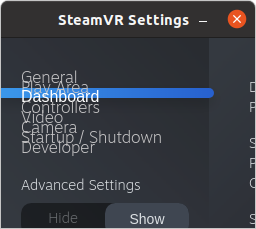
I have the same issue.
- the Settings menu item in SteamVR does not open any window at all, when HMD is connected.
- the settings window can be opened from the SteamVR tray icon, but is appears clipped exactly as in the previous comment. I cannot adjust the invisible options.
The OS is ALTLinux Sisyphus, SteamVR beta 1.16.1 (1610576818)
HMD is HTC VivePro
Same issue for me with Gnome (X11) on Arch. I am able to open the settings through the SteamVR window, but I cant use the settings.
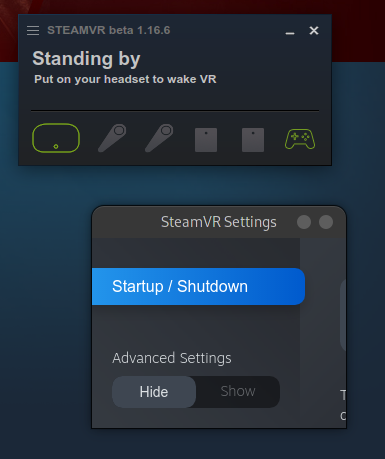
I have posted a Gnome workaround for this issue:
https://github.com/ValveSoftware/SteamVR-for-Linux/issues/445#issuecomment-855396808
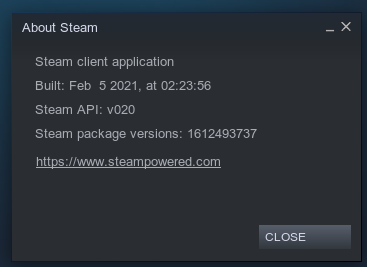
My settings window started opening correctly recently. Not sure what changed but it works now in the latest SteamVR beta and Steam beta on Ubuntu.
I still have the issue with the beta version on Ubuntu 21.10. @baxeno’s workaround works for me, although it is now quite annoying to install extensions on Ubuntu (you have to switch to the apt version of Firefox or install them manually).
Never had this issue on stock Ubuntu 20.04.3 LTS, the settings windows starts maximized and nothing is clipping.
While some workarounds in particular window managers exist, it really is a trivial bug of SteamVR. The settings window is obviously coded to appear as a non-resizable dialog. Your WM/DE is instructed to open it as a small window and NOT resize it. A clever WM may allow you to overrride it, but it is against the standard. If steamVR were open-source we would have fixed it long ago.
Your WM/DE is instructed to open it as a small window and NOT resize it.
Gnome opens it in full screen and allows you to un-maximize it which does not result in small clipping window. I could even resize it until a few updates ago. Is it annoying and not how it should be? Yes. Is it an issue? No.
Gnome opens it in full screen and allows you to un-maximize it which does not result in small clipping window. I could even resize it until a few updates ago.
That's better than what happens in other DEs, but current Gnome is so-o weird, that it became a marginal half-dead project with only RH users left. I used to be a Gnome fan until Gnome3 was taken over by evil aliens. Sorry for offtopic.
Gnome opens it in full screen and allows you to un-maximize it which does not result in small clipping window.
That’s not at all what I observe. For me Gnome opens it in a small clipped window that I cannot resize or maximize.
(still on Ubuntu 21.10 with SteamVR Beta)
So, Valve ever going to look at this one? If you end up in Safe Mode, you can't get out unless you reinstall everything.
Experiencing.
KDE Plasma (Wayland) on Arch, SteamVR beta (can repro on stable, no difference)
Can use the window when using the X11 session.
Same problem. KDE Plasma with Debian 13 Trixie and nvidia graphics card.
Still running into this. Bazzite with KDE Plasma 6.6.1.
Nothing extracted yet.
Describe the bug
SteamVR Settings Window content clipped because the window is too small. Likely HiDPI or font size related. The window is fixed size so I cannot resize it to get to the hidden controls.
To Reproduce
Launch SteamVR Settings
Expected behavior
I expect to be able to get to all settings
System Information (please complete the following information):
SteamVR-2020-01-27-PM_11_14_33.txt