[BUG] Error 307 Black HMD and Wrong SteamVR runtime
I also found, that my SteamVr installation is missing the runtime and sdk directories with bin/linux64.
This tells me: the console output.
I cannot loacte it in the ~/.local/share/Steam folder nor in ~/.steam folder.
Could it be that GL_ARB_shader_viewport_layer_array is neccesary to have as OpenGL extension. I run into the problem, when compiling the Ogre OpenVR sample.
Using xrandr --output HDMI2 --set non-desktop 0 and
xrandr --output HDMI2 --auto. I can make my Vive act as another screen. If I set it back to direct Mode (?). nvidia-settings nor KDE display settings can't find it.
I have a similar situation and executing xrandr --output was the first time something appeared in my Vive other than the black screen. Are you able to set the Direct Mode via the settings button?
Similar issue on Xubuntu 20.04.1 with Intel HD Graphics 630 and NVIDIA GeForce 1050 Ti (GP107M).
My guesses are that this situation occurs due to HDMI port being wired to iGPU and not to dGPU. Forcing config file to not use direct mode makes SteamVR unable to find HMD at all.
One time I've managed to make SteamVR think that it's in windowed mode, but it has detected that window isn't in focus, even though window hasn't existed at all.
I've looked more into this and found out that for laptops with HDMI connected to iGPU it's required to use render offload. In nvidia-driver-440 this feature works out-of-the-box.
With this information I've managed to launch SteamVR in a tricky way on Ubuntu (and Xubuntu as well) 20.04 with HTC Vive headset:
- Install
libqt5opengl5 - (Probably optional) Set
PRIME profilein NVIDIA X Settings app toOn demandand reboot - Launch Steam with discrete graphics (through new option in context menu, or
__NV_PRIME_RENDER_OFFLOAD=1 __GLX_VENDOR_LIBRARY_NAME=nvidia steam) - Power on HMD and connect only USB cable to laptop
- Launch SteamVR. It will create new window with VR view and with right dimensions for headset.
- Connect HDMI cable to laptop
- Enable HMD display as second monitor with
xrandr --output (your_port) --set non-desktop 0 - Move VR window on HMD display monitor
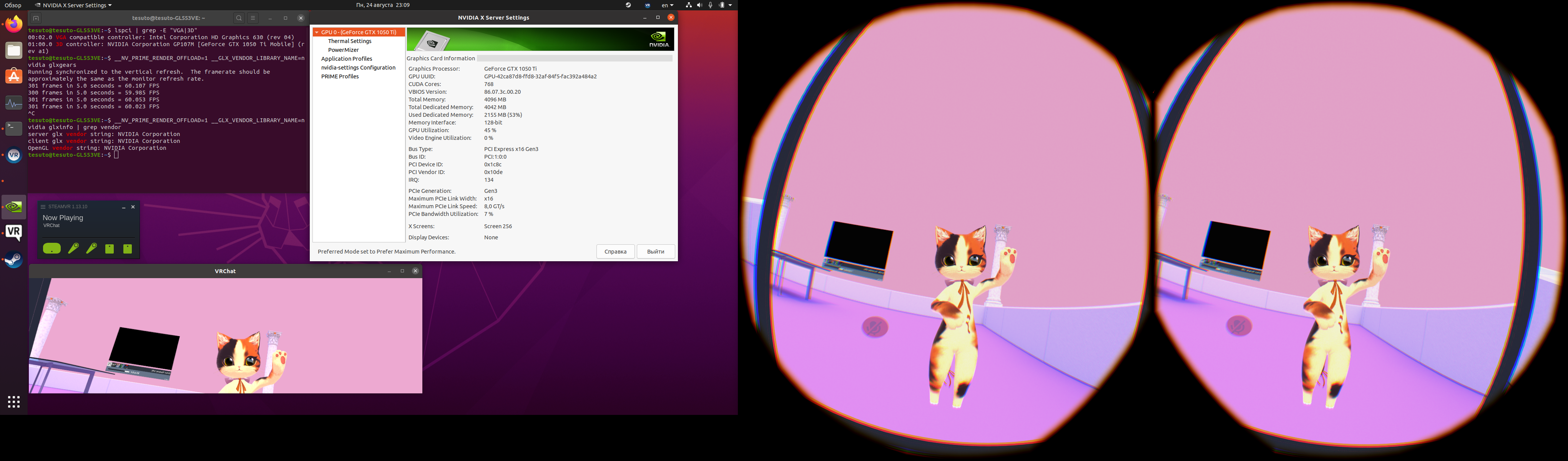
Notes:
- Try to keep up to 90 frames per second. If value drops below 60 you will get reprojection problem (#277).
- On Xubuntu SteamVR works better than on Ubuntu.
Hey, so I understand this is a little bit old, but I need some help figuring out this:
* Enable HMD display as second monitor with `xrandr --output (your_port) --set non-desktop 0`
What am I supposed to put in (your_port)? I tried many different things in the terminal, but they don't seem to work. I keep getting:
warning: output HDMI-1 not found; ignoring
X Error of failed request: BadRROutput (invalid Output parameter)
Major opcode of failed request: 140 (RANDR)
Minor opcode of failed request: 15 (RRGetOutputProperty)
Serial number of failed request: 41
Current serial number in output stream: 41
Thanks in advance for any help
Also I only have one HDMI port if that helps
Nothing extracted yet.
Describe the bug
Two Problems maybe linked:
System Information
Graphics driver version (run nvidia-settings): Nvidia 440.64
Graphics Cards: Optimus Laptop
Intel Corporation Skylake GT2 [HD Graphics 520]
NVIDIA Corporation GM108M [GeForce 940M]
Configured in /etc/X11/xorg.conf.d: https://gist.github.com/peetCreative/e74b1e3275f40da159ab3c421e96a2d4
Gist for SteamVR System Information:
Gist for console output:
https://gist.github.com/peetCreative/fc9e601b36a6287cafe1ac385562f483
Gist for Systemreport:
https://gist.github.com/peetCreative/739385a9a64f1bbd5716b046444efc7a
Gist for dmesg:
https://gist.github.com/peetCreative/14dce5da946077fb6efec616c052db5e
Opted into Steam client beta?: No
Opted into SteamVR beta?: Booth doesn't work
Have you checked for system updates?: Yes
Problemdescription
Expected behavior
No popup and HMD displaying sth
##Additional context
I more or less followed this tutorial:
https://blog.ybalrid.info/2018/03/install-and-run-steamvr-on-archlinux-for-using-an-htc-vive-and-do-opengl-openvr-developement/
I installed steam via package and from steam store.
I setup udev up with.
https://gist.github.com/peetCreative/1e9937e30a8e096fd8d86174d3c3d58f
Starting SteamVR like this gives me a Systemreport and the console output, which I linked above.
SteamVR seems to start nicely but shows that SteamVR Failed due to some core
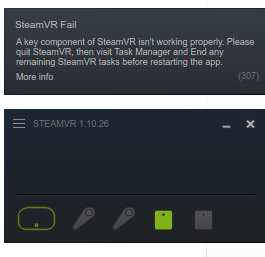
components failed.
But it detects my basestation and headset as green.
Then it autostarts the room calibration. And realizes that the version of SteamVR is not the latest.

Debugging
What I can see from Systemreport ist that:
vrmonitor says compositor interface is not available.
Which leads me to:
https://github.com/ValveSoftware/SteamVR-for-Linux/issues/274
and
https://github.com/OpenHMD/OpenHMD/issues/276
Using xrandr --output HDMI2 --set non-desktop 0 and
xrandr --output HDMI2 --auto. I can make my Vive act as another screen. If I set it back to direct Mode (?). nvidia-settings nor KDE display settings can't find it.
Also I found that this issue might be linked to
https://github.com/ValveSoftware/SteamVR-for-Linux/issues/286
But there is not more description.
From the output to console I found maybe the most promissing Error.
But that's very generic and I can not find, which part is causing it.
From here (https://github.com/ValveSoftware/SteamVR-for-Linux/issues/205) I got the idea looking in the above linked dmesg.
There I see the following failing, but I guess it's "just" the camera not working.
More in ~/.local/share/Steam/config/steamvr.vrsettings
I also thaught about, that in steamvr.vrsettings the GPU ist missing.
https://gist.github.com/peetCreative/90b387d81a267d926996b529921fc017
Maybe there link to graphics card is missing?
I was looking for some results on google, on open and closed issues on github,
When not plugging HDMI than I get the VR view to the Display. Everything works fine. Even room calibration.
Here I give the output. https://gist.github.com/peetCreative/337c02639c1f3d86050d52d0c6216dcf
For me it points out that the doesn't show up.
Problem seems to come with Direct Mode.
I think one might find some threads here but I didn't. :/
https://steamcommunity.com/app/250820/discussions/2/
Question
Do you have an idea which parts are causing Error 307 and why SteamVR thinks its too old?