[BUG] SteamVR Display Output goes to Monitor instead of Index
Hello @openyk, you might be seeing the behavior I see on my VR test box when vrcompositor wrongly uses the Intel chipset to render instead of the AMD chipset that the HMD is attached to. As a quick test, you can check if you have intel_icd.x86_64.json and move it aside with something like sudo mv /usr/share/vulkan/icd.d/intel_icd.x86_64.json /usr/share/vulkan/icd.d/intel_icd.x86_64.json.disabled.
Hey @kisak-valve that makes sense because my old Linux PC used an Intel CPU/chipset (current PC has AMD CPU). Unfortunately disabling the intel json config files did not work.
On the plus side, before I had 3 vulkaninfo errors and now only 1 comes up:
vulkaninfo | grep vulkan
ERROR: [Loader Message] Code 0 : /usr/lib/i386-linux-gnu/libvulkan_radeon.so: wrong ELF class: ELFCLASS32
Does that filepath/error seem familiar to you?
That error message is just telling you that the vulkan loader couldn't use the 32 bit radv driver with 64 bit vulkaninfo, which is expected and harmless.
Maybe give #334 a read and see if your experience lines up with the older issue report.
I had this issue earlier today and i just ended up unhooking everything and plugging it back in and it resolved the issue.
I had this issue since I re-enabled my iGPU, removing the intel-vulkan package solved it.
I have this issue.
There is no video output to the Index headset whatsoever, and all display output on steamVR goes directly to a non resizable window on the monitor.
Currently running Kernel 5.10.22-200.fc33.x86_64 with mesa 20.3.5-1.fc33 installed. I am using Wayland/Mutter under Gnome however, so most of the X-specific stuff listed in other threads isn't applicable it would seem.
Running on a vega-based AMD card with no problem on traditional monitor apps -
[drm] Initialized amdgpu 3.40.0 20150101 for 0000:04:00.0 on minor 1
When launching Steam VR I get the error message regarding Direct Display mode, then clicking it again results in a crash;
qt.qpa.wayland: Wayland does not support QWindow::requestActivate()
Fatal : VkResult is "UNKNOWN_ERROR" in /data/src/common/vrcommon/vrrenderer/vulkanrenderer.cpp at line 3678
crash_20210331131826_1.dmp[271346]: Uploading dump (out-of-process)
Last time I tried SteamVR on Wayland the same issue occured (Plasma/KWin however), so I think that steamvr simply does not support wayland for now.
If you're running multiple monitors try unplugging all but one display and the HMD. Also try unplugging and replugging both the DP and USB cables on the headset.
No joy. I did try signing into an xorg session, and after generating a new xorg configuration it seems insistent on utilizing a different video device, and not amdgpu.
To complicate matters I am running everything in a VM with devices passed through from a hypervisor.
To complicate matters I am running everything in a VM with devices passed through from a hypervisor.
You're positive the USB devices passed through correctly?
Yep - it's something I apparently need to take special care for because if everything is passed through and connected then the hypervisor hardlocks. But that's an issue vmware are utterly disinterested in resolving, and not relevant to this issue.
I managed to get a baremetal installation up and running after a little while and it works more reliably there. I think we must put this down to the difficulty of determining output devices in linux.
I suppose my next step will be to try and get everything in the VM up without the virtualized svga adapter which I think is what is causing the problem here.
When running linux directly, did steamvr work during a wayland session?
When running linux directly, did steamvr work during a wayland session?
I did not try SteamVR directly because I can't capture Windows in OBS on Wayland right now, but I did try OpenXR with Monado while running a Wayland Gnome session and it was working fine.
@melvyn2 - no it did not.
Is there any way to resolve this by now? I'm using an AMD GPU without any integrated graphics and I have the same issue.
Is there any way to resolve this by now? I'm using an AMD GPU without any integrated graphics and I have the same issue.
are you on wayland?
@melvyn2 Nope, X11.
@melvyn2 Nope, X11.
What distribution? Kernel? Druver and Firmware versions?
@HadetTheUndying Ubuntu 21.04, 5.12.0-9.1-liquorix-amd64, Mesa 21.1.2 - kisak-mesa PPA.
Which firmware? GPU or Index? Index is on latest firmware that SteamVR offered me but I updated a long time ago, nothing new since then. GPU firmware is taken from linux-firmware 1.197 package on Ubuntu.
For the people running Wayland. SteamVR itself is running via XWayland there. Currently drm-lease is not supported with XWayland or Wayland in general. There are some ongoing efforts to get this working though. The changes are not ready for prime time yet but if you want to play around see this merge request for official Wayland protocols: https://gitlab.freedesktop.org/wayland/wayland-protocols/-/merge_requests/67
You will need to get a patched version of your Wayland compositor (currently only Sway/wlroots and KWin) and a patched version of XWayland. All of them are linked in the merge request.
Does anyone have a PKGBUILD for the patched version of XWayland? I found this, but while XWayland is mentioned in the README here:
https://gitlab.freedesktop.org/lubosz/wlxr-pkgbuilds
I don't see a PKGBUILD for it.
@yaomtc try this. I'm not sure how to set the pkver correctly here, because yay always wants to update to the latest commit from the master branch, but otherwise this works for me. I've been able to get SteamVR running with this along with wlroots-git and sway-git.
pkgname=xorg-xwayland-git
pkgver=xorg.server.1.20.0.r1103.g667e180af
pkgrel=1
arch=('x86_64')
license=('custom')
groups=('xorg')
url="https://xorg.freedesktop.org"
pkgdesc="Run X clients under Wayland (git version)"
depends=('nettle' 'libegl' 'libepoxy' 'systemd-libs' 'libxfont2'
         'pixman' 'xorg-server-common' 'libxcvt')
makedepends=('meson' 'git'
             'xorgproto-git' 'xtrans'
             'pixman' 'libxkbfile' 'libxfont2' 'dbus'
             'xorg-font-util'
             'wayland' 'wayland-protocols'
             'libdrm' 'libepoxy'
             'systemd'
             'egl-wayland'
)
source=("xserver::git+https://gitlab.freedesktop.org/Zamundaaa/xserver.git#branch=drm-lease")
sha256sums=('SKIP')
provides=('xorg-xwayland' 'xorg-server-xwayland' 'xorg-server-xwayland-git')
conflicts=('xorg-xwayland' 'xorg-server-xwayland' 'xorg-server-xwayland-git')
replaces=('xorg-server-xwayland-git')

pkgver() {
  cd xserver
  git describe --long 2>/dev/null | sed 's/\([^-]*-g\)/r\1/;s/-/./g' ||
  printf "r%s.%s" "$(git rev-list --count HEAD)" "$(git rev-parse --short HEAD)"
}

build() {
  arch-meson xserver build \
    -D ipv6=true \
    -D xvfb=false \
    -D xnest=false \
    -D xcsecurity=true \
    -D xorg=false \
    -D xephyr=false \
    -D xwayland=true \
    -D xwayland_eglstream=true \
    -D xwin=false \
    -D xquartz=false \
    -D glamor=true \
    -D udev=true \
    -D systemd_logind=true \
    -D suid_wrapper=true \
    -D xkb_dir=/usr/share/X11/xkb \
    -D xkb_output_dir=/var/lib/xkb

  # Print config
  meson configure build
  ninja -C build
}

package() {

  # bin + manpage + .pc file
  install -m755 -Dt "${pkgdir}"/usr/bin build/hw/xwayland/Xwayland
  install -m644 -Dt "${pkgdir}"/usr/share/man/man1 build/hw/xwayland/Xwayland.1
  install -m644 -Dt "${pkgdir}"/usr/lib/pkgconfig build/hw/xwayland/xwayland.pc

  # license
  install -m644 -Dt "${pkgdir}/usr/share/licenses/${pkgname}" xserver/COPYING
}
Installs just fine manually, thanks @michaelnew! I'll test it out once I can get some other *-git packages to install, waiting on a fix for a patch atm so I can use it with Plasma/kwin
Tested briefly again today. This is still an issue. I am not sure when Fedora will be folding these changes into their distro if ever, and I'm a little reluctant to hose my installation attempting to build the patched version as i'm somewhat out of my depth here.
This might not that helpful, but I was encountering the exact same symptoms described here, including the message about switching to direct display mode (on a Vive instead of an Index), and it turned out that the HDMI part of the 3-in-1 cable was faulty. Connecting a different HDMI cable bypassed the issue and it worked perfectly on Plasma.
I am also having this issue on a fresh install of Pop!_OS 21.10 with a Radeon 6700XT, although it also happened on the previous 21.04 distro, both with my current card and with a Radeon Vega 56. Both of the cards worked perfectly under Windows 10 2004 onwards. As far as I know, Pop!_OS 21.10 does not use Wayland unless it is specifically enabled in a config file and enabled as a login session, which hasn't been done in my case.
I've been running sway-git and wlroots-git a long time, occasionally trying to start SteamVR and usually seeing crashing or VR view on monitor. After 1.7-RC1 I figured to try again since release notes say VR should be working now, well it didn't. Found this issue and tried installing xorg-xwayland-git, rebooted and as a big surprise VR was working with my Index. I played around for a while and pretty much everything worked except overlay menus which seems to be another issue.
Later today I figured to try playing again, VR doesn't work again at all. Rebooting, changing display and USB ports, disabling and enabling Direct Display Mode, restarting headset, different versions of SteamVR, reinstalling whole Steam and SteamVR, nothing brings the picture back.
Is there something obvious I'm missing or is the stack still so immature it can't be made work reliably?
edit:
Disconnecting HMD from breaker seems to work a lot better, getting picture pretty much every second restart of SteamVR. Checking dmesg when SteamVR fails to get picture I see vrcompositor[70554]: segfault at 10 ip 00007ff55aa6a424 sp 00007ffcc459f168 error 4 in libpthread-2.33.so[7ff55aa66000+f000] consistently. Another thing I noticed is game Until You Fall sometimes reports failing to get cursor and has to be killed. After that Steam Home doesn't start and any game that tries to start prints VKRenderThread[93530]: segfault at 7f6b1496f918 ip 00007f79b62e0ed8 sp 00007f7967ab4d90 error 6 in vrclient.so[7f79b60a9000+6ac000] and crashes.
I just started getting this bug out of nowhere. I was playing VRChat when suddenly SteamVR just crashed on me. Subsequently restarting SteamVR now pipes the headset output to a X11-window on my desktop with the SteamVR-client visible. It suggests to enable Direct Mode and wants a restart, if I do that then the same thing happens again, though the steamvr-client window is now absent. Only way to exit is to close/kill steam. Restarting steam afterwards resets the behavior to the initial state.
Running vulkaninfo | grep vulkan I get:
ERROR: [Loader Message] Code 0 : loader_scanned_icd_add: Driver /usr/lib/libvulkan_radeon.so supports Vulkan 1.2, but only supports loader interface version 4. Interface version 5 or newer required to support this version of Vulkan (Policy #LDP_DRIVER_7)
WARNING: radv is not a conformant Vulkan implementation, testing use only.
        VK_KHR_vulkan_memory_model                  : extension revision 3
        vulkanMemoryModel                                  = true
        vulkanMemoryModelDeviceScope                       = true
        vulkanMemoryModelAvailabilityVisibilityChains      = false
        vulkanMemoryModel                             = true
        vulkanMemoryModelDeviceScope                  = true
        vulkanMemoryModelAvailabilityVisibilityChains = false
I tried renaming /usr/share/vulkan/icd.d/amd_icd32.json to something else, didn't help.
Tried using SteamVR beta, no dice.
It's strange, I wasn't updating anything, and had been gaming for a solid 3 hours when it just decided to crap its pants out of nowhere.
For a late update, KDE Plasma beta 5.24 (aka 5.23.90) along with xwayland from git master works great for VR on wayland.
For a late update, KDE Plasma beta 5.24 (aka 5.23.90) along with xwayland from git master works great for VR on wayland.
I think I'll just wait the 3 days for 5.24 to drop and not go about mucking it up any further ;)
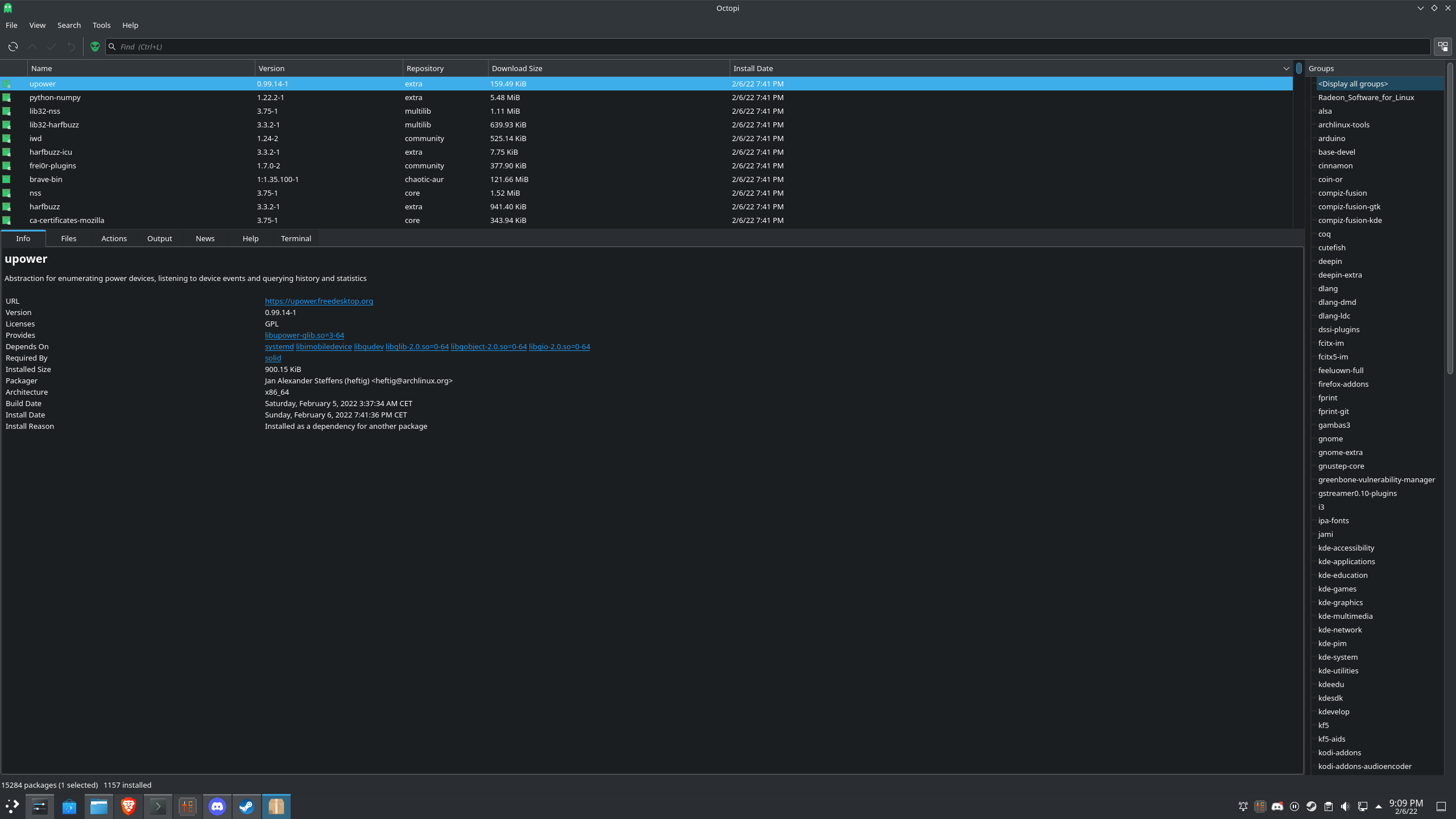
Aaaand just like that it started working again after a system update. Upgraded packages in screenshot. The only thing that comes to mind is the upower-package since it listens to device events; or perhaps the harfbuzz packages (IIRC there was some hubbub about freetype-fonts causing some weirdness awhile ago).
.
I had started seeing the same issue a week ago or so and I'm fairly sure it's related to an upgrade in Arch's packages as downgrading vulkan-icd-loader back to 1.2.199-2 fixed the issue for me. Not sure if it's related to the loader error posted above by @ZarathustraDK or if it's just a general issue with the new loader version though. I also downgraded SteamVR to the linux beta, which at first didn't fix it, but then it seemed fixed. Upgrading to latest SteamVR again introduced the issue, with old icd-loader as well and now I can't get it running again. Seems like that downgrade was just a fluke somehow.
@dsalt
This seems similar to #276.
Maybe, except, from that ticket:
I have never observed it on first run (though it's technically possible, it requires something else to have made use of the HMD).
This happens to me frequently on the first run since boot.
@AlexRamallo
it turned out that the HDMI part of the 3-in-1 cable was faulty. Connecting a different HDMI cable bypassed the issue and it worked perfectly on Plasma.
Out of interest, how did you ascertain this? I'm beginning to suspect it could be a hardware fault. (Stock Valve Index). Basically, I have to unplug and replug at the cablebreak and restart SteamVR in order for it to work, almost every time. I can get it working somewhat reliably if I do this, but it's not working every single time.
Software seems to have an impact too though, with more recent Nvidia drivers being problematic (470 legacy branch works, 500 is much less reliable needing a large number of restarts before you get lucky with a working setup, but then is more likely to crash). I'm now on a 5.10.115 kernel on NixOS 21.11 which is working pretty great, Ubuntu 20.04 (with Linux 5.13.0) worked less reliably than me and also had more noticable pauses/lag, crashes and the 'chaperone/UI wobble' where NixOS is buttery smooth in beatsaber. Proton versions also mattered quite a lot for reliably and for some software I have to choose an older proton verson (+ legacy nvidia drivers) to get them to start at all.
I've noticed that I get corrupt graphics around the right eye when this happens:

They are very flickery.
SteamVR 1.22.13
Debian Testing
Linux 5.18.2 (Debian 5.17 kernel + 1000hz + olddefconfig)
Mesa 22.1.0
Radeon 6700XT
Upon further inspection, it seems as though these flickery pixels are visible in the HMD, too. I thought it was a failing display, but artifacting appears to be very similar:

They're at the very edge of the screen, and really only visible out of the edge of my eye with the lenses cranked most of the way in.
Replying to https://github.com/ValveSoftware/SteamVR-for-Linux/issues/438#issuecomment-1149462001
I can confirm that this is the same flickering as shown when the window appears. This seems to be a bug with recent kernel versions as back when I got my Valve Index in August 2020, this was definitely not a thing
Yeah I also thought my vive was going bad but realized it was the glitching. Arch/KDE wayland
Hello @Goofybud16, that looks like #480 instead of the issue reported here.
Hello @Goofybud16, that looks like #480 instead of the issue reported here.
Yep, that looks to be the cause of the corrupted graphics. I do experience this bug (displaying on desktop, not headset) from time to time, that just led to me discovering that I was effected by that bug as well.
Hi everyone!
I want to share my experience with this bug. I have two computers with similar configuration: Alienware M15 and Dell G15 5521se. In the former, I was able to solve the bug that displays the images on the desktop instead on the HMD, with the latter I can't.
The Alienware M15 R6 has the following setup:
- Alienware M15 R6 BIOS Alienware 1.9.1
- CPU i7-11800H
- GPU Nvidia GeForce RTX 3060
- Dual boot Windows10 and Ubuntu 20.04.3lts
- GNOME version 3.36.8
- X11
- Linux kernel 5.11.0.27-generic
- Nvidia driver 470.57.02
- Steam package 1654574690
- SteamVR beta 1.23.4
With this configuration I can run steamVR with Valve Index. The first time I run the SteamVR, I get error 307, but renaming vulkan file for intel solve the issue. The images are displayed correctly on the lenses, the system crashes rarely during the usage. When it does, if I run SteamVR I usually get the extended mode bug. I can solve the issue simply disconnecting and reconnecting Index power cable. The critical aspects seems the kernel version and installing steamVR via apt. Using another kernel gives the extended mode bug consistenlty. Using apt I can install SteamVR without having problems of dependencies of any type.
I tried to configure a Dell G15 with a similar configuration, but on this machine the images are shown correctly on the desktop and not on the HMD, that is totally black.
- Dell G15 5521 special edition Dell BIOS 1.8
- CPU i7-12700H
- GPU Nvidia GeForce RTX 3060
- Dual boot Windows 11 and Ubuntu 20.04.4lts
- GNOME version 3.36.8
- X11
- Linux kernel 5.18.0-10.2-liquorix-amd64 ( I was forced to use this cause the mainline kernel do not work on this machine )
- Nvidia driver 470.129.06
- Steam package 1654574690
- SteamVR beta 1.23.4
I installed SteamVR using apt as before, I solved the bug given by the wrong vulkan selection ( error 307 ), but I always get the images on the desktop instead of the HMD, in addition SteamVR asks me to pass to the extended mode.
The first difference noticeble is that linux kernel is not the same. With the Alienware, I tried more recent kernel versions but none of them works. With Dell G15 i cant find another kernel version that works for all the hardware of my computer ( I get wifi/bluetooth board problems and also problems in recognizing the Nvidia GPU).
I hope these informations can be helpful to find a solution to this problem.
Hello @mariocorsanici, with Optimus laptops, should be worthwhile to also pay attention to if X is running on the Intel or NVIDIA GPU, with the latter having a better chance of the NVIDIA driver picking up the HMD on the HDMI port (from some testing with a Vive) for direct display.
Hi @kisak-valve, thanks for the quick response. On Dell G15 I run prime-select nvidia because without forcing it, I could not use my secondary monitor. I assume that this command will force X11 to work using Nvidia GPU, correct me if I am wrong. If I am wrong, how can I check if X11 is running using nvidia?
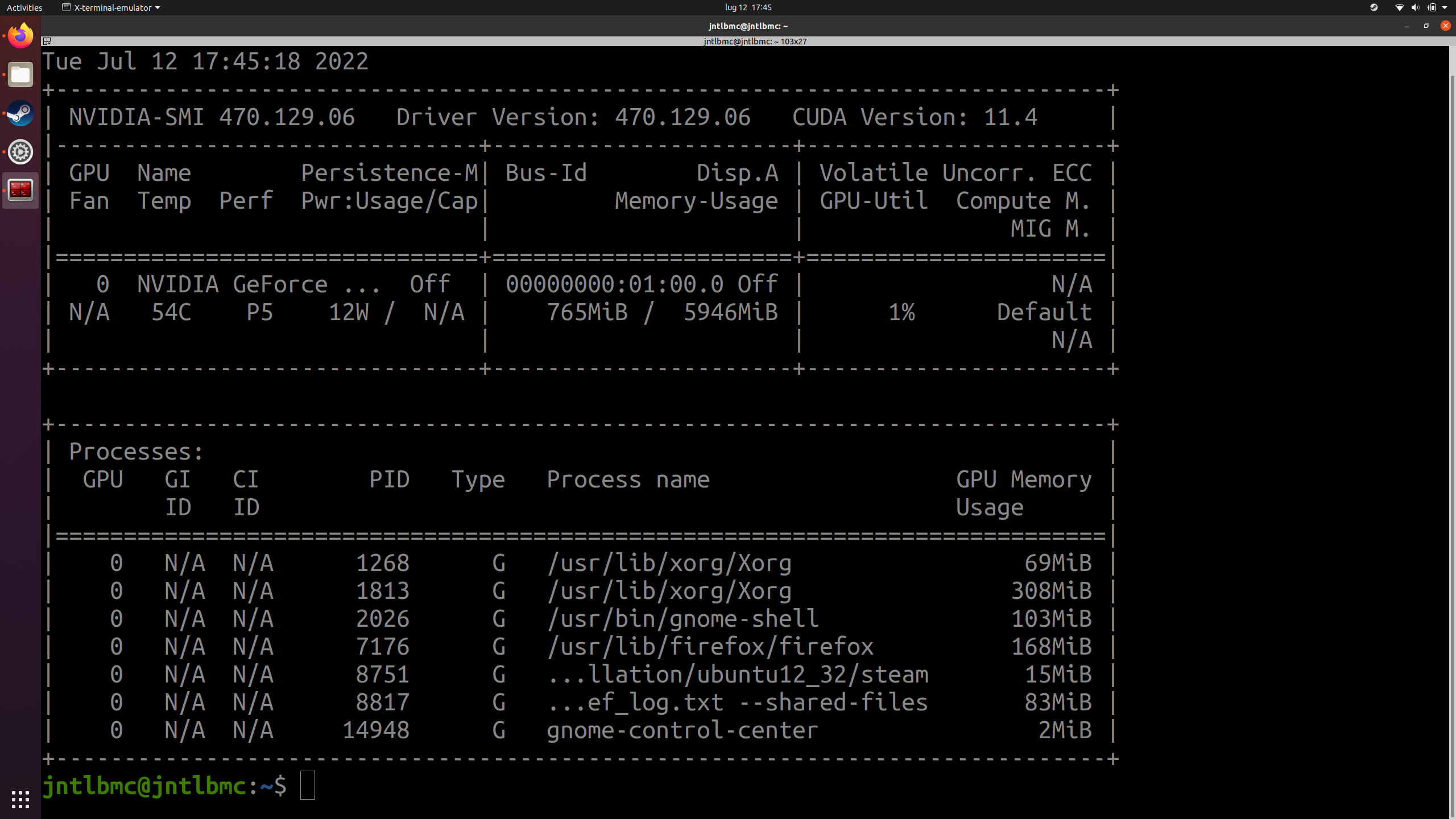
prime-select nvidia is probably doing exactly what you want for the best chance of success. For me, I'd expect to see nvidia-smi to show X using a couple hundred megabytes of vram in addition to the window manager being listed, in comparison to when the system is configured for PRIME render offload, where I'd expect to see only X using a handful of megabytes of vram by itself (with nothing expected to be using the secondary GPU at that time). There's probably a clear indicator in /var/log/Xorg.0.log, but I haven't needed to tell that apart from a log.
I checked also the output of nvidia-smi and i think it confirms that X11 is running using Nvidia.
Hello, I have recently opened another ticket but with the help of @kisak-valve and some tinkering I realized it's a duplicate of this one.
Here was the content of the issue:
Describe the bug
There are several issues I have noted, will go in order of severity from least bad to worst.
- You cannot boot the computer while having the Valve Index connected.
- When running SteamVR on Wayland it says "A key component of SteamVR isn't working properly." and refuses to do anything else, with black windows that bug out when you resize them on my regular monitors.
- If you switch temporarily to X11 you get a bit further:
As you can see (ignoring the Developer Settings which I opened), three random dark boxes open up, I see the preview of SteamVR Home on the desktop but if I use the headset it's completely dark inside, making the device completely unusable.
To Reproduce
Steps to reproduce the behavior:
- Connect the Valve Index
- Wait for Steam to download all the dependencies and runtimes
- Press the VR icon at the top right corner next to my username on Steam
- Be sad :(
Expected behavior
For the Valve Index to display picture and sound allowing me to play something.
System Information (please complete the following information):
- Distribution: ArchLinux
- SteamVR version: 1.26.7
- Steam client version: 1690583737 Fri, Jul 28 20:44 UTC -08:00
- Opted into Steam client beta?: No
- Graphics driver version: Mesa 23.1.6
- Gist for SteamVR System Information: https://gist.github.com/Plarpoon/19f1449bb7b79fa24bd11673e5321ff0
Screenshots
I had to post it at the header to explain the issue.
Additional context
I never had any of these issues with my old nVidia card, could it be an AMD driver issue?
Note: Commenters who are also experiencing this issue are encouraged to include the "System Information" section in their replies.
This was the answer I received:
Hello @Plarpoon,
- When running SteamVR on Wayland it says "A key component of SteamVR isn't working properly." and refuses to do anything else, with black windows that bug out when you resize them on my regular monitors.
- If you switch temporarily to X11 you get a bit further:
It looks like you're using GNOME/Wayland. This is consistent with the note at https://help.steampowered.com/en/faqs/view/18A4-1E10-8A94-3DDA:
Notably, Gnome Wayland, the default desktop environment for Ubuntu, is not supported as it does not support DRM leasing. Users using Gnome Wayland will need to switch to an alternative window manager/compositor in order to use SteamVR.(or use GNOME/X11)Skimming through your system information logs, it looks like you're using an AMD Radeon RX 7900 XTX with the linux 6.4.12 kernel. This combination has been problematic for some other users over at #598. It might be interesting to test how a 6.3.x kernel behaves.
Long story short, today 26 Aug 2023 the bug is still present with both Linux 6.1.47-1-lts and Linux 6.4.12-arch1-1. Both of which using X11 as Wayland on GNOME is apparently not supported yet.
If you want to give a quick glance at the specs:
I like always remain up for anything necessary to solve this issue, if required please do ping me or write me anything and I will try to help!
@Plarpoon try a different DE. KDE, a bare window manager, sway etc.
Also unplug everything. IME, the headset can become bugged when left plugged in for too long.
@Atemu oh, I thought the issue was having wayland on GNOME, not just GNOME itself. Also I do have an ultrawide monitor and a regular monitor always connected (the Valve Index is connected only for very short amounts of time when I need it, also because I can't literally boot the PC when it is connected since it tries to display images on it and it fails. Most likely related to this issue #598).
What do you mean by "connected"? Power, display, USB or a combination? (Which ones have you disconnected)
I meant power in my previous comment, sorry for being unclear.
I have the wires always connected (all of them) but the actual plug that separates the headset from the computer is always detached. Excluding those moments I make an actual attempt at using it I mean.
This is the headset connector that is always unplugged that I was talking about.
Nothing extracted yet.
Describe the bug
Upon starting SteamVR, the VR scene is rendered in a window on the monitor instead of the HMD. The Valve Index HMD display remains black.
To Reproduce
Steps to reproduce the behavior:
Expected behavior
The SteamVR default 3D visual scene outputs to the Valve Index HMD.
System Information (please complete the following information):
Screenshots
https://imgur.com/a/nIBUP9V
FYI, the window I've moved to the bottom of the screen is the room setup program popup. Also, I've tried doing it and the default SteamVR 3D room scene with the wooden floors comes up on the monitor as expected.
Additional context
This PC is using a fresh install of Debian Testing (dist-upgraded from Stable, as recommended). It didn't work on my main Debian Testing drive so installed the OS again to a separate drive to troubleshoot.
On this PC the HMD display outputs correctly on Windows SteamVR.
On this PC the HMD is not listed under "Settings > Displays".
The HMD display outputs correctly as an extended display on an AMD APU mini-PC.
The HMD display outputted correctly on an older Linux PC when using the same GPU (that PC used Debian Testing, Linux kernel 5.10.0-2-amd64)
The same bug happens when I start SteamVR without the HMD displayport cable plugged in. When I start SteamVR then plug displayport in, no change. When I start SteamVR with displayport in, then unplug it, no change. Of course each time I plug in or out the monitor goes briefly black due to the display IO change. HMD remains continuously black.
Feels like the issue is GPU graphics-driver-related but the fact that it works on Windows and LinuxAPU plus that it worked on the older Linux PC with the same GPU (so this bug is a regressive event in my eyes)... it's strange. I tried to use AMD's GPU driver install script to bolster Mesa (though Mesa should be fine because it worked before on that older PC) but doesn't work for the 5.10+ kernel (https://amdgpu-install.readthedocs.io/en/latest/install-overview.html).
Note: Commenters who are also experiencing this issue are encouraged to include the "System Information" section in their replies.