[BUG] Error 307 and system running graphics on CPU chipset
Hello @swv-github, this might not directly help, but running individual components of SteamVR directly from a terminal doesn't sound like it will give SteamVR a similar environment as when it is run from Steam. You might find something interesting by going up a folder and trying something like ~/.steam/steam/ubuntu12_32/steam-runtime/run.sh ./vrstartup.sh.
It's likely your hypothesis is based on those individual components being run manually in unexpected ways.
Please copy your system information from Steam (Steam -> Help -> System Information) and put it in a gist, then include a link to the gist in this issue report.
Replying to https://github.com/ValveSoftware/SteamVR-for-Linux/issues/493#issuecomment-1019397136
Thank you for your reply. I replaced my gist with the correct information. Sorry I misconstrued the directions. I find it strange that the system seems to be detecting my internal GPU instead of the dedicated one.
The original gist was not incorrect for what the issue report template requested. I just wanted to check the overall health of your system's video drivers.
https://gist.github.com/swv-github/66becd912449cec15681c791df18218f#file-gistfile1-txt-L142 looks curious, like you're trying to force the system to use your Intel GPU chipset instead of the AMD card, ideally, I think both OpenGL and Vulkan should be using the more powerful card with the HMD attached to that GPU. Also, https://gist.github.com/swv-github/66becd912449cec15681c791df18218f#file-gistfile1-txt-L409 is telling us that 64 bit Vulkan is unhealthy on your system.
The original gist was not incorrect for what the issue report template requested. I just wanted to check the overall health of your system's GPU drivers.
https://gist.github.com/swv-github/66becd912449cec15681c791df18218f#file-gistfile1-txt-L142 looks curious, like you're trying to force the system to use your Intel GPU chipset instead of the AMD card, ideally, I think both OpenGL and Vulkan should be using the more powerful card with the HMD attached to that GPU. Also, https://gist.github.com/swv-github/66becd912449cec15681c791df18218f#file-gistfile1-txt-L409 is telling us that 64 bit Vulkan is unhealthy on your system.
That's more than a little concerning. I'm not sure why my system would be forced to use the Intel chip, I certainly didn't do anything to do that. I'm also not sure what you mean by "unhealthy" but Vulkan seems to work well with non-VR games, but I'm a bit worried that it's screwing up my system now.
To be a little more specific, llvmpipe is mesa's faster software implementation. Mesa has a CPU-based vulkan renderer called lavapipe which is built on top of llvmpipe, and the second link into your system information tells us that it's being used by default over a GPU. VK_LAYER_MESA_device_select (which you have) is supposed to make sure lavapipe is always the last option to try, so something strange is happening there.
Hm. I'll try to uninstall the mesa drivers and re-install them? I'm not sure what else I can do.
Edit: I made sure that the intel_i686.json and intel_icd.x86_64.json had .disabled at the end, so I can't see why the system would force use the Intel drivers.
Hi,
I'm getting the same issue now, though my desktop environment runs on nvidia-xrun so nothing should be using my integrated intel gpu in this x-session else it will fail guaranteed :eyes:
Steps to reproduce the behavior:
Open ALVR which start SteamVR
See error: SteamVR Fail: A key component of SteamVR isn't working properly. Please quit SteamVR, then visit Task Manager and End any remaining SteamVR tasks before restarting the app. (307)
Exit SteamVR
Expected behavior
SteamVR opens and runs normally.
System Information (please complete the following information):
Distribution: Manjaro
SteamVR version: linux_v1.21.6 beta
Steam client version: Jan 16, 2022
Opted into Steam client beta?: No
Graphics driver version: Nvidia 470.82.00
Gist for SteamVR System Information: https://gist.github.com/Niroc/155897d2da119d00f68615b9f1db3e8f
Steam system info: https://gist.github.com/Niroc/ab1f133f7e79e9e0d7932670b5f6cdc5
Hello @Niroc, blind guess, does sudo mv /usr/share/vulkan/icd.d/intel_icd.x86_64.json /usr/share/vulkan/icd.d/intel_icd.x86_64.json.disabled have an effect? (#355)
YES!!
I'm now greeted with....
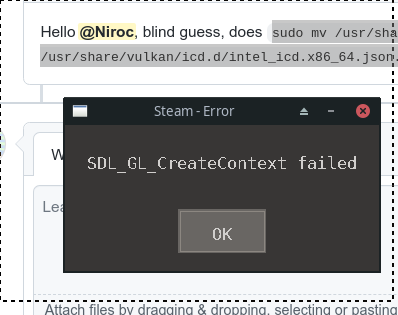
wait, I restarted steam and it's working now. Thank you!!
Hey this solved my issue two!!
I have an assus G14 with a Ryzen cpu so its a radeon gpu, so I had to run:
sudo mv /usr/share/vulkan/icd.d/radeon_icd.x86_64.json /usr/share/vulkan/icd.d/radeon_icd.x86_64.json.disabled
This was bugging me for weeks. Thanks!
Just updating I still had this issue when upgrading to ubuntu 23.10. Had to recall how to fix this. Using SteamVR Beta 1.26.6
Nothing extracted yet.
Describe the bug
A 307 error I hypothesize to originate from the vrcompositor not being able to communicate with libopenvr_api.so and libopenxr_api.so files properly.
EDIT: The above hypothesis is incorrect. A member of Valve below informed me this is due to me trying to run individual elements of SteamVR.
To Reproduce
Steps to reproduce the behavior:
Expected behavior
SteamVR opens and runs normally.
System Information (please complete the following information):
Note: Commenters who are also experiencing this issue are encouraged to include the "System Information" section in their replies.