Describe the bug
Hi guys i bought 3 DELL G15 SE Nvidia RTX 3060 for the lab where i work. We are used to work in linux environment (Ubuntu) developing robots and VR applications.
At first i had problem installing nvidia driver but following this thread, installing a liquorix kernel, i finally be able to make nvidia-driver works fine (https://forums.developer.nvidia.com/t/unable-to-install-nvidia-driver-on-dell-g15-rtx-3060-i7-12700h/219840).
Then i proceed to install steam (sudo apt install steam) and steamvr. At first run i had to fix the error 307 (vulkan file, intel_icd.x86_64.json.disabled).
I get these results:
nvidia-driver-510: crash to login screen
nvidia-driver-515: crash to login screen
nvidia-driver-410: doesn't crash, but no direct mode display. It shows eye display on a window and no graphics sent to VR headset.
As i can see in the github issues it's a common bug, but onestly trying different hint i didn't make steamvr works properly.
I also tried to disable the Hybrid mode in DELL BIOS (Optimus laptop have this mode where you can use both intel and nvidia gpu). Turning off this mode the system can see and use only the Nvidia GPU.
What i tried:
Switched different betas in the steamvr menu ( Beta v1.23.6, hotfix v1.21.12, linux_v1.14)
Tried different nvidia driver (470/510/515)
With DELL Hybrid mode enabled tried to set PRIME settings in nvdia x server setting to Performance mode
Reset headset
Power-cycle the computer and Index
Re-plug-in cables
Disable DELL Hybrid mode
To Reproduce
Steps to reproduce the behavior:
Follow all i described before
Launch SteamVR
See the VRCompositor window and a warning about direct display mode
Expected behavior
No window appears on the screen, and graphics appear on the Index display
System Information (please complete the following information):
Screenshots
Is it normal that i see the display port listed here? I connect the Valve index through a display port to type c adapter (in this laptop model there is only type c)
Additional context
I decide to write an issue because i experiencing this bug with other DELL laptop (alienware and G5) but in some way i sorted the bug. In this case i didn't find any solutions.
Thanks in advance for help.
Note: Commenters who are also experiencing this issue are encouraged to include the "System Information" section in their replies.
Describe the bug
Hi guys i bought 3 DELL G15 SE Nvidia RTX 3060 for the lab where i work. We are used to work in linux environment (Ubuntu) developing robots and VR applications.
At first i had problem installing nvidia driver but following this thread, installing a liquorix kernel, i finally be able to make nvidia-driver works fine (https://forums.developer.nvidia.com/t/unable-to-install-nvidia-driver-on-dell-g15-rtx-3060-i7-12700h/219840).
Then i proceed to install steam (sudo apt install steam) and steamvr. At first run i had to fix the error 307 (vulkan file, intel_icd.x86_64.json.disabled).
I get these results:
As i can see in the github issues it's a common bug, but onestly trying different hint i didn't make steamvr works properly.
I also tried to disable the Hybrid mode in DELL BIOS (Optimus laptop have this mode where you can use both intel and nvidia gpu). Turning off this mode the system can see and use only the Nvidia GPU.
What i tried:
To Reproduce
Steps to reproduce the behavior:
Expected behavior
No window appears on the screen, and graphics appear on the Index display
System Information (please complete the following information):
Screenshots
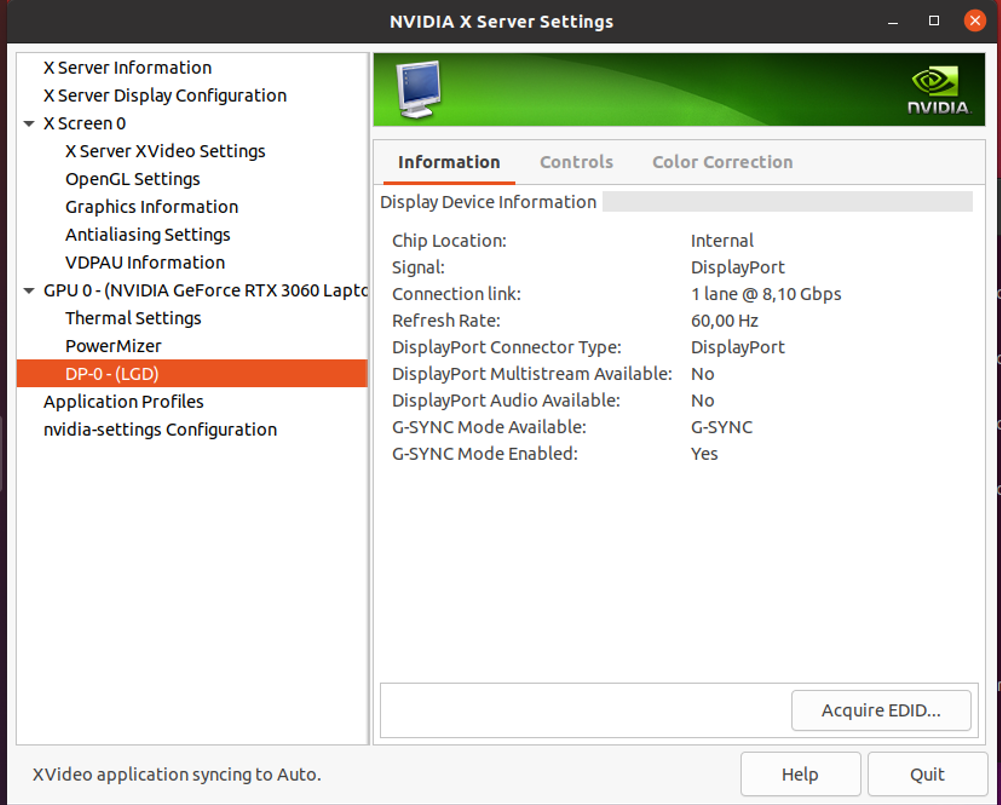
Is it normal that i see the display port listed here? I connect the Valve index through a display port to type c adapter (in this laptop model there is only type c)
Additional context
I decide to write an issue because i experiencing this bug with other DELL laptop (alienware and G5) but in some way i sorted the bug. In this case i didn't find any solutions.
Thanks in advance for help.
Note: Commenters who are also experiencing this issue are encouraged to include the "System Information" section in their replies.