Given that I intend to use xrdesktop eventually with this (that's a whole nother can of worms I can't even look at yet), simply switching to windows is not a fix. Just over a year ago things were working fine, and I was able to launch games (and xrdesktop) with little to no lag, so something has broken between now and then.
SteamVR Home loads fine and has no texture issues at this time, but I can't get any other game to load successfully, though I get no errors or issues, as some simply don't detect SteamVR even existing, while others simply switch from playing to stopped without even a window. Alyx is an example of the latter, and I can't find any logs or even a hint that the game even tried to launch.
Ok, big change, Boneworks actually launched, but all I got was a flat plane of the same garbage texture that slowly moved around with the screen (i'm assuming this is reprojection). Audio played fine, but the desktop view was also a black window, no update. Neos VR also has this same issue, but the desktop view loads fine. Everything in the game runs fine, including headset tracking and the controllers, just nothing useful in the headset itself.
Hello @Faeranne, I suspect that your system environment variable DRI_PRIME=pci-0000_00_02_0 which is getting the Steam client and OpenGL to run on your Intel chipset might be contributing to your issue. Can you test with the Steam client running on the same GPU as SteamVR? This environment variable might also be causing SteamVR to use mesa/lavapipe instead of mesa/RADV.
yeah, I saw that too, not sure where that system variable is coming from, or how it picked up the intel chipset, given I have the integrated GPU disabled in the BIOS. Any suggestions on where I could find that? I'm stock Ubuntu 22.04
Looks like setting DRI_PRIME=0 fixes all the issues. I have no idea where that is getting set, it's somewhere in Steam's launch options, but launching with the new environment fixes the issues. Should this issue be changed to suggest finding and fixing where that issue lies, or should I open a new issue?
That makes this a system config issue. I'm not aware of Steam or SteamVR ever setting this environment variable, especially since it's explicitly asking for pci-0000_00_02_0 (pcie bus 0) which is de-facto Intel only.
No specific instructions, but if it was my system, I'd check env in a terminal without Steam being involved and review any config files I can find that gets used by the desktop environment. Also, putting htop into tree view and using the 'e' hotkey might be useful as an alternative method to inspect the environment variables of individual processes and see if the desktop environment also has DRI_PRIME set.
So just env has no reference to DRI_PRIME. Is there a particular way I should be running this?
If you completely close Steam, then run steam from a terminal, does that have an effect on Steam's system information and SteamVR with no explicitly set environment variables?
Interestingly, until I try to launch SteamVR, the DRI_PRIME variable doesn't show up in the system info at all, either if I launch it from terminal or from the system menu. Once I do launch SteamVR, the problematic DRI_PRIME variable shows up only if I launch it through the system menu, launching from the terminal works fine, and the DRI_PRIME variable is never set. So I'm guessing it's likely associated with Ubuntu's launcher. Thing is, there isn't any variable in the .desktop file, and the context menu option is for launching on integrated graphics, rather than the discrete graphics.
I'm gonna guess at this point it is a system config issue like you said, just not an easy to trace one. I have no idea where Ubuntu is setting this flag, and honestly it's not that big a deal. Knowing now what's causing it, I can work around it enough. I'll dig into the iGPU vs dGPU issue later. Thanks so much for helping me find this.
Since it behaves fine with Steam run from a terminal, then this might be a quirk with GNOME shell and PrefersNonDefaultGPU=true in the desktop shortcut.
Nothing extracted yet.
Describe the bug
When attempting to use anything that has a flat texture, I get garbage blocks, this includes the VR Preview window
To Reproduce
Steps to reproduce the behavior:
Expected behavior
Launch with no graphical issues
System Information (please complete the following information):
nvidia-settingsorvulkaninfo | grep driverInfo:Mesa 22.1.4Screenshots
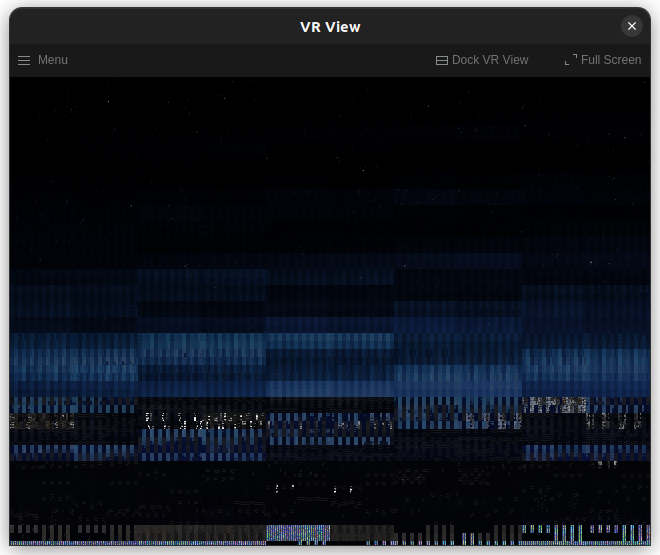
I'd provide more, but the screenshot key cord didn't work at all in vr, and since the VR View also has the same issue, I can't use that for the screenshot either.
Additional context
I have already attempted to disable async reprojection via
.steam/steam/config/steamvr.vrsettings, by including"enableLinuxVulkanAsync" : false,, as suggested in other issues, and as far as I can tell the setting has done nothing in any of the versions.Note: Commenters who are also experiencing this issue are encouraged to include the "System Information" section in their replies.