High Fidelity rendering broken with SteamVR Beta
To build it you need to set QT_CMAKE_PREFIX path even if you want the standard path and then just run cmake; make interface; interface/interface
QT_CMAKE_PREFIX_PATH=/usr/lib/cmake cmake ../hifi
make -j12 interface
interface/interface
If it doesn't start in VR mode, in the display menu there should be an OpenVR option.
Rebased my branch on RELEASE-7360 and it works correctly with latest SteamVR Beta. I have not tried if it was hifi or SteamVR who fixed it.
Happening again with hifi 7404 (my master branch is rebased on it) and latest steamvr beta http://store.steampowered.com/news/externalpost/steam_community_announcements/2140760316608983886. Not sure if the steamvr beta is at fault or not.
Maybe the same issue with janusvr
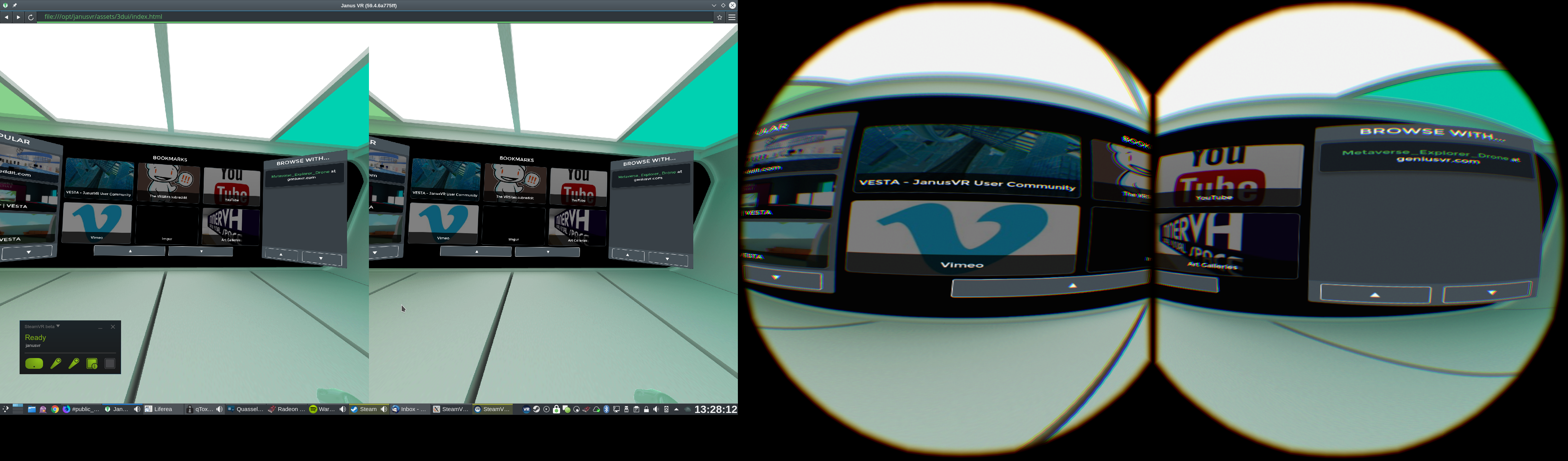
By now it happens with SteamVR stable too. So there are at least two apps that are not usable with neither beta nor stable.
High Fidelity is at least open source and can be fixed, but JanusVR is closed source.
Would be really nice if someone could look into it.
Thoughts:
How is it even possible that one eye gets rendered over the whole width of the SteamVR compositor? In high fidelity I've seen they use one texture for rendering both eyes into and then submit the same texture for both eyes, but with different hardcoded texture bounds for each eye. So at least there it's plausible why the texture intended for one eye can go across both eyes.
Next question: Do the apps think the display is twice as wide as it is and thus end up render one eye over the entire width or do the apps render with correct aspect ratio and the texture gets stretched? I haven't compared distorted and undistorted images much but on the JanusVR screenshot it looks a lot like the latter is the case.
First thing to find out is: Do the apps render with correct dimensions into their textures and SteamVR messes up displaying them or do the apps already have something wrong with the dimensions of the textures/rendertarget? I've looked a bit through the high fidelity source code but the rendering code is quite complex...
A temporary workaround for these problems for now is to uncheck "Enable Advanced Supersample Filtering" in the SteamVR -> Settings -> Developer panel. Working on a real fix.
It is indeed, thanks!
So this is a problem in SteamVR?
So this is a problem in SteamVR?
Yes, it was a regression caused by adding support for advanced supersample filtering. The Vulkan/GL interop code is using incorrect bounds for the image. I'll get it fixed soon.
I've checked in a fix and it should make it into the next SteamVR Beta update.
Should be fixed in the new SteamVR Beta: http://steamcommunity.com/games/250820/announcements/detail/1465223726802220981
Please confirm and close if so. Thanks.
Looks fixed to me.
@ChristophHaag , @danginsburg : Could you create a guide about using SteamVR with HiFi. We need to improve this guide:
https://github.com/highfidelity/hifi/blob/master/BUILD_LINUX.md
They probably wouldn't put it in their documentation because upstream high fidelity does not support SteamVR on Linux, their VR plugins are only enabled on windows.
I have a bunch of patches that enables their SteamVR support on Linux in my master branch: https://github.com/ChristophHaag/hifi which I update whenever I happen to see that they have a new release.
For compiling and building there isn't really anything special, it's basically cmake; make interface; interface/interface
The only thing is that they broke detection of the system qt (not sure if fixed by now) so you need to set QT_CMAKE_PREFIX_PATH. Here on Arch I build with this
mkdir build
cd build
QT_CMAKE_PREFIX_PATH=/usr/lib/cmake cmake -DRELEASE_TYPE=PRODUCTION -DCMAKE_BUILD_TYPE=Release ../hifi
Then there should be menu option to enable it https://www.youtube.com/watch?v=8oV7JiJHCh4
Nothing extracted yet.
Reported over here first https://github.com/highfidelity/hifi/issues/11438 but since nobody seems interested, reporting here too.
tl,dr: Since at least http://steamcommunity.com/games/250820/announcements/detail/2189169472245665464, possibly with earlier betas too, high fidelity renders one image stretched over both eyes. I have not seen any other application do this. With SteamVR stable it works correctly.
If you want to test this yourself, you probably want the master branch from my fork at https://github.com/ChristophHaag/hifi that enables hifi's openvr support on linux and has some fixes for other issues.