[Feature Request] Include option to filter "Early Access" games from Steam's lists
After being tricked again today into thinking that Wasteland 2 had been released, in the big ol' gigantic banner on Steam's front page, I got to thinking: Since adding in actual UI stuff tends to be hard (or at least non-trivial), could we at least get some kind of extra CSS tag added to Early Access games' containers? That way I could just throw together a little Stylish CSS code on my browser and never have to worry about 'em again.
Being able to do something like this would be just great:
@namespace url(http://www.w3.org/1999/xhtml);
@-moz-document domain("steampowered.com") {
  .early_access {
    display: none !important;
  }
}
Aha, just in case anyone else stumbles across this, it turns out there's an "Enhanced Steam" extension available for Firefox and Chrome which at least adds "Early Access" banners to the graphics for EA games (among other features) - http://www.enhancedsteam.com/
I've modified my own copy to include some more aggressive highlighting, which is making me absurdly happy... Anyone interested in that can find it here: https://github.com/jshackles/Enhanced_Steam_Firefox/issues/15
Closing per the last comment.
Nothing extracted yet.
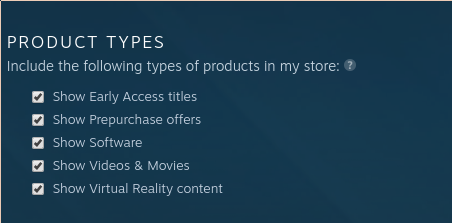
I'm glad that Steam provides a way for users to get to Early Access games if they want, but I've been becoming more and more frustrated by their presence in both the big banners and the lists of games. I've done various Early Access / Beta games in the past, and have had a handful of good experiences, but I've come to the conclusion that it's just not The Model For Me. I keep seeing interesting-looking things in the list and then being let down a bit that it's something I simply won't be buying until it's in a "final" state.
So anyway, having a checkbox-or-something somewhere which would prevent Early Access stuff from showing up would be great. Thanks!