X Error of failed request: BadValue (integer parameter out of range for operation)
I had this on 15.10 and 16.04 with AMD GPU.
On 23 Apr 2016 6:20 a.m., "André Furchner" [email protected] wrote:
Newly installed Ubuntu 16.04 with AMD 7970 GPU.
Running Steam on ubuntu 16.04 64-bit
STEAM_RUNTIME is enabled automatically
[2016-04-22 20:13:13] Startup - updater built Mar 31 2016 19:10:48
SteamUpdateUI: An X Error occurred
X Error of failed request: BadValue (integer parameter out of range for
operation)—
You are receiving this because you are subscribed to this thread.
Reply to this email directly or view it on GitHub
https://github.com/ValveSoftware/steam-for-linux/issues/4417
You can try to start steam with: "LD_PRELOAD='/usr/$LIB/libstdc++.so.6' steam". This works for me with 16.04 and free radeon driver.
I have tested the workaround posted by @at46 in a system with AMD A8-6600k + Sapphire Radeon R9 270.
The workaround works for me with open drivers used by Ubuntu 16.04 (x64). I have played successfully a couple of games like Tomb Raider with Ultra settings.
Only a couple of things:
- On first try the steam controller won't work, after a reboot it started working.
- The steam client open a terminal window telling me to update the steam runtime (which is updated according to the beta)
I have this problem with nvidia gpu (optimus) but not with intel gpu, on my Siduction.
- steam/unstable,now 1.0.0.52-1 i386
$ uname -r
4.5.3-towo.1-siduction-amd64
I am hitting this on 16.04 with a nvidia optimus gpu as well. "LD_PRELOAD='/usr/$LIB/libstdc++.so.6' steam" doesn't work.
Steam has own versions of many libraries but the radeonsi (opensource amd) driver needs a newer version of libstdc++.so.6. "LD_PRELOAD='/usr/$LIB/libstdc++.so.6' steam" forces steam to use the newer system library instead of the old version steam has. For optimus you maybe need to force steam to use some other libs. I'm not sure which libraries you need or if this will help at all. You can try "LD_PRELOAD='/usr/$LIB/libstdc++.so.6 /usr/$LIB/libgcc_s.so.1 /usr/$LIB/libxcb.so.1 /usr/$LIB/libgpg-error.so' steam".
Always, the same problem!
$ optirun steam
Running Steam on debian  64-bit
STEAM_RUNTIME is enabled automatically
[2016-06-12 21:10:01] Startup - updater built Apr 29 2016 22:18:33
SteamUpdateUI: An X Error occurred
X Error of failed request:  BadValue (integer parameter out of range for operation)

^C[90211.657883] [WARN]Received Interrupt signal.
$ dpkg -l | egrep "nvidia"
ii  bumblebee-nvidia                           3.2.1-13                             amd64        NVIDIA Optimus support using the proprietary NVIDIA driver
ii  glx-alternative-nvidia                     0.7.3                                amd64        allows the selection of NVIDIA as GLX provider
ii  libgl1-nvidia-glx:amd64                    352.79-8                             amd64        NVIDIA binary OpenGL libraries
ii  libgl1-nvidia-glx:i386                     352.79-8                             i386         NVIDIA binary OpenGL libraries
ii  libgl1-nvidia-glx-i386:i386                352.79-8                             i386         NVIDIA binary OpenGL 32-bit libraries
ii  libnvidia-eglcore:amd64                    352.79-8                             amd64        NVIDIA binary EGL core libraries
ii  nvidia-alternative                         352.79-8                             amd64        allows the selection of NVIDIA as GLX provider
ii  nvidia-installer-cleanup                   20151021+4                           amd64        cleanup after driver installation with the nvidia-installer
ii  nvidia-kernel-common                       20151021+4                           amd64        NVIDIA binary kernel module support files
ii  nvidia-kernel-dkms                         352.79-8                             amd64        NVIDIA binary kernel module DKMS source
ii  nvidia-kernel-support                      352.79-8                             amd64        NVIDIA binary kernel module support files
ii  nvidia-legacy-check                        352.79-8                             amd64        check for NVIDIA GPUs requiring a legacy driver
ii  nvidia-modprobe                            367.18-1                             amd64        utility to load NVIDIA kernel modules and create device nodes
ii  nvidia-settings                            340.93-1                             amd64        tool for configuring the NVIDIA graphics driver
ii  nvidia-support                             20151021+4                           amd64        NVIDIA binary graphics driver support files
ii  nvidia-vdpau-driver:amd64                  352.79-8                             amd64        Video Decode and Presentation API for Unix - NVIDIA driver
ii  nvidia-xconfig                             352.79-1                             amd64        X configuration tool for non-free NVIDIA drivers
ii  xserver-xorg-video-nvidia                  352.79-8                             amd64        NVIDIA binary Xorg driver
$ dpkg -l | egrep "steam"
ii  steam:i386                                 1.0.0.52-1                           i386         Valve's Steam digital software delivery system
$ uname -r
4.6.2-towo.1-siduction-amd64
Tesed in: Ubuntu 16.04, Elementary OS, Linux Mint Debian Edition
In /usr/games/steam I added export LD_PRELOAD='/usr/$LIB/libstdc++.so.6' after the exe= line, and can load Steam just fine from any shortcut.
Can you run other OpenGL applications? E.g. glxgears. Related: https://askubuntu.com/questions/893922/ubuntu-16-04-x-error-of-failed-request-badvalue-integer-parameter-out-of-range
Hello, is anyone still experiencing this issue on an up to date system?
Since these reports, Steam's handling of the Steam runtime has changed to prefer host libraries before the Steam runtime variants, which has avoided the common case leading to this issue.
Closing pending feedback.
Yep, getting this @kisak-valve
Backtrace:
(gdb) backtrace
#0 0xf7fd3929 in __kernel_vsyscall ()
#1 0xf7c4900c in pthread_cond_wait@@GLIBC_2.3.2 () from /usr/lib32/libpthread.so.0
#2 0xf7e7e8e1 in _XReply () from /usr/lib32/libX11.so.6
#3 0xf7e6b1fb in XListExtensions () from /usr/lib32/libX11.so.6
#4 0x565a576c in ?? ()
#5 0x565a5acc in xerror_handler(_XDisplay*, XErrorEvent*) ()
#6 0xf7e80b4f in _XError () from /usr/lib32/libX11.so.6
#7 0xf7e7d6fd in ?? () from /usr/lib32/libX11.so.6
#8 0xf7e7d7a7 in ?? () from /usr/lib32/libX11.so.6
#9 0xf7e7e93c in _XReply () from /usr/lib32/libX11.so.6
[#10](/issue/ValveSoftware/steam-for-linux/10) 0xf7e79ec1 in XSync () from /usr/lib32/libX11.so.6
[#11](/issue/ValveSoftware/steam-for-linux/11) 0xf72e11ab in ?? () from /usr/lib32/libGLX_nvidia.so.0
[#12](/issue/ValveSoftware/steam-for-linux/12) 0xf72d476c in glXCreateContext () from /usr/lib32/libGLX_nvidia.so.0
[#13](/issue/ValveSoftware/steam-for-linux/13) 0xf7fae4b8 in glXCreateContext () from /usr/lib32/libGLX.so.0
[#14](/issue/ValveSoftware/steam-for-linux/14) 0x565a30f0 in ?? ()
[#15](/issue/ValveSoftware/steam-for-linux/15) 0x565a8641 in CBaseLinuxUpdateUI::GatherGLInfo() ()
[#16](/issue/ValveSoftware/steam-for-linux/16) 0x565a8bcf in CBaseLinuxUpdateUI::BaseCreateWindow() ()
[#17](/issue/ValveSoftware/steam-for-linux/17) 0x565a974e in CXWindowsUpdateUI::BCreateWindow() ()
[#18](/issue/ValveSoftware/steam-for-linux/18) 0x5658da04 in ?? ()
[#19](/issue/ValveSoftware/steam-for-linux/19) 0x565793ac in ?? ()
[#20](/issue/ValveSoftware/steam-for-linux/20) 0xf79b17d1 in __libc_start_main () from /usr/lib32/libc.so.6
[#21](/issue/ValveSoftware/steam-for-linux/21) 0x5657cfa9 in _start ()
Sorry for this, @kisak-valve it was a misversioned package installed.
Apologies.
Note to anyone coming across this: Make sure all your driver packages are the same version. Been running into silent crashes for a day now trying to fix this, and it was a dependency which didn't update.
telans, how do I make sure all my driver packages are the same version?
Same issue.
Yep, getting this @kisak-valve
Backtrace:
(gdb) backtrace
#0 0xf7fd3929 in __kernel_vsyscall ()
#1 0xf7c4900c in pthread_cond_wait@@GLIBC_2.3.2 () from /usr/lib32/libpthread.so.0
#2 0xf7e7e8e1 in _XReply () from /usr/lib32/libX11.so.6
#3 0xf7e6b1fb in XListExtensions () from /usr/lib32/libX11.so.6
#4 0x565a576c in ?? ()
#5 0x565a5acc in xerror_handler(_XDisplay*, XErrorEvent*) ()
#6 0xf7e80b4f in _XError () from /usr/lib32/libX11.so.6
#7 0xf7e7d6fd in ?? () from /usr/lib32/libX11.so.6
#8 0xf7e7d7a7 in ?? () from /usr/lib32/libX11.so.6
#9 0xf7e7e93c in _XReply () from /usr/lib32/libX11.so.6
[#10](/issue/ValveSoftware/steam-for-linux/10) 0xf7e79ec1 in XSync () from /usr/lib32/libX11.so.6
[#11](/issue/ValveSoftware/steam-for-linux/11) 0xf72e11ab in ?? () from /usr/lib32/libGLX_nvidia.so.0
[#12](/issue/ValveSoftware/steam-for-linux/12) 0xf72d476c in glXCreateContext () from /usr/lib32/libGLX_nvidia.so.0
[#13](/issue/ValveSoftware/steam-for-linux/13) 0xf7fae4b8 in glXCreateContext () from /usr/lib32/libGLX.so.0
[#14](/issue/ValveSoftware/steam-for-linux/14) 0x565a30f0 in ?? ()
[#15](/issue/ValveSoftware/steam-for-linux/15) 0x565a8641 in CBaseLinuxUpdateUI::GatherGLInfo() ()
[#16](/issue/ValveSoftware/steam-for-linux/16) 0x565a8bcf in CBaseLinuxUpdateUI::BaseCreateWindow() ()
[#17](/issue/ValveSoftware/steam-for-linux/17) 0x565a974e in CXWindowsUpdateUI::BCreateWindow() ()
[#18](/issue/ValveSoftware/steam-for-linux/18) 0x5658da04 in ?? ()
[#19](/issue/ValveSoftware/steam-for-linux/19) 0x565793ac in ?? ()
[#20](/issue/ValveSoftware/steam-for-linux/20) 0xf79b17d1 in __libc_start_main () from /usr/lib32/libc.so.6
[#21](/issue/ValveSoftware/steam-for-linux/21) 0x5657cfa9 in _start ()
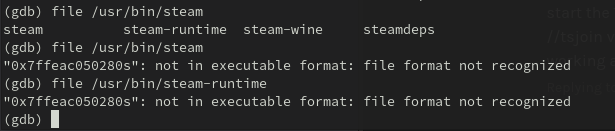
Can't recreate... gdb is just telling me either "No stack" when I try to use backtrace, or that steam is not a valid executable when I pass it /usr/bin/steam-runtime or /usr/bin/steam
I think it's a driver issue.
If I try to run TF2 I get this:
/bin/bash /usr/bin/prime-run steam steam://rungameid/440
Running Steam on manjarolinux 20.2.1 64-bit
STEAM_RUNTIME is enabled automatically
Pins up-to-date!
Steam client's requirements are satisfied
/home/_/.local/share/Steam/ubuntu12_32/steam steam://rungameid/440
[2021-02-10 21:50:35] Startup - updater built Feb  5 2021 02:23:49
Installing breakpad exception handler for appid(steam)/version(1612493737)
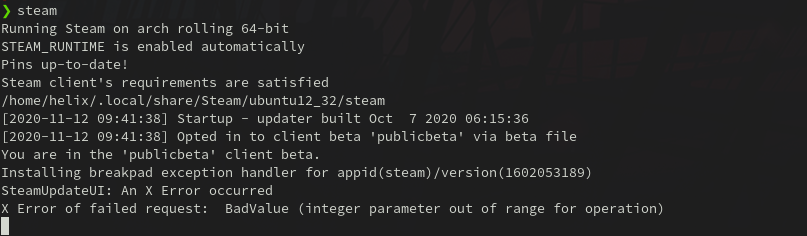
SteamUpdateUI: An X Error occurred
X Error of failed request:  BadValue (integer parameter out of range for operation)
If I try to run Minecraft I get this:
prime-run minecraft-launcher
[0210/215114.438302:INFO:main_context.cpp(108)] CEF initialized successfully.

[0210/215114.438484:INFO:main_context.cpp(109)] CEF version: 3.3202.1694.gf061c23

[0210/215114.532192:ERROR:gl_context_glx.cc(192)] Failed to create GL context with glXCreateNewContext.
[0210/215114.532237:ERROR:gpu_info_collector.cc(51)] gl::init::CreateGLContext failed
[0210/215114.532251:ERROR:gpu_info_collector.cc(119)] Could not create context for info collection.
[0210/215114.532277:ERROR:gpu_init.cc(53)] gpu::CollectGraphicsInfo failed (fatal).
[0210/215114.535234:WARNING:x11_util.cc(1349)] X error received: serial 186, error_code 2 (BadValue (integer parameter out of range for operation)), request_code 152, minor_code 24 (X_GLXCreateNewContext)
[0210/215114.535380:ERROR:gpu_child_thread.cc(254)] Exiting GPU process due to errors during initialization
[0210/215115.003996:ERROR:browser_gpu_channel_host_factory.cc(108)] Failed to launch GPU process.
Also this fails:
prime-run glxgears
X Error of failed request:  BadValue (integer parameter out of range for operation)
  Major opcode of failed request:  152 (GLX)
  Minor opcode of failed request:  3 (X_GLXCreateContext)
  Value in failed request:  0x0
  Serial number of failed request:  25
  Current serial number in output stream:  26
Data:
5.10.7-3-MANJARO
nvidia-utils=460.39
Update:
Yesterday I removed cuda package from my system.
Today I ran a system update and it updated nvidia drivers. prime-run glxgears works again.
[2021-02-11T10:13:47+0200] [ALPM] upgraded linux510 (5.10.13-2 -> 5.10.15-1)
[2021-02-11T10:13:47+0200] [ALPM] upgraded linux510-nvidia (460.39-7 -> 460.39-9)
Still happening. Manjaro 22.0.2 , nvidia 525.85.05 . telans said "Make sure all your driver packages are the same version." I have different bug-patch versions; is Steam really that sensitive?
Warning: mhwd-nvidia-525.85.05-1 is up to date -- skipping
Warning: nvidia-utils-525.85.05-1 is up to date -- skipping
Warning: linux515-nvidia-525.85.05-3 is up to date -- skipping
Warning: lib32-nvidia-utils-525.85.05-1 is up to date -- skipping

$ /home/moses/.local/share/Steam/steam.sh
steam.sh[3241063]: Running Steam on manjarolinux 22.0.2 64-bit
steam.sh[3241063]: STEAM_RUNTIME is enabled automatically
setup.sh[3241132]: Steam runtime environment up-to-date!
steam.sh[3241063]: Steam client's requirements are satisfied
[2023-02-11 13:51:54] Startup - updater built Feb 10 2023 02:37:25
[2023-02-11 13:51:54] Startup - Steam Client launched with: '/home/moses/.local/share/Steam/ubuntu12_32/steam'
SteamUpdateUI: An X Error occurred
X Error of failed request:  BadValue (integer parameter out of range for operation)
I just got this on Pop!_OS. When I try to open steam through the GUI, no windows show up, but a process does boot.
❯ neofetch
             /////////////                jeremy@pop-os
         /////////////////////            -------------
      ///////*767////////////////         OS: Pop!_OS 22.04 LTS x86_64
    //////7676767676*//////////////       Host: Thelio Mira thelio-mira-r1
   /////76767//7676767//////////////      Kernel: 6.2.6-76060206-generic
  /////767676///*76767///////////////     Uptime: 1 day, 10 hours, 28 mins
 ///////767676///76767.///7676*///////    Packages: 2776 (dpkg), 55 (flatpak), 20 (snap)
/////////767676//76767///767676////////   Shell: bash 5.1.16
//////////76767676767////76767/////////   Resolution: 1920x1080, 3840x2160
///////////76767676//////7676//////////   DE: GNOME 42.5
////////////,7676,///////767///////////   WM: Mutter
/////////////*7676///////76////////////   WM Theme: Pop
///////////////7676////////////////////   Theme: Desert-GTK [GTK2/3]
 ///////////////7676///767////////////    Icons: pop-os-branding [GTK2/3]
  //////////////////////'////////////     Terminal: gnome-terminal
   //////.7676767676767676767,//////      CPU: AMD Ryzen 5 5600X (12) @ 3.700GHz
    /////767676767676767676767/////       GPU: NVIDIA GeForce RTX 3070 Ti
      ///////////////////////////         Memory: 6436MiB / 64208MiB
         /////////////////////
             /////////////
Running steam through the terminal shows:
❯ steam
steam.sh[213594]: Running Steam on pop 22.04 64-bit
steam.sh[213594]: STEAM_RUNTIME is enabled automatically
setup.sh[213664]: Steam runtime environment up-to-date!
steam.sh[213594]: Steam client's requirements are satisfied
[2023-06-16 18:34:57] Startup - updater built May 30 2023 20:40:12
[2023-06-16 18:34:57] Startup - Steam Client launched with: '/home/jeremy/.steam/debian-installation/ubuntu12_32/steam' '-nominidumps' '-nobreakpad'
Installing breakpad exception handler for appid(steam)/version(1685488080)/tid(213761)
SteamUpdateUI: An X Error occurred
X Error of failed request:  BadValue (integer parameter out of range for operation)
Newly installed Ubuntu 16.04 with AMD 7970 / 280X GPU.
Running Steam on ubuntu 16.04 64-bit STEAM_RUNTIME is enabled automatically [2016-04-22 20:13:13] Startup - updater built Mar 31 2016 19:10:48 SteamUpdateUI: An X Error occurred X Error of failed request: BadValue (integer parameter out of range for operation)