Hi,
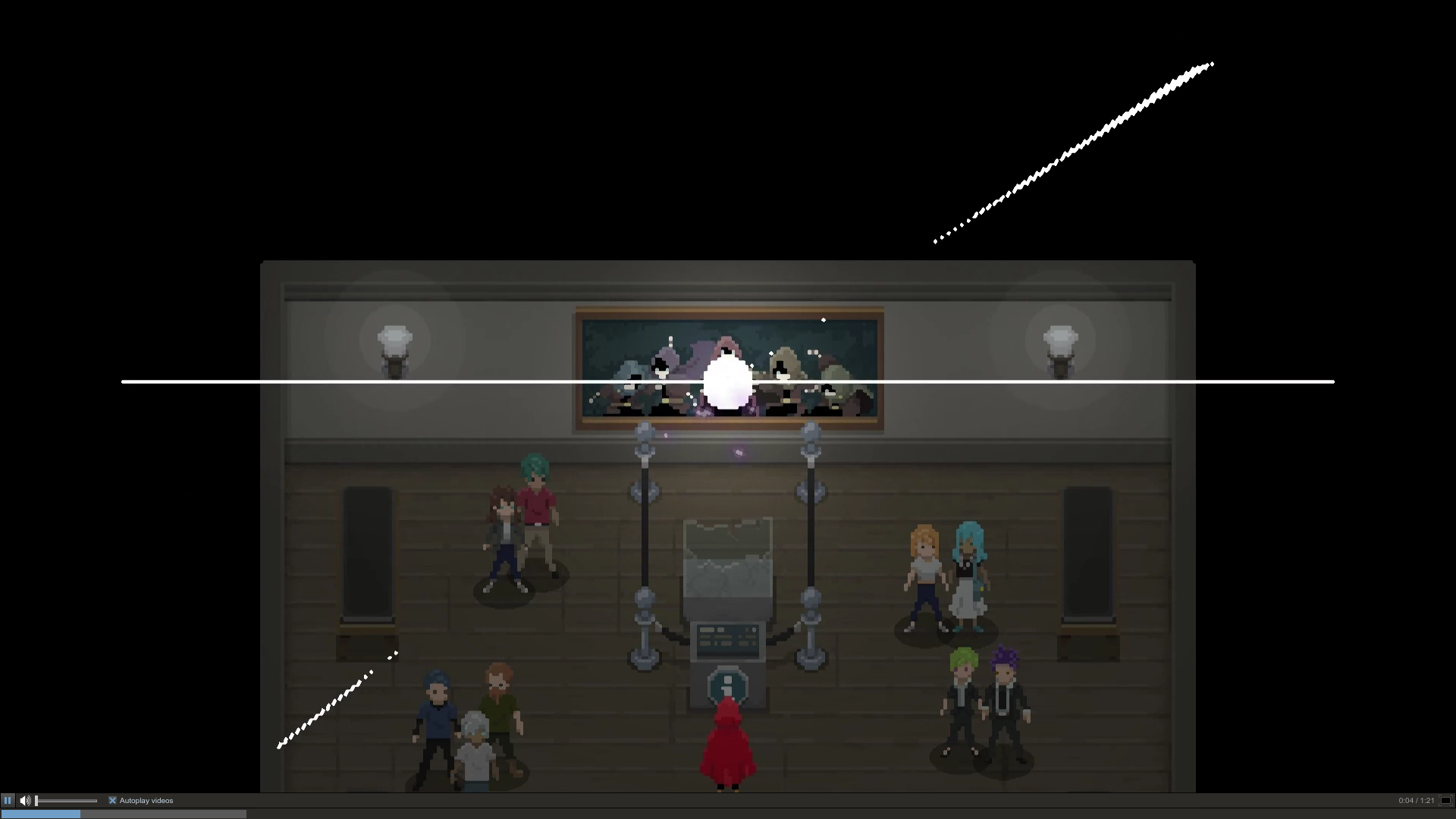
since the last update of steam client, I'm not able to see videos full screen. While the whole display goes black*, only a small part of the Display is the actual Video. Screenshot
The navigation of the video goes across the display, so clicking on the right bottom into the abyss, where normally the full screen button should be, would close full screen.
One interesting point is that, the actual Video is always the size of the inner window of the client. Making it bigger results in a bigger video, but still not a complete cover.
I cropped the window into the screen shot to make it clearer. Overlap Picture.
*The black part in the screen shot is buggy, since I closed my Laptop for hibernation. That usually causes some graphical glitches. You can ignore that in this case.
Here are some infos about my System
dpkg -l |grep steam
ii steam 1.0.0.49-1 i386 Valve's Steam digital software delivery system
Using Beta Client
Build: Apr 29 2016 at 22:27:58
Steam API: v017
Steam package version: 1461972496
My system:
2xMonitors setup(1920x1080 & 1600x900)
Debian Jessie
GNOME 3.14.1
dpkg -l | grep radeon
ii libdrm-radeon1:amd64 2.4.58-2 amd64 Userspace interface to radeon-specific kernel DRM services -- runtime
ii libdrm-radeon1:i386 2.4.58-2 i386 Userspace interface to radeon-specific kernel DRM services -- runtime
ii radeontool 1.6.3-1 amd64 utility to control ATI Radeon backlight functions on laptops
ii radeontop 0.8-1 amd64 Utility to show Radeon GPU utilization
ii xserver-xorg-video-radeon 1:7.5.0-1 amd64 X.Org X server -- AMD/ATI Radeon display driver
dpkg -l | grep mesa
ii glx-alternative-mesa 0.5.1 amd64 allows the selection of MESA as GLX provider
ii libegl1-mesa:amd64 10.3.2-1+deb8u1 amd64 free implementation of the EGL API -- runtime
ii libegl1-mesa-drivers:amd64 10.3.2-1+deb8u1 amd64 free implementation of the EGL API -- hardware drivers
ii libgl1-mesa-dri:amd64 10.3.2-1+deb8u1 amd64 free implementation of the OpenGL API -- DRI modules
ii libgl1-mesa-dri:i386 10.3.2-1+deb8u1 i386 free implementation of the OpenGL API -- DRI modules
ii libgl1-mesa-glx:amd64 10.3.2-1+deb8u1 amd64 free implementation of the OpenGL API -- GLX runtime
ii libgl1-mesa-glx:i386 10.3.2-1+deb8u1 i386 free implementation of the OpenGL API -- GLX runtime
ii libglapi-mesa:amd64 10.3.2-1+deb8u1 amd64 free implementation of the GL API -- shared library
ii libglapi-mesa:i386 10.3.2-1+deb8u1 i386 free implementation of the GL API -- shared library
ii libgles1-mesa:amd64 10.3.2-1+deb8u1 amd64 free implementation of the OpenGL|ES 1.x API -- runtime
ii libgles2-mesa:amd64 10.3.2-1+deb8u1 amd64 free implementation of the OpenGL|ES 2.x API -- runtime
ii libglu1-mesa:amd64 9.0.0-2 amd64 Mesa OpenGL utility library (GLU)
ii libglu1-mesa:i386 9.0.0-2 i386 Mesa OpenGL utility library (GLU)
ii libopenvg1-mesa:amd64 10.3.2-1+deb8u1 amd64 free implementation of the OpenVG API -- runtime
ii libwayland-egl1-mesa:amd64 10.3.2-1+deb8u1 amd64 implementation of the Wayland EGL platform -- runtime
ii mesa-utils 8.2.0-1 amd64 Miscellaneous Mesa GL utilities
dpkg -l | grep drm
ii libdrm-intel1:amd64 2.4.58-2 amd64 Userspace interface to intel-specific kernel DRM services -- runtime
ii libdrm-intel1:i386 2.4.58-2 i386 Userspace interface to intel-specific kernel DRM services -- runtime
ii libdrm-nouveau2:amd64 2.4.58-2 amd64 Userspace interface to nouveau-specific kernel DRM services -- runtime
ii libdrm-nouveau2:i386 2.4.58-2 i386 Userspace interface to nouveau-specific kernel DRM services -- runtime
ii libdrm-radeon1:amd64 2.4.58-2 amd64 Userspace interface to radeon-specific kernel DRM services -- runtime
ii libdrm-radeon1:i386 2.4.58-2 i386 Userspace interface to radeon-specific kernel DRM services -- runtime
ii libdrm2:amd64 2.4.58-2 amd64 Userspace interface to kernel DRM services -- runtime
ii libdrm2:i386 2.4.58-2 i386 Userspace interface to kernel DRM services -- runtime
ii libva-drm1:amd64 1.4.1-1 amd64 Video Acceleration (VA) API for Linux -- DRM runtime
Hi,
since the last update of steam client, I'm not able to see videos full screen. While the whole display goes black*, only a small part of the Display is the actual Video.
Screenshot
The navigation of the video goes across the display, so clicking on the right bottom into the abyss, where normally the full screen button should be, would close full screen.
One interesting point is that, the actual Video is always the size of the inner window of the client. Making it bigger results in a bigger video, but still not a complete cover.
I cropped the window into the screen shot to make it clearer.
Overlap Picture.
*The black part in the screen shot is buggy, since I closed my Laptop for hibernation. That usually causes some graphical glitches. You can ignore that in this case.
Here are some infos about my System
Using Beta Client
Build: Apr 29 2016 at 22:27:58
Steam API: v017
Steam package version: 1461972496
My system:
2xMonitors setup(1920x1080 & 1600x900)
Debian Jessie
GNOME 3.14.1