Can't Right-Click Tray Icon Anymore in KDE (05/01/17 Beta)
Hello @Unaccounted4, please copy your system information from steam (Steam -> Help -> System Information) and put it in a gist, then include a link to the gist in this issue report.
The system tray is working fine on Gentoo Linux (no steam runtime) with Cinnamon 3.0 and Mate 1.12.
Here's the Steam system info: https://gist.github.com/Unaccounted4/6ff411074c748a873788a7c74e4b5718
The tray menu does seem to work in MATE for me as well, it's just in Plasma 5.8.5 which no longer works after the update.
EDIT: Replaced pstebin URL with Gist.
I have a similar problem, when I left click on the tray icon, I don't even get a menu. Nothing happens, only the Steam client gives out this error:
(steam:4721): LIBDBUSMENU-GLIB-WARNING **: About to Show called on an item wihtout submenus. We're ignoring it.
This worked perfectly fine before the last beta update.
I'm on Linux Mint 18.1 with Cinnamon 3.2. Here's the output of the Steam System Information: https://gist.github.com/NoXPhasma/73e404310b6a46fb438d8ac4a3be8846
Same on Ubuntu 16.10/Unity with the newest update: when I click on Steam icon, it shows small rectangular without any menu items.
https://gist.github.com/xplt/143b57471a2b8193ecf36de58232467b
I can also confirm this issue with Ubuntu Unity, while the close behaviour works as expected, the indicator menu is now blank.
System info: https://gist.github.com/LiamDawe/695a741f6e19ddefb32e2109baa7e961
So there seem to be two issues interacting with the tray icon:
- Empty contexmenu when right clicking
- No reaction on left click
For me (1) is not an issue, (2) is, but this also happens without beta opt-in. No changes to start parameters were made.
KDE Neon dev unstable (Plasma 5.8.90).
Same issue here on Unity.
System info: https://gist.github.com/tatokis/1b1e54fbae3dedd020c73707a3163c65
If I run steam with STEAM_RUNTIME_PREFER_HOST_LIBRARIES=0 the AppIndicator/Tray icon works again.
If I run steam with STEAM_RUNTIME_PREFER_HOST_LIBRARIES=0 the AppIndicator/Tray icon works again.
That works indeed. Now we need to know which library is needed for the Appindicator, so we can install it native and don't need to rely on the steam runtime for that
I can't speak for Ubuntu, but on Gentoo this is the dependency tree for libappindicator: https://gist.github.com/kisak-valve/8958ab1ad52c24f749adca56d9d4e236
The highlights are that it is linked against gtk2, libindicator, libdbusmenu-gtk, and libdbusmenu-glib.
I have those installed, for amd64. Ubuntu 16.04/Mint 18 doesn't have any i368 builds on 64bit versions (Who's using a 32bit OS nowadays anyway?). Seems there might be the problem. Why does steam still need 32bit libraries?
For me it was libdbusmenu-gtk4:i386 which was missing and now the menu spawns correctly on right click once more.
That's sudo apt install libdbusmenu-gtk4:i386 on Ubuntu 16.04.
Interesting, libindicator1:i368 doesn't exist, but libdbusmenu-gtk4:i386 does. And that seems to deliver libappindicator.so.1 too. That fixes that for me too, thanks @Unaccounted4.
But still my question, why does Steam in 2017 still needs 32bit libraries?
Because Steam is 32Bit, as are many of the games in it.
Keep in mind that the point of the steam runtime is to avoid this issue in the first place.
I assume there is some incompatibility that is caused with what libdbusmenu-gtk4 is linked against on the runtime.
Just to recap,
Libappindicator is built against libindicator and libdbusmenu. These libraries are available in the steam runtime and are also commonly available as system libraries from various distros. As a set, steam can use the steam runtime or system variants of these libraries, but may get the quirk behavior if the two sets are mixed.
To deal with this issue we currently can either complete the partial system set or run steam with STEAM_RUNTIME_PREFER_HOST_LIBRARIES=0.
"sudo apt install libdbusmenu-gtk4:i386" also worked for me. Running that actually installed 2 libraries, libdbusmenu-glib4:i386 and libdbusmenu-gtk4:i386.
My distro is Linux Mint 17 Qiana using XFCE (which is based off of Ubuntu 14.04.3 LTS trusty)
I understand about being able to use the bundled libraries or the native ones, but it still seems like there's a dependency bug in 1 of 2 places. Either:
1.) Steam needs to be more specific about these i386 libraries when using or checking to use the system vs. provided libraries, or
2.) The combination of existing/missing libraries that we found ourselves in is an invalid combination, and dependencies should be added to the ubuntu (or other variants) repos/packages to shore up the problem.
If it's #1, then this shouldn't be closed yet. If it's #2, then let's get the ball rolling on contacting package maintainers.
I think this should be up to Steam.
For example, if it sees that the host is missing libdbusmenu-gtk4:i386, then it should not only use its built in one for this, but also for the rest of the dependencies required to create the tray icon/appindicator.
So something like groups of libraries, where if one is missing then the rest of the group will also fall back to the ones bundled in the runtime in order to avoid incompatibilities.
The sudo apt install libdbusmenu-gtk4:i386 works on Ubuntu 14.04. Thank You Unaccounted4! :)
Also seeing this on Fedora 25
Can confirm that exporting STEAM_RUNTIME_PREFER_HOST_LIBRARIES=0 in your environment works as a workaround
Confirming here that installing libdbusmenu-gtk4:i386 works on Ubuntu 16.04.1 LTS
same here, ubuntu 16.04.1 LTS, default Unity interface, tray icon has no itens. Both solutions, STEAM_RUNTIME_PREFER_HOST_LIBRARIES=0 steam, or install libdbusmenu-gtk4:i386, has worked, but i guess the bug still should be fixed, because is hard for begginer find this kind of workaround.
Same problem with Fedora 25, though I think that the problem is also causing the Steam client to crash when I try to do "Help > System Information"; see issue #4856. After fixing the issue with STEAM_RUNTIME_PREFER_HOST_LIBRARIES=0 the system information is as seen here.
Looking at my packages, I see that I have libdbusmenu-gtk3-12.10.2-10.fc24.x86_64 (gtk3, not gtk4). Trying to install the 32 bit version of this package (to run without having to do STEAM_RUNTIME_PREFER_HOST_LIBRARIES=0 ) gets this error:
Error: nothing provides libwayland-egl.so.1 needed by gtk3-3.22.2-2.fc25.i686
I've filed a bug about the missing 32-bit package here.
EDIT: Never mind the strike-through text, that was a user error on my part.
@matthew-cline The libbusmenu-gtk4 package on Ubuntu doesn't correspond to GTK4 which doesn't exist. It means libdbusmenu-gtk.so.4:
$ dpkg -L libdbusmenu-gtk4:i386
/.
/usr
/usr/lib
/usr/lib/i386-linux-gnu
/usr/lib/i386-linux-gnu/libdbusmenu-gtk.so.4.0.12
/usr/share
/usr/share/doc
/usr/share/doc/libdbusmenu-gtk4
/usr/share/doc/libdbusmenu-gtk4/copyright
/usr/lib/i386-linux-gnu/libdbusmenu-gtk.so.4
/usr/share/doc/libdbusmenu-gtk4/changelog.Debian.gz
Whereas on Fedora we have (given by dnf provides "*/libdbusmenu-gtk.so.4.0.12"):
libdbusmenu-gtk2-12.10.2-10.fc24.i686 : A library that pulling out some code out of indicator-applet
Repo        : fedora
However as far as I can tell installing that has no effect. Additionally, since libappindicator is needed, bringing that in causes the following to be installed as dependencies, which seems like a better choice (the following is shown by rpmreaper):
 L       93K libappindicator           12.10.0-12.fc25.i686
        1.2M ├─> atk                       2.22.0-1.fc25.i686
        1.8M ├─> cairo                     1.14.8-1.fc25.i686
        596K ├─> fontconfig                2.12.1-1.fc25.i686
        716K ├─> freetype                  2.6.5-1.fc25.i686
        2.4M ├─> gdk-pixbuf2               2.36.4-1.fc25.i686
       11.2M ├─> glib2                     2.50.2-1.fc25.i686
  o    14.4M ├─> glibc                     2.24-4.fc25.i686
       13.1M ├─> gtk2                      2.24.31-2.fc25.i686
        197K ├─> libdbusmenu               12.10.2-10.fc24.i686
         80K ├─> libdbusmenu-gtk2          12.10.2-10.fc24.i686
        203K ├─> libindicator              12.10.1-8.fc25.i686
        722K └─> pango                     1.40.3-1.fc25.i686
Which also seems to not do anything as well :/
I tried installing the 32-bit versions of both libdbusmenu-gtk3 and libappindicator (with all their dependencies), yet neither fixed the problem. (Though I didn't try having both installed at the same time...)
@matthew-cline and other Fedora users: https://bugzilla.rpmfusion.org/show_bug.cgi?id=4449
I've installed that 32 bit package the last time I had this issue and it worked. Now I'm on a fresh install it remains broken on Ubuntu 16.04.2 despite applying previous solution. What can be done to bring the menu back now?
Kubuntu 16.04.1
sudo apt install libdbusmenu-gtk4:i386 is working for me.
Thank you very munch everybody for helping ;-)!
sudo apt install libdbusmenu-gtk4:i386 works for me too.
I've added it to my Linux-tools repo.
Installing libdbusmenu-gtk4:i386 fixed the problem on Kubuntu 14.04.
installing libdbusmenu-gtk4:i386 worked but the real solution would be to get modern and make the steam client 64 bit, every computer since the mid 2000s pretty much has a 64 bit cpu, cmon guys
Couldn't agree more. It is time to leave the past in the past and move on to 64bit.
I have same issue on Debian 9 with KDE 5.8.6. sudo apt install libdbusmenu-gtk4:i386 did not help. Only with STEAM_RUNTIME_PREFER_HOST_LIBRARIES=0
As a workaround for Fedora users, downloading the libdbusmenu-gtk4:i386 package from Ubuntu and running steam with
LD_PRELOAD="path/to/library/extracted/from/package/libdbusmenu-gtk.so.4.0.12" steam
Allows then to right click the tray and get the menu without having to use STEAM_RUNTIME_PREFER_HOST_LIBRARIES=0.
To clarify, the libdbusmenu-gtk3.so.4.0.12 provided natively by Fedora from the package libdbusmenu-gtk3-12.10.2-10.fc24.i686 does not work for Steam, the version from Ubuntu needs to be downloaded and used instead.
Having a serious look into the subject, it seems that the libdbusmenu from Ubuntu is more recent, and that the bug seen in Fedora was fixed in this bug report from Ubuntu.
The proper solution for Fedora users would then be to get the most up to date version of libdbusmenu packaged upstream so it can be used by steam correctly.
what cons of STEAM_RUNTIME_PREFER_HOST_LIBRARIES=0?
These are all the ways I've seen people fix this issue.
sudo apt install libdbusmenu-gtk4:i386 && steam
STEAM_RUNTIME_PREFER_HOST_LIBRARIES=0 steam
DBUS_SESSION_BUS_ADDRESS="$(dbus-daemon --session --print-address --fork)" steam
dbus-launch steam
@PedroArvela I've updated the libdbusmenu packages in Fedora (16.04.0), and I got confirmation that the issue is fixed with the latest updates.
There is another issue though, the steam package pulls in the GTK 3 variant of libdbusmenu, I will trigger another update to correct it to GTK 2.
installing libdbusmenu-gtk4:i386 worked but the real solution would be to get modern and make the steam client 64 bit, every computer since the mid 2000s pretty much has a 64 bit cpu, cmon guys
This works well thanks!
I'm getting this same issue now in the stable version on OpenSUSE with KDE (Leap and Tumbleweed). Nothing happens when clicking the tray button. STEAM_RUNTIME_PREFER_HOST_LIBRARIES=0 works as a workaround, but I can't find any libdbusmenu-gtk4 32bit compat packages like the mentioned above.
confirming that sudo apt install libdbusmenu-gtk4:i386 worked for me too (Ubuntu 16.04)
I also had this issue on Linux Mint 18 using Cinnamon front-end. Install the 32bit libdbusmenu-gtk4 also worked for me. But wouldn't it be better if it just worked out of the box? This seems like an unnecessary hoop to jump through.
Gentoo, works with libdbusmenu, but doesn't work with libdbusmenu-qt 0.9.3_pre20160218
I'm not sure how it works but I assume that libdbusmenu-qt is supposed to be a substitute for libdbusmenu[-gtk]
With libdbusmenu-qt it prints (steam:26724): LIBDBUSMENU-GLIB-WARNING **: About to Show called on an item wihtout submenus. We're ignoring it. and popup menu shows, but it is empty and 1x1 pixel size
@everyone: thanks for the info , STEAM_RUNTIME_PREFER_HOST_LIBRARIES=0 does fix the problem
@valve : please keep in mind this also breaks launching certain games. Today I stopped being able to launch Steamworld Heist. It crashed on startup generating a core dump. Disabling host libs fixed the problem!
This issue should be fixed with the 2017-07-25 steam beta client. Can anyone reproduce this issue with the beta client?
I tried installing the beta, now Steam just crashes when I try to launch it. I get this, if it helps: crash_20170726181547_1.dmp[391]: file ''/tmp/dumps/crash_20170726181547_1.dmp'', upload yes: ''CrashID=bp-b28d6f90-6554-40fa-ba35-99a072170726''
Uninstalled libdbusmenu-gtk4:i386 to confirm that it's still broken in non-beta Steam: Check.
Installed Steam Beta Client to check if it's fixed while keeping libdbusmenu-gtk4:i386 removed: Check
Is it fixed? Yes! (My system: XFCE4 on Xubuntu)
Same issue here on current non-beta client; confirmed fixed after switching to beta (KDE Plasma 5.10.4)
Running sudo apt install libdbusmenu-gtk4:i386 fixed it. I'm using the latest Steam beta, Gnome 3.24.2, and Ubuntu 17.04.
Rebuilding dev-libs/libdbusmenu with the abi_x86_32 USE flag fixed it for me on Gentoo on KDE Plasma 5.10.4.
"sudo apt install libdbusmenu-gtk4:i386" also worked for me.
Ubuntu 17.30
apt install libdbusmenu-gtk4:i386 worked in Ubuntu 16.04. Thanks!
Stupid question: How does one start STEAM with this "STEAM_RUNTIME_PREFER_HOST_LIBRARIES=0 " from within the launcher? In other words, can I modify the launcher command? (Using Ubuntu 16.04.4 LTS)
@cement-head You can add it to the .desktop file, yeah.
Not sure how to do this, can someone give me detailed instructions on how to edit the launcher?
@cement-head In a terminal window:
cp /usr/share/applications/steam.desktop ~/.local/share/applications/steam.desktop
nano ~/.local/share/applications/steam.desktop
Then change the Exec= line.
Okay, so I add "STEAM_RUNTIME_PREFER_HOST_LIBRARIES=0" prior to the command, like this?
Exec=STEAM_RUNTIME_PREFER_HOST_LIBRARIES=0 /usr/games/steam %U
Didn't fix the missing menus, because it won't launch. Need more help, I need more detailed instructions
Solved! For those of you like me, who need more detailed instructions - here's how to do it.
In a terminal window (CTRL+ALT+T):
cp /usr/share/applications/steam.desktop ~/.local/share/applications/steam.desktop
gedit ~/.local/share/applications/steam.desktop
Then, edit line 4 "Exec" from
Exec=/usr/games/steam %U
to
Exec=sh -c "STEAM_RUNTIME_PREFER_HOST_LIBRARIES=0 /usr/games/steam %U"
Save & Close the file. Right-click on the steam.desktop file, select Properties, select Permissions Tab, and check the Execute option Permissions to enable "Allow executing file as a program".
Close the steam Properties dialogue.
Save & Close the file. Right-click on the steam.desktop file, select Properties, select Permissions Tab, and check the Execute option Permissions to enable "Allow executing file as a program".
Alternatively: chmod +x ~/.local/share/applications/steam.desktop
For Manjaro Linux you want to install (in Octopi):
lib32-libdbusmenu-gtk2
libdbusmenu-gtk2 (this should install along with the first one by default)
lib32-libdbusmenu-glib (this should install along with the first one by default)
a bit late to the party, but it does indeed seem fixed now, no longer needing any special tricks (tested on opensuse 42.3)
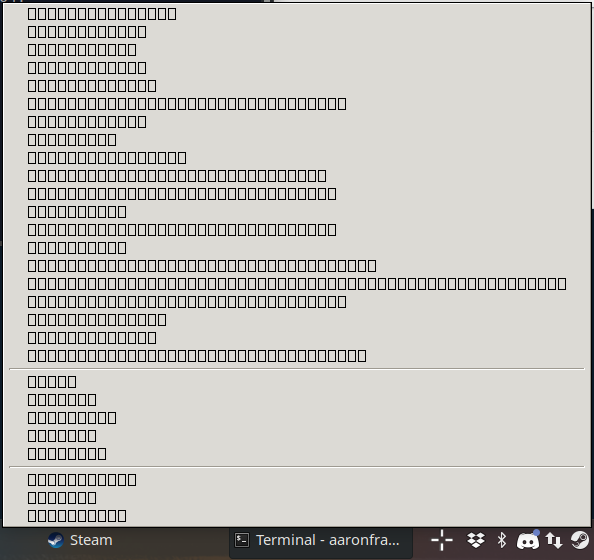
The menu opens for me, but the font is just squares. Xubuntu 18.04 & XFCE 4.12.
Had this too on Slackware64-14.2 on KDE4 since a couple of Steam Client Beta updates.
Solution was to install the libdbusmenu package from SBo albeit with a little edit in the SlackBuild script: you must add the --with-gtk=2 option to the configure part.
Neither fix works, here is System Information from Help > System Information https://gist.github.com/AlekEagle/f0fff268b2983163e4dfd338e3bec993
Error, that occurs is (steam:415010): LIBDBUSMENU-GLIB-WARNING **: 11:06:22.632: About to Show called on an item wihtout submenus. We're ignoring it.
I just faced this problem. Not sure what caused it.
I recently upgraded to Mint 20.3, maybe it's related.
edit:
Fix for me found in https://github.com/ValveSoftware/steam-for-linux/issues/5222
deleting the pinned_libsXX folders in ~/.steam/steam/ubuntu12_32 as mentioned fixed this for me. Someone there mentioned a dist-upgrade in Mint as the cause, so this might be it.
Your system information
Please describe your issue in as much detail as possible:
Ever since the beta update came through, I no longer get the tray menu when right-clicking the tray icon in KDE.
Steps for reproducing this issue: