Corrupt game updates on NTFS partitions
latest beta steam client and NTFS partition (FTL game as example on re-download broken cache)
Wouldn't just disabling the file-system "optimization" that you guys do on NTFS fix this until you guys find a better fix? Atleast then I won't have to boot windows just for dota
@SethDusek What file-system "optimization" are you referring to?
@sixsupersonic
Linux
Fixed issues when installing games onto filesystems, such as ZFS, that report abnormally large sector sizes.
I had this same issue on Ubuntu 16.04 on my NTFS partition, but not ext4. I found a work around posted on a previous issue https://github.com/ValveSoftware/steam-for-linux/issues/596 by updating fstab with the following information when mounting (defaults,exec,uid=1000,gid=1000).
Another note, is even smaller games that don't get the "corrupt update files" fail to validate after a successful install.
I'm getting the same symptoms with my SteamLibrary on a remote ZFS filesystem mounted via NFS4 under a local EXT4 partition.
Both machines are up-to-date 64-bit Arch Linux.
Remote ZFS is using default options, except "compression=on" and "atime=off", and was created with "ashift=12".
Local mount options are "noatime,exec,rsize=1048576,wsize=1048576".
First game to show "CORRUPT UPDATE FILES" was TF2 (tooltip text says "..../downloading/440/bin/basehaptics.txt"). Tried verify, deleting local content, and manually deleting temp+download directories from filesystem. After researching issue, tried verifying a known-good game (UIplink) which failed. Download succeeds, but will fail a subsequent manual verification.
Also tried Steam beta and downloading from a different mirror without success.
(From @lectrode at https://github.com/ValveSoftware/steam-for-linux/issues/4660#issuecomment-273939912)
Been having this issue for the past few months (same error messages and symptoms). I've tried everything from verifying files to fresh installing on a completely new computer and re-downloading all my games. The games experiencing the issue that I know of are CS:GO and Dota. Tested on both latest stable and latest beta versions of Steam for linux.
I'm using Btrfs for the main system partition. The games are stored on a larger hard drive formatted to NTFS. This setup was working fine until a few months ago (and still does for the rest of the games). Both hard drives are the standard mechanical ones, not SSD.
I did find something that seems fairly interesting: it fails when the NTFS hard drive is connected via SATA. If I connect the same hard drive via USB as an external device (through a SATA to USB adapter), it works without issue.
(There is nothing physically wrong with the SATA connections. As stated above I tried fresh installing everything on a new computer and had the same results)
(If you're wondering why I'm using NTFS instead of much better filesystems, its because this is usually part of a dual boot system and both the Windows games and Linux games are/will be stored on it)
Technical:
Kernel: 4.4.41-1-MANJARO
Steam: Built: Jan 19 2017 1:23:02; API: v017; package versions: 1484790260
I can confirm the workaround in tonyscha's comment works. Glad I was directed to the current bug report. Looks like this also allows successfully verifying installed game files.
The workaround in @tonyscha's comment does indeed work
Confirming the workaround of @tonyscha as well.
@tonyscha's workaround solved my problem with missing update files
You need to mount NTFS with custom parameters. For example:
sudo mount -t ntfs-3g /dev/sda1 -o rw,uid=1000,gid=1000,dmask=0002,fmask=0003 /mnt/windows
I've got these parameters there: https://wiki.debian.org/NTFS
Also you can add these parameters to /etc/fstab:
/dev/sda1 /mnt/windows ntfs-3g rw,uid=1000,gid=1000,dmask=0002,fmask=0003 0 0
If you want to put your WINEPREFIX into NTFS partition, you must use these parameters, or Win will say "/mnt/windows/wineprefix isn't owned by you"
@tonyscha 's workaround solved my problem with corrupt update files on ntfs drive, debian 8.7
Is there any updates? I belive @tonyscha 's solution is not the right way.
Has this problem been fixed? It affects me too, after applying @tonuscha's fix it works, but I think it's strange the mount options have such an influence on that.
After applying @tonyscha's fix, I am able to install big sized games on an NTFS partition without it showing as corrupt.
Confirming @tonyscha fix works.
The mount options "fix" is just a hack/workaround. A proper fix should be made by Valve devs.
ok so comming
from: (rw,nosuid,nodev,relatime,user_id=0,group_id=0,allow_other,blksize=4096,user)
to : (rw,relatime,user_id=0,group_id=0,default_permissions,allow_other,blksize=4096)
Hacked the problem out on my NTFS filesystem
UUID=B6F0B8C3F0B88B5F /media/rabbit-hole ntfs-3g defaults,rw,exec,uid=1000,gid=1000,dmask=0077,fmask=0077,_netdev 0 2
The preceding /etc/fstab line is working in my case. Are uid and gid reset to 0 (root) anyway? Perhaps, but I verified that it works by installing CS:GO. Worth noting that /media/rabbit-hole is owned by my user.
@kisak-valve It's been over a year but no official fix from Steam. This is very disappointing. This issue really annoys me.
Yeah I've just got back to TF2, and it says that I have corrupt update files with ~/Library/Application Support/Steam/steamapps/downloading/440/bin/basehaptics.txt, I have tried deleting this folder but it just pops back into the folder, anything I could do? I know there are solutions above but I don't understand what NTFS and that stuff means so if anyone could help me out that would be great. I also have a corrupt update file problem with CSGO but the TF2 is problem is more important than that so I want fixes and solutions for that. Yes I play on a mac, yes I know mac's aren't very good but it should run fine so getting a new computer wouldn't be a solution. Thanks
You could add me on Steam https://steamcommunity.com/profiles/76561198219926077/ just comment first
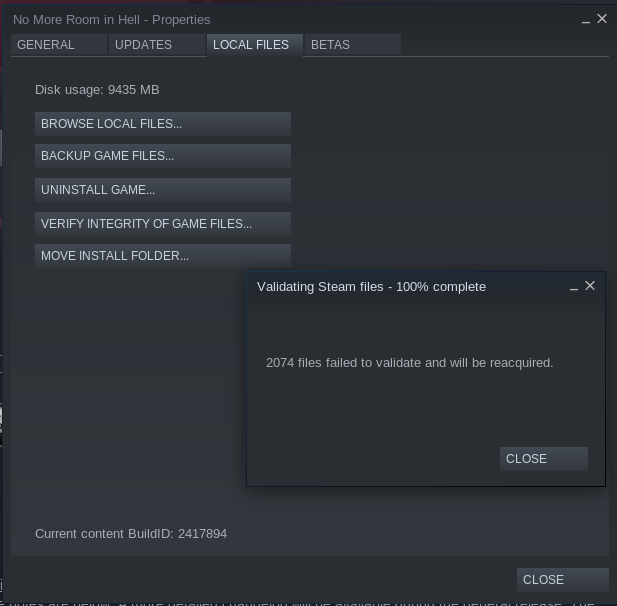
If i download a new game. After downloading, the game is ok for Steam. I go to verify integrity of game files and Steam detect all game files corrupt.

Assert( Assertion Failed: pInfo->nNumWritesFinished > 0 ):depotreconstruct.cpp:619
I came up with a potential (cleaner) workaround for this problem and went ahead to test if it works.
- I created a 24 GB file on my NTFS drive using
$ dd if=/dev/zero of=ext4csgo bs=65536K count=384 - Created an ext4 volume within the file using
$ mkfs.ext4 ext4csgo - Created a mount point for it
$ sudo mkdir /mnt/csgo - Added a mount entry to
/etc/fstab/storage/warehouse/ext4csgo /mnt/csgo auto x-gvfs-show 0 0 - Mounted the volume using
$ sudo mount -a
Steam installs CS:GO successfully, and the game runs fine (if a bit slowly, I'm guessing due to double filesystem overhead), until the machine is rebooted. After next OS boot, Steam goes back to showing "corrupt update files" repeatedly.
I have this issue as well but with a slight difference:
Both CSGO and Dota 2 are installed on the home partition formated in ext4, however there is also a steam library on a NTFS hard drive.
For some reason steam in it's twisted logic downloads the updates to the steam library folder on the NTFS hard drive instead of the home partition were the games in question are.
Is there any way to change the folder were steam downloads the updates to ?
PS: Steam won't let me remove the library folder
By some reason, someone knows how to force udisks2 to default use user uid,gid by default? For me is default using uid=0,gid=0 with 777, triggering this issue
udisksd[17681]: Mounted /dev/sda3 at /run/media/waltercool/disk1 on behalf of uid 1000
ntfs-3g[18119]: Cmdline options: rw,nodev,nosuid,uhelper=udisks2
ntfs-3g[18119]: Mount options: rw,nodev,nosuid,uhelper=udisks2,allow_other,nonempty,relatime,fsname=/dev/sda3,blkdev,blksize=4096
ntfs-3g[18119]: Ownership and permissions disabled, configuration type 7
I want to avoid the fstab solution because my ntfs volume is external, auto-mounted with udisks2.
The latest steam beta client (Mar 20 or newer) has a change which is expected to resolve the problems with the validation failing after download. Please test and report!
CS:GO installation on an NTFS volume still fails here, with "corrupt update files". Mint 18.2 (Ubuntu 16.04 package base), Linux 4.15.0, Steam client built Mar 20 2019, at 18:38:53.
@outfrost can you provide the mount options of your NTFS volume. I made changes in the Steam Client that definitely fixed the test cases I could reproduce, but I suspect there are several more ways to break things I haven't seen.
@TTimo I can't post options (I've changed file system), but I can say steps to reproduce:
- format disk under windows
- mount it in Ubuntu (it has a very short list of options)
@outfrost can you provide the mount options of your NTFS volume. I made changes in the Steam Client that definitely fixed the test cases I could reproduce, but I suspect there are several more ways to break things I haven't seen.
The line in /etc/fstab is
/dev/disk/by-uuid/<UUID_here> /storage/warehouse auto nosuid,nodev,nofail,x-gvfs-show,x-gvfs-name=Warehouse 0 0
@outfrost what does mount | grep warehouse tell you? Not sure how to interpret the mount options you are showing in fstab here.
The change made in the Steam Client was related to handling mount options that use allow_other - the Steam Client wasn't prepared to handle files that it has permissions to but is not owner of. Even then, that option shouldn't be used as Steam Play will have issues with it, and games themselves might also.
There's still a lot of mount options that would break things I suspect. Some we may be able to fix, some that should simply not be used. My recommendation is -t ntfs-3g -o noatime,uid=1000,gid=1000 (replace uid/gid with your steam user values).
@outfrost what does
mount | grep warehousetell you? Not sure how to interpret the mount options you are showing in fstab here.
/dev/sdd3 on /storage/warehouse type fuseblk (rw,nosuid,nodev,relatime,user_id=0,group_id=0,allow_other,blksize=4096)
The change made in the Steam Client was related to handling mount options that use
allow_other- the Steam Client wasn't prepared to handle files that it has permissions to but is not owner of. Even then, that option shouldn't be used as Steam Play will have issues with it, and games themselves might also.There's still a lot of mount options that would break things I suspect. Some we may be able to fix, some that should simply not be used. My recommendation is
-t ntfs-3g -o noatime,uid=1000,gid=1000(replace uid/gid with your steam user values).
So, basically, Steam is incompatible with the default way of permanently mounting volumes in Ubuntu, the one distribution that it is said to officially support?
Thank you for testing, the next beta client update will have more fixes for this.
I've tested CS:GO again, using the Apr 4 2019, 03:18:17 build of Steam, both with
type fuseblk (rw,nosuid,nodev,relatime,user_id=0,group_id=0,allow_other,blksize=4096)
and with relatime replaced with noatime.
The game installed fine, and survived intact and playable through two runs of "verify game files" (one with relatime and one with noatime). Thank you for the fixes.
Could anyone else retest on their machines?
Closing this as fixed. Very possible other issues related to NTFS and/or big inodes still remain in the client, feel free to open new reports and reference this.
This is a continuation of #4752, which the NTFS issue was accidentally combined with an ext4 issue.
Symptoms: Larger updates from games like Dota-2 and CS:GO fail to update when installed to an NTFS partition since the 2016-12-12 steam client update.