same problem.
Wed Apr 19 22:17:18 2017 GMT: file ''/tmp/dumps/crash_20170419231710_6.dmp'', upload yes: ''CrashID=bp-ae594b20-eb4b-4f2c-b1a3-e8da72170419''
Steam client version (build number or date):
Build date: Mar 22 2017 at 23:45:04
Distribution (e.g. Ubuntu):
Gentoo Linux (x64)
Opted into Steam client beta?: [Yes/No]
No
Have you checked for system updates?: [Yes/No]
Yes
I dont know why but i debug it and the segfault was in libaudio.so
according with that issue: #4753
I disable the equalizer module of pulse audio and it worked.
It seems that Steam doesnt like the pulseaudio's equalizer module :(
@Unknown-Zombie Could you try to do some debug like me? If the segmentation fault is in libaudio.so you have to comment in /etc/pulse/default.pa the folowing lines
#load-module module-equalizer-sink
#load-module module-dbus-protocol
for starting the debugger is the following line
DEBUGGER=gdb steam
Same thing happening to me on Ubuntu. Tried to debug the segfault with GDB and found that it happens in libaudio.so too.
The real problem is that I don't have either equalizer-sink or dbus-protocol active. None of them are even present in my /etc/pulse/default.pa
Here are my currently loaded pulse audio modules:
$ pactl list short modules
0	module-device-restore
1	module-stream-restore
2	module-card-restore
3	module-augment-properties
4	module-switch-on-port-available
5	module-udev-detect
6	module-alsa-card	device_id="0" name="pci-0000_00_1f.3" card_name="alsa_card.pci-0000_00_1f.3" namereg_fail=false tsched=yes fixed_latency_range=no ignore_dB=no deferred_volume=yes use_ucm=yes card_properties="module-udev-detect.discovered=1"
7	module-bluetooth-policy
8	module-bluetooth-discover
9	module-bluez5-discover
10	module-native-protocol-unix
11	module-default-device-restore
12	module-rescue-streams
13	module-always-sink
14	module-intended-roles
15	module-suspend-on-idle
16	module-systemd-login
17	module-position-event-sounds
18	module-filter-heuristics
19	module-filter-apply
20	module-x11-publish	display=:0
21	module-x11-bell	display=:0 sample=bell.ogg
22	module-x11-cork-request	display=:0
23	module-x11-xsmp	display=:0 session_manager=local/tavo-Inspiron-7559:@/tmp/.ICE-unix/3137,unix/tavo-Inspiron-7559:/tmp/.ICE-unix/3137
any hints?
@tavomaciel
I'm sorry. In my case the problem was the equalizer sink module.
I think ps4 controller is a sound card when plugged by usb.
Maybe they try to change the default output back and they crash the application.
Sorry for not have any hint for you.
I found an awkward solution: disabling PulseAudio. Don't even need to uninstall it, just disabling. By doing this you lose the tray sound icon, but PulseAudio was giving me tons of headaches anyway (wouldn't change output to headphones, etc).
So having to deal with only alsamixer is a problem, but I can deal with that.
Thanks everyone!
Same for me. Archlinux.
same problem. gentoo
Same. Debian unstable.
I found a workaround!
I have multiple sound outputs, and in paprefs I had "Add virtual output device for simultaneous output on all local sound cards" checked (which loads module-combine and module-combine-sink I think). It is now unchecked and steam can start with my dual shock 4 controller plugged in and working!
I just ran into this problem and found another, possibly better workaround for it. I describe what worked for me in issue #4753 because it seemed more relevant there, but wanted to mention it here for anybody that runs into the problem as a side-effect of a controller and finds this report. The gist of it is I replace Steam's libpulse.so.0 and libpulsecommon-1.1.so with distro-provided versions of libpulse and libpulsecommon via LD_PRELOAD (and a symlink for libpulsecommon). No crashes with controller or BPM, and BPM even plays sound on launch now.
I'm experiencing this issue on Arch Linux x64 despite never experiencing issue #4753. I have a JACK + PulseAudio setup that involves using module-jack-sink, and I also use module-echo-cancel, and paprefs to have a simultaneous output.
Absolutely none of these workarounds works for me on its own, and none of them work all together. The only thing that does work is if I use every workaround listed here, minus messing with any library files as @Ilazki suggested (that doesn't affect anything, maybe because I'm already using native runtime and have the x32 pulse libraries installed), plus NOT using module-echo-cancel or module-jack-sink. So I think @Ilazki was right on the money when they said in #4753 that "BPM really dislikes PA modules that add sinks."
Sadly, that's not good enough. I need most of the stuff I had to disable to get this working 24/7, especially module-echo-cancel and module-jack-sink. So I don't get to enjoy Steam's configuration utility on my DS4 on Linux, even though it works fine with my Steam controller and both controllers work fine on Windows Steam, until this gets fixed. I'm gonna have to make do with text file configs and ds4drv.
This bug's behavior has changed. Now, instead of only being present when the DS4 config option is checked, it's present all the time. No matter what I do, as long as I have any non-standard sinks running in PulseAudio and a DualShock 4 plugged into my computer (whether wired or Bluetooth), Steam will crash, freeze, and sometimes even hard freeze my entire system along with it.
If anyone else is seeing this new behavior, too, then this bug just became a very major one. It's already gone unfixed for way too long, and now it's causing me to never be able to use a DS4 on Linux games at all, especially not Steam ones.
Well, here's about 3/4 of a workaround that I've managed to figure out: https://superuser.com/questions/1339052/block-a-specific-program-from-accessing-a-device
EDIT: 4/4 now! It fully works if you use the DS4 over Bluetooth, and I'd expect it to also work over USB (if you use the controller's IDs instead of the Bluetooth adapter), though I haven't tested that.
tl;dr using firejail to blacklist Steam from your Bluetooth card in /dev/bus/usb/ fixes this bug, and if you use the DS4 via a wired connection, blacklisting the controller itself in /dev/bus/usb/ probably also works.
In fact, BPM even still detects it as a DualShock 4 controller and can configure it and everything, which further implies this bug comes from Steam doing something really stupid with an aspect of the controller that is not the joystick (/dev/hidraw and /dev/input/jsX), probably the sound card. It also proves that whatever Steam is doing wrong, it involves its access to /dev/bus/usb/XXX/YYY where XXX is the USB bus it's connected to and YYY is the USB device number.
Having same issue on Gentoo stable with steam overlay launcher (native multilib). My steam controller will work until I sign in. After sign in steam locks up. If I turn off the controller steam will come back to life.
This issue is now affecting my Steam Controller as well! And the same blacklisting trick that's working for my DS4 isn't working for my SC, despite, the behavior of the bug being identical.
Upon further testing, it seems all that changed behavior was actually a completely separate issue. A brand new one with sc-controller--if sc-controller's daemon turns on after Steam launches (so a workaround is plugging the controller in before launching Steam), then Steam is frozen. @spiderfudge If this sc-controller stuff is not your bug, then I don't think I have your bug.
Meanwhile, this bug has actually changed for the better. I'm finding that not only has it not in fact been affecting the Steam Controller, but as for DS4, it seems to be no longer happening when DS4 config is off in Steam's settings, rather than happening if a DS4 controller is plugged in at all. So... finally back to what the issue title actually says.
Seeing this on Fedora 28 x86-64 with the beta client. Removing libpulse* from the runtimes has no effect. Disabling PS controller support from within the Steam client lets the client run normally, but reduces DS4 support accordingly.
This is happening to me in Arch Linux, but only if I configure pulseaudio to use stereo and reduce the volume changing /usr/share/pulseaudio/alsa-mixer/paths/analog-output.conf.common
from
[Element PCM]
volume = merge
to
[Element PCM]
volume = ignore
volume-limit = 0.01
(actually it does not matter if is PCM or another entry like [Element Analog Output])
So if instead I use surround 5.1 and do not change that configuration file there is no problem, I can use my system in a normal way and reduce my general volume by 40db with for example a pavucontrol slider. But I find very annoying some games with surround 5.1.
Edit: following on this it also happens if steam is launched when pulseaudio is configured with 5.1 but with a remap-sink to stereo, but is interesting to note that starting steam with pulseaudio in 5.1 (without the remap) and restart pulseaudio with the remap config works (does not crash and the game is in stereo mode).
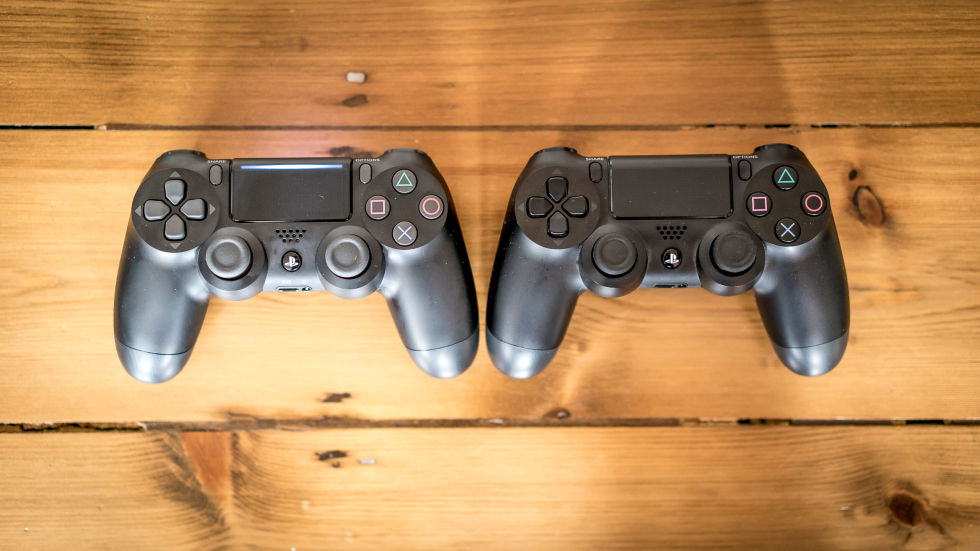
This just started happening when I started using a new DS4 from a new PS4 Pro (has a light bar on the touchpad as well as on the back between the triggers). I switched back to the old DS4 from original PS4 and it works fine. Anyone able to replicate? On Arch btw.
This just started happening when I started using a new DS4 from a new PS4 Pro (has a light bar on the touchpad as well as on the back between the triggers). I switched back to the old DS4 from original PS4 and it works fine. Anyone able to replicate? On Arch btw.
Same issue here. Immediately crashes the stream when the controller connects to the Linux host.
This just started happening when I started using a new DS4 from a new PS4 Pro (has a light bar on the touchpad as well as on the back between the triggers). I switched back to the old DS4 from original PS4 and it works fine. Anyone able to replicate? On Arch btw.
Same issue here. Immediately crashes the stream when the controller connects to the Linux host.
It'd be good if someone who has the issue could confirm if they're using a new or old DS4 and if using an old DS4 works OK.
I think I'm using an old one?
I have 2. One that came with my refurbished non-Pro PS4, which I bought after the Pro was available, that last I heard was "1st gen" My 2nd one was bought later, is supposed to be the "2nd gen" (new firmware, different Linux driver, less black buttons and sticks, and the sticks wear out less quickly), and is the one I've been using on Linux.
I looked up this comes-with-Pro one when @AsaVenton made their post, and couldn't find a discerning feature other than "supports USB signals on a PS4 too instead of only on PC," something neither of mine do.
All the talk of it suddenly having a touchpad lightbar has only confused me. My supposed 1st gen controller even has a light bar on it, and it's not a separate light source on either of them--just the light carrying that way through the controller's internals. To be honest, in my life I've never seen a DS4 that didn't have "another" light bar on the touchpad like that, and I saw plenty thanks to friends when the console and DS4 were both brand new, long before the Pro.
I think I'm using an old one?
I have 2. One that came with my refurbished non-Pro PS4, which I bought after the Pro was available, that last I heard was "1st gen" My 2nd one was bought later, is supposed to be the "2nd gen" (new firmware, different Linux driver, less black buttons and sticks, and the sticks wear out less quickly), and is the one I've been using on Linux.
I looked up this comes-with-Pro one when @AsaVenton made their post, and couldn't find a discerning feature other than "supports USB signals on a PS4 too instead of only on PC," something neither of mine do.
All the talk of it suddenly having a touchpad lightbar has only confused me. My supposed 1st gen controller even has a light bar on it, and it's not a separate light source on either of them--just the light carrying that way through the controller's internals. To be honest, in my life I've never seen a DS4 that didn't have "another" light bar on the touchpad like that, and I saw plenty thanks to friends when the console and DS4 were both brand new, long before the Pro.
This picture shows the difference in light bars which indicates whether the DS4 is 1st or 2nd gen. 2nd gen on the left with a light bar on the touchpad between the share and options buttons, 1st gen on the right without that lightbar. I'm not certain if this even has anything to do with the issue or just something that affected me.
According to Gentoo wiki 2nd gen DS4 requires Linux 4.10. My 2nd gen dualshock 4 is detected and seems to function correctly other than when trying to use it with Steam.
Hm, then this is getting very weird indeed. At one point an internet source had me comparing model numbers and software firmware versions to see which was which gen, and even that said that my 1st gen was 1st and 2nd gen was 2nd. They both have that light bar, though? So I guess they're both 2nd gen?
So, yeah, I am currently running a 2nd gen DS4 that does still have this issue. If you want to make sure you have the exact same issue, the steps to reproduce seem to be:
-Have any nonstandard PulseAudio modules that create sources or sinks running (such as module-echo-cancel, or module-combine-sink, which is automatically loaded by the paprefs setting "Add virtual output device for simultaneous output on all local sound cards", or even a PulseAudio-based equalizer)
-Have the PlayStation Configuration Support toggle on in Steam's controller settings
-Connect a DS4
If any one of those 3 steps is not your case, there should be no crash, and as a temporary workaround you could see if it's possible on your setup to get away with avoiding the 1st or 2nd ones. Run pacmd list-modules to get a list of loaded modules. Look for any with "source" or "sink" in their title (although I'm pretty sure "module-always-sink" doesn't count and is safe and is the default on most distros) to see if you're running any that add a source or sink.
Unfortunately, I don't know if the PulseAudio source/sink issue would have to be accounted for on the host, guest, or both, in a streaming setting. But I would expect both, since both have to interact with the controller and both are capable of crashing when all 3 steps to reproduce are happening.
On top of that, instead of using Steam's config for your controllers, if you're not on Windows, you have the option of using an open-source tool, sc-controller, which at this point is just plain better in every way than Big Picture Mode's configuration options with the Steam Controller and DS4. You could have it installed on both the host and the Steam Link and come up with your own way to sync profile files between the two devices. That way, you could easily use a DS4 with a full GUI config without having to do that through Steam and deal with crashing.
been having this same issue, didn't even think about a potential audio interaction. such strange behaviour from steam, hope it'll get some love from Valve, and in the mean time I'll try out sc-controller.
i can reproduce this with a 100% success rate by enabling the pulse audio jack sink module
This issue has now combined with another issue to force me to play Sekiro with a 360 controller (oh the horror). For some reason Sekiro does something no other Steam game in my library does: it causes the exact same behavior that enabling PlayStation controller support in Steam BPM causes. My first guess is that if it detects a Dualshock, then maybe it forces Steam to enable that checkbox somehow, even when I have sc-controller running and emulating the Dualshock as an XBox controller. The same behavior happens if I don't have sc-controller running but still don't have the PlayStation checkbox on. In that case, other games, say Rogue Legacy, will just support the Dualshock out of the box, but Sekiro will make Steam crash.
this is also happing to me on Ubuntu 18.04 with kernel 4.19.37. I have schenhizer gsx 1000 using the modifications from here github and if I have both the gsx and a ds4 connected with ds4 support enabled in steam, steam crashes, Disconnecting the gsx allows steam to work with a ds4.
I know this issue is getting long in the tooth, but I haven't been in a situation to troubleshoot any more since I first made the ticket (yeah, almost 2 years ago).
The issue stems from Pulse Audio. I sat down tonight and looked at my Pulse Audio configuration -- I was able to completely remedy this issue by removing some custom modules I had added to my pulse audio config.
I had two lines that loaded custom modules, one was a module-null-sink and the other a module-loopback that I had added to my /etc/pulse/default.pa long ago that I have now removed. I am now able to turn on DS4 customization support, and fully remap the controller, using Steam.
@Unknown-Zombie I'm glad my advice worked for you, even though was a different pulseaudio module than me.
Hope you can play games properly.
I sat down tonight and looked at my Pulse Audio configuration -- I was able to completely remedy this issue by removing some custom modules I had added to my pulse audio config.
That's great for you, but unfortunately not everyone has these extra modules in use by chance. Being forced to choose between using the controller or using the PA configuration I use to stream and record because of this bug is really annoying. I tried working around it by making helper scripts to load/unload the modules and choosing whether I wanted to use controller or record, but I finally got frustrated and just stopped using the DS4 completely.
My "fix" was to get an 8bitdo controller (similar dpad/analog stick layout, which is what I got a DS4 for) and start using it instead because it doesn't have audio hardware that makes Steam explode. I like the DS4 but it's basically been a wasted purchase for two years because of this bug.
That's great for you, but unfortunately not everyone has these extra modules in use by chance. Being forced to choose between using the controller or using the PA configuration I use to stream and record because of this bug is really annoying. I tried working around it by making helper scripts to load/unload the modules and choosing whether I wanted to use controller or record, but I finally got frustrated and just stopped using the DS4 completely.
Wholeheartedly agree. The issue lies with Steam, not PulseAudio.
It would be cool to get fixed. Another handy tool which doesn't work currently is pulseeffects (https://github.com/wwmm/pulseeffects). This one is an awesome tool of different audio effects you can put on every pulse source. I would like to use it with mopidy cause mopidy itself doesn't offer audio normalisation.
It seems we need to reproduce It in SteamOS to have real answer from Valve
@kisak-valve can you provide docker images of SteamOS to reproduce the problem?
http://fabiorehm.com/blog/2014/09/11/running-gui-apps-with-docker/
If valve provide me docker images of SteamOS I can try to reproduce it and try to do a reproducer.
@kisak-valve
Are there some documentation to create valid reproducer to be able to raise the priority of this bug?
I think we followed the github template but nobody is checking that this bugs affects multiple distros and multiple users.
So in theory this is a high priority issue.
Can you provide any hint in order to raise the priority of a bug? I mean, what is your scoring system for evaluate the impact of a bug? number of users affected? number of distros affected? reproducibility?
Sorry if this text sound a little bit rude but we wanted to get steam better because we believe valve is a good company and we want to believe that linux is a good platform for gaming.
Thanks you for your amazing work 👍
Something interesting and annoying about this bug that I've noticed is the crash happens even if the DS4's sound hardware is disabled via PulseAudio. I thought maybe that if I turned it off with pavucontrol I could use that as a workaround since I don't care about the controller's sound support, but it didn't matter. Even disabled Steam crashes on startup if certain PA modules are loaded and the DS4 is connected.
That's great for you, but unfortunately not everyone has these extra modules in use by chance. Being forced to choose between using the controller or using the PA configuration I use to stream and record because of this bug is really annoying. I tried working around it by making helper scripts to load/unload the modules and choosing whether I wanted to use controller or record, but I finally got frustrated and just stopped using the DS4 completely.
I didn't have those modules there "by chance" either; they were there for video recording and streaming.
I do not think it's a "fix" for any issue to expect a user to remove modules they've added to their Pulse Audio config (which they've probably added there for good reasons). If you're inclined to take advantage of the workaround, and in a position where you can do so after weighing the pros and cons, then doing so is just a stopgap until the problem is properly solved.
That's why I haven't closed the issue.
On a lark I decided to try my DS4 with the latest beta client and it now seems to be working, even with the PulseAudio configuration untouched. I don't know if anything deliberate was done to fix this or if possibly-related code tightening affected this issue as well. I don't think it's worth closing this issue yet, but it may be worth retesting.
Latest Steam beta, this crash still happens. This is 2 years after reporting the bug, how has nobody at Valve tried to fix this yet? It currently prevents me from playing any Steam game with a controller...
Turned up with kinda workaround: Raspberry Pi 3 with steam link binary. Not sure if mike and speaker are working, what games do support it?
Yep, still happening for me as well, even after a switch to Debian Buster and newer libraries. Remove any PA modules that add new sinks and all is well again, so nothing changed behaviour-wise.
Hello, "Fix crash caused by audio cards with no active port set" in the 2019-07-16 Steam client update may have had an effect for Dualshock 4 users. Please retest if the behavior of Steam with a DS4 is still causing a crash.
Tested and all seems to be fine on my machine . Thank you very much. https://i.imgur.com/Jv3XT5F.png
Might give this info to the wine dev's too. Maybe thats helpfull for fixing elex + ps4 controller.
Just tested with the latest beta and it's working again, no crashing at all despite my unusual PulseAudio sink configuration. May have taken a while but it's still very much appreciated, I like the controller and was sad I couldn't use it reliably. Thanks for the fix.
Thanks for retesting, closing as fixed.
It's fixed for me, too. Thanks! It feels great to finally have this bug gone.
Sorry for the spam.
Only to say thanks to Valve.
Keep going in this way.
:-)

Your system information
https://gist.github.com/Unknown-Zombie/71e3d878ffe1c666b5aafe7456fc675b
Please describe your issue in as much detail as possible:
The Linux Steam client will segfault when connecting a Dualshock 4 controller via USB when the option "PS4 Configuration Support" is enabled. If that option is enabled, disconnecting the Dualshock 4 will allow Steam to start up, but it will crash as soon as you connect the controller.
Turning off the "PS4 Configuration Support" option will not cause Steam to crash in any case where the controller is connected. The client will start as normal.
This was not a problem before the client update released on March 9th.
Steps for reproducing this issue:
Terminal output: https://gist.github.com/Unknown-Zombie/7351a2c820fcc55a67c347fb33c05023
or:
Terminal output: https://gist.github.com/Unknown-Zombie/501cf880dea13549001c4ed0d078eecd