Xbox One Controller with Configuration Support acts as 2 devices at once
Per "Fixed XBox controllers potentially having a second phantom controller when not opted into Steam Configuration support." in the 2017-05-18 steam beta client update, please opt into the steam beta and retest this issue.
After enabling the beta I still get a second phantom controller when opted into Xbox Configuration Support.
Note that the condition is the opposite of what's in the change log.
$ grep 'X-Box' /proc/bus/input/devices
N: Name="Microsoft X-Box One S pad"
N: Name="Microsoft X-Box 360 pad"
I have the same problem on Ubuntu 16.04. I'm using the steamos-xpad-dkms module.
My config: 3 Xbox 360 Wireless Controllers, 1 Steam controller. Latest Steam beta with xbox controller support enabled.
It is hard to find a pattern. Enabling all 4 controllers gives the best experience. But using only the steam controller and two xbox 360 controllers often results in shadow inputs.
Games I test this problem with: Towerfall Ascension and Move Or Die.
In Towerfall Ascension the "shadowed" xbox controller is detected as "???" (just like the steam controller), whereas the real xbox controllers are detected as "XBOX 360".
I too suffer(ed) this "Ghosting"
First let's know there's a difference between the global "Xbox Configuration Support" and the per-game setting "Use Steam Configuration for Non-Steam Controllers" which is there: https://i.imgur.com/ckuTIDz.jpg (game -> manage -> controller options)

I have 4 controllers, Xbox ONE Wired and 3 Xbox 360 Wireless connected to my Linux Mint (cinnamon) 18.3 box using a (genuine?) Microsoft Wireless dongle.
For me the "Ghosting" of inputs is coming from that second per-game option ("Use Steam Configuration for Non-Steam Controllers"), which is enabled by default for all games. Indeed, adding players twice in Rocket League was one symptom and other games exhibited similar issues - sometimes a game would register the Xbox 360 Wireless as a Steam Controller, and sometimes correctly identify it as the 360 Wireless.
I did not have issues with the Xbox ONE Wired controller.
I suppose the issue "remains", at least for me, save some other configuration I am not understanding.
This issue is still occurs, not only on Arch Linux with an Xbox controller. I also have this issue with all of my controllers (Xbox 360, Switch Pro, Generic) on Arch Linux and Linux Mint.
This makes the Configuration Support feature unusable as it causes problems in many games (especially coop games).
I just tested on a fresh Ubuntu 18.04 install and same problem. The controller with Configuration Support is saw like another player (eg. player 2 if it's the first controller plugged in).
This is still an issue. Any way to fix it?
I'm surprised that almost nobody complains about it...
Can confirm I am having the same issue.
I have this issue too, impossible to play Road Redemption even in single player because it always enable player 2 in the same controller.
same issue here with a razer tournament edition
Mmmh, I recently tried again with my Xbox 360 controller and it seems like I do not have the problem anymore. :thinking:
(On Arch Linux with Steam Beta.)
BUT still an issue with my Nintendo Switch Pro Controller.
I am very disappointed because it also happens with my Steam Controller.
Same problem with a pxn-9613 gamepad. Steam creates a shadow Xbox 360.
Arch Linux.
I have the same issues with Road Redemption using Linux Mint 19.1 Cinnamon.
As a temporary workaround I can recommend forcing the usage of Proton 4.2.3 which eliminates the problem completely.
I started having this issue after connecting my Xbox One controller to my MacOS laptop. Now any controller (Xbox or not) that I connect gets duplicated.
Same issue on Ubuntu 18
same here with latest Manjaro and Steam beta :/
Here the trick :
2. Avoiding xpad conflict
Check if your distro loads xpad module to handle XBOX controller events:
lsmod | grep xpad
If it returns a blank line, you're fine, go straight to the next section. If it returns something else, you must unload xpad module before loading xboxdrv by executing this command:
rmmod xpad
Also getting the same issues with an Xbox One controller connected via Bluetooth. Steam had incorrect bindings for the controller, which I just had to remap. However the only way I could get it working to an extent is Force off "Steam Input Per-Game setting" - the problem then being that I was unable to change the controller configuration for Rocket League to how I needed it.
Operating System Version:
"Arch Linux" (64 bit)
Kernel Name: Linux
Kernel Version: 5.4.2-arch1-1
X Server Vendor: The X.Org Foundation
X Server Release: 12006000
X Window Manager: KWin
Steam Runtime Version: steam-runtime_0.20191119.3
I fixed the ghosting on my machine (Ubuntu 18.04).
Go into Big Picture > Settings > Controller Settings > Uncheck Xbox Config Settings.
Before:
I: Bus=0005 Vendor=045e Product=02fd Version=0903
N: Name="Xbox Wireless Controller"
P: Phys=00:1a:7d:da:71:13
S: Sysfs=/devices/pci0000:00/0000:00:14.0/usb3/3-7/3-7:1.0/bluetooth/hci0/hci0:71/0005:045E:02FD.0006/input/input29
U: Uniq=5c:ba:37:9c:98:cf
H: Handlers=kbd event24 js0
B: PROP=0
B: EV=20001b
B: KEY=7fff000000000000 0 100040000000 0 0
B: ABS=30627
B: MSC=10
B: FF=107030000 0

I: Bus=0003 Vendor=28de Product=11ff Version=0001
N: Name="Microsoft X-Box 360 pad"
P: Phys=
S: Sysfs=/devices/virtual/input/input30
U: Uniq=
H: Handlers=event25 js1
B: PROP=0
B: EV=20000b
B: KEY=7cdb000000000000 0 0 0 0
B: ABS=3003f
B: FF=10000 0
After:
I: Bus=0005 Vendor=045e Product=02fd Version=0903
N: Name="Xbox Wireless Controller"
P: Phys=00:1a:7d:da:71:13
S: Sysfs=/devices/pci0000:00/0000:00:14.0/usb3/3-7/3-7:1.0/bluetooth/hci0/hci0:71/0005:045E:02FD.0006/input/input29
U: Uniq=5c:ba:37:9c:98:cf
H: Handlers=kbd event24 js0
B: PROP=0
B: EV=20001b
B: KEY=7fff000000000000 0 100040000000 0 0
B: ABS=30627
B: MSC=10
B: FF=107030000 0
Yeah good job, now try to customize the button actions in Steam controller configuration
I was having the same problem using an 8BitDo SN30pro+ in Xbox mode. For this particular controller I have selected "Switch Pro Configuration Support" and "Use Nintendo Button Layout". Unfortunately, to solve the issue I have to go to game-specific settings and select "Forced Off" under "Steam Input Per Game Settings" in "Controller Options". I am running PopOS 20.04, all settings mentioned are in Steam Big Picture Mode.
Same problem here with my 8bitdo SN30 Pro+, it makes ti difficult to play 2d games with the dpad, since it registers a rapid movement form left to right and it gets stuck.
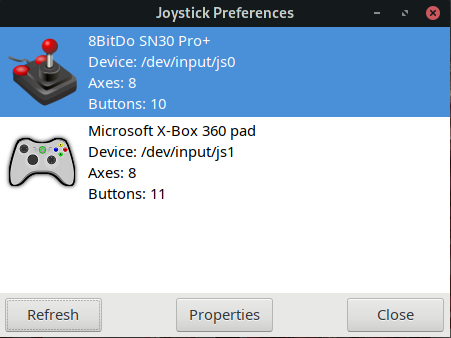
as you can see, it sees it as a second xbox controller is pluged in , but that is because is in xinput mode. To overcome the problem with the dpad I had to change it to joystick move as a workarround.
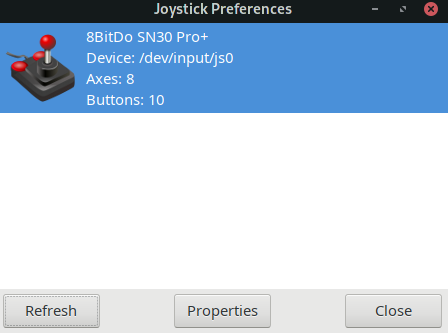
If i close steam I get the expected behavior.
Also on native games it registers like a second controller is being uses when I press start it activates a second player, example game BLEED.
This happens in Ubuntu and manjaro for me.

I'm having the same problem with my DualShock 4. It shows 2 controllers connected on Steam BigPicture (generic gamepad and DS4).
When I'm trying to play RocketLeague, my DS4 doesn't work properly and joins as the 2nd player.
System info:
- Steam:
- Built: Feb 12 2021, at 23:22:28
- Steam API: v020
- Steam package versions: 1613176728
- Operating System Version:
- "Arch Linux" (64 bit)
- Kernel Name: Linux
- Kernel Version: 5.10.16-arch1-1
- X Server Vendor: The X.Org Foundation
- X Server Release: 12010000
- X Window Manager: KWin
- Steam Runtime Version: steam-runtime_0.20201203.1
Tried the same udev rules as OP -> https://steamcommunity.com/app/353370/discussions/0/490123197956024380
The weird part is: even with the DS4 disconnected, it shows as if I have 1 "joystick" connected:
ls -al /dev/input
...
crw-rw----   1 root input 13, 64 Feb 14 00:47 js0
And when I connect the DS4, it shows as js1:
ls -al /dev/input
...
crw-rw----   1 root input 13, 64 Feb 14 00:47 js0
crw-rw----   1 root input 13, 64 Feb 14 00:49 js1
Then, I tried using the new evdev API (instead of the joystick API). Installed the xf86-input-evdev package with sudo pacman -Syu xf86-input-evdev and ran sudo rmmod joydev.
Blacklisted the joydev module to prevent it from loading with blacklist joydev on /etc/modprobe.d/blacklist.conf.
Now when I plug my controller, this happens:
ls -al /dev/input/by-id
total 0
drwxr-xr-x 2 root root 240 Feb 14 01:51 .
drwxr-xr-x 4 root root 580 Feb 14 01:51 ..
lrwxrwxrwx 1 root root   9 Feb 14 01:50 usb-Logitech_USB_Receiver-if02-event-mouse -> ../event6
lrwxrwxrwx 1 root root   9 Feb 14 01:50 usb-Logitech_USB_Receiver-if02-mouse -> ../mouse0
lrwxrwxrwx 1 root root   9 Feb 14 01:50 usb-OBINS_OBINS_AnnePro2_SN0000000001-event-if01 -> ../event3
lrwxrwxrwx 1 root root   9 Feb 14 01:50 usb-OBINS_OBINS_AnnePro2_SN0000000001-event-if02 -> ../event4
lrwxrwxrwx 1 root root   9 Feb 14 01:50 usb-OBINS_OBINS_AnnePro2_SN0000000001-event-kbd -> ../event2
lrwxrwxrwx 1 root root   9 Feb 14 01:50 usb-OBINS_OBINS_AnnePro2_SN0000000001-if03-event-joystick -> ../event5
lrwxrwxrwx 1 root root  10 Feb 14 01:51 usb-Sony_Interactive_Entertainment_Wireless_Controller-event-if03 -> ../event20
lrwxrwxrwx 1 root root  10 Feb 14 01:51 usb-Sony_Interactive_Entertainment_Wireless_Controller-if03-event-joystick -> ../event21
lrwxrwxrwx 1 root root  10 Feb 14 01:51 usb-Sony_Interactive_Entertainment_Wireless_Controller-if03-event-mouse -> ../event19
lrwxrwxrwx 1 root root   9 Feb 14 01:51 usb-Sony_Interactive_Entertainment_Wireless_Controller-if03-mouse -> ../mouse1
It appears that my AnnePro2 (keyboard) is a joystick too?
usb-OBINS_OBINS_AnnePro2_SN0000000001-if03-event-joystick -> ../event5
usb-Sony_Interactive_Entertainment_Wireless_Controller-if03-event-joystick -> ../event21
Then I removed both devices (keyboard and controller) and plugged only the DS4. Started the game. It worked.
Wth? I don't know exactly what's going on but it appears that my keyboard is being recognized as a "joystick"?
Please, someone enlighten me.
Finally here is some hope!
https://steamcommunity.com/groups/SteamClientBeta/announcements/detail/2872724078255992088
Fixed Linux games seeing multiple controllers when Steam controller configuration support is enabled
I definitely see some difference in the beta. "Binding of Isaac: Rebirth (Afterbirth+)" now sees 1 controller instead of 2 copies. But I haven't done thorough testing to verify that it is or isn't fixed.
Also note that output is still the same:
$ grep 'X-Box' /proc/bus/input/devices
N: Name="Microsoft X-Box One S pad"
N: Name="Microsoft X-Box 360 pad"
so apparently it can't be used as a verification criterion.
Closing per the last couple comments.
Still issue with PS4 controller with BT connection.
Steam detect one controller, but Streets of Rage detect 2.
I need turn off steam input config for PS4 controller to work properly as 1 controller.
With cable is no problem and game get only one controller.
For Xbox One S controller all are good, with and without steam input configs.
same problem as deathxxx123. i play moonlight from deck destop mode and only easy solution to play with 2 ds4 controllers i see is to turn off steam when i launch games.
Proton versions
proton 4.2x1 2019-05
Your system information
Got udev rules from here: https://steamcommunity.com/app/353370/discussions/0/490123197956024380
Please describe your issue in as much detail as possible:
This has been confirmed on two Arch Linux systems, one with "Microsoft X-Box One pad" and (completely separately) one with "Microsoft X-Box One S pad". If Xbox Configuration Support is enabled, two controllers become active at the same time – the real one with its default events and the virtual one with actions as configured in Controller Configuration.
Steps for reproducing this issue:
cat /proc/bus/input/devices