Adding a non-steam game adds a broken link to a different game altogether - ? error parsing spaces in .desktop file paths
I am able to confirm this issue. Despite having no problems when launching my desktop files from krunner, Steam fails to launch applications added with Exec lines such as the following:
Exec=env SteamGameId=233610 SteamAppId=233610 STEAM_COMPAT_DATA_PATH="/home/username/.local/share/proton_tools/compatdata/233610" "/home/username/.local/share/Steam/steamapps/common/Proton 3.16 Beta/proton" run /home/username/.local/share/proton_tools/common/Distance/Distance.exe
As a workaround, I have found it necessary to create launcher scripts and have the desktop file exec the launcher script. This is not a perfect workaround. I recommend that the following specification be referenced: https://standards.freedesktop.org/desktop-entry-spec/desktop-entry-spec-latest.html#exec-variables
Here's a little more information.
Everything after the space in a path gets sent to "SET LAUNCH OPTIONS"
Workaround: Remove "SET LAUNCH OPTIONS" and manually finish the path in "Target:" will fix the issue
Please describe your issue in as much detail as possible:
Folder names with spaces cause issues when adding Non-Steam games.
If you add a Non-Steam game with a space in the path, Steam will cut off the "Target:" before the space and place the rest of the path within the "SET LAUNCH OPTIONS"
Manually fixing the "Target:" and removing the "SET LAUNCH OPTIONS" will fix the issue
Steps for reproducing this issue:
- Add Non-Steam game to library with path containing space(s)
(example: /data/game folder/game.exe) - "Target:" becomes "/data/game"
- "SET LAUNCH OPTIONS" becomes "folder/game.exe"
- Launching game from library does nothing
Confirming this. Additionally, setting the target again using the "Change..." button in the properties, sets it correctly even if it contains spaces so no need to type it manually. This also shows there is code to handle this properly already in the client, can be re-used.
Yes this is the same issue as the one I mentioned [1].
The second issue similar to this is related to the set launch options function itself ignoring %command% placement.
(commenting to keep track of this bug)
To Valve developers: this bug seems to be really "low-hanging fruit", most likely broken quoting or path splitting, I wouldn't be surprised if this was a bug on Windows or OSX as well.
I managed to hit this issue (on Linux) while pointing directly to .exe file inside ~/.wine. Every single game from GOG will be affected.
This is a very annoying issue and it shouldn't take much to resolve this. Why has this not been looked at yet, in years?
yes its just a steam gui interface issue, not sure if its present under windows client. no idea why valve ignores this issue.
It is not present under Windows, works fine there. It's not even present in the "Change" button routine in the Linux version. It baffles me too why this has not been fixed yet, it's so easy to correct.
I hate to bother with this, but three years after the first bug report the problem still persists. As far as I can tell the problem should be quite easy to solve, if not by a few lines of code.
Yes it still exists, you can work around it by going into the added non-steam games Properties and re-select the exe again and adjust the launch options, be aware however when you change the NAME or LINKED exe it makes a entirely new shortcut and you need to close the properties down and look for that new shortcut and go over it again.
Its not intuitive so lots of people are likely unable to use this steam feature thinking its completely broken, however its only semi-broken if you follow the steps I said above.
Yes it is annoying to have to do this.
I'm adding to the pile of people to this ticket. It is very annoying that this bug was initially discovered in 2017 and yet it's not even at least assigned for someone to look at.
The most annoying part is not the code unproperly parsing the string, it's the fact that after EVERY CHANGE you need to close out or everything after your first change drops.
It's not happening for all non-steam games that I add, only the ones with spaces in the name or path.
I wonder if the community can patch this bug themselves? like do we have access to look at that portion of steam code? I don't believe this is a issue under windows is it?
Probably not, since the Steam client is not open source (and I doubt they will simply release snippets of code). However, I can't imagine that it's that difficult to fix this bug, especially for experienced developers at Valve.
Seems like all we can do is hope the problem is fixed soon. In the meantime, I will probably continue to use Lutris (which is probably better for the task anyway).
this bug also changes the "Start in" directory
This is occurring with "among us" installed on Linux from Steam.
Still present on the latest client/beta client. Using Fedora 33.
This is a major headache, especially since Proton is so useful.
Just checking in again because it's still present. I'm using Fedora 35 now, and I recently had a friend run into this on Ubuntu.
With the Steam Deck coming out, this seems more and more necessary to fix.
omg this is literally just a quoting issue, and still isn't done. Steam..
..uh.. ..get it together.
On Thu, Oct 28, 2021 at 5:40 PM DeathTBO @.***> wrote:
Just checking in again because it's still present. I'm using Fedora 35
now, and I recently had a friend run into this on Ubuntu.With the Steam Deck coming out, this seems more and more necessary to fix.
—
You are receiving this because you commented.
Reply to this email directly, view it on GitHub
https://github.com/ValveSoftware/steam-for-linux/issues/5220#issuecomment-954243813,
or unsubscribe
https://github.com/notifications/unsubscribe-auth/AAS4PT6L5AJMN7KOXM4PUR3UJG7MHANCNFSM4EBEAN2Q
.
Triage notifications on the go with GitHub Mobile for iOS
https://apps.apple.com/app/apple-store/id1477376905?ct=notification-email&mt=8&pt=524675
or Android
https://play.google.com/store/apps/details?id=com.github.android&referrer=utm_campaign%3Dnotification-email%26utm_medium%3Demail%26utm_source%3Dgithub.
I confirm that this issue still present in Dec 16 2021 steam client release: When trying yo add external programs (which can be used for proton as well) from paths with spaces the path is split to properties to TARGET and START IN fields from the first space the parser faces.
Hello, per "Fixed adding non-Steam shortcuts with spaces in the path" in the 2022-03-31 Steam client beta update, please opt into Steam's beta client and retest this issue.
I can confirm that the Mar 31, 2022 23:11:43 build indeed finally correctly added a shortcut an executable with spaces in its path.
Btw, might want to make the "About Steam" page contain copyable text. I could've copied the date and package versions then. ;)
Of course on my system no shortcuts actually launch — all remain at "Updating XYZ", showing#SteamUI_JoinDialog_LaunchGameReady, but that's possibly related to https://github.com/ValveSoftware/steam-for-linux/issues/7664. Though I'm seeing it with native Linux shortcuts, too.
Hello, per "Fixed adding non-Steam shortcuts with spaces in the path" in the 2022-03-31 Steam client beta update, please opt into Steam's beta client and retest this issue.
Hello,
I tested following beta version:
Mar 31 2022, at 23:11:43
Steam API: v020
Steam package versions: 1648789923
I confirm that it worked with following test case:
/home/share/programs/win32/Folder Name With Spaces/Double Spaces/UTF-8 テストケース ÿ Földer/test program.exe
- There can be more than one folders with spaces
- There can be other UTF-8 characters
- The executable name can have spaces
- The file picker set correct TARGET and START IN for the executable
- The executable ran as expected
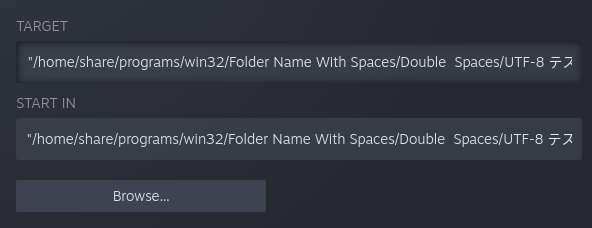
And yes, I tested this with a win32 executable with proton like in my original finding post.
Thanks for retesting. Closing as fixed in the 2022-05-12 Steam client update.
Thank you!
Your system information
Please describe your issue in as much detail as possible:
I cannot add some non-steam games to my library. Please see the video showing a failure to add the GOG version of Baldur's Gate Enhanced Edition, which demonstrates the problem thus:
I have a working .desktop file for the GOG version of Baldur's Gate Enhanced Edition under
$HOME/.local/share/applicationswhich can be used to launch the game normally from the Unity dash. I try to add the game to steam, but it does not show up in the list of applications. Note there is an "Icewind Dale Enhanced Edition" option (another one of my GOG games) detected automatically with an incorrect launch path (pointing to$HOMErather than$HOME/GOG Games/Ice...).I try to browse for the Baldur's Gate .desktop file manually. I locate and select it, but instead I get a selection for Icewind Dale (again, with the dodgy path). If I add this file, I get a broken launcher which does not launch either game. The Target is set to
""$HOME/GOG"(which is not a valid path, and suggests the space in the path has not been parsed correctly) and Start In is set to""$HOME".I think steam is not parsing the desktop files correctly, so certain games do not show up automatically in the selection dialog and trying to add these games manually results in broken links being created.