You might be missing some essential fonts. Try installing the default ones, as well as Noto Fonts which can replace most fonts that you might be missing after that.
Hello @pthfdr-42, do you have the fonts-liberation package?
pthfdr:/u/h/pthfdr> fc-list
/usr/share/fonts/truetype/UnifontMedium.otf: Unifont:style=Medium
/usr/share/fonts/truetype/Anonymous.ttf: Anonymous Pro:style=Regular
/usr/share/fonts/X11/suxus-iso-8859-1.bdf: suxus:style=Regular
I only have 3 fonts (2 truetype) installed because I do not want the extra fonts.
In privious versions (several monthes ago), Steam could fall back to the default sans/serif/monospace font.
I think that you should make Steam to fallback to a usable font, like what is displayed in the game list (in this example, Anonymous Pro).
Closing because the reporting user has turned into a ghost.
Nothing extracted yet.
Your system information
Please describe your issue in as much detail as possible:
Describe what you expected should happen and what did happen. Please link any large code pastes as a Github Gist
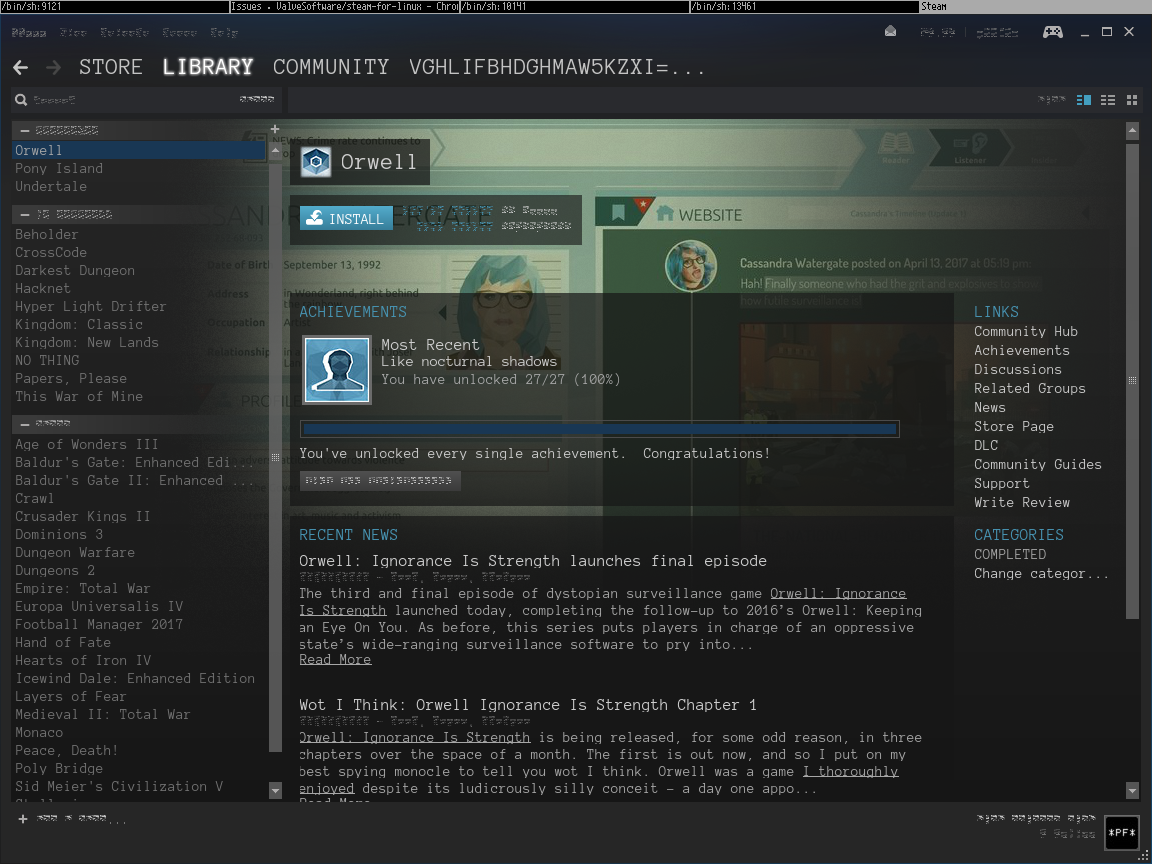
The fonts in the Steam UI is distorted, like this:
Notice the menu bar.
error.log and
assert_20180525115726_22.dmp.gz
Steps for reproducing this issue: