Error: You are missing the following 32-bit libraries, and Steam may not run: libc.so.6

I have the same issue on CentOS 7.5. But the three libraries I'm missing are libGL.so.1, libEGL.so.1 and libGL.so.1 agian. I'm sure I have installed those libraries, it works fine a week ago when I first install steam, just like @HebaruSan ,but I can't launch steam now.
Recently I installed Nvidia Driver 390.59(there is no Nvidia driver before) , Nvidia CUDA and caffe2, meanwhile I also yum install some libraries(cant remember) ,is that the reason I can't launch steam?
————UPDATE——————————
I found the solution!
https://github.com/ValveSoftware/steam-for-linux/issues/321
carlos-jenkins' solution fixed the problem! but a little difference.
if you update your Nvidia driver, and get this problem, try this:(I'm copying carlos' solution)
sudo nano /etc/ld.so.conf.d/steam.conf
I didn't have steam.conf, so I created one.
add this two line
/usr/lib32 /usr/lib/i386-linux-gnu/mesa
after this, I still have the problem, so I went to /usr/lib/i386-linux-gnu, but found no /mesa folder, I search for a while, and found what libraries I'm missing(libGL.so.1) at /usr/lib/i386-linux-gnu,so I changed /usr/lib/i386-linux-gnu/mesa to /usr/lib/i386-linux-gnu, and execute:
sudo ldconfig
start steam, worked fine!
if you still can't fix the problem, learn more at #321
(sorry for my poor English if I'm wrong somewhere, I'm not a English speaker.)
Still having this issue, I took a look at the script that prints this error, and it looks like libc.so.6 is a bit of a fake output, as it is a fallback/guess on the script's part and not the output of an actual command detecting a problem:
function get_missing_libraries()
{
	# Make sure to turn off injected dependencies (LD_PRELOAD) when running ldd
	if ! LD_PRELOAD= ldd "$1" >>/dev/null 2>&1; then
		# We couldn't run the link loader for this architecture
		echo "libc.so.6"
	else
		LD_PRELOAD= ldd "$1" | grep "=>" | grep -v linux-gate | grep -v / | awk '{print $1}' || true
	fi
}
That script is run on two files depending on the state of your install, either ~/.steam/steam/ubuntu12_32/steam or ~/.steam/steam/ubuntu12_32/steamui.so:
function check_shared_libraries()
{
	if [ -f "$STEAMROOT/$PLATFORM/steamui.so" ]; then
		MISSING_LIBRARIES=$(get_missing_libraries "$STEAMROOT/$PLATFORM/steamui.so")
	else
		MISSING_LIBRARIES=$(get_missing_libraries "$STEAMROOT/$PLATFORM/$STEAMEXE")
	fi
	if [ "$MISSING_LIBRARIES" != "" ]; then
		show_message --error $"You are missing the following 32-bit libraries, and Steam may not run:\n$MISSING_LIBRARIES"
	fi
}
Taking a look at those files, they and many of the others in that directory are empty!:
$ ls -gGSr ubuntu12_32/
total 236848
-rwxrwxr-x 1         0 May 18 18:01 vgui2_s.so
-rwxrwxr-x 1         0 May 18 18:01 streaming_client
-rwxrwxr-x 1         0 May 18 18:01 steamui.so
-rwxrwxr-x 1         0 May 18 18:01 steamservice.so
-rwxrwxr-x 1         0 May 18 18:01 steamoverlayvulkanlayer.so
-rwxrwxr-x 1         0 May 18 18:01 steam_monitor
-rwxrwxr-x 1         0 May 18 18:01 steamclient.so
-rwxrwxr-x 1         0 May 18 18:01 steam
-rwxrwxr-x 1         0 May 18 18:01 serverbrowser.so
-rwxrwxr-x 1         0 Mar 26  2015 libx264.so.142.crypt
-rwxrwxr-x 1         0 May 18 18:01 libvstdlib_s.so
-rwxrwxr-x 1         0 May 18 18:01 libvideo.so
-rwxrwxr-x 1         0 May 18 18:01 libtier0_s.so
-rwxrwxr-x 1         0 Apr 24 20:28 libSDL2-2.0.so.0
-rwxrwxr-x 1         0 May 18 18:01 liboverride.so
-rwxrwxr-x 1         0 May 18 18:01 libaudio.so
-rwxrwxr-x 1         0 May 18 18:01 gameoverlayui.so
-rwxrwxr-x 1         0 May 18 18:01 gameoverlayui
-rwxrwxr-x 1         0 May 18 18:01 gameoverlayrenderer.so
-rwxrwxr-x 1         0 May 18 18:01 friendsui.so
-rwxrwxr-x 1         0 May 18 18:01 filesystem_stdio.so
-rwxrwxr-x 1         0 May 18 18:01 crashhandler.so
-rwxrwxr-x 1         0 May 18 18:01 chromehtml.so
Maybe a bad update (on May 18, 2018) accidentally blew away these files? I'm going to try to reset my steam folder to get it to reinstall (hopefully without losing my games library).
Whatever the original cause, the message about libc.so.6 is misleading as that library likely has nothing to do with the issue.
Just removing the ubuntu12_32 folder causes this on launch:
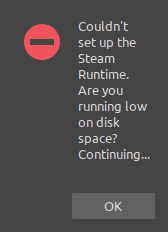
(This partition has 20 GB free space.)
... so presumably more is needed to trigger a reinstall...
EDIT: That message means the unpack_runtime function is failing. Unfortunately it's got 6 unsuccessful return statements, so we've got several branches of possible problems to rule out now... Conveniently, stdout contains this:
Unpack runtime failed, error code 1
... which pinpoints the block that's failing:
	if ! has_runtime_archive; then
		if [ -d "$STEAM_RUNTIME" ]; then
			# The runtime is unpacked, let's use it!
			check_pins "$STEAM_RUNTIME"
			return 0
		fi
		return 1
	fi
Which in turn means this function is returning 1:
function has_runtime_archive()
{
	# Make sure we have files to unpack
    if [ ! -f "$STEAM_RUNTIME.$ARCHIVE_EXT.part0" ]; then
		return 1
	fi

	if [ ! -f "$STEAM_RUNTIME.checksum" ]; then
		return 1
	fi

	return 0
}
I've got a .part0 file, but it's in that corrupted folder that I renamed to try to trigger a reinstall:
$ find . -name \*.part0
./ubuntu12_32-OLD/steam-runtime.tar.xz.part0
So it looks like the steam.sh script isn't capable of this kind of bootstrapping, I may need to delete my whole steam folder and start over.
OK, this procedure successfully initiated a reinstall:
cd ~/.local/share
mv Steam Steam-OLD
steam
After copying over my steamapps folder manually, I'm back in business.
The support side of this issue can be considered resolved. I'll leave it open in case any Valve staff wish to investigate why so many critical files were missing their contents or improve upon the ability of steam.sh to restore the runtime folders or report more accurate error messages.
FWIW, I just ran into this error with Ubuntu 18.04 and running "steam --reset" worked for me.
thanks alot @alasky17 . it worked well
Ubuntu 18.04, 64-bit.
@alasky17 's solution yields the following for me:
user@user-Inspiron-5675:~$ steam --reset
Error: Couldn't find bootstrap, it's not safe to reset Steam. Please contact technical support.
@HebaruSan's solution doesn't exactly work because Steam's data is in ~/.steam, not ~/.local/share/Steam, however mv ~/.steam ~/STEAMBACKUP initiated a re-install., and subsequently appears to work.
Also on Ubuntu 18.04.2 LTS, 64-bit.
Hmmm @TheDiscordian way of resetting Steam works, but the problem with missing libc.so.6 persists unchanged.
If running Parallels, I think this location might (maybe) help, in the ld.so.conf.d/steam.conf
/usr/lib/parallels-tools/tools/tools32/lib
It doesn't happen to me, but I have a suggestion.
Wouldn't it make more sense to simply launch the app and capture the error from dynamic linker loader, and then present the error, than trying to emulate dynamic linker behaviour and its search paths?
Also NEEDED, RPATH and RUNPATH directly from the executable / library, using objdump -p ... | egrep '\bNEEDED\b' might be more elaborate method of looking at dependencies.
If running Parallels, I think this location might (maybe) help, in the ld.so.conf.d/steam.conf
/usr/lib/parallels-tools/tools/tools32/lib
I'm running Parallels and came across this issue, after installing the 32 bit libraries and then trying to symlink the necessary files that were coming up in the error box, I wasn't having much luck.
Then I ran sudo apt-get install libnm-util2:i386 which worked for me
Oh god this is really confusing. I need a lotta help here
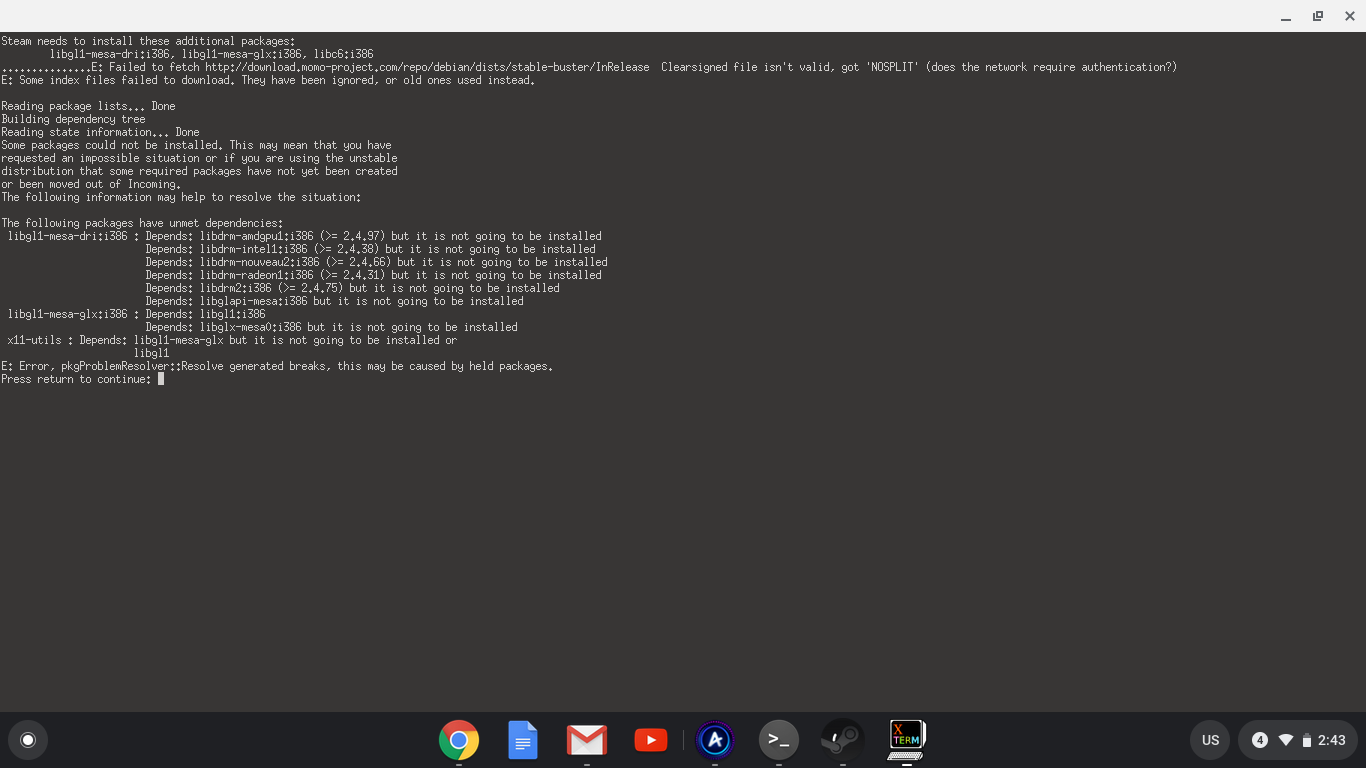
@saum22 , momo-project.com isn't a valid site, looks like you fat-fingered mono-project.com somewhere.
How do I fix that, help
@saum22 Please start a new issue, what you're reporting has nothing to do with this one.
EDIT: do not do this, it will fuck up eveything; this installed 390 drivers alongside 430 and I couldn't boot, if you are having this problem just enter recovery mode and
apt purge nvidia
I was missing libGL.so.1
apt install libgl1-nvidia-glx
was the fix
Simple (Ubuntu 22.04)
sudo apt install libc6-i386 libgl1:i386 libdrm2:i386
None of this is working, hoping to re open this. It specifies libc.so.6, not anything else. I just want to know why it says I don't have it even though I do, and why Steam still boots up but says "the steam browser is disabled. see this support article for more information". It gives me this link https://help.steampowered.com/en/ . it also says that I have to install the files and leaves me with this message:

Please help, this is getting to be very annoying.
Hello @LetsPlay75, the :armhf packages variants in that screenshot are unusual. Are you sure that you're using an x86 distro install? The Steam for Linux client does not support ARM systems.
@LetsPlay75 What does uname -a shows, and what is the output of apt policy?
Upstream links
- ValveSoftware/steam-for-linux/issues/321x1 2018-06
Your system information
Please describe your issue in as much detail as possible:
When I try to launch Steam, it says this:
This error is incorrect; my system does have the 32 bit version of
libc6.so.6:It was working fine less than a week ago.
Steps for reproducing this issue:
Unknown (other than "launch it"). I do not know how Steam is trying to find the file, so I can't determine how to set up a system to generate this error.