Newest beta - Steam controller keeps turning on after being turned off.
Hello @fosspill, tapping the Steam button and Y should be the normal power off controller combination, with holding the steam button down as a fail-safe method.
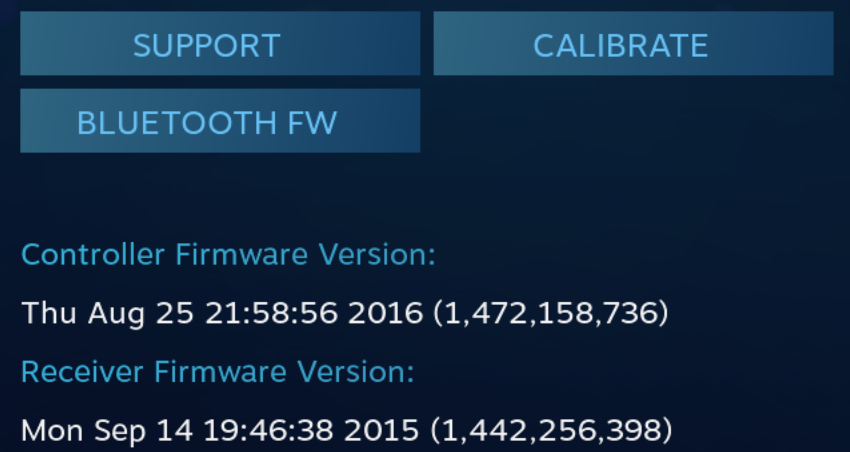
In Big Picture Mode -> Settings -> Controller Settings -> Detected Controllers -> Steam Controller what firmware version is on the controller?
@kisak-valve
Same issue when using steam button + Y. Steam controller automatically starts right after turning off.
Firmware:
Thu Apr 12 22:31:51 2018 (1 523 565 111)
EDIT:
Alright, so... After checking the stream controller firmware version in big picture it now shuts off as expected.
Note: This issue started with the new chat beta. At least now I have a proper workaround! :)
Open steam big picture -> navigate to controller -> close steam big picture -> turn off controller
Feel free to close the issue if you believe this is a one of a kind bug
The latest beta firmware is May 30th. Can you go through the update process again and re-test please? We had an issue where the controller wouldn't turn off during the same session as it paired over BLE which may be the same issue you're seeing.
Ah alright, I hadn't received a notification about a new update, so sorry about that!
It does not seem to be related to pairing as: 1) controller was not in ble mode, 2) controller had already been synced for ~1-2 months (with multiple restarts inbetween)
It's also a bit hard to test now as just opening the controller in steam big picture was enough to fix it (permanently apparently, as it remains properly functioning after reboots and everything)
Hm, after the new steam update I again had the same issue. Sadly it doesn't seem to get fixed now. I'll live with taking out the batteries :)
I've now reset my controller and upgraded to the most recent firmware through the steam beta client. I'm still experiencing this issue (also after multiple reboots). So this is still an issue with the most recent firmware, but only on the steam beta branch.
So, some news. We have two machines with steam controllers. Now both of them (newest firmware, newest steam beta) are doing this. The only way to turn them off is taking out the battery for ~1 sec.
I'd like to second this. Exactly this issue is occurring on my device as well. Regarding the BLE firmware from May 31st 2018 and receiver firmware Sep 14th 2015. Rolling back to the firmware fixes this and the device behaves as expected. However, after re-flashing BLE, it has started switching itself on again.
I want to point out, that I am not participating in Beta software distribution. Nevertheless, BLE connectivity works and is an awesome feature!
Same here. Everything was working well before the BLE update. Tried to reinstall the update; didn't help.
The worst thing is that it happens also in pairing mode. When pairing fails, controller turns off and restarts. Can't be turned off without removing the batteries
Whoops, I'm on Windows
I made this account because I stumbled onto a temporary solution, at least for me. I was having the same issue, and while I was fine taking out a battery, the beeping was starting to irritate my boyfriend.
He suggested I try quitting out of Steam with the controller still plugged in, and it worked. I was able to restart Steam afterwards, and the controller stayed off.
Not sure if it works for everybody, but at least it did for me.
Thank you for sharing, @Lithikitty . So if I understand you correctly, you connect the controller via cable and close down Steam, disconnect it and it will stay off? On my end disconnecting the controller from the cable does seem to shut down the controller completely, regardless of Steam running or not. So maybe your workaround could be reduced to "connecting and disconnecting the cable".
So this is getting kind of frustrating. I can imagine how this is not really a steam-for-linux issue, but an issue with the Steam Controller firmware itself. However I'm on the stable update channel, so this should have never happened, since it seems very much so that the firmware is buggy. I'm going to ~contact the customer support with this~ post it on the forums first, to see if anybody else can relate.
https://steamcommunity.com/app/353370/discussions/0/1746720717332383557/
Same here, if i only turn it on for a few minutes, i can switch it off. But if i use it more than that, it will turn on after being closed. Need to plug / unplug to switch off.......
issue still happening, no idea how to fix it
After updating to BLE-Firmware, my controller is also affected.
Same issue.
same issue
I have this issue.
same
@austinp-valve I am using a firmware from 2016 for my Steam Controller and I have found if I turn the controller on I can turn it back off with Steam + Y (usually it works immediately). However when I've been gaming and quit the game, I usually have to turn my controller off a few times as it keeps turning back on.
I decided to try the Bluetooth FW and it's even worse. It literally won't stay turned off with the firmware from May 2018. Even holding down the Steam button doesn't work. It immediately turns back on. I decided to rollback the firmware as at least that one turns off eventually.
May 2018 FW example vid - lol I'm surprised I recorded for 3 minutes.. I'm sure this would continue on forever.
Update: Ok thats odd, even though I've rolled back the firmware it is acting like the Bluetooth FW, it wont let me turn it off now. Other than removing the batteries, I have to plug it into USB and unplug it to get it to turn off. Turning it off in Big Picture mode results in it turning itself back on, so does a long press of the steam button.
Update 2: I did a firmware recovery, and I appear to be able to turn it off again, although it takes many attempts.
After a few years of having the same issue periodically, I noticed it happens in specific parts of a year. Could it be related to humidity and/or temperature?
Wondering if there is a solution?
Nothing extracted yet.
Your system information
Please describe your issue in as much detail as possible:
Expected result:
Turning off controller, either by holding steam button or through big picture, should turn the controller off.
Actual result:
Turning off controller, either by holding steam button or through big picture, makes the controller turn itself back on after turning off.
Workaround:
Taking out one of the batteries.
Steps for reproducing this issue: