Steam does not create desktop shortcuts and start menu shortcuts
Hello @cortablo, in a quick test, this is working for me on multiple test boxes. What are some of the games you tried and what is the full path to your desktop folder?
Hello @kisak-valve I installed all my Steam games and the list below shows which games created the links and which did not.
2/30 Games have created the shortcuts.
Borderlands 2 (did not work)
Counter-Strike (did not work)
Counter-Strike: Condition Zero (did not work)
Counter-Strike: Condition Zero Deleted Scenes (did not work)
Counter-Strike: Global Offensive (did not work)
Counter-Strike: Source (did not work)
Day of Defeat (did not work)
Day of Defeat: Source (did not work)
Deathmatch Classic (did not work)
Half-Life (did not work)
Half-Life 2 (did not work)
Half-Life 2 Deathmatch (Did not work)
Half-Life 2: Episode One (did not work)
Half-Life 2: Episode Two (Did not work)
Half-Life 2: Lost Coast (did not work)
Half-Life Deathmatch: Source (did not work)
Half-Life: Blue Shift (did not work)
Half-Life: Opposing Force (did not work)
Half-Life: Source (did not work)
Left 4 Dead 2 (worked)
Portal (did not work)
Portal 2 (did not work)
Ricochet (did not work)
Saints Row: The Third (did not work)
Team Fortress: Classic (Did not work)
Terraria (worked)
Tomb Raider (did not work)
Tropico 5 (did not work)
Dota 2 (did not work)
Team Fortress 2 (did not work)
My desktop path: /home/jan/Schreibtisch (My ubuntu is in german)
Thanks! My quick test was with Cave Story+, which works.
I also noticed that when I try to right-click on the game, then on Create Desktop Shortcut click an error message comes: Could not create shortcut. A shortcut to this game is already on the desktop
I have this " Could not create shortcut. A shortcut to this game is already on the desktop " issue with only one game.
Rise of The Tomb Raider. Running on Mint 18.3 box with Turkish language.
BTW , that new importing missing icons from Windows builds feature works great. Also a redownload is not necessary. Deleting previous shortcut and verifying integrity of files before creating new shortcut is just enough.
Thanks guys.
I'm using Ubuntu MATE 16.04 and I have the same problem. It seems only work with certain games. The only game that I was able to create a shortcut for through Steam was Hotline Miami, but the icon had the generic Steam logo and not the Hotline Miami logo.
Door-kickers (doesn't work)
The Binding of Isaac: Rebirth (doesn't work)
Hotline Miami (works)
I had the same problem.
Debian Buster with KDE.
Working:
- Fallout 4
- Wildlife Park
- Kingdoms and Castles
- The Witness
- The Talos Principle
- Payday 2
- Brawlhalla
- Machinarium
Not working:
- The Bridge
- Nihilumbra
I have the exact same problem. Seems the windows games that installed have no issues getting icons, its only the Linux games
Same problem. Linux Mint 19.

Tested on native steam games (Stardew Valley, Cities Ckylines), and Windows game through proton (Mafia: The City of Lost Heaven).
I have noticed that when creating the shortcut by yourself by creating a .desktop file:
[Desktop Entry]
Name=Game Name
Comment=Play this game on Steam
Exec=steam steam://rungameid/GAMEID
Icon=steam_icon_GAMEID
Terminal=false
Type=Application
Categories=Game;
The shortcut works, but there is no ICON and those a generic empty file icon is choosen, could it be that Steam cannot find the icon and those it fails to create a proper shortcut?
I recall that half life (1) was creating a shortcut properly, so maybe it is something that depends from install to install(as in it isn't simply the issue of lack of icon or of icon alias name not being registered)
Same issue here - claims that the shortcut already exists when there is no shortcut for some games.
Tried with:
- Cities Skylines (shortcut in menu with correct icon)
- Overlord (failed)
- Prison Architech (shortcut in menu, but has steam logo for the icon)
- Stardew Valley (failed)
- Surviving Mars (failed)
@dawnmist
As a temporary workaround copy one of the shortcuts edit them with a text editor, here is an example of how an Dead Island shortcut looks like:
[Desktop Entry]
Name=Dead Island
Comment=Play this game on Steam
Exec=steam steam://rungameid/91310
Icon=steam_icon_91310
Terminal=false
Type=Application
Categories=Game;
Now go to your library in my case it will be Shadow Warrior Classic (1997) and click on Community Hub: copy the link in my case it is _https://steamcommunity.com/app/238070/_
And modify the example Dead Island entry like so:
[Desktop Entry]
Name=Shadow Warrior Classic (1997)
Comment=Play this game on Steam
Exec=steam steam://rungameid/238070
Icon=steam
Terminal=false
Type=Application
Categories=Game;
238070 from _https://steamcommunity.com/app/238070/_ replaced 91310
Until that's fixed I guess you can create the shortcuts manually.
Same issue here - claims that the shortcut already exists when there is no shortcut for some games.
Tried with Bioshock Infinite.
Confirmed here too on Xubuntu 18.04. Tried with 3 games:
Terraria (desktop shortcut created, app menu shortcut failed)
Civilization V (both desktop and app menu icon failed)
Starbound (both desktop and app menu icon failed)
Tried Terraria a 2nd time without deleting the existing icon and it said it created a shortcut? O.o
Honestly, that tells me that Steam doesn't actually try to detect if the icon was successfully created, but rather that the script succeeded/failed. In other words, it's a misleading message, likely for a hack fix to get basic functionality with the intent to get back to it later to do it right. It's the kind of stuff that should only exist in beta and never make it to release builds, tbf. Why this has continued to exist for this long without being addressed is beyond me.
So, i've used strace to try to guess what files Steam tries to modify, and out of pure luck found out that removing contents of ~/.local/share/Steam/steam/games fixes the issue (the folder contains cached game icons afaiu).
edit: it does make desktop files in my xdg_desktop folder, but not in ~/.local/share/applications to have them nicely in the menu.
edit2: i've quickly reinstalled Terraria (~400mb) and it did make the local-share-applications shortcut, guess i'll have to move them from desktop myself (anyway i never use the desktop on linux).
edit3: it sets icon in those desktop files to plain steam, ugh
edit4: when gimp CAN open the ico file from ~/.local/share/Steam/steam/games, then steam can create the desktop file, and when Microsoft Windows plugin failed to open this ico file then Steam can't too.
I guess that when i removed the icons and reinstalled terraria the new terraria icon became ok and it worked that time.
I don't have that folder on mine. However, I did locate Terraria's icons at ~/.local/share/icons/hicolor. Unfortunately, as I said in my previous post, Terraria was one that I never had an issue with for the desktop shortcut. So, @necauqua, I'd suggest trying a different game and comparing the two's results. I don't know how to do it, or I'd do it myself.
Edit: Okay. I found where Steam actually stores its icons on my system. The place up there was the stuff that was translated by Xfce. Steam has its own internal storage at ~/.steam/steam/games that has 2 corrupted icon files that correspond with the tests from my initial post. Deleting them allowed Steam to create a desktop icon (using the base steam icon rather than the icon for the actual game as @necauqua figured out already.
So, to summarize:
- steam fails to create desktop file when game icon is corrupted somehow
- if you delete the icon, steam will create the desktop file but with steam icon (and no icon will be in your .local/share/icons folder, obviously).
@Yowlen oh, i guess terraria was a bad choise (i've tested with it because it is small, as you can guess) since it worked for you. Trying different games now.
Nah, reinstallation did not fix it.
Well, at least we got much closer - corrupted icons.
Yes & no. Corrupted icons may cause the creation script to fail, but there's still another issue: Menu shortcuts. Those aren't created properly at all, regardless of game.
Plus the message handling itself still needs work since if an icon is already present, the script actually "succeeds" and doesn't use the "check to see if you already have an icon" message, as evidenced by my first post.
This 2nd one is probably part of the reason it took so long to track the icon creation issue down, tbh. Proper error handling is of the utmost importance. Only a newbie developer would make such a blatant and obvious mistake for something this important.
In my case, I have seen some .ico files (e.g. Killing Floor) in ~/.local/share/steam/games that Dolphin (KDE file manager) can not create thumbnails for and no graphics utility can display. What I have found out when I have inspected those "corrupted" icons with "file" utility is interesting:
$ file 3b231267de8f8c9e628701668f44dbdf79ed605d.ico
3b231267de8f8c9e628701668f44dbdf79ed605d.ico: Zip archive data, at least v1.0 to extract
I've renamed the file extension from .ico to .zip and it really turned out to be a zip archive of .png files with different resolutions. I haven't had the chance to test with other games but from my experience I reach the conclusion that some games deliver their icons in true MS Windows .ico format while some others deliver their png icons in a zip archive, but these archives get mistakenly renamed to .ico as well; resulting in an error in creating desktop shortcuts.
Well, i think on game installation is goes with the same routine as when creating desktop shortcuts, but for menu shortcuts, and fails in the same way - Terraria has the proper icon format and it added a menu shortcut upon installation.
Although there is still no button for manually creating menu shortcuts and you have to reinstall the game for it to try to create one.
@efeciftci does renaming them to .zip make Steam recognize that these are actually archives and not windows icons, and make it work?
@necauqua no it does not. If I rename the .ico archive into .zip, Steam will create a shortcut with the default icon (as it can't find the exact file ending in .ico). If I verify game contents, the archive with .ico extension will be created in that directory again, which will in turn cause Steam to pop out an error while creating a shortcut.
I have just inspected a few games in steamdb.info website. Information tab for some of these games display a linuxclienticon property, which links to a zip file that contains png game icons. The games I have checked and having this property are:
- Killing Floor
- Rise of the Tomb Raider
- Team Fortress Classic
And the ones that do not have this property are:
- Terraria
- The Talos Principle
- Orwell
It would seem that in the current Steam client beta, the games that can not create shortcuts are the games with the linuxclienticon property. I don't know how the shortcut creation is handled in the current beta, but I guess the following method would work:
if the game has set the linuxclienticon property:
    unzip the provided file and use the contained png file(s) as game icon
else:
    use the windows icon method.
I have three of these games you've listed @efeciftci
-Rise of The Tomb Raider : Says there is already a shortcut on my desktop while there isn't
-Talos Principle: Plain Steam logo
-Orwell: Proper shortcut
I'm on latest stable , if that makes a difference.
Good to know the issue stems from this property. Should help to narrow down a fix a lot quicker.
I did a test myself just now. Starbound is affected by this issue, and like the other affected ones, does have a linuxclienticon property. So I took the .ico file from the clienticon property and placed it in my ~/.steam/steam/games folder. I was worried because it's a different hash filename than the one for the linux zip, but it seems simply placing it in the folder without renaming it allowed Steam to create the shortcut without issue.
So it seems the issue is that it downloads the Linux one when available, otherwise going for the Windows one, but the same logic doesn't exist when assigning the icon itself. It unequivocally expects the Windows one for that part.
So as a workaround for now, downloading the clienticon file from steamdb.info and placing it in that folder will work.
Edit: Typo.
Edit 2: Civ V also works with this method, so I think it's safe to say this will work for all affected games.
Edit 3: Just wanted to add that this means there's 2 potential solutions code-wise.
-
Depreciate the
linuxclienticonproperty and just use theclienticonproperty for everything. -
Implement proper support for the
linuxclienticonproperty in the remaining sections.
The first is probably the easier & more efficient option unless the linuxclienticon property is used elsewhere for some reason. The only foreseeable issue is some distros potentially missing .ico support, but it shouldn't be too hard to add it to the package dependencies if necessary.
With ids.txt containing newline-separated ids of desired games, you can download icons to them with this command
cat ids.txt | \
  xargs -I appid curl -sL 'https://steamdb.info/app/appid/info' | \
  grep '>clienticon<' -A1 | \
  grep -oP 'href=".*?"' | \
  cut -d'"' -f2 | \
  xargs -L1 curl -OJ
And thanks @Yowlen, all my games now have icons in quick-launch menu, hurray
edit: If you have a ton of games, i've made a script, but it requires steam api key, which is very easy to get here.
So you save below text as script.sh, chmod+x it and run ./script.sh <username> <apikey> and it will download all the icons into the current directory. Also it has like no checks so might not work for whatever reason, e.g. you have spaces in your username or whatever.
script.sh
#!/bin/bash

username=$1
apikey=$2

steamid=$(curl -s https://steamidfinder.com/lookup/$username | grep steamID64 | grep -oP '\b\d+')

curl -s "http://api.steampowered.com/IPlayerService/GetOwnedGames/v0001/?key=$apikey&steamid=$steamid&format=json" | \
    grep -oP '"appid":\d+' | \
    cut -c9- | \
    xargs -I appid curl -sL 'https://steamdb.info/app/appid/info' | \
    grep '>clienticon<' -A1 | \
    grep -oP 'href=".*?"' | \
    cut -d'"' -f2 | \
    xargs -L1 curl -OJ

# and then do something like mv *.ico ~/.local/share/Steam/steam/games
Well we have all the instructions for a full workaround but to make it even more simple, here is an automated script to download the game icon and the full name, format the files properly, and put them all in the proper places. Just run it with the game id, feel free to adjust paths.
steam-create.sh
Could somebody from Valve look into this @kisak-valve , please?
It's not a big issue, but clearly something annoying and the community has already figured the problem out, I think.
Yes & no.
At this point, it shouldn't take more than 5 minutes to go in and fix the icon selection issue, but it still doesn't create Start Menu icons for some people (like myself, running Xfce). And since that problem is still part of the original issue, it can't be marked closed until that part is fixed too.
Edit: I guess I didn't test this properly. I can verify it does create Start Menu links in Xfce. Oops.
So, yeah, just the part about fixing the icons should be enough to close this issue unless someone else is having issues with the start menu icons in their chosen desktop environment. The fact that the error handler is unable to properly process & notify the user about what's going on is probably best put in its own issue tracker.
Hi ! Can anyone enlighten me what the current status of this issue is ?
Under all distros I tried (KDE Neon, Ubuntu 18.04, Linux Mint, Manjaro so under KDE, Gnome, Cinnamon) I still get the shortcut creation error on quite a few games (i.e. : Rise of the Tomb Raider, PAWARUMI, Steredenn, World of Goo...) but not all of them (Talos Principle... & Steam Play ones).
For me, the Civ VI shortcut has the Steam icon and not the icon of the game, and trying to create a shortcut for Dota 2 throws the well known error. KDE Neon 5.14 here. I also had this issue on a few other games.
Yeah, it seems some work is being done on this, but not in the right way. I've noticed that Space Empires IV pops up the well-known error. (I'm installing by forcing Steam Play for all Windows games since Steam hasn't marked it as compatible but it's been known to work in Wine for years.)
Anyway, the weird part is that the reason it's erroring out is because the icon exists in the ~/.steam/steam/games folder. It seems to not want to create it unless the icon isn't there. Even Skyrim, which I've also installed via the forced Steam Play thing, doesn't do this.
Looking through the icons themselves, it looks like SE4 is the smallest icon at 766 bytes because it was made in a day & age where all icons were 32x32, so my guess is that a change to Steam's built-in icon conversion subroutine broke compatibility with smaller icons. I can manually create the desktop & menu shortcuts using the 32x32 SE4 .ico that I downloaded to that folder without issue, so it's definitely an issue with Steam's method.
I could be wrong, but with the information I have, that seems to be the conclusion here.
I have managed to get the shortcut desktop creation properly. But, I still need a solution to get the shortcuts into the start menu (I'm using KDE Neon) without all the annoying manual work.
Your system information
- Steam client version (build number or date): Date Nov 10 2018
Steam API v018
Steam package versions 1541819448 - Distribution (e.g. Ubuntu): opensuse tumbleweed
- Opted into Steam client beta?: Yes
- Have you checked for system updates?: Yes
cant create shortcuts for native linux games using the latest kde desktop version
i just get this message

same here, can create shortcuts on desktop for ones that already had shortcuts in menu, but not for new ones
Steam client version (build number or date): Date Nov 10 2018
Steam API v018
Steam package versions 1541819448
Distribution (e.g. Ubuntu): Linux Mint 19
Opted into Steam client beta?: Yes
Have you checked for system updates?: Yes
this is definitely a corrupted icons issue.
i had eight icons in my ~/.steam/steam/games folder, three of those were corrupted, and that was the games that refused to add themselves to desktop/menus
deleting the corrupted files and now steam will create shortcuts, but, using a steam icon as opposed to the game icon. Or if you replace the ico files with good icons, it uses them
(even then only adding to teh desktop though and not main menu)
Client: Nov 10 2018 02:44:42
API: v018
Package: 1541819448
Distribution: Fedora 29 x86_64
Beta: No
Updates: Yes
Installed all the main Tomb Raider series except Shadow today. Similarly to above, all the Windows games got App Menu icons, but neither of the two Linux Native (Tomb Raider, Rise of the Tomb Raider) games did.
In my case, no desktop icons were created.
Well everything is availible here to just make the desktop file yourself. I have not heard from anyone else but I have a script that does it all correctly on my system.
So, does Valve have any plans to actually fix this many-years-old problem? Or are we going to have to forever create menu links by hand? This is a HUGE problem for those of us with a large number of games that don't make menu links. I don't have enough time in my schedule to sit here doing something dull monotonous for hours that the Steam client should have done properly in the first place.
From the updates Steam has implemented since the original collaboration between me and two others that narrowed down the original issue, it's clear they are working on it. All games that have both the linuxclienticon and clienticon properties do properly create icons on my Xfce system using the stable branch of Steam.
So at this point, the issues being faced are likely one of the following:
-
Incompatibilities between Steam and the desktop environments in question (I've noticed a lot of KDE Plasma users replying as of late)
-
An incompatibility with the .ico file itself (My issue with the old 32x32 size, 766 bytes icon for Space Empires IV outlined above, for example.)
So any further replies should probably list some extra info in order to solve their issue. Namely:
- The desktop environment being used (Unity, KDE, etc.)
- If some games work and others don't, the names of the games that don't work (Can be ignored if all games are missing icons)
Ubuntu Gnome here, I just installed 2 games in the last few minutes.
Dex (269650) no desktop icon created
Maia (252250) desktop icon created
neither one of them shows up in Application search.
All games that have both the
linuxclienticonandclienticonproperties do properly create icons on my Xfce system using the stable branch of Steam.
My system is Xfce using beta steam. So Xfce it would appear is not immune
Ah. I'm sorry. I missed your earlier post, @dm2912. I literally just got Stellaris and can verify the corrupted icon issue you mentioned, as it's affected by this issue.
So it seems that barring issues with specific desktop environments, the main issue faced now is as you said, corrupted icons. This will, unfortunately, be harder to narrow down and fix since it'd require going into the server's files and adjusting the icons themselves, but a failsafe could be implemented in the Steam to at least detect these during installation and either use an alternate method (the icon property, perhaps?) or otherwise bypass the icon entirely and just create it with the generic Steam icon.
It happens here too, I was using Arch and changed to Fedora and games that used to have shortcuts (like CS:GO and Cities Skylines) now don't have. All Windows games using Proton have shortcuts.
Every game in ~/.local/share/Steam/steam/games that have a corrupted icon fails to create a shortcut, deleting the content of that folder allows me to create desktop shortcuts, however, they all have generic Steam icons then. Verifying game files integrity recreates the game icon in that folder, however, if the game had corrupted icon, it will continue having a corrupted icon.
Really weird behaviour since those games created icons/shortcuts normally in the recent past.
Games with that problem for me:
- Cities Skylines
- Counter Strike Global Offensive
- Life is Strange
- Metro 2033 Redux
- Middle Earth: Shadow of Mordor
- Portal 2
- Refunct
- Rise of the Tomb Raider
- Sid Meier's Civilization VI
- Shadow Tactics: Blades of the Shogun
- Super Meat Boy
- This is the Police
As said earlier, Windows game doesn't have this problem, and these native games too:
- Bastion
- Outlast
- Regions of Ruin
- Road Redemption
- This War of Mine
Okay. I can verify that the corrupt icon download for Stellaris is the same issue faced before with other games. It's downloading the linuxclienticon zip and giving it the filename of the clienticon property that's expected by the actual icon creation process.
I thought this was fixed already, but I guess it wasn't.
At any rate, the scripts by various users up above should still be effective workarounds for the issues most people are having. Alternatively, as I mentioned in my original diagnosis on this problem, you can manually find the game on steamdb.info and download the clienticon file for it in the Information tab, and place it in Steam's folder alongside the other icons, overwriting the corrupt one if need be. It should work then.
For me on my Ubuntu-based distro, the path for the icons is ~/.steam/steam/games but someone else mentioned theirs are stored at ~/.local/shared/steam/games instead. Be sure to check that it's saving in the right path for you.
For menu shortcuts, Steam only does those on installation, so you'll have to either uninstall & reinstall or backup, uninstall & then restore the backup to fix those. But Steam will try to use existing files during the install process, so you don't have to worry about it trying to overwrite the correct icon with the corrupt one once it's in place.
Suffering from the same problem!
So far, only one of my games are blessed with a shortcut and thats "Mount&Blade: Warband".
Any other game is left without a shortcut and i'm unable to creat new shortcuts myself (which i shouldn't have to do in the first place.) This has been a problem for so long, why is it so hard to fix it?
(Running Linux Mint 19)
Steam-beta-client: No
SteamPlay: No
Kernel: 4.15.0-39-generic
AMD Ryzen 5
Fedora 29 x64
Steam Beta: Yes
Kernel: 4.19.4-300
Desktop Environment: KDE 5.52.0 / Plasma 5.14.3
Tested: Dota 2, CS:GO, and Arma 3
Sucks because I just switched my main rig to Linux. My laptop (also Fedora 29) didn't have an issue when I created a shortcut for Factorio.
- Steam client version: Build-Date: 2018-Nov-26
- Distribution: Linux Mint 19 Cinnamon 64-bit (Based on Ubuntu 18.04 LTS)
- Opted into Steam client beta?: No
- Have you checked for system updates?: Yes
- Games, that probably work, I must test them:
- Cities: Skylines: https://store.steampowered.com/app/255710/Cities_Skylines/
- Sid Meier's Civilization® V: https://store.steampowered.com/app/8930/Sid_Meiers_Civilization_V/
- Hexcells: https://store.steampowered.com/app/265890/Hexcells/
- Games, that DID NOT work:
- Project Hospital: https://store.steampowered.com/app/868360/Project_Hospital/
So, let's get right into it and debug this thing finally!
$ ls -lhF ~/.local/share/Steam/steam/games/

-rwxrwxr-x 1 vlastimil vlastimil 102K Dec  4 14:51 051f52fdea67d8f16a20daaccaf2fbfa1823d202.ico*
-rwxrwxr-x 1 vlastimil vlastimil 159K Nov 12 12:06 3f2b22c6d7bca4d39f06c203d16facb50014bbbb.ico*
-rw-rw-r-- 1 vlastimil vlastimil 178K Oct 17 10:00 61f9291306d3f002cc749d437ce84c42c9c9d52d.ico
-rw-rw-r-- 1 vlastimil vlastimil  11K Sep 26 15:13 75a21c39178811f5ec421d85a58fa2a07c2633b7.ico
-rwxrwxr-x 1 vlastimil vlastimil  60K Nov 27 03:42 7f263bfdc0c2df24b756d7e87472c6b447ee8538.ico*
-rwxrwxr-x 1 vlastimil vlastimil 362K Nov 19 13:09 866ec9836186e7127888bfd7a11231a3971f105d.ico*
-rwxrwxr-x 1 vlastimil vlastimil  602 Feb  4  2010 PlatformMenu.vdf*
-rwxrwxr-x 1 vlastimil vlastimil 9,9K May  4  2006 SteamMovie.ico*
First strange thing you'll notice here is that some of the files have an execute flag (indicated also with an asterisk after file name).
Second thing you'll notice here is that some files are tiny, others are larger to be an icon on itself.
So, running the following will reveal more:
$ file ~/.local/share/Steam/steam/games/*

/home/vlastimil/.local/share/Steam/steam/games/051f52fdea67d8f16a20daaccaf2fbfa1823d202.ico: Zip archive data, at least v1.0 to extract
/home/vlastimil/.local/share/Steam/steam/games/3f2b22c6d7bca4d39f06c203d16facb50014bbbb.ico: Zip archive data, at least v2.0 to extract
/home/vlastimil/.local/share/Steam/steam/games/61f9291306d3f002cc749d437ce84c42c9c9d52d.ico: MS Windows icon resource - 5 icons, 16x16, 32 bits/pixel, 24x24, 32 bits/pixel
/home/vlastimil/.local/share/Steam/steam/games/75a21c39178811f5ec421d85a58fa2a07c2633b7.ico: Zip archive data, at least v2.0 to extract
/home/vlastimil/.local/share/Steam/steam/games/7f263bfdc0c2df24b756d7e87472c6b447ee8538.ico: Zip archive data, at least v2.0 to extract
/home/vlastimil/.local/share/Steam/steam/games/866ec9836186e7127888bfd7a11231a3971f105d.ico: MS Windows icon resource - 6 icons, 16x16, 32 bits/pixel, 32x32, 32 bits/pixel
/home/vlastimil/.local/share/Steam/steam/games/PlatformMenu.vdf:                             ASCII text, with CRLF line terminators
/home/vlastimil/.local/share/Steam/steam/games/SteamMovie.ico:                               MS Windows icon resource - 6 icons, 16x16, 4 bits/pixel, 16x16, 8 bits/pixel
Now, that we know some of the files are actually .zip archives, let's take a closer look at them, copy them to safe location first:
$ mkdir -p ~/steamIcons && cp ~/.local/share/Steam/steam/games/*.ico ~/steamIcons && cd ~/steamIcons && rm SteamMovie.ico
Now, let's remove the execute permission as it should not be there at all by my standards, and list what we got:
$ chmod -x * && ls -lh

-rw-r--r-- 1 vlastimil vlastimil 102K Dec  6 23:54 051f52fdea67d8f16a20daaccaf2fbfa1823d202.ico
-rw-r--r-- 1 vlastimil vlastimil 159K Dec  6 23:54 3f2b22c6d7bca4d39f06c203d16facb50014bbbb.ico
-rw-r--r-- 1 vlastimil vlastimil 178K Dec  6 23:54 61f9291306d3f002cc749d437ce84c42c9c9d52d.ico
-rw-r--r-- 1 vlastimil vlastimil  11K Dec  6 23:54 75a21c39178811f5ec421d85a58fa2a07c2633b7.ico
-rw-r--r-- 1 vlastimil vlastimil  60K Dec  6 23:54 7f263bfdc0c2df24b756d7e87472c6b447ee8538.ico
-rw-r--r-- 1 vlastimil vlastimil 362K Dec  6 23:54 866ec9836186e7127888bfd7a11231a3971f105d.ico
We should probably separate those icons from archives now:
$ mkdir -p ico zip
$ mv 61f9291306d3f002cc749d437ce84c42c9c9d52d.ico 866ec9836186e7127888bfd7a11231a3971f105d.ico ico/
$ mv *.ico zip/
And give those zip archives proper extension:
$ for file in *; do mv "${file}" "${file}.zip"; done && ls -lh
Now, I would like to create a directory for each of the zip files, and unzip those file in the directories:
$ for filename in *; do dirname="${filename%.zip}"; dirname="${dirname%.ico}"; mkdir -p "${dirname}"; unzip "${filename}" -d "${dirname}";rm "${filename}"; done
I need to see the directory structure now. You probably won't have tree installed, so let's install it, on my Ubuntu based Linux:
$ sudo apt-get install tree
And let's see what we have:
$ tree

.
├── 051f52fdea67d8f16a20daaccaf2fbfa1823d202
│   └── icons
│       ├── icon_16.png
│       ├── icon_24.png
│       ├── icon_32.png
│       ├── icon_64.png
│       └── icon_96.png
├── 3f2b22c6d7bca4d39f06c203d16facb50014bbbb
│   ├── 128x128.png
│   ├── 16x16.png
│   ├── 24x24.png
│   ├── 256x256.png
│   ├── 32x32.png
│   ├── 64x64.png
│   └── 96x96.png
├── 75a21c39178811f5ec421d85a58fa2a07c2633b7
│   ├── Hexcells Icon 128.png
│   ├── Hexcells Icon 16.png
│   ├── Hexcells Icon 32.png
│   ├── Hexcells Icon 64.png
│   └── Hexcells Icon 96.png
└── 7f263bfdc0c2df24b756d7e87472c6b447ee8538
    ├── civ5.png
    └── __MACOSX

6 directories, 18 files
As far as I can see, here we have unfortunately a few non-identifiable games, so better see in GUI:
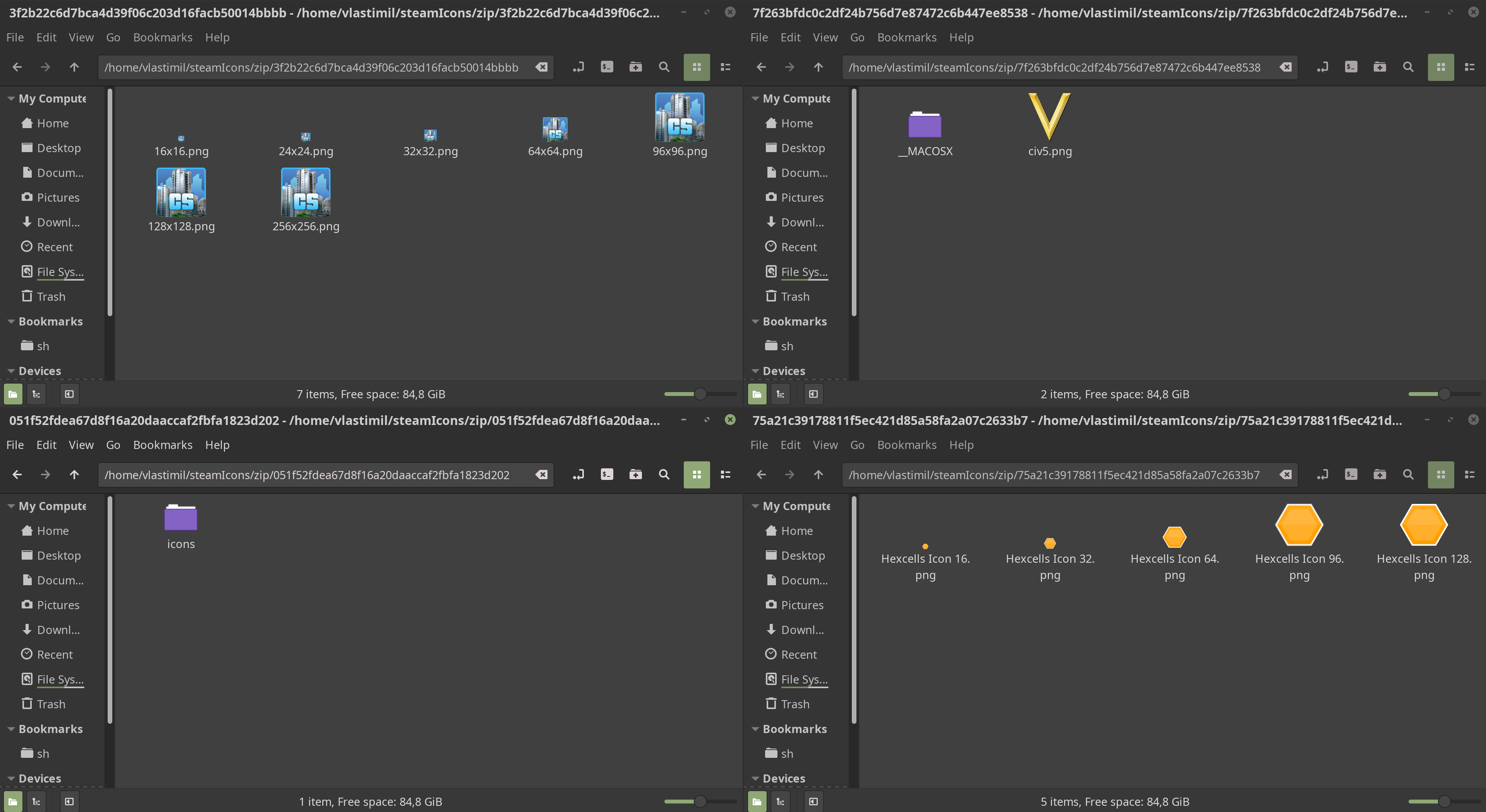
And I think I have found the cause now!
As you may see for yourself, the games that did work have the png icons right inside the directory, whereas the game which did not work in my test case (Project Hospital) has a sub-directory called icons which then contains those icons.
Case solved, @kisak-valve Please adjust the Steam client to handle these cases. Thank you.
I think @burianvlastimil nailed it and it seems like an easy fix, I really don't know how could Valve let this problem go since the launch of Steam on Linux. I'm hoping it gets fixed soon.
Nice catch @burianvlastimil ! However, I found an anomaly:
CS:GO has its icons in the root of the zip, but still having this issue
$ unzip d1159d1a4d0e18da4d74f85dbb4934d7a92ace2b.ico
Archive:  d1159d1a4d0e18da4d74f85dbb4934d7a92ace2b.ico
 extracting: icon16x16.png
 extracting: icon24x24.png
 extracting: icon32x32.png
 extracting: icon48x48.png
 extracting: icon64x64.png
However, if I delete the zip entirely, suddenly I can successfully create a desktop shortcut, albeit with no icon.
I also tested GTA V via SteamPlay. It puts its icon not in a zip, but just one .ico file i.e.
$ file 06b52e09e284542dd99eea45f9f85f68440dbcaf.ico
06b52e09e284542dd99eea45f9f85f68440dbcaf.ico: MS Windows icon resource - 24 icons, 16x16, 16 colors, 4 bits/pixel, 16x16, 8 bits/pixel
And it works as expected
In my case, the issue is with the whole zipped icon thingy, not just whether the icon is at the root of the zip or not. It only works properly when the icon is not a zip and located at the root of the 'games' folder.
I am running Arch with KDE. My Steam is built at Dec 12, 2018 and I opted for the beta.
@burianvlastimil Looks like Project Hospital has an invalid Linux icon set, and this should be reported to the developer so they can fix it.
There is also a Steam client issue with mismatching file format and extensions for downloaded icon files that should be fixed in the next major Beta cycle next year.
Mount and Blade, and Factorio both create desktop shortcuts just fine. Arma 3 creates a working shortcut but is missing its icon.
On a side note, I have my Desktop folder symlinked from another drive, and it does not place the shortcuts in the Desktop folder. Instead it just puts it in my users home ~ folder.
I was having this issue. I ran steam --reset just to see what would happen, and once I restarted steam, I gained the ability to create desktop shortcuts for the previously broken games(albeit with only the default steam icon). No other changes. For testing purposes I uninstalled one previously working game and one previously broken, and reinstalled. Create desktop shortcuts only worked for the previously working.
TL;DR steam --reset lets you create shortcuts for already installed games.
Per "Fixed a bug that could result in being unable to create shortcuts for certain games. To unblock previously affected titles, delete all *.ico and *.zip files from ~/.steam/root/steam/games and "Verify Game Files" to re-download the icons with the right format" in the 2019-01-16 Steam client beta update, please opt into the beta client and retest this issue.
I have updated my Steam beta client, deleted all previously available icon zip and ico files, verified all games' files and now the client is able to create to desktop shortcuts for all games that use either zip or ico based shortcut icons without any problems.
Confirmed working for both types on Fedora 28 x86-64.
Can confirm that it works on my Linux Mint 19.1 desktop as well!
Deleted all the .ico files, opted-in for Steam-Beta and then verified the integrity of my games, suddenly i could make shortcuts! However not all the games shortcuts looks the way they should, a couple had only a blank-file image as the shortcut, but at least they all functioned properly!
Hello @Mumrik93, please open a new issue report for the follow up issue.
It works now. Mint 18.3
Confirmed to work on Fedora 29 x64, with KDE 5.53.0 / Plasma 5.14.4
Also confirmed to work on Arch Linux with Plasma 5.14.4. Nice! :dancer:
I can verify the main issue is fixed here too. Xubuntu 18.04
That said, the whole 766-byte legacy icon issue I was having w/ Space Empires IV is still present. Steam still refuses to create a shortcut for it, even though the icon file is present in the folder & readable just fine like the rest by my file manager's .ico thumbnailer.
@Yowlen @kisak-valve Confirm fix for Bioshock Infinite. For Hitman: Codename 47 no icon, bug still present.
@Sebastian1978 Looking over Hitman's info on steamdb.info, it seems that it lacks all icon properties except for the icon jpg image. Steam is only set to use the clienticon and with the latest beta update, linuxclienticon properties. As a result, Hitman: Codename 47 has no way to obtain a proper icon atm. It would seem adding some extra logic to add fallback support for the icon property will be necessary here.
So, as it stands, we seem to have two main issues still in play:
- Lack of support for 32x32x4 (16-color) icons such as the one used by Space Empires IV
- Lack of support for
iconproperty for games that are missing both theclienticonandlinuxclienticonproperties
As per @kisak-valve 's suggestion to someone else, I'll put the 1st into a separate issue report since the main one for this is clearly fixed & it would help to distinguish the issue better.
I suggest you do the same with your Hitman issue, Sebastian, including the info I gave here in your new report. I'd do it myself, but I don't own any games affected by that one, so I can't test once it's fixed, so it's better if you're the one tagged by updates.
Edit: The issue report for 32x32 pixel, 16-color, 766-byte icons is #6048
Can confirm that the beta update resolved this issue on Linux Mint 19.1 Xfce.
Grim Fandango fails to create a shortcut. Deleting the *.zip and *.ico from ~/.steam/steam/steam/games/ and verifying game data did not solve the issue. The archive is probably partially corrupt; errors during extract seem to show this. Extracted images don't have any apparent corruption.
I was able to successfully create a desktop file after manual extraction of the archive, renaming of each file to steam_icon_316790.png, and copying the matching sizes to their directories in ~/.local/share/icons/hicolor/
Unfortunately, the desktop file generated by Steam used the generic steam icon. By editing the desktop file, I Changed the icon to reference 316790 as used in the properly generated Steam desktop files; but this resulted in no icon at all.
Tested using February 2nd Steam Beta build on Arch XFCE.
I contacted DoubleFine regarding the issue & will update with details if they happen to respond.
@Myrddin-Wyllt Confirmed that the zip file in the Steam DB does have an issue, whereas none of the zip files for the games I have installed do. Since this doesn't affect the archive contents themselves this should be fixed in the Steam client (with a new issue opened specifically for this), but it might be worth letting the game developer know of the issue as well.
@Myrddin-Wyllt @TehFreek We've sorted out the Grim Fandango icon issue.
You will likely need to verify the integrity of your game cache before trying to create a new shortcut so that the new icon archive will be pulled down (you probably don't need to, but it wouldn't hurt to delete ~/.steam/root/steam/games/1b2ef83045a69ee84c7d92fca3aa6bc6496bac10.zip as well).
@Cheeseness
I've confirmed the archive is fixed. I can't thank people enough for the attention to this issue; I'm glad Steam is getting the polishing it's deserved for years. Frustrations abound over these types of nit-picky issues.
@TehFreek
You're right that corner cases like these should have sensible handling. Errors which don't pose an issue should be ignored & flagged/logged by Valve for fixing on their servers.
@Myrddin-Wyllt, it depends if there's more out-of-spec icon archives and if they can't be fixed. In any case, if anyone comes across another broken icon zip, that should be reported in a separate issue report.
Closing as the fix for the opening post's issue has shipped in the 2019-02-01 Steam client update. Thanks for retesting.
Per "Fixed a bug that could result in being unable to create shortcuts for certain games. To unblock previously affected titles, delete all *.ico and *.zip files from ~/.steam/root/steam/games and "Verify Game Files" to re-download the icons with the right format" in the 2019-01-16 Steam client beta update, please opt into the beta client and retest this issue.
I did the same steps but it didn't work for Battle Tanks: Legends of World War II

Hello @mbnoimi, please open a new issue report.
Why was this issue closed? The problem still occurs. Many games are able to create shortcuts properly, yet some fail. Did you actually fix this and forget to add a regression test?
@petteyg The reply above yours literally answers your question. The original issue was solved. The games that are still bugged are bugged for different reasons, so they have to debug them individually.
@petteyg The reply above yours literally answers your question. The original issue was solved. The games that are still bugged are bugged for different reasons, so they have to debug them individually.
No, it does not, given my Steam log shows the exact same "shortcut already exists" that was supposedly fixed.
Because the subsystem isn't designed to handle errors, so it still gives the same "success" error even if the underlying problem is different.
The original bug affected literally every Windows game because Steam didn't support making shortcuts using .ico files in the first place. That bug has been solved, so the issue has been closed. Any further bugs in this area are game-specific, so they've asked that we open new reports for each new game to let them track them individually.
I've fixed that by
$ cp ~/Desktop/Dota\ 2.desktop ~/.local/share/applications
Explanation:
When you click on 'Add desktop shortcut' in the Steam library, it does create the shortcut in the ~/Desktop. But Gnome 3 expects it in the ~/.local/share/applications directory to be able to add that shortcut in the favorites.
It works for me in my Debian Buster/Gnome 3.30.2.
I still have this bug.
As a workaround, for Dota 2 game for example, create an empty file called "Dota 2.desktop" on the desktop and then the "create desktop shortcut" button will work. For GWENT, create "GWENT The Witcher Card Game.desktop" on the desktop. And so on for each game.
I've fixed that by
$ cp ~/Desktop/Dota\ 2.desktop ~/.local/share/applicationsExplanation:
When you click on 'Add desktop shortcut' in the Steam library, it does create the shortcut in the ~/Desktop. But Gnome 3 expects it in the ~/.local/share/applications directory to be able to add that shortcut in the favorites.It works for me in my Debian Buster/Gnome 3.30.2.
It's not even creating files in ~/Desktop when I use it, it also doesn't edit files as tgharib said.
(I tried creating shortcuts for Portal 1 and 2)
anyone looking at this in 2023 or beyond, this thread is likely very relevant: #6922
thought I'd just quickly mention I noticed some issues with corrupted .ico game thumbnails showing up in the directory ~/.steam/debian-installation/ where the icons had no file extension and the filenames had invalid encoding. I documented what I was able to figure out in this issue #6922 but I wasn't able to get the full picture. If anyone encounters something similar or Valve are trying to squash a bug hopefully something in that thread can help! :)
I've been gathering information on this, as well. Most of the issues I've encountered stem from three root problems:
-
For native Linux games, Steam expects certain archive layouts, and some devs use different folder/file structures than expected.
-
Steam's client expects a .ico file in its database for non-Linux games. Most of these are caused by corrupt icons.
-
Other Windows-based games have archives or are missing the right field altogether, causing Steam to fall back and download things that the shortcut creation process isn't expecting.
In all three of these cases, the old behavior was to fail without creating the shortcut. That was changed a couple years back so that the shortcuts will be created, but result in using the default Steam icon instead.
The only solution for the archives is to go one by one and fix the database on Steam's servers, but I've found a workaround for the corrupted icons issue, which makes up the majority of these issues.
From what I can gather, a simple script can be made and run on the whole of Steam's database to fix the issue. The result would probably also need a client update for all platforms that use .ico files for Windows-only games. That means at least Linux, but possibly also Windows depending on how Valve creates shortcuts on that platform. This update would perform a one-time clear and recreation of all the icons it's created and has cached in order to ensure checksum compatibility with the server.
There's a tool called "wrestool" that is the common way on Linux to extract .ico files from .exe files. However, it can often result in noise instead of working images. It's clear that Valve is using this tool to extract .ico files for its database, as many of the icons end up with this same corruption. My experimentation concludes that this result is caused by corrupted headers/data in the relevant section of the .exe file that is then uncritically copied by the tool into the .ico file.
The images within the .ico file aren't corrupted, and so I've found that using the tool to extract those images from the .ico file, then recombining them into a new .ico file fixes this and allows Steam to create shortcuts with usable icons. A script can easily be created to go through each .ico file, detect which images exist inside, extract them, and then recreate the new file.
Interestingly, I've noticed that this can sometimes produce .ico files that don't match what's normally shown in any manual fix using other image files from steamdb.info. I've only just recently realized this and so because of testing, I can't say as to the cause.
However, I can at least say that the one icon where I discovered this discrepancy was missing the 128x128 and 96x96 icon files. It had the 256x256 one, as well as 64x64 and down. If Steam globally uses the 128x128 icon size for its base, that could explain it, as games commonly have some details in higher resolution icons that are removed for lower resolution ones. It would also mean that somewhere within Steam's server infrastructure, there is a way to get ahold of working icons for other sizes, and that would make for a better solution than using wrestool for everything.
That's only an initial theory for now, though. I'd need to test other icons to confirm or disprove it before I can suggest such a thing with any level of certainty. The wrestool method would work to clear the Steam database of errors, and this newly discovered image difference problem is part of why I recommended the client-side refresh. It will cause users to have some different icons for the affected games, but it will ensure they work and that they're consistent across all platforms -- excluding the archive problems, of course.
A potential solution to detecting corrupt archives and missing fields in Steam's database would be to have the Linux (and possibly Mac) Steam client(s) send a log to the servers when it has to create a shortcut that uses the default Steam icon. That log would let them know the affected game/app, what file(s) it downloaded for the icon, and what file it expected for it.
If the last two are the same, it would indicate an archive that isn't compatible with Steam's built-in folder layouts. On the other hand, if they're different filenames, then that indicates a missing file and the client is falling back to downloading something that it's not set up to use as an actual icon.
Either way, they can then use these logs to manually fix these issues either on the server side or within the client, depending on the problem.
In short, there's solutions to fixing 99% of the problems currently being encountered for missing shortcuts/icons. Valve just has to implement them.
for me, this only seemed to be an issue when Steam was installed via flatpak. any other method and shortcuts appear to be automatically created no problem, except for their icons being default steam-logo
For me it does not work if the game attempts to create a shortcut with a colon symbol ":" in the filename.
For instance: "Dune: Spice Wars" did not work but "Age of Empires IV: Anniversary Edition" worked because the resulting filename for "Age of Empires IV: Anniversary Edition" did not include a colon. The resulting filename is: "Age of Empires IV Anniversary Edition".
You can still manually create the desktop shortcuts for those games that do attempt to include a colon (just omit the colon from the filename).
Nothing extracted yet.
Your system information
Notebook: Packard Bell TE69KB
CPU: AMD E2-3800 (Quad-Core)
RAM: 4GB DDR3 L Memory
GPU: AMD Radeon HD 8280
HDD: 1TB WD HDD
Please describe your issue in as much detail as possible:
If I want to install a game and check Create desktop shortcut and Create start menu shortcut is set and I click Next, no shortcuts will be created.
Steps for reproducing this issue: