Monitor no longer shuts off when idle
Same issue here on Arch Linux. Is it related to
The screensaver will now be correctly interrupted when using controllers or In-Home Streaming
from the July 16, 2018 update?
It's likely related.
As an added data point, I tried disabling in home streaming and have my steam controller turned off, and the display still won't sleep.
This is still a problem as of today. I'm on a Gentoo machine with a blanking timeout of 10 minutes, which is never triggered as long as Steam is running, but works immediately after Steam is terminated.
Confirming this issue on Fedora 28 with Steam version 1536436120. Steam prevents DPMS from turning off my monitors but does not prevent xautolock from locking my screen. I have no controllers connected and I've disabled in-home streaming. If I close Steam DPMS works and my monitors shut off when expected.
If you're trying to reproduce it I've found that if I start Steam but don't interact with it my DPMS settings work as expected, at least with the DPMS timeouts set very low for testing. It's only when I interact with Steam - changing tabs to and from my library, chatting, opening the options menus - that Steam starts interfering with DPMS. It's also possible that letting enough time pass without interacting it will also trigger the bug; I did not test enough to rule this out.
FWIW, I've been experiencing this issue since way before the July update, and I remember noticing it even on Windows more than a year ago.
I've been having this issue since at least before issue https://github.com/ValveSoftware/steam-for-linux/issues/5532 opened.
I've got neither org.gnome.ScreenSaver or org.freedesktop.ScreenSaver dbus services and my x11 idle timer continues to increase. Still, my monitors never sleep with steam open (I can just open steam for this issue to take effect, i don't need to interact with it or start a game).
How is steam disrupting dpms behavior as it seems x11 idle isn't used and the dbus methods return errors on my system?
for ref. sdl2 functions:
-
X11_SuspendScreenSaver()
-
SDL_DBus_ScreensaverTickle()
-
SDL_DBus_ScreensaverInhibit()
I confirm this exact same issue on my system:
Linux 4.x (64 bit)
    Kernel Name:  Linux
    Kernel Version:  4.18.14-arch1-1-ARCH
    X Server Vendor:  The X.Org Foundation
    X Server Release:  12002000
    X Window Manager:  awesome
    Steam Runtime Version:  steam-runtime-beta-release_2018-09-03

I'm still experiencing this problem, too.
Linux 4.x (64 bit)
Kernel Name:  Linux
Kernel Version:  4.18.7-arch1-1-ARCH
X Server Vendor:  The X.Org Foundation
X Server Release:  12001000
X Window Manager:  awesome
Steam Runtime Version:  steam-runtime-beta-release_2018-09-03
This is still a problem.
Steam is intentionally inhibiting DPMS. Run dbus-monitor --session, then start Steam, and search the output for "inhibit":
$ dbus-monitor --session
[...]
method call time=1549222988.474789 sender=:1.315 -> destination=org.freedesktop.ScreenSaver serial=2 path=/org/freedesktop/ScreenSaver; interface=org.freedesktop.ScreenSaver; member=Inhibit
   string "My SDL application"
   string "Playing a game"
method call time=1549222988.475227 sender=:1.213 -> destination=org.gnome.SessionManager serial=704 path=/org/gnome/SessionManager; interface=org.gnome.SessionManager; member=Inhibit
   string "My SDL application"
   uint32 0
   string "Playing a game"
   uint32 8
I'm using the Steam client beta, Steam package version 1549129917 (built 2nd Feb 2019 17:21:48).
Any news on this?
Can confirm that this is happening on my Arch install with bspwm as my window manager.
Operating System Version:
    "Arch Linux" (64 bit)
    Kernel Name:  Linux
    Kernel Version:  5.0.3-arch1-1-ARCH
    X Server Vendor:  The X.Org Foundation
    X Server Release:  12004000
    X Window Manager:  bspwm
    Steam Runtime Version:  <Runtime disabled>
Can confirm also on
ubuntu 18.10
xfce 4.12
I can confirm too.
Antergos, Steam beta, KDE.
method call time=1557473218.655330 sender=:1.15 -> destination=org.kde.Solid.PowerManagement.PolicyAgent serial=20651 path=/org/kde/Solid/PowerManagement/PolicyAgent; interface=org.kde.Solid.PowerManagement.PolicyAgent; member=AddInhibition
   uint32 4
   string "My SDL application"
   string "Playing a game"
method call time=1557473218.833311 sender=:1.15 -> destination=org.kde.Solid.PowerManagement.PolicyAgent serial=20654 path=/org/kde/Solid/PowerManagement/PolicyAgent; interface=org.kde.Solid.PowerManagement.PolicyAgent; member=ReleaseInhibition
   uint32 4307
Also seeing this here. With the Steam client running, no blanking. Without, blanking occurs as it should.
I'm using the screen blanker built into X, Devuan beowulf, current Steam beta, Xfce, xf86-video-amdgpu 19.0.1.
Just posting my info from issue #6337 into this thread so people don't have to click though. Also, whether or not I've recently played a game, or played a game since exiting and restarting the Steam client has no bearing on this, it just randomly occurs.
Your system information
Steam client version (build number or date): Jun 21 2019 @ 01:43:20. API v018
Steam package versions: 1561159470
Distribution (e.g. Ubuntu): KDE Neon 5.16
Opted into Steam client beta?: Yes
Have you checked for system updates?: Yes
Please describe your issue in as much detail as possible:
Steam client randomly disables power management with the notification "My SDL application is currently suppressing power management: playing a game" dosplayed in the Battery and Brightness widget. Exiting Steam and restarting will clear the problem for a random period of time, after which the power management is disabled again with the same notification.
Steps for reproducing this issue:
Run Steam client.
Wait a random, indeterminate period of time.
Notice screen no longer blanks after set inactivity time.
Seems to be similar to issue #5532 from about a year ago, but I don't recall having that problem back then. This started happening a few weeks ago, and I've just now taken the time to trace it to the Steam Client.
happens here too, and its quite annoying
I also have this problem, and have for at least several months. Maybe more; I'm not sure when it started. Monitor never turns off when Steam is running, turns off as normal when idle if Steam is not running.
Operating System Version:
    "Arch Linux" (64 bit)
    Kernel Name:  Linux
    Kernel Version:  5.0.11-arch1-1-ARCH
    X Server Vendor:  The X.Org Foundation
    X Server Release:  12004000
    X Window Manager:  Openbox
    Steam Runtime Version:  steam-runtime_0.20190626.0
the really weird part is i dont have a org.freedesktop.ScreenSaver nor org.kde.Solid.PowerManagement.PolicyAgent because i run a standalone WM. and i even tried setting the sdl env vars,
SDL_VIDEO_ALLOW_SCREENSAVER
SDL_HINT_VIDEO_ALLOW_SCREENSAVER
and it still "inhibits" it.
OS: Fedora 30
Kernel: 5.1.17-300.fc30.x86_64
Desktop: Cinnamon 4.0.10
Steam client version: 1563346602 Built Jul 17 2019 @ 06:14:18
I have an applet (Presentation Applet) that tells when apps are inhibiting the screen saver. Frequently, "My SDL application" will inhibit the screensaver, the only way to get rid of it is to log out or close Steam. Ironically, I also have the opposite problem where Steam wont inhibit the screensaver during a game, and the X server doesn't detect my gamepad as input prolonging the sleep timeout, so in gamepad games the screen will turn after 10 minutes of playing unless I use said applet to disable power saving features temporarily.
I have the same issue:
Operating System Version:
    "Arch Linux" (64 bit)
    Kernel Name:  Linux
    Kernel Version:  5.2.13-arch1-1-ARCH
    X Server Vendor:  The X.Org Foundation
    X Server Release:  12005000
    X Window Manager:  i3
    Steam Runtime Version:  steam-runtime_0.20190711.3
I'm using the screensaver built in to X too.
I'm having the same issue.
Operating System Version:
    "Manjaro Linux" (64 bit)
    Kernel Name:  Linux
    Kernel Version:  5.2.14-1-MANJARO
    X Server Vendor:  The X.Org Foundation
    X Server Release:  12005000
    X Window Manager:  KWin
    Steam Runtime Version:  <Runtime disabled>
I initially noticed this due to messages like these appearing in KSyslog:
9/14/19 12:59 PM org_kde_powerdevil powerdevil: Enforcing inhibition from ":1.11" "My SDL application" with cookie 39 and reason "Playing a game"
Then when restarting Steam I would see several of them pop out at once.
|9/15/19 9:42 AM|org_kde_powerdevil|powerdevil: Scheduling inhibition from ":1.11" "My SDL application" with cookie 15 and reason "Playing a game"|
|---|---|---|
|9/15/19 9:42 AM|org_kde_powerdevil|powerdevil: Releasing inhibition with cookie  15|
|9/15/19 9:42 AM|org_kde_powerdevil|powerdevil: It was only scheduled for inhibition but not enforced yet, just discarding it|
|9/15/19 9:42 AM|plasmashell|qml: temp unit: 0|
|9/15/19 9:42 AM|org_kde_powerdevil|powerdevil: Scheduling inhibition from ":1.11" "My SDL application" with cookie 16 and reason "Playing a game"|
|9/15/19 9:42 AM|org_kde_powerdevil|powerdevil: Releasing inhibition with cookie  16|
|9/15/19 9:42 AM|org_kde_powerdevil|powerdevil: It was only scheduled for inhibition but not enforced yet, just discarding it|
|9/15/19 9:42 AM|kdeinit5|Registering ":1.121/org/ayatana/NotificationItem/steam" to system tray|
Xset confirms DPMS is disabled while Steam is running.
Screen Saver:
  prefer blanking:  yes    allow exposures:  yes
  timeout:  0    cycle:  600
DPMS (Energy Star):
  Standby: 0    Suspend: 0    Off: 0
  DPMS is Disabled
While Steam is closed:
Screen Saver:
  prefer blanking:  yes    allow exposures:  yes
  timeout:  0    cycle:  600
DPMS (Energy Star):
  Standby: 120    Suspend: 180    Off: 240
  DPMS is Enabled
  Monitor is On
This is exacerbated by #6503 due to repeated unblanking. Previously, once forced, the display would remain blanked (except in specific circumstances).
I use a hotkey combo running the command sh -c "sleep 1 && xset dpms force off" to force my monitors to sleep - I have sleep mode otherwise turned off. After putting the displays to sleep, the steam client forces them to wake up almost immediately. Sometimes, after putting the monitor to sleep multiple times, the screens will remain dark until either I wake them up or the steam client pops up a message telling me the client is ready to update. This continues until I have exited the client, at which point the screens stay dark until I activate them. Basically, the same as reported above. I did not notice this behavior before I upgraded to Debian Buster from Stretch, but it is definitely a problem now.
Operating System Version:
    Debian GNU/Linux 10 (buster) (64 bit)
    Kernel Name:  Linux
    Kernel Version:  4.19.0-6-amd64
    X Server Vendor:  The X.Org Foundation
    X Server Release:  12004000
    X Window Manager:  GNOME Shell
    Steam Runtime Version:  steam-runtime_0.20191007.0
To add to @tripkin 's comment-
I also have the issue under Buster. However, I definitely had the issue under Stretch as well. Unfortunately I can't recall if I had it under Jessie.
I'm also having this problem, currently with Debian Buster, but it's been an issue for years. I always assumed that, since Steam makes heavy use of browser functionality, and I noticed the problem in Chromium around the same time as Steam, that it's related to this bug with Chromium inhibiting power management: https://bugs.launchpad.net/ubuntu/+source/gnome-session/+bug/1600622
Same thing here. Archlinux current. Monitor blanks but never turns back light off when steam is running.
Same here.
As a workaround to the dbus DPMS inhibition issue, simply start the Steam client from the console with DBUS_SESSION_BUS_ADDRESS environment variable set to an invalid location. Example on how this can be achieved can be done, and some warnings that steam writes out when it can't find dbus follows:
$ DBUS_SESSION_BUS_ADDRESS=unix:abstract=/dev/null steam
...
(steam:22879): libappindicator-WARNING **: 22:02:17.398: Unable to get the session bus: Could not connect: Connection refused
...
(steam:22879): LIBDBUSMENU-GLIB-WARNING **: 22:02:17.452: Unable to get session bus: Could not connect: Connection refused
Note that this workaround will break things such as the app indicator icon at the tray and possibly other features that depend on dbus, but until Valve fixes this issue, this may be an acceptable compromise to allow steam to stay running to download updates without keeping the screen on (or have it turn back on randomly despite already forcing the screen off using xset dpms force off; especially useful for users with multiple screens connected using Display Port with buggy video card/drivers that don't play nice with desktop settings/window locations when they are manually powered off).
Yes, again, this is a sledgehammer solution - a solution that blocks just that org.freedesktop.ScreenSaver Inhibit message would be much more preferable.
@metatoaster unfortunately that doesn't work on my machines.
i've posted on this report in the past - i'm running without either of the dbus services that steam is trying to use for this (and still get no blanking)... maybe steam is falling back to some other method of screensaver inhibition (one where my X idle timer continually increases) in this case.
side note: i'd imagine that other DE users will see the same as me since steam is only trying freedesktop & gnome connections. i don't know if there is some abstraction for these dbus service names, but the way xdg-screensaver works i'd guess not.
Since Steam uses it for offload and at least with NVIDIA any process using the GPU will block blanking... I'm not surprised.
nvidia-smi will show what processes are using it.
I am seeing this behaviour on Linux Mint 19.2 with Cinnamon desktop.
I've also started experiencing this issue since recently.
I have to shut down steam in order to be able to use xset dpms force off (which gets waken up after a few seconds otherwise).
I only started having this issue after signing up for the beta client when the new library was released. When the new library left beta, I did too but the problem remained. Surprised to see that the bug has been around for so long, and disappointed that it hasn't been fixed after all this time.
Happens to me as well, Arch Linux with i3.
Arch Linux with KDE, same issue.
Manjaro Linux with Gnome3, still have this issue.
Yep, been having this issue for quite a while myself. Recently mismatched my lib32 nvidia drivers w/the 64-bit ones, and Steam wasn't starting for a bit, and my display power management was working, which was wonderful. Got Steam working again last night and the issue returned.
Almost a year and a half, and no solution. Come on Valve! Put a checkbox in settings that allows us to disable it. I want to be able to leave the client running and have my screens turn off when I go to sleep. I'm gonna quote Skwisgar Skwigelf: "This is d**dos!"
I kindly request comments on why the clearly-identified problem breaking monitor sleep cycles hasn't been dealt with after all this time. Is there any specific setup that Valve doesn't want to break? I honestly don't understand. Shutting down Steam when you leave your machine unattended is not an option if you use Steam's messaging features to keep in touch with people.
Likely because it is not considered critical to the operation of steam. And also, likely, because it's dev's don't have this particular use case. Also, not so certain they even read these comments...
Shutting down the Steam client is, arguably, an option if you're merely using its messaging features as you're likely to have the mobile app to fall back on.
However, while a download is in progress, shutting it down isn't an option but is a time when it is reasonable to leave it unattended. For that, if nothing else, this needs to be fixed.
Likely because it is not considered critical to the operation of steam
Maybe not, but not being able to leave Steam running does cost them sales. Probably not enough to use it as an argument for making it a high-priority fix, but "I'm not buying things because I'm not using it" goes against Steam's purpose as a storefront.
When I discovered that Steam was inhibiting display power management, the first thing I did was stop running Steam unless I needed to launch a game. As a workaround, I instead started to use the web chat at https://steamcommunity.com/chat/ in Chrome, made to run as a standalone window (via ⋮> More tools > Create shortcut), which looks and acts mostly the same, but doesn't affect power management.
That means I only use Steam to launch games or buy ones I already know I want, so I miss out on announcements and random sales, I don't impulse buy, I don't browse as often, and I stopped using the discovery queue feature as much. This has been a problem for years, meaning years of reduced buying as a result.
I totally agree, and that is how I use steam now. I start it up when a game needs it, and then it gets shut down. No impulse buys, no announcements, and so forth. It really is a case of lost sales.
I think they're trying to get us to accept that it happens, because a bug that stays in long enough becomes a feature... Just sayin'
$ dbus-send --print-reply --dest=org.gnome.SessionManager /org/gnome/SessionManager/Inhibitor2400 org.gnome.SessionManager.Inhibitor.GetAppId
method return time=1581545957.566430 sender=:1.14 -> destination=:1.637 serial=21651 reply_serial=2
   string "My SDL application"
For some reason Steam presents itself as My SDL application.
$ dbus-send --print-reply --dest=org.gnome.SessionManager /org/gnome/SessionManager/Inhibitor2400 org.gnome.SessionManager.Inhibitor.GetReason
method return time=1581545778.878954 sender=:1.14 -> destination=:1.591 serial=21554 reply_serial=2
   string "Playing a game"
It also reports "Playing a game" as reason for inhibiting sleep. And this is despite the fact that I'm not playing a game. There's no game running. Only the Steam client itself.
For some reason Steam (or "My SDL app")
Each SessionManager Inhibitor only lives for a few seconds, and dbus-send --print-reply --dest=org.gnome.SessionManager /org/gnome/SessionManager org.gnome.SessionManager.GetInhibitors might return empty for a while, but if you try again in 10 seconds, there you have it.
I can confirm this behaviour.
I tested with xset dpms 10 10 10. If I start steam and wait 10 seconds, the monitor goes off. But if I start a game and then I close it, the monitor won't go off anymore.
Monitoring with dbus-monitor --session I can see that after starting a game (and closing it), steam keeps sending screensaver inhibit requests like this over and over again:
method call time=1581678387.408841 sender=:1.4570 -> destination=org.freedesktop.ScreenSaver serial=47 path=/org/freedesktop/ScreenSaver; interface=org.freedesktop.ScreenSaver; member=Inhibit
   string "My SDL application"
   string "Playing a game"
It will never sent the Uninhibit request, so the screen just won't go off. The only solution is to kill or stop steam.
My work around at the moment is to use this script to start steam:
#!/bin/sh

xdg-dbus-proxy "$DBUS_SESSION_BUS_ADDRESS" "$XDG_RUNTIME_DIR/steam-bus-proxy" --filter --call=org.freedesktop.DBus.*=* --call=com.feralinteractive.GameMode.*=* &
DBUS_SESSION_BUS_ADDRESS="unix:path=$XDG_RUNTIME_DIR/steam-bus-proxy" steam
kill %1
The script use xdg-dbus-proxy to allow only methods in org.freedesktop.DBus to pass. Unfortunately, it doesn't allow allowing everything to pass but some things.
(Edit) I've added com.feralinteractive.GameMode in the white list.
kill %1 would be much better than killall xdg-dbus-proxy: you don't want to kill other instances.
kill %1would be much better thankillall xdg-dbus-proxy: you don't want to kill other instances.
You're right. I've edited my comment.
Maybe they’ll consider adding a blocklist in addition to the current filtering options.
Tried the dbus proxy workaround, but even when using it Steam still does something that causes my screen to unblank. The only solution that works for me is "don't run Steam" and it's annoying.
Digging into this a bit further, it seems that steam tries to prevent the system from idling using multiple ways.
The following methods need to be blocked
org.freedesktop.ScreenSaver.Inhibit
org.gnome.SessionManager.Inhibit
org.gnome.ScreenSaver.SimulateUserActivity
org.freedesktop.ScreenSaver.SimulateUserActivity
Expanding on @patlefort's workaround, I allowed a few more things through the proxy.
Of interest are "com.canonical.*=*" and "org.kde.*=*" which are needed for KStatusNotifier/AppIndicators to work.
Without them, steam falls back to the classic tray icon, which causes multiple issues.
For now I settled with
xdg-dbus-proxy "$DBUS_SESSION_BUS_ADDRESS" "$XDG_RUNTIME_DIR/steam-bus-proxy" --filter --call="org.freedesktop.DBus.*=*" --call="org.freedesktop.IBus.*=*" --call="org.freedesktop.portal.*=*" --call="com.feralinteractive.GameMode.*=*" --call="com.canonical.*=*" --broadcast="*=*" --call="org.kde.*=*" --call="org.gtk.*=*"
which seems to work adequately without causing any additional problems.
Please fix this. This is not simply an annoyance.
It is a source of major frustration, and has been for me for multiple years.
Inhibiting the screensaver/lock screen unconditionally is unacceptable.
My monitors would randomly wake up, even after locking the computer, requiring me to manually turn them all off every single time.
I should also note that this bug makes notify-osd disable notifications completely for me, and having no notification pop-ups has been extremely frustrating.
Thanks @patlefort and @tatokis ! Unfortunately, the screen saver kicks in even if I run the modifications you identified. Perhaps it is because of something in Debian 10.3...
For me on Manjaro the workaround also doesn't work.
@tripkin If I understood your message correctly, this bug is about the screen saver never running/computer not idling because steam of preventing it.
If your screen saver does run, it might be because it doesn't obey any of the dbus methods that are used, or for some reason they aren't implemented on your system. In that case, it sounds like a different issue.
That said, you can append --log to the xdg-dbus-proxy command to get a realtime log of what's being sent through the proxy. It can help identify other dbus methods that may have something to do with this. If there's no output from the proxy command with --log, then the proxy isn't set up correctly.
You can also run watch xprintidle to see if the X idle timer gets reset constantly without any user input. In my case, it never got reset after I set up the proxy.
@tatokis Normally I don't want the screen saver running at all. What I do instead is use a hotkey to blank the displays using "sh -c "sleep 1 && xset dpms force off" which works great unless steam is running, in which case, after a short time period of between 1 and 5 seconds, the screens wake up...
I will try invoking --log and see if anything else comes up, and xprintidle as well to do a little troubleshooting. Thanks for the troubleshooting tips!
I noticed it stopped working for me on KDE. It is working on Gnome. The behavior is very strange. When I start steam, on the first attempt from dpms, my screen will blank and turn back on after a few seconds. After that, they never blank at all. xprintidle show that nothing is resetting the counter and "xset q" show that DPMS is still on with proper values. Blocking all dbus calls from Steam doesn't make a difference. Steam must be calling some underlying X function to wake them up and bypass that counter but I'll have to dig into it to know what exactly.
OK, I've tried adding logging to /usr/bin/xdg-screensaver, and it doesn't seem like Steam calls that (it's what mpv uses).
I also tried putting a custom xset in my PATH which logs and calls the original, but it doesn't seem like that is called either.
Lastly I tried creating a custom library which replaces int XResetScreenSaver(Display *display) with a function that prints a message and LD_PRELOAD it (both a 32bit and 64bit version, just in case), but it doesn't seem to be called either (it's what SDL2 uses). In case anyone else want to try, here's the code: http://ix.io/2iqb
I've also been running this, and even if it reports idle time above the DPMS timeouts the lockscreen doesn't kick in/display isn't turned off: http://ix.io/2iq4
So how on earth steam manages to kill the power management is beyond me at this point.
edit: just in case it wasn't clear: I don't have any screensaver stuff with dbus available, so I can see a bunch of calls from steam trying to inhibit all over the place (when it shouldn't), so it's doing something else shady in addition to that.
The following methods need to be blocked
org.freedesktop.ScreenSaver.Inhibit
org.gnome.SessionManager.Inhibit
org.gnome.ScreenSaver.SimulateUserActivity
org.freedesktop.ScreenSaver.SimulateUserActivity
I would like to corroborate the posts from @patlefort and @tatokis, and also to add a small bit of the output from xdg-dbus-proxy with --log:
C61: -> org.gnome.ScreenSaver call org.gnome.ScreenSaver.SimulateUserActivity at /org/gnome/ScreenSaver
*HIDDEN* (ping)
C62: -> org.freedesktop.ScreenSaver call org.freedesktop.ScreenSaver.SimulateUserActivity at /org/freedesktop/ScreenSaver
*HIDDEN* (ping)
B62: <- (no sender) return from C61
*REWRITTEN*
B63: <- (no sender) return from C62
*REWRITTEN*
C63: -> org.freedesktop.ScreenSaver call org.freedesktop.ScreenSaver.Inhibit at /org/freedesktop/ScreenSaver
*HIDDEN* (ping)
B64: <- (no sender) return from C63
*REWRITTEN*
C64: -> org.gnome.ScreenSaver call org.gnome.ScreenSaver.SimulateUserActivity at /org/gnome/ScreenSaver
*HIDDEN* (ping)
C65: -> org.freedesktop.ScreenSaver call org.freedesktop.ScreenSaver.SimulateUserActivity at /org/freedesktop/ScreenSaver
*HIDDEN* (ping)
B65: <- (no sender) return from C64
*REWRITTEN*
B66: <- (no sender) return from C65
*REWRITTEN*
These are the periodic dbus calls that, on my system (Gentoo Linux, like the OP), are responsible for registering the inhibitions I see in my journal. When filtered out by the proxy, no such inhibitions appear. This is really the smoking gun, and it is part of what you should see if the workaround is effective.
That the Steam client is unconditionally spoofing user activity on a periodic basis is, indeed, Very Bad Behavior.
When filtered out by the proxy, no such inhibitions appear. This is really the smoking gun, and it is part of what you should see if the workaround is effective.
Does the filtering block the calls, or just drop them? Because it manages to keep my display on when I don't have any screenshot daemons available over dbus, I'm wondering if it just does whatever tricks it does if the dbus calls fails (and then I could create a dummy daemon that just drops the calls).
edit: just got another idea and tried to use the x11 security extension to block whatever the steam client is doing, unfortunately that doesn't allow access to e. g. glx either and isn't very configurable. just in case someone else thinks about it and don't want to waste time trying to get it to work. :-)
The only viable solution for those that the dbus filtering doesn't work for, that I know, is to use xautolock to run killall steam. Then you don't leave your desktop unlocked forever and burn out your screen if you forget to exit steam.
edit: tested with a dummy dbus daemon that just exposes the dbus interfaces steam tries to contact and logs the events (and ignores them): https://github.com/sandsmark/dbus-screensaver-inhibit-dummy
It still somehow manages to keep my display on and unlocked.
edit: it seems like once a minute it spins up several threads to do its evil magic (or its just for some reason doing all dbus calls in its own thread, which is a bit dumb but fair enough). I think I'll stop for now until next time I come back to my desktop fully open and awake, since the only next step I can think of is reversing and binary patching.
edit: happened again, so I fired up x11trace. Looking at the trace output I'm suspecting the new (game) library is to blame, via chromium (also found out it tries to get the funnily misspelled "CHOME_SELECTION").
anyways, found out that something in the steam codebase is calling * 036:<:00ac: 4: Request(115): ForceScreenSaver mode=Reset(0x00). So now I'm thinking about modding x11trace to filter out certain requests (unless something like that already exists, I haven't been able to find it at least).
edit: fwiw, I figured it out: digged through the chromium code, and found out that if you set e. g. XDG_CURRENT_DESKTOP to XFCE (or whatever you want) it gets satisfied with its blocked dbus calls. what made this messy to dig through is that both steam itself and the embedded chromium tries to inhibit sleep/locking/screensavers. I guess chromium does it because of some video or something in the game library. this should be an issue on windows too, but I don't have windows so I can't check.
so, in conclusion: XDG_CURRENT_DESKTOP=XFCE xdg-dbus-proxy "$DBUS_SESSION_BUS_ADDRESS" "$XDG_RUNTIME_DIR/steam-bus-proxy" --filter --call="org.freedesktop.DBus.*=*" --call="org.freedesktop.IBus.*=*" --call="org.freedesktop.portal.*=*" --call="com.feralinteractive.GameMode.*=*" --call="com.canonical.*=*" --broadcast="*=*" --call="org.kde.*=*" --call="org.gtk.*=*" seems to work for me.
@sandsmark Could you please clarify how to use this workaround? Just today tracked down that Steam was the cause of this issue for me on Manjaro KDE.
If you're using KDE using the proxy-filter-thing should be enough (since KDE sets a magic environment variable that steam/chromium recognizes).
But if you're not using a DE like gnome or kde, you need to run XDG_CURRENT_DESKTOP=XFCE xdg-dbus-proxy "$DBUS_SESSION_BUS_ADDRESS" "$XDG_RUNTIME_DIR/steam-bus-proxy" --filter --call="org.freedesktop.DBus.*=*" --call="org.freedesktop.IBus.*=*" --call="org.freedesktop.portal.*=*" --call="com.feralinteractive.GameMode.*=*" --call="com.canonical.*=*" --broadcast="*=*" --call="org.kde.*=*" --call="org.gtk.*=*" steam-native
Otherwise you (hopefully) just need to run xdg-dbus-proxy "$DBUS_SESSION_BUS_ADDRESS" "$XDG_RUNTIME_DIR/steam-bus-proxy" --filter --call="org.freedesktop.DBus.*=*" --call="org.freedesktop.IBus.*=*" --call="org.freedesktop.portal.*=*" --call="com.feralinteractive.GameMode.*=*" --call="com.canonical.*=*" --broadcast="*=*" --call="org.kde.*=*" --call="org.gtk.*=*" steam-native
Of course use steam instead of steam-native if you don't use steam-native.
On my KDE I still need to call it with the xfce current desktop option though..
Hmm, doesn't seem to be working for me. I use KDE Manjaro.
Tried both of those - as a bash script and a KDE launcher. I just get back "No socket path given"
I even setup steam-native to try it that way in case it would help, same thing.
Hmm, doesn't seem to be working for me. I use KDE Manjaro.
Tried both of those - as a bash script and a KDE launcher. I just get back "No socket path given"
I even setup steam-native to try it that way in case it would help, same thing.
the folllowing seems to work on my manjaro KDE:
#!/bin/sh

XDG_CURRENT_DESKTOP=XFCE xdg-dbus-proxy "$DBUS_SESSION_BUS_ADDRESS" "$XDG_RUNTIME_DIR/steam-bus-proxy" --filter --call="org.freedesktop.DBus.*=*" --call="org.freedesktop.IBus.*=*" --call="org.freedesktop.portal.*=*" --call="com.feralinteractive.GameMode.*=*" --call="com.canonical.*=*" --broadcast="*=*" --call="org.kde.*=*" --call="org.gtk.*=*" &
DBUS_SESSION_BUS_ADDRESS="unix:path=$XDG_RUNTIME_DIR/steam-bus-proxy" steam
kill %1
Thank you, this does seem to work for me as well!
Do people running into this issue have a game controller connected? The client is only supposed to attempt to inhibit the screensaver in that way when game controller user activity is detected.
@Plagman I have the steam controller wireless dongle plugged in all the time, but the controller itself is off.
Do you see the same dbus activity from the client and screensaver symptoms if you unplug the wireless receiver as a test?
@Plagman I do not have a game controller connected, but I may have paired my Steam Controller once.
I unplugged the dongle and restarted steam but I'm still getting this periodically
C8: -> org.gnome.ScreenSaver call org.gnome.ScreenSaver.SimulateUserActivity at /org/gnome/ScreenSaver
C9: -> org.freedesktop.ScreenSaver call org.freedesktop.ScreenSaver.SimulateUserActivity at /org/freedesktop/ScreenSaver
There's nothing under /dev/input/js*
and
$ ./sdl-jstest --list
No joysticks were found
$ ./sdl2-jstest --list
No joysticks were found
I have an xbox one wireless dongle plugged in, as well as an xbox one controller plugged in wired. I've previously paired multiple bluetooth controllers, not currently active. Not sure how to check for the issue though.
I leave a controller plugged in wired pretty much 100% of the time, so I definitely don't want Steam using the controller sitting there as reason to prevent sleep. It should only do so if the controller has been used recently, I'd think?
Do people running into this issue have a game controller connected? The client is only supposed to attempt to inhibit the screensaver in that way when game controller user activity is detected.
Even with my wired xbox360 controller disconnected (and xboxdrv service stopped), the problem still occurs.
This workaround does prevent launching Lutris games as non-steam links
@Merrit only Lutris games or all non-Steam links?
@muvor I tested, seems to be only Lutris links. I can launch native linux games from GOG, normal linux applications, etc.
However both native linux games and wine games that are lutris links don't work with the workaround - work fine with normal Steam client.
Here I try to run Celeste through a Lutris link (using Steam workaround):
[merritt@SHODAN Games]$ sh steam-workaround.sh
Manjaro steam native configuration found!
Running Steam on manjarolinux 20.0.1 64-bit
STEAM_RUNTIME is disabled by the user
Can't find 'steam-runtime-check-requirements', continuing anyway
/home/merritt/.local/share/Steam/ubuntu12_32/steam
Installing breakpad exception handler for appid(steam)/version(1589513816)
Installing breakpad exception handler for appid(steam)/version(1589513816)

(steam:38449): Gtk-WARNING **: 12:42:34.879: Unable to locate theme engine in module_path: "adwaita",
Installing breakpad exception handler for appid(steam)/version(1589513816)
STEAM_RUNTIME_HEAVY: 0
[0522/124235.329690:INFO:crash_reporting.cc(247)] Crash reporting enabled for process: browser
[0522/124235.381007:WARNING:crash_reporting.cc(286)] Failed to set crash key: UserID with value: 0
[0522/124235.381167:WARNING:crash_reporting.cc(286)] Failed to set crash key: BuildID with value: 1589511870
[0522/124235.381185:WARNING:crash_reporting.cc(286)] Failed to set crash key: SteamUniverse with value: Public
[0522/124235.381198:WARNING:crash_reporting.cc(286)] Failed to set crash key: Vendor with value: Valve
[0522/124235.445744:WARNING:crash_reporting.cc(286)] Failed to set crash key: UserID with value: 0
[0522/124235.445860:WARNING:crash_reporting.cc(286)] Failed to set crash key: BuildID with value: 1589511870
[0522/124235.445868:WARNING:crash_reporting.cc(286)] Failed to set crash key: SteamUniverse with value: Public
[0522/124235.445877:WARNING:crash_reporting.cc(286)] Failed to set crash key: Vendor with value: Valve
[0522/124235.446858:INFO:crash_reporting.cc(247)] Crash reporting enabled for process: gpu-process
[0522/124235.624565:WARNING:crash_reporting.cc(286)] Failed to set crash key: UserID with value: 0
[0522/124235.624708:WARNING:crash_reporting.cc(286)] Failed to set crash key: BuildID with value: 1589511870
[0522/124235.624726:WARNING:crash_reporting.cc(286)] Failed to set crash key: SteamUniverse with value: Public
[0522/124235.624743:WARNING:crash_reporting.cc(286)] Failed to set crash key: Vendor with value: Valve
[0522/124235.626344:INFO:crash_reporting.cc(247)] Crash reporting enabled for process: utility
Installing breakpad exception handler for appid(steam)/version(1589513816)
Installing breakpad exception handler for appid(steam)/version(1589513816)
Installing breakpad exception handler for appid(steam)/version(1589513816)
Installing breakpad exception handler for appid(steam)/version(1589513816)
Installing breakpad exception handler for appid(steam)/version(1589513816)
Installing breakpad exception handler for appid(steam)/version(1589513816)
Installing breakpad exception handler for appid(steam)/version(1589513816)
Installing breakpad exception handler for appid(steam)/version(1589513816)
Installing breakpad exception handler for appid(steam)/version(1589513816)
Installing breakpad exception handler for appid(steam)/version(1589513816)
Installing breakpad exception handler for appid(steam)/version(1589513816)
Installing breakpad exception handler for appid(steam)/version(1589513816)
Installing breakpad exception handler for appid(steam)/version(1589513816)
Installing breakpad exception handler for appid(steam)/version(1589513816)
Installing breakpad exception handler for appid(steam)/version(1589513816)
CApplicationManagerPopulateThread took 99 milliseconds to initialize (will have waited on CAppInfoCacheReadFromDiskThread)
Installing breakpad exception handler for appid(steam)/version(1589513816)
Installing breakpad exception handler for appid(steam)/version(1589513816)
CAppInfoCacheReadFromDiskThread took 243 milliseconds to initialize
Installing breakpad exception handler for appid(steam)/version(1589513816)
Opted-in Controller Mask for AppId 0: 4
Installing breakpad exception handler for appid(steam)/version(1589513816)
Local Device Found
  type: 1b1c 1b09
  path: sdl://0
  serial_number:  - 0
  Manufacturer:
  Product:      Corsair K70R Gaming Keyboard
  Release:      111
  Interface:    -1

Local Device Found
  type: 045e 02d1
  path: sdl://1
  serial_number:  - 0
  Manufacturer:
  Product:      Microsoft X-Box One pad
  Release:      101
  Interface:    -1

!! Steam controller device opened for index 0.
Steam Controller reserving XInput slot 0

(steam:38449): Gtk-WARNING **: 12:42:36.696: gtk_disable_setlocale() must be called before gtk_init()
Controller 0 connected, configuring it now...
Installing breakpad exception handler for appid(steam)/version(1589513816)
Controller has an Invalid or missing unit serial number, setting to '45e-2d1-40a8395'
Controller device closed after hid_read failure
Installing breakpad exception handler for appid(steam)/version(1589513816)
!! Controller 0 attributes:
  Type: 32
  ProductID: 721
  Serial: 45e-2d1-40a8395
  Capabilities: 001843ff
  Firmware Version: 0
  Firmware Build Time: 2147483647 (Tue, 19 Jan 2038 03:14:07 GMT)
  Bootloader Build Time: 2147483647 (Tue, 19 Jan 2038 03:14:07 GMT)
Could not load local selection (), local override (/home/merritt/.local/share/Steam//controller_config/bigpicture_gamepad.vdf), or user path (/home/merritt/.local/share/Steam/userdata/67797909/config/controller_configs/bigpicture_gamepad.vdf), checking last resort path: /home/merritt/.local/share/Steam//controller_base/bigpicture_gamepad.vdf
Loaded Config for Last Resort Path for App ID 413090, Controller 0: /home/merritt/.local/share/Steam//controller_base/bigpicture_gamepad.vdf
[413090]Non-Steam Controller Configs Enabled: 1
Could not load local selection (), local override (/home/merritt/.local/share/Steam//controller_config/bigpicture_gamepad.vdf), or user path (/home/merritt/.local/share/Steam/userdata/67797909/config/controller_configs/bigpicture_gamepad.vdf), checking last resort path: /home/merritt/.local/share/Steam//controller_base/bigpicture_gamepad.vdf
Loaded Config for Last Resort Path for App ID 413090, Controller 0: /home/merritt/.local/share/Steam//controller_base/bigpicture_gamepad.vdf
Loaded Config for Local Override Path for App ID 413080, Controller 0: /home/merritt/.local/share/Steam//controller_base/empty.vdf
[413080]Non-Steam Controller Configs Enabled: 1
Loaded Config for Local Override Path for App ID 413080, Controller 0: /home/merritt/.local/share/Steam//controller_base/empty.vdf
BuildCompleteAppOverviewChange: 2
Local Device Found
  type: 1b1c 1b09
  path: sdl://0
  serial_number:  - 0
  Manufacturer:
  Product:      Corsair K70R Gaming Keyboard
  Release:      111
  Interface:    -1

Local Device Found
  type: 045e 02d1
  path: sdl://1
  serial_number:  - 0
  Manufacturer:
  Product:      Microsoft X-Box One pad
  Release:      101
  Interface:    -1

!! Steam controller device opened for index 0.
Steam Controller reserving XInput slot 0
Fossilize INFO: Overriding serialization path: "/home/merritt/.local/share/Steam/shader_cache_temp_dir_vk_64/fozpipelinesv4/steamapprun_pipeline_cache".
Controller 0 connected, configuring it now...
We thought 0 was already a connected controller?Controller 0 disconnected
Controller has an Invalid or missing unit serial number, setting to '45e-2d1-40a8395'
Installing breakpad exception handler for appid(steam)/version(1589513816)
roaming config store loaded successfully - 918 bytes.
migrating temporary roaming config store
BRefreshApplicationsInLibrary 1: 47ms
Installing breakpad exception handler for appid(steam)/version(1589513816)
BYieldingQueryAccountsRegisteredToController
!! Controller 0 attributes:
  Type: 32
  ProductID: 721
  Serial: 45e-2d1-40a8395
  Capabilities: 001843ff
  Firmware Version: 0
  Firmware Build Time: 2147483647 (Tue, 19 Jan 2038 03:14:07 GMT)
  Bootloader Build Time: 2147483647 (Tue, 19 Jan 2038 03:14:07 GMT)
Loaded Config for Local Selection Path for App ID 413090, Controller 0: /home/merritt/.local/share/Steam/steamapps/workshop/content/241100/1689651975/1007024772344596662_legacy.bin
[413090]Non-Steam Controller Configs Enabled: 1
Loaded Config for Local Selection Path for App ID 413090, Controller 0: /home/merritt/.local/share/Steam/steamapps/workshop/content/241100/1557881022/956347096063773104_legacy.bin
Opted-in Controller Mask for AppId 413080: 4
Loaded Config for Local Override Path for App ID 413080, Controller 0: /home/merritt/.local/share/Steam//controller_base/empty.vdf
[413080]Non-Steam Controller Configs Enabled: 1
[0522/124238.740492:INFO:crash_reporting.cc(270)] Crash reporting enabled for process: renderer
[0522/124238.836354:INFO:crash_reporting.cc(270)] Crash reporting enabled for process: renderer
[0522/124238.993692:INFO:crash_reporting.cc(270)] Crash reporting enabled for process: renderer
Installing breakpad exception handler for appid(steam)/version(1589513816)
Failed to init SteamVR because it isn't installed
ExecCommandLine: "'/home/merritt/.local/share/Steam/ubuntu12_32/steam'"
System startup time: 5.46 seconds
!! Controller 0 attributes:
  Type: 32
  ProductID: 721
  Serial: 45e-2d1-40a8395
  Capabilities: 001843ff
  Firmware Version: 0
  Firmware Build Time: 2147483647 (Tue, 19 Jan 2038 03:14:07 GMT)
  Bootloader Build Time: 2147483647 (Tue, 19 Jan 2038 03:14:07 GMT)
Fetching Config Sets 0
CClientJobFetchPersonalizationFileID
[0522/124239.686048:INFO:crash_reporting.cc(270)] Crash reporting enabled for process: renderer
[0522/124239.692242:INFO:crash_reporting.cc(270)] Crash reporting enabled for process: renderer
OnFocusWindowChanged to window type: k_nGameIDControllerConfigs_Desktop, AppID 413080
Loaded Config for Local Override Path for App ID 413080, Controller 0: /home/merritt/.local/share/Steam//controller_base/empty.vdf
Set Account Config Sets 0 1 1
BuildCompleteAppOverviewChange: 656

(steam:38449): Gtk-WARNING **: 12:42:40.518: gtk_disable_setlocale() must be called before gtk_init()

(steam:38449): Gtk-WARNING **: 12:42:40.518: gtk_disable_setlocale() must be called before gtk_init()

(steam:38449): Gtk-WARNING **: 12:42:40.519: gtk_disable_setlocale() must be called before gtk_init()

(steam:38449): Gtk-WARNING **: 12:42:40.519: gtk_disable_setlocale() must be called before gtk_init()

(steam:38449): Gtk-WARNING **: 12:42:40.520: gtk_disable_setlocale() must be called before gtk_init()

(steam:38449): Gtk-WARNING **: 12:42:40.521: gtk_disable_setlocale() must be called before gtk_init()

(steam:38449): GLib-CRITICAL **: 12:42:40.521: unquote_string_inplace: assertion 'err == NULL || *err == NULL' failed
RegisterForAppOverview 1: 150ms
RegisterForAppOverview 2: 151ms

(steam:38449): Gtk-WARNING **: 12:42:41.275: gtk_disable_setlocale() must be called before gtk_init()

(steam:38449): Gtk-WARNING **: 12:42:41.276: gtk_disable_setlocale() must be called before gtk_init()

(steam:38449): Gtk-WARNING **: 12:42:41.277: gtk_disable_setlocale() must be called before gtk_init()

(steam:38449): Gtk-WARNING **: 12:42:41.278: gtk_disable_setlocale() must be called before gtk_init()

(steam:38449): Gtk-WARNING **: 12:42:41.278: gtk_disable_setlocale() must be called before gtk_init()

(steam:38449): Gtk-WARNING **: 12:42:41.279: gtk_disable_setlocale() must be called before gtk_init()

(steam:38449): GLib-CRITICAL **: 12:42:41.279: unquote_string_inplace: assertion 'err == NULL || *err == NULL' failed
[4113705503]Non-Steam Controller Configs Enabled: 0
Opted-in Controller Mask Forced Off

(steam:38449): Gtk-WARNING **: 12:42:48.438: gtk_disable_setlocale() must be called before gtk_init()

(steam:38449): Gtk-WARNING **: 12:42:48.444: gtk_disable_setlocale() must be called before gtk_init()
CAPIJobRequestUserStats - Server response failed 2
Loaded Config for Local Override Path for App ID -181261793, Controller 0: /home/merritt/.local/share/Steam//controller_base/empty.vdf
GameAction [AppID 4113705503, ActionID 1] : LaunchApp changed task to SiteLicenseSeatCheckout with ""
GameAction [AppID 4113705503, ActionID 1] : LaunchApp changed task to CreatingProcess with ""
GameAction [AppID 4113705503, ActionID 1] : LaunchApp waiting for user response to CreatingProcess ""
GameAction [AppID 4113705503, ActionID 1] : LaunchApp continues with user response "CreatingProcess"
Game update: AppID 0 "Celeste", ProcID 38621, IP 0.0.0.0:0
GameAction [AppID 4113705503, ActionID 1] : LaunchApp changed task to Completed with ""
ERROR: ld.so: object '/home/merritt/.local/share/Steam/ubuntu12_32/gameoverlayrenderer.so' from LD_PRELOAD cannot be preloaded (wrong ELF class: ELFCLASS32): ignored.
>>> Adding process 38621 for game ID 33554432
ERROR: ld.so: object '/home/merritt/.local/share/Steam/ubuntu12_32/gameoverlayrenderer.so' from LD_PRELOAD cannot be preloaded (wrong ELF class: ELFCLASS32): ignored.

(steam:38449): Gtk-WARNING **: 12:42:50.382: gtk_disable_setlocale() must be called before gtk_init()
>>> Adding process 38622 for game ID 33554432

(steam:38449): Gtk-WARNING **: 12:42:50.445: gtk_disable_setlocale() must be called before gtk_init()
>>> Adding process 38625 for game ID 33554432
ERROR: ld.so: object '/home/merritt/.local/share/Steam/ubuntu12_32/gameoverlayrenderer.so' from LD_PRELOAD cannot be preloaded (wrong ELF class: ELFCLASS32): ignored.
>>> Adding process 38627 for game ID 33554432
>>> Adding process 38628 for game ID 33554432
ERROR: ld.so: object '/home/merritt/.local/share/Steam/ubuntu12_64/gameoverlayrenderer.so' from LD_PRELOAD cannot be preloaded (wrong ELF class: ELFCLASS64): ignored.
>>> Adding process 38629 for game ID 33554432
Failed to register: GDBus.Error:org.freedesktop.DBus.Error.ServiceUnknown: org.freedesktop.DBus.Error.ServiceUnknown
Game removed: AppID 0 "Celeste", ProcID 38621
Uploaded AppInterfaceStats to Steam
@Plagman Steam thinks I don't have a controller, but still prevents monitor from shutting off:
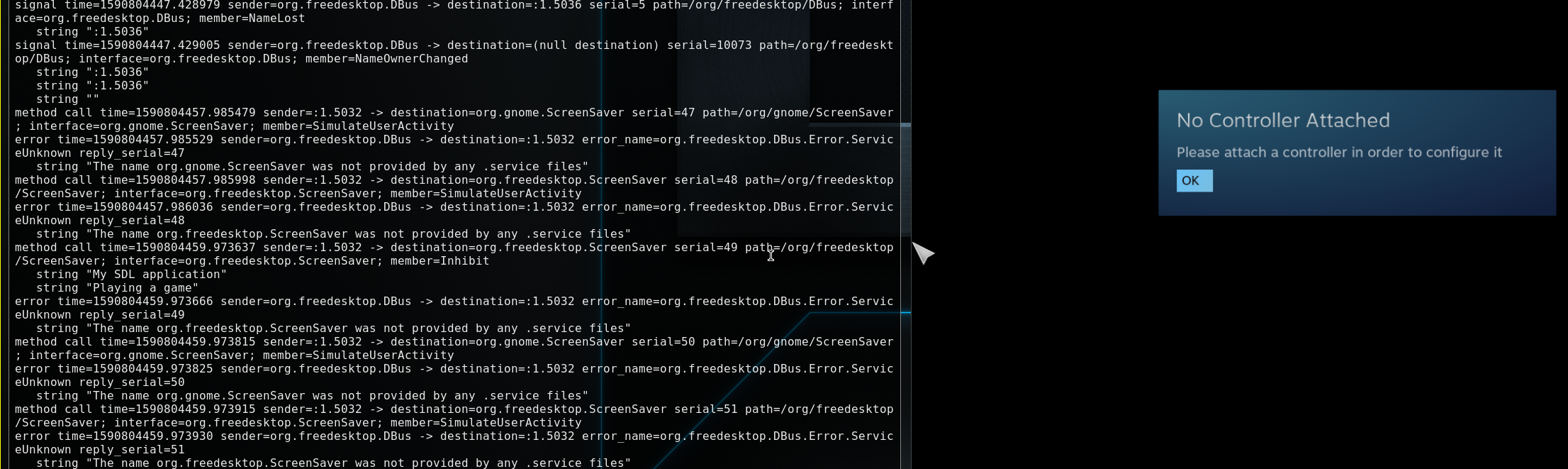
I'm affected by the issue as well, am running latest steam beta (package version 1591251555) in GNOME 3.36.3 on openSUSE Tumbleweed 20200611. The worst aspect of this is not only it prevents monitor from shutting off when no game is running, but also it doesn't prevent monitor from sleeping when the game is running. Is it just me, or is the feature working completely other way around?
@Plagman could you please highlight best workarounds for the newcomers like me? Also is there any additional information I could provide to give the issue a boost? TIA.
I just noticed that my keyboard appears to be reported as a gamepad.
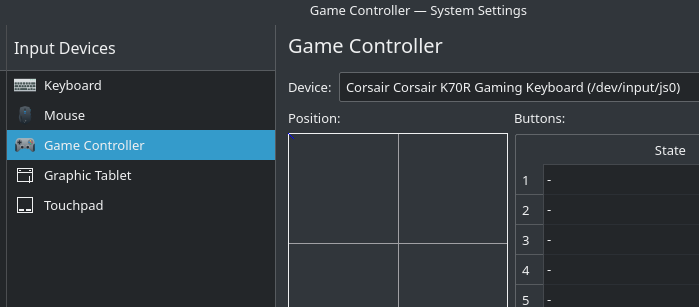
Is it possible this could be contributing to the issue?
Some hopefully relevant info:
udevadm info /dev/input/js0
P: /devices/pci0000:00/0000:00:12.0/usb8/8-3/8-3:1.0/0003:1B1C:1B09.0003/input/input23/js0
N: input/js0
L: 0
S: input/by-id/usb-Corsair_Corsair_K70R_Gaming_Keyboard-joystick
S: input/by-path/pci-0000:00:12.0-usb-0:3:1.0-joystick
E: DEVPATH=/devices/pci0000:00/0000:00:12.0/usb8/8-3/8-3:1.0/0003:1B1C:1B09.0003/input/input23/js0
E: DEVNAME=/dev/input/js0
E: MAJOR=13
E: MINOR=0
E: SUBSYSTEM=input
E: USEC_INITIALIZED=5133254
E: ID_INPUT=1
E: ID_INPUT_JOYSTICK=1
E: ID_INPUT_KEY=1
E: ID_INPUT_KEYBOARD=1
E: ID_VENDOR=Corsair
E: ID_VENDOR_ENC=Corsair
E: ID_VENDOR_ID=1b1c
E: ID_MODEL=Corsair_K70R_Gaming_Keyboard
E: ID_MODEL_ENC=Corsair\x20K70R\x20Gaming\x20Keyboard
E: ID_MODEL_ID=1b09
E: ID_REVISION=0109
E: ID_SERIAL=Corsair_Corsair_K70R_Gaming_Keyboard
E: ID_TYPE=hid
E: ID_BUS=usb
E: ID_USB_INTERFACES=:030101:030000:
E: ID_USB_INTERFACE_NUM=00
E: ID_USB_DRIVER=usbhid
E: ID_PATH=pci-0000:00:12.0-usb-0:3:1.0
E: ID_PATH_TAG=pci-0000_00_12_0-usb-0_3_1_0
E: ID_FOR_SEAT=input-pci-0000_00_12_0-usb-0_3_1_0
E: DEVLINKS=/dev/input/by-id/usb-Corsair_Corsair_K70R_Gaming_Keyboard-joystick /dev/input/by-path/pci-0000:00:12.0-usb-0:3:1.0-joystick
E: TAGS=:seat:uaccess:
udevadm test-builtin input_id /class/input/js0
Load module index
Parsed configuration file /usr/lib/systemd/network/99-default.link
Created link configuration context.
ID_INPUT=1
ID_INPUT_JOYSTICK=1
ID_INPUT_KEY=1
ID_INPUT_KEYBOARD=1
Unload module index
Unloaded link configuration context.
sudo dmesg | grep -i hid
[109756.329791] hid-generic 0003:10D5:55A2.0019: input,hidraw1: USB HID v1.10 Keyboard [No brand 2Port KVMSwicther] on usb-0000:04:00.0-1.3/input0
[109756.330874] usbhid 5-1.3:1.1: couldn't find an input interrupt endpoint
[109760.106029] logitech-hidpp-device 0003:046D:4041.0018: HID++ 4.5 device connected.
[109760.315996] logitech-hidpp-device 0003:046D:4041.0018: multiplier = 8
[110216.050740] sony 0005:054C:09CC.001A: input,hidraw7: BLUETOOTH HID v81.00 Gamepad [Wireless Controller] on 00:02:72:33:90:9a
[111509.837263] logitech-hidpp-device 0003:046D:4041.0018: multiplier = 8
[112365.297780] logitech-hidpp-device 0003:046D:4041.0018: multiplier = 8
[113048.462208] logitech-hidpp-device 0003:046D:4041.0018: multiplier = 8
[114338.417257] logitech-hidpp-device 0003:046D:4041.0018: multiplier = 8
[119903.994904] logitech-hidpp-device 0003:046D:4041.0018: multiplier = 8
[157444.386457] sony 0005:054C:09CC.001B: input,hidraw7: BLUETOOTH HID v81.00 Gamepad [Wireless Controller] on 00:02:72:33:90:9a
[158189.543213] logitech-hidpp-device 0003:046D:4041.0018: multiplier = 8
[184113.245885] sony 0005:054C:09CC.001C: input,hidraw7: BLUETOOTH HID v81.00 Gamepad [Wireless Controller] on 00:02:72:33:90:9a
[187391.858242] logitech-hidpp-device 0003:046D:4041.0018: multiplier = 8
[192837.058860] sony 0005:054C:09CC.001D: input,hidraw7: BLUETOOTH HID v81.00 Gamepad [Wireless Controller] on 00:02:72:33:90:9a
[196091.610185] sony 0005:054C:09CC.001E: input,hidraw7: BLUETOOTH HID v81.00 Gamepad [Wireless Controller] on 00:02:72:33:90:9a
[240533.515234] sony 0005:054C:09CC.001F: input,hidraw7: BLUETOOTH HID v81.00 Gamepad [Wireless Controller] on 00:02:72:33:90:9a
[269258.916892] logitech-hidpp-device 0003:046D:4041.0018: multiplier = 8
[272363.394860] sony 0005:054C:09CC.0020: input,hidraw7: BLUETOOTH HID v81.00 Gamepad [Wireless Controller] on 00:02:72:33:90:9a
[284697.874508] logitech-hidpp-device 0003:046D:4041.0018: multiplier = 8
[288161.992090] logitech-hidpp-device 0003:046D:4041.0018: multiplier = 8
[330098.060285] sony 0005:054C:09CC.0021: input,hidraw7: BLUETOOTH HID v81.00 Gamepad [Wireless Controller] on 00:02:72:33:90:9a
[342735.454690] logitech-hidpp-device 0003:046D:4041.0018: multiplier = 8
[354345.877261] logitech-hidpp-device 0003:046D:4041.0018: multiplier = 8
[354367.579986] sony 0005:054C:09CC.0022: input,hidraw7: BLUETOOTH HID v81.00 Gamepad [Wireless Controller] on 00:02:72:33:90:9a
[355483.114864] logitech-hidpp-device 0003:046D:4041.0018: multiplier = 8
[359131.928804] logitech-hidpp-device 0003:046D:4041.0018: multiplier = 8
[361811.398279] logitech-hidpp-device 0003:046D:4041.0018: multiplier = 8
[363783.019051] sony 0005:054C:09CC.0023: input,hidraw8: BLUETOOTH HID v81.00 Gamepad [Wireless Controller] on 00:02:72:33:90:9a
[363809.818364] logitech-hidpp-device 0003:046D:4041.0018: multiplier = 8
[413852.402849] sony 0005:054C:09CC.0024: input,hidraw7: BLUETOOTH HID v81.00 Gamepad [Wireless Controller] on 00:02:72:33:90:9a
Connected:
- 0 gamepads
- 1 bluetooth dongle (which is used for PS4 controller)
- 1 XBOX One wireless dongle
- Corsair gaming keyboard
Same issue here, on Windows 10. Screen turns off for 1 second and then turns back on. It's happening both with and without the XBOX dongle plugged in.
This has been bothering me for a few years now, and my main display now has ripples burned into it as a result of forgetting to either exit Steam or turn off my display/computer before bed countless times. The fixes proposed above don't work for me on Arch+i3; any other suggestions?
I personally used nativefier to create an electron app for steamchat (https://steamcommunity.com/chat/), and added killall steam before i3lock and exec steam -silent after it exits. Not ideal, but at least my monitors turn off.
This has been bothering me for a few years now, and my main display now has ripples burned into it as a result of forgetting to either exit Steam or turn off my display/computer before bed countless times. The fixes proposed above don't work for me on Arch+i3; any other suggestions?
I mentioned xautolock (and use killall steam as a locker) earlier, but I think you need to patch the lmakefile to forcibly disable usage of the screensaver extension, and build it yourself. I. e. change the 1 to a 0 here: https://github.com/l0b0/xautolock/blob/master/Imakefile#L9
AFAIK it only monitors for keyboard events, though, so hopefully you play games with keyboard input. :-)
If that doesn't work we at least know it is faking keyboard input, and I'll see if I can update my LD_PRELOAD hack to disable xtest calls. But I think I looked for xtest stuff (it's the old way of doing screensaver inhibition), so I don't think it's that.
I found out that Steam turns the monitor back on only once.
As a workaround, this works for me:
sleep 1; xset dpms force off; sleep 15; xset dpms force off
FYI Valve employees: this bug is keeping me from keeping Steam open all the time. I shut it down as soon as I'm done playing a game.
Something something engagement numbers.
I debugged this topic as it annoyed me and because I think it's not state of the art anymore to keep monitors on while idling...
It's not a Steam issue alone. Actually it's a combination of the SDL community decision to disable the screensaver by default on SDL applications with SDL-release-2.0.2 onwards and Steam not taking care of overwriting this default setting.
I haven't dug down to the nastiest lowest level of detail in SDL2 yet, but here's a proof of concept. It disables the two functions which keep the monitor alive by immediate return statements:
steam_screensaver.tar.gz
tar xf steam_screensaver.tar.gz && cd steam_screensaver && make install
Then you can start steam by executing the newly created dampf command, which will inject the modified SDL library using the DEBUGGER variable of steam, to keep all steam files untouched:
I think Valve ( @Plagman ) should consider checking the following part in the SDL2 library "include/SDL_hints.h":
/**
 *  \brief  A variable controlling whether the screensaver is enabled.
 *
 *  This variable can be set to the following values:
 *    "0"       - Disable screensaver
 *    "1"       - Enable screensaver
 *
 *  By default SDL will disable the screensaver.
 */
#define SDL_HINT_VIDEO_ALLOW_SCREENSAVER    "SDL_VIDEO_ALLOW_SCREENSAVER"
@xypiie it is my understanding that steam uses SDL's functions to do that, but I don't think it's SDL doing it itself in this case.
For example, something like ffplay disables the screensaver because it uses SDL, but if you set the env var SDL_VIDEO_ALLOW_SCREENSAVER=1 ffplay /path/to/media/file, ffplay no longer inhibits the screensaver.
Setting that variable to steam, however, does not fix this issue.
Additionally, LD_PRELOADing libSDL from steam's runtime to ffplay with the above env var does not inhibit the screensaver either.
It sounds like steam is manually calling SDL's functions, which also explains why you stubbing them fixed the issue but the env var doesn't work.
We can also see that the bundled libSDL also has support for this if we run strings against it.
$ strings ~/.steam/ubuntu12_64/libSDL2-2.0.so.0 | grep SCREENSAVER
SDL_VIDEO_ALLOW_SCREENSAVER
I don't personally want to mess with injecting libraries to Steam, however if you want to try, you can modify your stub to call backtrace() and backtrace_symbols() and then print that to stderr/stdout to see what is calling that function.
https://www.gnu.org/software/libc/manual/html_node/Backtraces.html
Alternatively, you can set a breakpoint with a debugger and get a backtrace that way, especially if you have debug symbols in your libSDL.
After that you'll probably need to dig into the memory map in /proc to find what belongs to which library and then steam itself to figure out what each function does.
Do keep in mind that LD_PRELOAD breaks the latest Proton (it's a known bug, not sure if fixed yet).
As a sidenote, it's easy to detect that SDL is being used because if you call GetReason() over DBus you get 'Playing a game'.
And finally, for anyone still using the xdg dbus proxy to block this, I had to allow another path so that steam can launch my file manager, in this case Nemo. Something to keep in mind if you can't browse your screenshots.
xdg-dbus-proxy "$DBUS_SESSION_BUS_ADDRESS" "$XDG_RUNTIME_DIR/steam-bus-proxy" --filter --call="org.freedesktop.DBus.*=*" --call="org.freedesktop.IBus.*=*"  --call="org.freedesktop.portal.*=*" --call="com.feralinteractive.GameMode.*=*" --call="com.canonical.*=*" --broadcast="*=*" --call="org.kde.*=*" --call="org.gtk.*=*" --call="org.Nemo.*=*"&

export DBUS_SESSION_BUS_ADDRESS="unix:path=$XDG_RUNTIME_DIR/steam-bus-proxy"
I tried killing the SDL API earlier as well with the LD_PRELOAD thing I posted about, but I think there's several different parts in steam inhibiting (blink, sdl and I think some manual stuff), so it's a bit confusing to dig through.
This is still an issue and extremely annoying.
This is still an issue and extremely annoying.
Even more annoying since it also prevents the computer from sleeping/suspending, which means that if you're on battery you may return to a dead laptop.
I've tried the following "steam-wrapper" but it does unfortunately not work as intended. The screen blanking is still prevented.
_save_dbus=$DBUS_SESSION_BUS_ADDRESS
XDG_CURRENT_DESKTOP=XFCE xdg-dbus-proxy "$DBUS_SESSION_BUS_ADDRESS" "$XDG_RUNTIME_DIR/steam-bus-proxy" --log --filter --call="org.fr    eedesktop.DBus.*=*" --call="org.freedesktop.IBus.*=*"  --call="org.freedesktop.portal.*=*" --call="com.feralinteractive.GameMode.*=*    " --call="com.canonical.*=*" --broadcast="*=*" --call="org.kde.*=*" --call="org.gtk.*=*" --call="org.Nemo.*=*" &
export DBUS_SESSION_BUS_ADDRESS="unix:path=$XDG_RUNTIME_DIR/steam-bus-proxy"
steam-runtime
kill %1 # kill xdg-dbus-proxy
export DBUS_SESSION_BUS_ADDRESS=$_save_dbus # restore DBUS
Confirmed still a problem, linux mint. I wish there was a way to prevent it that doesn't just involve shutting steam down each time. i like the little icon with its shortcut to starting whatever games I've played recently, but I don't like it keeping my screen on when it doesn't need to be on.
I debugged this topic as it annoyed me and because I think it's not state of the art anymore to keep monitors on while idling...
It's not a Steam issue alone. Actually it's a combination of the SDL community decision to disable the screensaver by default on SDL applications with SDL-release-2.0.2 onwards and Steam not taking care of overwriting this default setting.
I haven't dug down to the nastiest lowest level of detail in SDL2 yet, but here's a proof of concept. It disables the two functions which keep the monitor alive by immediate return statements:
steam_screensaver.tar.gz
tar xf steam_screensaver.tar.gz && cd steam_screensaver && make install
Then you can start steam by executing the newly createddampfcommand, which will inject the modified SDL library using the DEBUGGER variable of steam, to keep all steam files untouched:I think Valve ( @Plagman ) should consider checking the following part in the SDL2 library "include/SDL_hints.h":
/**
 *  \brief  A variable controlling whether the screensaver is enabled.
 *
 *  This variable can be set to the following values:
 *    "0"       - Disable screensaver
 *    "1"       - Enable screensaver
 *
 *  By default SDL will disable the screensaver.
 */
#define SDL_HINT_VIDEO_ALLOW_SCREENSAVER    "SDL_VIDEO_ALLOW_SCREENSAVER"
This fix work well for me. I've made an AUR package named "steam-screensaver-fix" based on this. After installation, you should have a menu item "Steam (Screensaver fix) (Runtime)" and "Steam (Screensaver fix) (Native)".
Replying to https://github.com/ValveSoftware/steam-for-linux/issues/5607#issuecomment-800642048
If I do all of that can I afterwords go back to using the desktop icon for steam to launch it, or do I have to always use dampf to do it? I would prefer to just be able to use the desktop icon to lunch it.
If I do all of that can I afterwords go back to using the desktop icon for steam to launch it, or do I have to always use dampf to do it? I would prefer to just be able to use the desktop icon to lunch it.
If you are talking about my AUR package, tt doesn't overwrite anything, so you can use either one. You will have an icon for steam with the fix and steam without the fix, no need for a command. If you install it manually, you'll have to use the dampf command. You can edit your desktop icon to make it launch dampf.
In your steam options, you should disable "Run steam when computer starts" or it will not use the fix on startup. You'll have to add it manually in your DE options.
Replying to https://github.com/ValveSoftware/steam-for-linux/issues/5607#issuecomment-800661095
(after having to google aur) I'm using mint... so I can't use the aur package correct? Meaning I have to do the manual way. Is it hard to make the default steam icon run the command? I think I already have it so it doesn't start at startup so that part shouldn't be an issue. Edit: also the fix won't say make it to where while I'm playing games it goes to screensaver or anything like that?
Replying to https://github.com/ValveSoftware/steam-for-linux/issues/5607#issuecomment-800662798
I don't use mint but if you are launching it from a desktop icon, you can try to right click it and see if there is an edit button. Otherwise you can edit it with a text editor from your Desktop folder in your home directory. Just edit the Exec= line to point to dampf.
Replying to [#5607 (comment)](https://github.com/ValveSoftware/steam-for-linux/issues/5607#issuecomment-800662798)
I don't use mint but if you are launching it from a desktop icon, you can try to right click it and see if there is an edit button. Otherwise you can edit it with a text editor from your
Desktopfolder in your home directory. Just edit theExec=line to point to dampf.
Ok thank you
Replying to [#5607 (comment)](https://github.com/ValveSoftware/steam-for-linux/issues/5607#issuecomment-800662798)
I don't use mint but if you are launching it from a desktop icon, you can try to right click it and see if there is an edit button. Otherwise you can edit it with a text editor from your
Desktopfolder in your home directory. Just edit theExec=line to point to dampf.
Ok so I'm not very experienced and this happened. I'm not quite sure what I need to do to get it to work...
alex@VivioBook15:~/Downloads$ tar xf steam_screensaver.tar.gz && cd steam_screensaver && make install
wget https://www.libsdl.org/release/SDL2-2.0.12.tar.gz
--2021-03-16 16:10:30-- https://www.libsdl.org/release/SDL2-2.0.12.tar.gz
Resolving www.libsdl.org (www.libsdl.org)... 2604:a880:1:20::181:e001, 192.241.223.99
Connecting to www.libsdl.org (www.libsdl.org)|2604:a880:1:20::181:e001|:443... connected.
HTTP request sent, awaiting response... 200 OK
Length: 5720162 (5.5M) [application/x-gzip]
Saving to: ‘SDL2-2.0.12.tar.gz’
SDL2-2.0.12.tar.gz 100%[===================>] 5.46M 14.8MB/s in 0.4s
2021-03-16 16:10:31 (14.8 MB/s) - ‘SDL2-2.0.12.tar.gz’ saved [5720162/5720162]
tar xf SDL2-2.0.12.tar.gz
patch -d SDL2-2.0.12 -p1 < 0001-SDL-allow-screensaver.patch
patching file src/core/linux/SDL_dbus.c
mkdir -p lib32
(cd lib32 && ../SDL2-2.0.12/configure --disable-input-tslib --host=i686-linux-gnu "CFLAGS=-m32" "CXXFLAGS=-m32" "LDFLAGS=-m32")
checking build system type... x86_64-pc-linux-gnu
checking host system type... i686-pc-linux-gnu
checking how to print strings... printf
checking for i686-linux-gnu-gcc... no
checking for gcc... gcc
checking whether the C compiler works... no
configure: error: in /home/alex/Downloads/steam_screensaver/lib32': configure: error: C compiler cannot create executables See config.log' for more details
make: *** [Makefile:12: lib32/libSDLsteam.so] Error 77
alex@VivioBook15:~/Downloads/steam_screensaver$ dampf
dampf: command not found
alex@VivioBook15:~/Downloads/steam_screensaver$
The patch by @xypiie causes an annoying issue with CS:GO on my machine: the resolution is detected incorrectly when launching, causing 3/4ths of the screen to be cut off because the resolution is too large. The game is automatically changing the resolution to 3640x1920, which is the combined width and maximum height of my monitors (a 2560x1440 main monitor and a portrait mode 1920x1080 monitor) and refuses to change it to anything useful.
This only happens when running Steam with the dampf alias, ie. when using the patch. It doesn't happen when running Steam normally. I presume either the patch contains some inadvertent change that causes this, or Steam uses a custom SDL library that contains some kind of custom resolution detection stuff.
I suppose that issues like this would be expected in a proof-of-concept hack, but be warned anyway.
Replying to https://github.com/ValveSoftware/steam-for-linux/issues/5607#issuecomment-827318685
oh, have you tried my hack with latest SDL? Maybe there was an update on the SDL in the meantime.
Can confirm this is still an issue. Using @patlefort 's patch for now but I feel this should definitely be patched.
I've actually not had this issue anymore, so I thought it had been silently resolved. Using Fedora 34 with KDE Plasma 5.22.4.
this is still an issue for me on Fedora 34 with I3-gaps 4.19.1
This is an issue on Debian 11 with i3-gaps 4.19.1. Seems this issue is 2 years old. Any plan to fix?
issue on Manjaro Cinnamon too
Same happening on Arch Linux, kernel: 5.14.14-arch1-1 and bspwm version: 0.9.10-1
Extremely frustrated by this for months on end until I discovered it was steam that was causing my desktop to stay up, @Plagman, please pay attention to this.
Issue still present. Problem only when two DDR4 modules installed in system. No issue when only one of them installed (I tried both modules running along).
My system:
Debian 11 64-bit (linux kernel 5.10.0-9-amd64)
AMD Ryzen 5 3500 6-Core Processor
MSI B450 GAMING PLUS MAX (MS-7B86)
DDR4-2133 8GB G.SKILL + XMP support up to 2400
DDR4-2400 8GB GOODRAM
Same problem on windows 10: I am getting blue screen with memory management error
Reproduction steps on clean OS installed with Steam:
Run Steam
Run any game (in my case Dota 2 and Left 4 Dead 2)
Close the game and return to steam client
Try to run Google Chrome or to shutdown system
Also it's hard to start OS, it's randomly freezes, unplug power cable did not help. Efficient way is to change memory speed in bios or to unplug memory module.
Can confirm that this is still happening to me! Xubuntu 18.04 kernel 5.4.0-90-generic
Just saw it myself, appeared this week after updating Steam client to "Built: Nov 22 2021, at 22:12;24, Steam API: v020, Steam package versions: 1637624439" Here's what I saw in the debug log for xscreensaver:
xscreensaver-systemd: 01:19:57: uninhibited by "Steam" (:1.481) with cookie 395CF25D
xscreensaver-systemd: 01:19:57: inhibited by "Steam" (:1.481) with "Client interface" -> cookie E76B9B98
xscreensaver-systemd: 01:20:27: uninhibited by "Steam" (:1.481) with cookie E76B9B98
xscreensaver-systemd: 01:20:27: inhibited by "Steam" (:1.481) with "Client interface" -> cookie 132DBF8C
xscreensaver-systemd: 01:20:27: inhibited by "Steam" since Wed Dec  1 01:20:27 2021
xscreensaver-systemd: 01:20:27: exec: xscreensaver-command -verbose -deactivate
xscreensaver-command: already inactive, resetting activity time
Using ArcoLinux (just arch) and noticed suspend is stopped due to Steam: Client Interface so I guess that is related to this. Annoying.
Sometimes it will disappear but most times it's there.
Is this ever going to be fixed??
It's probably not an easy fix (read: that doesn't cause other issues), so just subscribe to the issue and wait.
just subscribe to the issue and wait.
Instructions unclear, subscribed and been waiting since 2018.
Joking aside, this problem was already around for probably a year (maybe more) before the this bug report was filed in 2018, which means it's been unaddressed for almost as long as Steam for Linux has existed. The whole time, I've been unable to leave the Steam client running normally, which sucks because it's the only way I can keep in contact with some old friends. I had to stop running the client at all unless I need to launch a game, and instead switch to using either the website to chat or a Steam-to-IRC proxy, for years now. I'm on my third Debian version since I first encountered this bug!
I'm being patient, but this has gotten a bit ridiculous.
I'm not sure if it affects all distros as I was using Garuda and suspend appeared to work... I'll be keeping a eye on it.
This is still an issue and extremely annoying.
Even more annoying since it also prevents the computer from sleeping/suspending, which means that if you're on battery you may return to a dead laptop.
Does anyone know if this happens on the Deck too? would be pretty bad if the Deck can't sleep or turn off the screen because Steam is running
I do have this issue in Debian bookworm (testing)
When playing a game with big saves that sync to the Steam cloud (e.g., Factorio with mods) it's an extra pain since Steam can't close immediately, after waiting too many times, I turned off the cloud saving for Factorio, for context I do sleep my monitor/s manually, I do have 60 minute timeout too, but it doesn't matter if Steam prevents any of those anyway, but it's an extra trouble when having to leave the computer after playing a game: quit the game, quit Steam, wait for Steam to close, and then I can put the monitor to sleep, guess I'll have to create an specific version of my sleep script that SIGTERM the Steam process, detect if steam is executing and when it's not then put the monitor/s to sleep, until now it was just "sleep 4s && xset dpms force off" ... sigh
Does anyone know if this happens on the Deck too? would be pretty bad if the Deck can't sleep or turn off the screen because Steam is running
It would be hilarious if it was a issue. But I doubt it. Like I said its not a wide spread problem.
I doubt the Deck uses xscreensaver, but I don't know. The problem I observed was Steam client sending the xscreensaver-command -deactivate repeatedly, even when there was no game playing.
Since it's not really possible for non-Valve developers to fix this in the Steam client, here's a patch for xscreensaver-systemd that makes it ignore inhibit commands from Steam. It's not a solution, but it allows at least me to pretend the issue isn't there. If you're playing with a gamepad you may need to manually inhibit and uninhibit xscreensaver when starting a game.
I'm not making any guarantees about anything, but I hope it helps somebody!
diff --git a/driver/xscreensaver-systemd.c b/driver/xscreensaver-systemd.c
index 2a5a11f..6899aef 100644
--- a/driver/xscreensaver-systemd.c
+++ b/driver/xscreensaver-systemd.c
@@ -515,6 +515,15 @@ xscreensaver_method_inhibit (sd_bus_message *m, void *arg,
   s = strrchr (application_name, '/');
   if (s && s[1]) application_name = s+1;

+  /* FIXME: Hack to prevent the Steam UI from inhibiting the screensaver. */
+  if (strcmp (application_name, "Steam") == 0 &&
+      strcmp (inhibit_reason, "Client interface") == 0) {
+    if (verbose_p)
+      fprintf (stderr, "%s: inhibited by \"%s\" (%s) with \"%s\", ignored\n",
+               blurb(), application_name, sender, inhibit_reason);
+    return -1;
+  }
+
   if (strcasestr (inhibit_reason, "audio") &&
       !strcasestr (inhibit_reason, "video")) {
     /* Firefox 78 sends an inhibit when playing audio only, with reason
I don't think my system uses xscreensaver, but I think I've still had this issue once or twice even recently. Most of the time my screen turns off fine though. I think Steam might only inhibit the screensaver if you have a chat window open.
I don't think my system uses xscreensaver, but I think I've still had this issue once or twice even recently. Most of the time my screen turns off fine though. I think Steam might only inhibit the screensaver if you have a chat window open.
I've never had a single chat window open. For me the issue began a few weeks ago, and I haven't seen it before, over the past seven years. No settings changed, and I'm using the same limited featureset as always. The Steam client starts regularly (once or twice per minute) sending DBus inhibit commands to org.freedesktop.ScreenSaver as soon as it's started, with or without any prior user interaction.
@Plagman @kisak-valve I think a reasonable description of the bug at a code level is found, could you maybe give it some thought?
After months of watching this issue with no fixes or complete workarounds, I got annoyed enough to dig deeper into this and have found a workaround that seems to be working for me. Many of the workarounds posted here try to block DBus messages used by xscreensaver and some desktop environments. But xscreensaver (or any equivalent) is not installed on my machine, nor does the XFCE session manager (to my knowledge, at least) listen to any of these interfaces. I only use the blanking/DPMS support built into Xorg.
The screensaver is inhibited from the main SDL event loop. When X11_PumpEvents is called, it checks an internal flag (_this->suspend_screensaver). If this is set, two things happen. It calls SDL_DBus_ScreensaverTickle(), which calls the SimulateUserActivity DBus method on org.freedesktop.ScreenSaver and org.gnome.ScreenSaver. (Again, this probably has no effect on my system since I'm not running anything that listens to these, but it's probably relevant to many people's setups). It also calls XResetScreensaver, which is an Xlib function. This is what was preventing my machine from sleeping, and what the DBus-only workarounds don't address.
SDL defaults to this behavior being enabled (which disables the screensaver). As noted in the documentation, this can be overridden by setting SDL_VIDEO_ALLOW_SCREENSAVER=1 in the environment, which changes the default. However, the application can still call SDL_DisableScreenSaver() which re-enables the above behavior in the main event loop regardless of the environment variable. Additionally, a call to SDL_DisableScreenSaver() will cause an Inhibit call on the org.freedesktop.ScreenSaver DBus interface each time it is made.
To prevent this from happening, this function can be replaced by a preloaded library that replaces SDL_DisableScreenSaver() with a stub that does nothing:
/* sdl_block_screensaver_inhibit.c */

#include <stdio.h>

void SDL_DisableScreenSaver(void) {
    fprintf(stderr, "prevented SDL_DisableScreenSaver()\n");
}
(an empty function is sufficient, but the printf lets you know when it's getting called...)
Compile with:
gcc -shared -fPIC -ldl -m32 -o sdl_block_screensaver_inhibit.so sdl_block_screensaver_inhibit.c
Steam can then be launched as follows:
LD_PRELOAD="/full/path/to/sdl_block_screensaver_inhibit.so" SDL_VIDEO_ALLOW_SCREENSAVER=1 steam
You can also put the .so file in /usr/lib32 or the appropriate equivalent on your system and change to LD_PRELOAD=sdl_block_screensaver_inhibit.so instead of the full path. Editing the command line in /usr/bin/{steam,steam-runtime,steam-native} should also make this work when launched from the GUI, though these might get overwritten by your OS's package manager if the steam package ever gets updated.
The SDL_VIDEO_ALLOW_SCREENSAVER=1 may or may not be needed on your system; including it does seem to prevent an initial Inhibit message at startup that otherwise makes it through.
The downside to this workaround is that games launched by Steam will also load the stub and won't be able to disable the screensaver either (if they use SDL) but I generally generate enough input events when I'm playing something to keep the screen awake.
From watching the output of the printf when the call is intercepted, I've observed that SDL_DisableScreenSaver() is called once at startup (possibly from SDL itself to set up the default behavior). On a fresh launch of the Steam client, at this point it is not called again, until the first interaction with the user interface. (For me it seems to be sufficient to click anywhere in the window; it doesn't even need to be on anything specific.) At this point, SDL_DisableScreenSaver() is called, and appears to start a timer that results in it getting called again every 30 seconds or so. I really don't see anything in the SDL source that explains this, which leads me to believe that the Steam client, for whatever reason, is repeatedly calling it deliberately. This sort of explains the behavior others have mentioned where the system is able to sleep after first launching the Steam client but not after interacting with it.
@bmayton solution works for me, did some tests and my monitors don't wake up anymore
Xfce launcher doesn't like this style of command:
LD_PRELOAD="/full/path/to/sdl_block_screensaver_inhibit.so" SDL_VIDEO_ALLOW_SCREENSAVER=1 /usr/games/steam steam -silent %U
complains saying it's a non-existing path, I created a steam_fix_standby.sh with the line, called the script file in the launcher and it works
I can confirm on KDE this Steam behavior, my computer never goes to sleep anymore since long time now. This is what the Energy applet in KDE says:
https://i.imgur.com/RfcWmrk.jpg
Basically, "Steam is blocking sleep and screen locking". But nothing is running in Steam, no game, it is in the tray area.

I didn't know KDE had an applet to display this, and I can confirm Steam shows up in there for me as well. I think the reason I haven't encountered this issue is because I've built a habit of locking my screen manually whenever I leave my desk, and KDE must be smart enough to not listen to inhibit requests when the screen is locked. Maybe something to try as a workaround of sorts.
I've now been using the workaround provided by @bmayton and can confirm that it works like a charm ..
I expanded a bit on it as follows:
/* sdl_block_screensaver_inhibit.c */

#include <stdio.h>

#ifdef __i386__
static char* arch = "x86";
#else
static char* arch = "x64";
#endif

void SDL_DisableScreenSaver(void) {
	fprintf(stderr, "[%s] prevented SDL_DisableScreenSaver()\n", arch);
}
... and built it with:
gcc -shared -fPIC -ldl -m32 -o sdl_block_screensaver_inhibit.so sdl_block_screensaver_inhibit.c
gcc -shared -fPIC -ldl -m64 -o sdl_block_screensaver_inhibit_64.so sdl_block_screensaver_inhibit.c
... with the following wrapper_steam.sh:
PATH_TO_LIB="<path>"

LD_PRELOAD="$PATH_TO_LIB/sdl_block_screensaver_inhibit.so $PATH_TO_LIB/sdl_block_screensaver_inhibit_64.so" \
	SDL_VIDEO_ALLOW_SCREENSAVER=1 \
	/usr/bin/steam 2>&1 | grep -v "wrong ELF class: "
... which allows a usable log output from steam.
@ygaeon if you name the libs sdl_block_screensaver_inhibit_lib32.so & sdl_block_screensaver_inhibit_lib64.so then you can shrink the $LD_PRELOAD line to LD_PRELOAD="$PATH_TO_LIB/sdl_block_screensaver_inhibit_\$LIB.so" (make sure $LIB is escaped.) The $LIB is expanded by ld.so(8) based on the bitness of the binary being run.
It's also possible to have a script generate the libraries on demand
@RunningDroid .. neat, thanks. I got a few pieces of that script that I can learn from (especially redirecting output through trap) :+1: .. also, didn't know of fd before :+1:
I noticed my monitors haven't been sleeping for months and didn't bother digging into it until a few days ago when I clicked on the Inhibit Applet in my panel (Mint with Cinnamon) and it showed that Steam and com.feralinteractive.GameMode were inhibiting power management.
GameMode was resolved by terminating some wine processes that didn't stop after playing a game through Lutris, but I haven't found any simple solution for Steam and I'm not annoyed enough to do the workarounds mentioned here. Exiting Steam is my workaround if I really want my monitors to sleep.
@bmayton thank you for nailing down this workaround. I couldn't use the $LIB mechanism @RunningDroid brought up because on NixOS, $LIB expands to the same thing for both 32bit and 64bit executables, but I made it work through $PLATFORM instead. If for whatever reason anyone's implementing a similar fix through $PLATFORM, it can be hard to find out what it's getting expanded to on your machine. I finally found out by running ld-linux.so as an executable (yes, you can do that even though it's named .so) with --help, at the bottom of the output, it's the one with AT_PLATFORM next to it.
It's worth pointing out that a workaround to the gamepad + native SDL hiccup exists: https://github.com/foresto/joystickwake
This is how X waking in a game should work anyway. The screensaver is supposed to be inhibited by input... and joysticks are input.
I included a different output string in the 32bit and 64bit versions of my .so, and I was surprised to notice it was the 32bit one that was being used. Is the steam client really still 32bit?
Maybe it is unrelated to the issue at hand, but inhibit is not working at all inside a flatpak. The api org.freedesktop.portal.Inhibit should be used.
LD_PRELOAD="$PATH_TO_LIB/sdl_block_screensaver_inhibit.so $PATH_TO_LIB/sdl_block_screensaver_inhibit_64.so"
SDL_VIDEO_ALLOW_SCREENSAVER=1
/usr/bin/steam 2>&1 | grep -v "wrong ELF class: "... which allows a usable log output from `steam`.
Just not use 64 bit preload (steam binary is 32 bit) and use setenv("LD_PRELOAD","",1) in constructor to disable LD_PRELOAD for child processes:
#include <stdio.h>

#ifdef __i386__
static char* arch = "i386";
#else
static char* arch = "amd64";
#endif
#include <unistd.h>
#include <stdlib.h>

__attribute__((constructor))
static void reset_env()
{
    fprintf(stderr,"sdl_block_screensaver_inhibit: resetting env\n");
    setenv("LD_PRELOAD","",1);
}

void SDL_DisableScreenSaver(void) {
#define buflen 1024
        char buff[buflen] = "";

        ssize_t len = readlink("/proc/self/exe", buff, buflen);

        if (len != -1)
            buff[len] = '\0';
        fprintf(stderr, "[%s] prevented SDL_DisableScreenSaver() in %s\n", arch, buff);
}
This will not reset LD_PRELOAD in scripts because bash is 64 bit, but will reset it on every 32 bit process AFTER library will be preloaded, so it will not touch children (games, xdg-open, bash, etc)
@mittorn Thank you! My screensaver is finally working again!
Edit: lol, it's working a little too well; controller input doesn't prevent the screensaver, now I'm trying to fix that, haha!
@mittorn, it works too well here – I specifically need it disabled when SteamVR is running else I'll get a GPU hang when the screen blanker kicks in (after which X needs a restart to unscramble the display).
Power saving for monitors and TV's on X11/Linux has always been quite terrible. I believe my X11 hangs if it puts my LG 4k 120hz OLED to sleep and you attempt to wake it up again.
The best solution is to just disable all power management on the display and ensure the screensaver hasn't got power management turned on like xscreensaver does. I need to use a blank image for a screen saver because if I turn off my monitor, X11 flips out and can't recover most times. (probably same for wayland)
Power-saving otherwise works fine: it's the specific combination of SteamVR (and its DRM lease) and X's built-in DPMS which is the problem (I don't know about xscreensaver). amdgpu does successfully reset the GPU, though with residual complaints from snd_hda_intel.
I vaguely recall something about X blanking more than it should.
SteamVR works fine for me, maybe you need update mesa/kernel/xorg driver
Well. I've just pulled in xserver-xorg & xserver-xorg-core from Devuan testing and it still falls over, so I'd say that the X DPMS bug re. DRM leasing is still present.
Against that, though, it seems that I no longer need to patch bits of X to get SteamVR working twice within the same X session (but I do still need to switch away then back to X between exiting & restarting SteamVR).
Same here on Ubuntu with two monitors which are waking up and going sleep repeatedly on lock screen even if no game is actually running. Very annoying.
@RunningDroid this seems to be working perfectly, thanks! I put the script in /opt/steam-screensaver-fix, symlinked it in /bin, then edited the steam.desktop target to that script instead. Manjaro doesn't come with dash but it seemed to work fine in bash. I won't bother trying to integrate mittorn's code because I think I'd rather the screensaver still apply to games too.
I took the code made by @bmayton, @ygaeon, and @mittorn, and expanded on it a bit so that it actually allows games to inhibit the screensaver (if of course you want that). It works by checking the name of the executable - if it's steam, then it does nothing, else it will call the real SDL_DisableScreenSaver(). The hardest part is actually calling the real function, you have to do some dlsym magic (and I just looked at what libTAS does :stuck_out_tongue:).
https://gist.github.com/InfoTeddy/4d41a5b5b5fc39f52666923a12cfce1e
Just confirmed this is what has been causing my three monitors to stay awake throughout the nights for the past year or more.
Seriously Valve wtf, address this.
Same thing here on KDE and Fedora.
Same thing with i3wm on Void Linux
That issue was really annoying and it is shocking that it was not addressed for so long. However after I switched from xfce to sway on wayland it disappeared.
I took the code made by @bmayton, @ygaeon, and @mittorn, and expanded on it a bit so that it actually allows games to inhibit the screensaver (if of course you want that). It works by checking the name of the executable - if it's
steam, then it does nothing, else it will call the realSDL_DisableScreenSaver(). The hardest part is actually calling the real function, you have to do somedlsymmagic (and I just looked at what libTAS does stuck_out_tongue).https://gist.github.com/InfoTeddy/4d41a5b5b5fc39f52666923a12cfce1e
Didn't work for me... running Xubuntu Ubuntu 22.04.1 LTS if that makes a difference
Come on Valve fix this.
That spams logs on Fedora 36.
Fix this bug, save the planet!
The issue caused my monitor to suffer from ghosting now after i forgot to turn it off manually. Why is this not addressed at all? Besides the obvious negative effect of wasting energy, it potentially damages hardware! Other than that, @InfoTeddy's solution works for me. Thanks!
For anyone who uses NixOS, this overlay, together with:
- InfoTeddy's
.cfile (or the slightly modified version next to the overlay file) - adding your platform value to the code (see the comment)
cleanly sets up the LD_PRELOAD fix.
EDIT: New version of comment in response to @zeorin's issue below.
@tejing1 how did you get the platform value for 32 bit applications? All the 32 bit apps I've tried (e.g. wine, or hello from pkgsi686Linux.hello) don't give me a satisfactory answer, ldd reports not a dynamic executable even though file seems to disagree: ELF 32-bit LSB executable, Intel 80386, version 1 (SYSV), dynamically linked. For now I've kept it as i686 = 32.
@tejing1 how did you get the platform value for 32 bit applications? All the 32 bit apps I've tried (e.g.
wine, orhellofrompkgsi686Linux.hello) don't give me a satisfactory answer,lddreportsnot a dynamic executableeven thoughfileseems to disagree:ELF 32-bit LSB executable, Intel 80386, version 1 (SYSV), dynamically linked. For now I've kept it asi686 = 32.
Ah, you need to use a 32 bit ldd to handle a 32 bit binary, apparently, but file also shows the interpreter:
$ nix run nixpkgs#file -- $(nix build --no-link --print-out-paths nixpkgs#pkgsi686Linux.coreutils)/bin/coreutils
/nix/store/wbz370cjxq4hfss45hagvcwv1cpw024g-coreutils-9.1/bin/coreutils: ELF 32-bit LSB executable, Intel 80386, version 1 (SYSV), dynamically linked, interpreter /nix/store/bzw74a7dla8iqk2h8wshwi03fbgj2c5h-glibc-2.35-163/lib/ld-linux.so.2, BuildID[sha1]=2669f3b43fd4f73ebc1ffd4d5237e55e760e18d3, for GNU/Linux 2.6.32, not stripped
$ /nix/store/bzw74a7dla8iqk2h8wshwi03fbgj2c5h-glibc-2.35-163/lib/ld-linux.so.2 --help | grep AT_PLATFORM | egrep -o '^ *[^ ]+' | egrep -o '[^ ]+'
i686
I don't know for sure, but I strongly suspect i686 is the only value any modern machine is likely to have here, anyway.
The embarrassing part is even forcing monitors to sleep e.g.
sleep 2; xset -display :0.0 dpms force off
steam constantly sends wake ups so they just wake up immediately..
valve why not open source your crappy client so I can fix it in a few minutes..
A really simple solution (like, 10 minute solution) here would be to just make this configurable in the steam settings and just wrap the SDL_DisableScreenSaver call. My guess would be that this is a convenient behavior for the Steam Deck but inconvenient for everyone else, but that doesn't really justify how long standing this issue is as a configuration file alone would be enough to have the best of both worlds.
I feel like this is really important for Valve to fix as it makes the general Linux distro experience "worse" than Windows (particularaly on KDE systems) in a way where new users will likely blame Linux and not realize that it's actually Steam forcing systems to stay awake and waste energy.
Valve is not gonna fix this unless you bring this issue to their attention, mention it in support tickets, on forums, or elsewhere.
@Eoin-ONeill-Yokai idk if this is steam deck related, steam has done this for years before steamdeck was around
Issue was opened in 2018. Nothing related to Steam Deck.
It may not be specifically related to Steam Deck, however since the Steam Deck runs Linux it also seems to encounter this problem in desktop mode (I found this issue while looking for solutions to this problem on my Deck)... maybe a little visibility that this impacts Steam Deck / SteamOS users as well will encourage Valve to try and fix it properly with a setting or something?
Im not sure if this is related, but also Steam inhibits sleep through systemd when steam client is running, but NOT when running a game, which is crazy - my computer is never going to sleep in the night, unless i manually quit Steam, but when im actually playing a game - to does, usually causing the game to crash...
PS. I have compiled the code shared by @InfoTeddy, but cannot make it to work. When im trying to preload it im getting an error regardless if im using lib64 or lib32 version:
ERROR: ld.so: object '/opt/fix_steam_screensaver_lib.so' from LD_PRELOAD cannot be preloaded (wrong ELF class: ELFCLASS32): ignored.
ERROR: ld.so: object '/opt/fix_steam_screensaver_lib64.so' from LD_PRELOAD cannot be preloaded (wrong ELF class: ELFCLASS64): ignored.
Could someone please advise what am i doing wrong? Here is the wrapper im using:
LD_PRELOAD="/opt/fix_steam_screensaver_lib.so" SDL_VIDEO_ALLOW_SCREENSAVER=1 /usr/games/steam
(i also couldnt get $LIB variable to work)
Personally, I do not have systemd on my system, but still having this
issue. Though I'm not fully free from the systemd ecosystem, I do at least
have elogind installed and running.
пт, 7 апр. 2023 г. в 09:34, Michal @.***>:
Im not sure if this is related, but also Steam inhibits sleep through
systemctl when running, but NOT when running a game, which is crazy - my
computer is never going to sleep in the night, unless i manually quit
Steam, but when im actually playing a game - to does, usually causing the
game to crash—
Reply to this email directly, view it on GitHub
https://github.com/ValveSoftware/steam-for-linux/issues/5607#issuecomment-1500119289,
or unsubscribe
https://github.com/notifications/unsubscribe-auth/ANNBGGPSPKTDFDQYNJ32HSTW77NRNANCNFSM4FN45DOA
.
You are receiving this because you commented.Message ID:
@.***>
steam inhibits sleep/suspend.. period... systemd or not isn't relevant.
steam inhibits sleep/suspend.. period... systemd or not isn't relevant.
Not so simple: sway-idle for example is immune to it.
yes it is that simple...
you're talking about wayland, in which case it's just broken and thus ironically you get the results you want. anything on X stays awake.
I've had this problem for years, and just recently discovered it was gone. Steam Beta Client just received a major rehaul, maybe this is what solved it - intentionally or unintentionally.
Garuda Linux, i3wm
EDIT: Seems like I spoke in haste :( Sleep works if I startup steam without touching it after. But after interacting with it, i.e. playing a game and exiting it, it still blocks sleep.
Yea the UI overhaul did fix a lot of stuff, not the sleep issue though (on xorg, at least)
Not fixed for me :frowning_face: Just tried the steam beta w/ xorg & i3wm, steam still prevents dpms power saving.
Beta looks good though, much snappier UI :+1:
I recently switched to Linux (Kubuntu) on my main non-work system. I saw people complaining about this, and counted myself lucky to not have this problem for the first few weeks. I went for about 20 days with the Steam client running in the background, but the system shutting off the display after a timeout as it should. So, clearly it is "possible" for the Steam client to behave itself.
However, now I have this problem. The one thing that I changed in Steam recently is turning on the option for "allow background processing of Vulkan shaders", once I realized that having that on would keep me from having to wait several minutes for a game to start while it processes shaders. Seemingly, once I turned that option on, I started having this issue with Steam blocking the monitor from turning off.
I tried turning that option back off and restarting the client, but it is still preventing the system from shutting the monitor off on a timeout. So, I guess I can't say for sure that it is connected, though I can't think of anything else that I changed in Steam at the same time. I guess I will be implementing the solution above with the little wrapper program and LD_PRELOAD.
@AaronKelley did you happen to plug in any new HID devices during that period, or install any software to manage them?
@AaronKelley did you happen to plug in any new HID devices during that period, or install any software to manage them?
No, the only HID devices I have connected are normal laptop stuff (keyboard/touchpad), a pretty plain USB mouse, and a DualSense controller that I connect via Bluetooth. But those have been in use the entire time that I've been on Kubuntu and I don't have any software to manage them installed beyond what normally comes with KDE.
I wouldn't be surprised if KDE disables keep awake for everything except what it deems correct. (so basically everything except video players and full screen video)
People with window managers like @sitedyno & I won't have that luxury though
maybe somehow updating the steam options triggered it's "keep awake" though? some internal setting that wasn't set until the "save" button in options got clicked?
maybe there's a .ini file somewhere in steam's 50000000 files with it set lmao
seems like windows actually had this issue years ago too
https://www.reddit.com/r/Steam/comments/a4f7wn/psa_if_your_pc_isnt_going_to_sleep_it_might_be/
@AaronKelley
https://github.com/ValveSoftware/steam-for-linux/issues/5532#issuecomment-648553372
does his command work for you? I don't have that power management installed but KDE maybe does
@AaronKelley Understood. Thanks. I was hoping we could maybe get a lead on something.
That said, I tested this again, and I can no longer reproduce it myself. I am not sure what changed.
Running
dbus-monitor destination=org.freedesktop.ScreenSaver
and
while true; do xprintidle; sleep 5; done
I see that Steam is inhibiting when I move my mouse, but not when I type. (Not sure why every now and then it uninhibits and re-inhibits immediately. Also not sure why it needs to do that when the cursor moves.)
But if I stop moving my mouse, after a few seconds, Steam just calls Uninhibit() over DBus, and stays like that, and xprintidle keeps counting up and doesn't reset. Eventually, my monitors turn off. Once I move the mouse again, everything wakes up, the X idle counter resets, and Steam starts calling inhibit again. We'll see what happens when I let it run overnight.
If I recall correctly, when I first encountered this issue, it happened to me even with all the Steam windows closed. But now even with the store (although it doesn't have a fancy background video playing at the moment) and friends open, it still doesn't happen.
I wouldn't be surprised if KDE disables keep awake for everything except what it deems correct. (so basically everything except video players and full screen video)
I have noticed some power management oddities in KDE, with it sometimes failing to do things like lock the session based on the timeout that you have set in settings. (I ended up writing a script to "fix" this and lock the session after the screen turns off if KDE fails to do so itself. It looks like the bug is in the "kscreen" daemon which handles multiple monitors.) So, maybe it was "correcting" this behavior on its own, and somehow it is no longer doing so.
KDE actually shows active inhibitors at the top of the popup that appears if you click the tray battery icon; that's how I realized that Steam is responsible for this behavior.
@AaronKelley [#5532 (comment)](https://github.com/ValveSoftware/steam-for-linux/issues/5532#issuecomment-648553372) does his command work for you? I don't have that power management installed but KDE maybe does
That command does not work for me, but I can do "sudo systemd-inhibit --list" to get a list of blocking applications. Steam seems to pop in and out of the list.
If I recall correctly, when I first encountered this issue, it happened to me even with all the Steam windows closed.
I have also observed this with no Steam windows open.
I've had this problem for years, and just recently discovered it was gone. Steam Beta Client just received a major rehaul, maybe this is what solved it - intentionally or unintentionally.
Not fixed for me (XFCE-4.19)
sudo systemd-inhibit --list
That list is showing computer sleep not monitor sleep. systemd won't list anything screen related (like full screen videos, steam, etc) as far as "monitor sleep" goes
for me, it won't show any video / steam etc.
It does shot things that would need to be cleaned up / put to sleep before the system was to sleep (suspend)
Is there anything new about this since Steam released a new UI?
Is there anything new about this since Steam released a new UI?
No, it still happens and previous workaround still works.
To be fair I had the opposite situation where the system would go to sleep when I manually started big game updates before leaving, when I came back it was sleeping and the updates only downloaded a few GB.
I'll try to do more tests but it seems to be inconsistent with the expected behavior for sure.
@Zorrototo this is about monitor sleep not system sleep
I think that system sleep is prevented by preventing monitor sleep?
Yes it is about monitor sleep, but if the system goes to sleep it means the event prohibition is not working at all sometimes (and some other times, nothing is going on in Steam, and I can see that Steam Client Interface blocks monitor locking or sleep in KDE energy widget. As said these mechanism are not consistent with what is expected (when nothing is going on in Steam, do not prevent/prohibit anything, and if a game or a download is active, prevent monitor idling or system sleep).
Nope, you can go into system sleep which disables the "keep monitor awake" event that steam is doing.. which is via making xorg etc think a video is playing.
You can't go into monitor sleep, because it wakes up immediately
:rocket:
Github has collapsed quite a few good comments above, including these two comments with a great workaround:
- https://github.com/ValveSoftware/steam-for-linux/issues/5607#issuecomment-1013983457
- https://github.com/ValveSoftware/steam-for-linux/issues/5607#issuecomment-1028130259
:rocket:
If the DPMS and screensaver inhibition from Steam is intentional because of Xorg not properly detecting gamepad usage as user input, please consider adding a setting to toggle it or implement something like joystickwake into steam instead. Maybe add joystickwake as a recommended package?
https://github.com/foresto/joystickwake
Thank you.
Reproducing the problem (monitor not sleeping / screen not locking) with Ubuntu 23.04 / Wayland / Steam version 1694466342
For me, after starting Steam, it happens if there is an Steam "Update news" opened, or if Steam's main window is on "Store / Featured". (Even if these windows are minimized)
Workaround :
=> Close "Update News" window
=> In Steam main window, go to Library
@Saroumane Can you please make a ticket here? https://help.steampowered.com/en/
They were unable to help me since Arch Linux is unsupported, but I think Ubuntu is a supported OS.
I have been experiencing this issue for a year, using manjaro and endeavouros both with KDE. The only solution I have is to just not use Steam unless I'm playing a game.
In my case the culprit was the ASrock RGB LED controller on the motherboard, which shows up as a HID-class USB device. The system thinks it's a gamepad, creates /dev/input/js0, and it looks like the analog stick is pulled to the top left corner, and this triggers steam to inhibit the screensaver. I'm not using this RGB controller, and disabling it with an udev rule fixed the steam issue.
FYI there is a great AUR package that containing the workarounds reported in this thread: https://aur.archlinux.org/packages/steam-screensaver-fix
Distribution: Arch Linux (Linux Kernel 6.5.8-arch1-1)
Steam client version: 1698091420
Opted into Steam client beta?: Yes
Have you checked for system updates?: Yes
Steam System Info: https://files.catbox.moe/m6wybw.txt
Steam Diagnostics: https://files.catbox.moe/7pjg0m.txt
I'm having the same issue under KDE.
My laptop battery is dying fast because of steam block sleep, on latest manjaro kde
Valve pls fix
Same here. I must to exit Steam every time, because it blocks screen blank.
The Arch workaround from https://github.com/ValveSoftware/steam-for-linux/issues/5607#issuecomment-1762843411 works fine on Slackware as well. Just checkout https://gitlab.com/patlefort/steam-screensaver-fix, compile the shared object as per https://aur.archlinux.org/cgit/aur.git/tree/PKGBUILD?h=steam-screensaver-fix, and export it as $LD_PRELOAD before starting Steam. Ta-daaa, xscreensaver can blank the screen again! :sunglasses: :+1:
Curious side note: I actually didn't have this problem until about three weeks ago. No idea what suddenly caused the issue to pop up on my system ... :man_shrugging:
I've had this problem for years, and just recently discovered it was gone. Steam Beta Client just received a major rehaul, maybe this is what solved it - intentionally or unintentionally.
Not fixed for me (XFCE-4.19)
Not fixed for me ☹️ Just tried the steam beta w/ xorg & i3wm, steam still prevents dpms power saving.
Beta looks good though, much snappier UI 👍
Try to start steam, steam-runtime, steam-native without "-silent" option. If you start with silent option, you must to maximize and then minimize the Steam's window. If Steam's window is maximized, workaround won't work. Try to just minimize Steam's window.
This is still a huge problem, and Valve doesn't give a f***. They really don't care, better work losing time on new pointless bugdates with breaking all their already greatly working UI and CS:GO, and new cases for alpha quality CS2.
The Arch workaround from [#5607 (comment)](https://github.com/ValveSoftware/steam-for-linux/issues/5607#issuecomment-1762843411) works fine on Slackware as well. Just checkout https://gitlab.com/patlefort/steam-screensaver-fix, compile the shared object as per https://aur.archlinux.org/cgit/aur.git/tree/PKGBUILD?h=steam-screensaver-fix, and export it as
$LD_PRELOADbefore starting Steam. Ta-daaa,xscreensavercan blank the screen again! 😎 👍Curious side note: I actually didn't have this problem until about three weeks ago. No idea what suddenly caused the issue to pop up on my system ... 🤷♂️
Some new Valve's bugdate.
the issue still unresolved
If you close the window (but Steam is still running in the background, with the systray icon) that should be enough to allow your monitors to turn off. It's only when the Steam window is open and visible on your desktop that it seems to inhibit sleep.
That wasn't my experience last time I tested it (which was, admitttedly, a while ago). In my tests, even minimized to the systray, it still blocked the monitor from turning off.
That wasn't my experience last time I tested it (which was, admitttedly, a while ago). In my tests, even minimized to the systray, it still blocked the monitor from turning off.
I think you have to leave the 'Store' tab (for example : switch to 'Library tab') before minimizing to systray.
Then it should work. (That's the workaround I use)
For me, the display is able to turn off now since latest steam client update, no special handling (minimizing, switching to some tab) needed:
Steam Beta Branch: Stable Client
Steam Version: 1709168962
Steam Client Build Date: Thu, Feb 29 1:39 AM UTC -08:00
Steam Web Build Date: Mon, Feb 26 9:21 PM UTC -08:00
Steam API Version: SteamClient021
This is on three of my machines using latest releases of XFCE components.
Replying to https://github.com/ValveSoftware/steam-for-linux/issues/5607#issuecomment-1977349790
OK, after some time I now noticed that if steam's store tab is active it sometimes inhibits screensaver, which is also displayed in the XFCE power manager panel plugin with the message "./steamwebhelper is currently inhibiting power management". It may be that this is dependent on the content that is being displayed. Switching to the library tab fixes that as others have already noted. This can be set automatically on start-up: Steam->Settings->Interface->Start Up Location->Library
No, the Library tab is also blocking the screensaver.
Maybe this bug will resolve faster if I start sending partial power bills to Valve for whenever I forget to turn off steam and all my monitors are on all night long...
To be fair I do not have this issue since a long time now on KDE. Steam does not prohibit my system to go to sleep (//EDIT: monitor can go to sleep then the system goes to sleep). I actually now have the opposite issue: I start big updates, I leave the house, computer goes to sleep during download of big updates, and when I come back only a little bit of the update was downloaded because it went to sleep during download.
Here is my startup line from my custom Steam.desktop file Exec=STEAM_FRAME_FORCE_CLOSE=1 /usr/bin/steam %U so nothing special that would make my setup different from others, besides that option I set when starting Steam, but I highly doubt it helps for the issue here.
To clarify, this issue is about the screensaver/locker activation and the monitor turning off (aka dpms), not about the system suspending. Inhibiting the screensaver/locker/dpms can potentially also inhibit suspend, depending on how other things are configured, but they are separate things.
Also, just judging by the confirmations people have given in this thread, it does seem as though the issue might be confined to less comprehensive windowing environments such as tiling window managers or some of the lightweight desktop environments like xfce, notably not kde or gnome.
For me, the issue is gone again meanwhile, after it had appeared out of the blue back in January this year (see https://github.com/ValveSoftware/steam-for-linux/issues/5607#issuecomment-1882654274). Screensaver blanking is working fine again, even without the Arch fix/workaround from https://github.com/ValveSoftware/steam-for-linux/issues/5607#issuecomment-1762843411. :man_shrugging:
I've been mostly avoiding running Steam due to this issue. A month or so ago a comment mentioned something had changed. Current behavior for me is that when Steam is running in any tab/window/screen the monitor will not turn off, but when I quit Steam it will turn off when the computer is idle again. This is a change from previous behavior, where running Steam once would prevent my monitors from turning off until the computer rebooted even after Steam was closed and/or killed. I am using i3. I do not use any of the provided wrappers. It is unclear if something was fixed - or broke! - in i3, Steam, X11, or some library Steam relies on, etc. It seems unlikely it was a deliberate change on Valve's part.
Edit: I believe Chromium is sometimes keeping the screen on as well, likely when I have a foreground video in one of my 60+ tabs. That said, I have replicated the behavior of running Steam, closing Steam, and my screens turning off after the idle timeout.
@Iiridayn Yea this hasn't been worked on at all and 100% of the comments claiming otherwise are people that aren't even talking about the same thing or people that cannot be deciphered / drunks.
It's possible some part of steam kept running on your system after closing it. As I've seen that for the last 10+ years it is pretty common some section of steam stays running on linux and all of it doesn't get killed off. The last year they've fixed most of that as far as I've seen.. so now maybe you're actually closing all of it instead of only partial. Unless before you did go in htop or something and kill all of it.
Possibly emailing steam this link might get them to work on it, I doubt they look at this github and @Plagman the assignee could be dead for all we know.
The only thing that works is the AUR package which kills steam's ability to constantly call SDL_DisableScreenSaver and thus keep screen awake.
If people aren't actually insane and their screens do turn off with steam up there is something else on their system that blocks steam's calls to SDL_DisableScreenSaver or maybe ignores that entirely and has their own implementation on desktop environments etc
My comment from June 2019 where I describe my code to put my monitors to sleep still holds true. If I exit the steam client, I can run my dpms command (a script) to turn the monitors off. If the client is running, even minimized to tray, the screens wake up after a few seconds. I am currently running Debian 11 with relevant upgrades to gnome and steam. I do not have to go searching for and killing any running processes, I just need to make sure I exit the steam client normally.
script is:
sh -c "sleep 3 && xset dpms force off"
https://github.com/ValveSoftware/steam-for-linux/issues/5607#issuecomment-542244424
Replying to https://github.com/ValveSoftware/steam-for-linux/issues/5607#issuecomment-2065642679
I am still seeing that on Xubuntu 22.04.4 LTS.
When Steam is running, your command causes the screen to turn off for several seconds and then turn the backlight turns on with a black screen. Moving the mouse or pressing a key instantly unblanks the screen.
Replying to https://github.com/ValveSoftware/steam-for-linux/issues/5607#issuecomment-2065642679
I have some Windows screens that do that - one is an LG. One of them is connected by DP, the other is DVI. At home on my Linux box I have two Dell Screens and two Samsung connected by a mix of HDMI, DVI, and DP. The Windows screens blank with the backlight on, my Linux screens go black (the Samsung screens leave the backlight on for 30 seconds or so before shutting off). I don't know how much of the backlight on Windows is screen related and how much is video card/driver related. My home GPU is Radeon, my work GPU is NVIDIA. I only run Steam at home and if it is running foreground or background, my screens wake up. If it is not running, my screens stay in power saving mode.
I don't know if any of that helps, but it is all the result of my observations, and for me is very consistent.
Another +1 to add to the pile.
OS: Garuda Hyprland (Arch-base)
DE/WM: Hyprland
Compositor: Wayland
Using this application, easily shows Steam doing this, at seemingly random times -- almost always on the Store page, but sometimes on other pages, including the Library.
The only time Steam should be sending the inhibit signal is when a game is started from Steam, and that inhibit should be removed when the game is no longer running. An argument can possibly be made to inhibit when downloading/updating, but given that Steam is designed to handle download interruption (in case of suspend/etc), I would assert that even when actively downloading, it should not inhibit screensaver/lock.
+1. Really ought to be able to control which applications are allowed to inhibit sleep.
Steam should only inhibit power saving (whether its screen saver or sleep) when the media was played manually by the user, not when it plays automatically (for example when opening a product page)
To be fair, if sleep is inhibited because you have a video playing in the store opened page, this is pushing it too much in my opinion to ask for a fix for that, it does what it is supposed to do here, whether you wanted to see the video or not.
To be fair, if sleep is inhibited because you have a video playing in the store opened page, this is pushing it too much in my opinion to ask for a fix for that, it does what it is supposed to do here, whether you wanted to see the video or not.
But that's not the reason. It doesn't matter if you opened store page since starting steam at all. As long as I have steam running, it will turn on my monitor right after I disable it via xset dpms force off. It just won't allow the monitor to be disabled.
Then why is it reported this way then?
Steam should only inhibit power saving (whether its screen saver or sleep) when the media was played manually by the user, not when it plays automatically (for example when opening a product page)
I dont get the question. One of the explanations given above for the very annoying problem we're talking in this thread was Steam client (auto)playing something in the background. I do understand very well that the system should inhibit power saving when the user is actually watching something, but there should be no inhibition if something (video, animation, javascript, whatever) is autoplaying in the background without user involvement
this seems like confusion over different uses of "should". someone describing their understanding of the intended behaviour ("steam should do abc" -> "I believe that steam is meant to do abc") is different to someone describing their desired behaviour ("steam should do xyz" -> "I want steam to do xyz"), even if they use the same words.
Please, stop... This is an issue tracker. Take this pedantic discussion elsewhere and stop spamming everyone.
In this case "I believe that steam is meant to do ABC" and "I want steam to do XYZ" are both potential solutions to "Problem αβɣ", which we are looking at in this thread.
Please lets focus on finding the solution for 6 years old problem, instead of nitpicking on brainstormed ideas.
[edit] Sorry, havent seen the post above before the posting, EOT on semantics from my side
I have this issue,had to use steam-screensaver-fix from AUR. Can someone setup an donation page for valve so they can hire an dev to fix basic 6 years old bug?
Just open source the code and it'll be fixed in a few days.
come on gabe.. lets see that ugly mess of slapped together 24 year old code
Adding to this, I am running Debian (12) Bookworm
It seems to turn off with the system settings initially then just turns back on then never off again.
screen goes blank for 2 seconds then comes back on..
extremely annoying that this isn't fixed yet.
ubuntu 24.04, kernel 6.8.0
For any newcomers to this issue thread, please can we :+1: the original post right at the top if this issue is also occurring for you, and subscribing to the issue, instead of making a "me too" comment and spamming everyone?
We know it's still an issue. The issue is Open. :pray:
Some people are going to want to inhibit the screensaver/dpms some are not. With the steamdeck you can set a monitor poweroff right in the client. If this was enabled in the steam client on linux I suspect most people would be happy. (Except the people that have a special screensaver they want to run). But seems a good place to spend steam-points (like startup movies, etc)
For me (Xubuntu 22.04.5 LTS) the screen actually never turns off again after starting steam once - even if steam and all it's processes were stopped! Only rebooting helps.
xscreensaver process is still up and I have absolutely no idea why it doesn't work anymore.
I could live with the issue as long as it stops after quitting steam but having to physically turn off the screen or reboot is very annoying!
The latest beta client supports a "-disable-screensaver-inhibit" command line option that will prevent Steam from inhibiting the screen saver when it detects computer activity. This feature of the Steam client is required on Steam Deck and SteamOS, but depending on your use case on Desktop we realize you may not want this.
The Steam client inhibits the screen saver under various conditions such as mouse or controller activity, game streaming, game overlay activity and more. If the system is left idle for roughly 30 seconds and nothing is happening indicating activity on the system, the Steam client will allow the screen saver again.
We have not been able to reproduce situations where the Steam client is permanently preventing the screen saver to activate as described above. But if you run into such a problem, you may want to use these two new command line options: "-verbose-screensaver-inhibit" and "-verbose-computer-activity" to understand why the Steam client thinks there is activity on your system. If you still believe there is an issue with the Steam client after that please open a separate issue and provide logs.
We've noted reports that explicitly disabling the monitor with "xset dpms force off" may result in the monitor coming back up again after a few seconds. We believe this happens when the command is issued while the Steam client is actively inhibitingthe screen saver. Issuing this command once the Steam client no longer inhibits appears to work as intended.
After testing -disable-screensaver-inhibit my screen lock hotkey is working again. My normal xautolock was 2 hours, and while it seems to work right now if I set it to one minute, Steam was inhibiting it at 2 hours before and I'll have to wait and see if it works normally now.
It's really weird that Steam is inhibiting the screensaver for as long as 30 seconds after it detects activity even if that activity has nothing to do with Steam. That's very bizarre behaviour for any application, and it's obviously going to interfere with any screen locking hotkeys triggered by users. It could make sense if there was a game running, but not if I'm, say, scrolling in my web browser and Steam is in another virtual desktop.
It inhibits it forever and is very easy to reproduce, even with all usb devices unplugged. The AUR package should really cover what if anything needed to be 'known' to reproduce, or just ask someone in the past 6 years here to take 5 mins to do it..
Anyway thanks for the fix, please add it in the settings as a checkbox.
The verbose logs should stay as a flag since you need command line to see that anyway
@awused yea especially if steam is minimized + no software running from it, the thing should be entirely inactive.
Everything seems to be working fine for me now. I was using the AUR packages before, but I no longer need them.
I agree with the checkbox option.
I've filed https://github.com/ValveSoftware/steam-for-linux/issues/11315 because I think the intended behaviour described in https://github.com/ValveSoftware/steam-for-linux/issues/5607#issuecomment-2391391457 is bad enough that it should be fixed, but to keep it separate from the greater issue described in this bug (permanent inhibition without user activity).
For what it's worth my monitors did shut off as expected after two hours of inactivity with -disable-screensaver-inhibit this time.
steam -console -verbose-screensaver-inhibit -verbose-computer-activity, console view:
screen saver inhibit: computer is activescreen saver inhibit: computer is activescreen saver inhibit: computer is activesc…
Running Steam beta client with -verbose-screensaver-inhibit -verbose-computer-activity gave me these messages in the console_log.txt in ~/.local/share/Steam/logs
[2024-10-07 18:05:01] Client version: 1728093750
[2024-10-07 18:05:01] wayland: skipping init because GAMESCOPE_WAYLAND_DISPLAY is not set
[2024-10-07 18:05:01] Warning: wayland init failed, some functionality may be unavailable
[2024-10-07 18:05:01] Using udev for HIDAPI joystick device discovery
[2024-10-07 18:05:01] Using udev for joystick device discovery
[2024-10-07 18:05:01] Loaded SDL version 3.1.2-1986-g4fa92d233
[2024-10-07 18:05:01] GetWin32Stats: display was not open yet, good
[2024-10-07 18:05:01] GetWin32Stats: display was not open yet, good
[2024-10-07 18:05:01] Warning: failed to set thread priority: set failed for 8: 1:
[2024-10-07 18:05:01] Warning: failed to set thread priority: set failed for priority 8
[2024-10-07 18:05:01] Warning: support for elevated priorities is most likely unavailable, suppressing future warnings
[2024-10-07 18:05:01] wayland: skipping init because GAMESCOPE_WAYLAND_DISPLAY is not set
[2024-10-07 18:05:01] Warning: failed to set thread priority: set failed for 8: 1:
[2024-10-07 18:05:01] Warning: failed to set thread priority: set failed for 8: 1:
[2024-10-07 18:05:01] computer activity: mouse
[2024-10-07 18:05:01] Steam Runtime Launch Service: starting steam-runtime-launcher-service
[2024-10-07 18:05:01] Steam Runtime Launch Service: steam-runtime-launcher-service is running pid 14979
[2024-10-07 18:05:01] Failed to init SteamVR because it isn't installed
[2024-10-07 18:05:01] screen saver inhibit: computer is active
[2024-10-07 18:05:01] screen saver inhibit: inhibit
[2024-10-07 18:05:01] GLibLog: domain:Gtk  msg:gtk_disable_setlocale() must be called before gtk_init()
[2024-10-07 18:05:01] local (potentially out of sync) copy of roaming config loaded - 163 bytes.
[2024-10-07 18:05:01] screen saver inhibit: computer is active
[2024-10-07 18:05:01] screen saver inhibit: computer is active
[2024-10-07 18:05:01] screen saver inhibit: computer is active
[2024-10-07 18:05:01] screen saver inhibit: computer is active
[2024-10-07 18:05:01] screen saver inhibit: computer is active
[2024-10-07 18:05:01] roaming config store loaded successfully - 163 bytes.
[2024-10-07 18:05:01] LoadShortcuts: loading shortcuts from: /home/dreams/.local/share/Steam/userdata/101103699/config/shortcuts.vdf
[2024-10-07 18:05:01] IPC function call IClientRemoteStorage::InitializeUGCQuotaUsage took too long: 107 msec
[2024-10-07 18:05:01] IPC function call IClientAppManager::GetNumInstalledApps took too long: 42 msec
[2024-10-07 18:05:01] System startup time: 4.44 seconds
[2024-10-07 18:05:01] screen saver inhibit: computer is active
[2024-10-07 18:05:01] screen saver inhibit: computer is active
[2024-10-07 18:05:02] ExecCommandLine: "'/home/dreams/.local/share/Steam/ubuntu12_32/steam' '-srt-logger-opened' '-verbose-screensaver-inhibit' '-verbose-computer-activity'"
[2024-10-07 18:05:02] screen saver inhibit: computer is active
[2024-10-07 18:05:02] screen saver inhibit: computer is active
[2024-10-07 18:05:03] screen saver inhibit: computer is active
[2024-10-07 18:05:03] screen saver inhibit: computer is active
[2024-10-07 18:05:04] screen saver inhibit: computer is active
[2024-10-07 18:05:04] screen saver inhibit: computer is active
I noticed the "computer activity: mouse" popping up and tried removing my mouse and completely launch everything with the keyboard and notice Steam no longer inhibit screensaver, but the moment I plug in and move my mouse then my monitor will just refused to blank.
I use qtile as my WM, I'm not sure if mouse hover focus was affecting it so I turned it off and did another run.
[2024-10-07 18:22:36] Client version: 1728093750
[2024-10-07 18:22:36] wayland: skipping init because GAMESCOPE_WAYLAND_DISPLAY is not set
[2024-10-07 18:22:36] Warning: wayland init failed, some functionality may be unavailable
[2024-10-07 18:22:36] Using udev for HIDAPI joystick device discovery
[2024-10-07 18:22:36] Using udev for joystick device discovery
[2024-10-07 18:22:36] Loaded SDL version 3.1.2-1986-g4fa92d233
[2024-10-07 18:22:36] GetWin32Stats: display was not open yet, good
[2024-10-07 18:22:36] GetWin32Stats: display was not open yet, good
[2024-10-07 18:22:36] Warning: failed to set thread priority: set failed for 8: 1:
[2024-10-07 18:22:36] Warning: failed to set thread priority: set failed for priority 8
[2024-10-07 18:22:36] Warning: support for elevated priorities is most likely unavailable, suppressing future warnings
[2024-10-07 18:22:36] wayland: skipping init because GAMESCOPE_WAYLAND_DISPLAY is not set
[2024-10-07 18:22:36] Warning: failed to set thread priority: set failed for 8: 1:
[2024-10-07 18:22:36] Warning: failed to set thread priority: set failed for 8: 1:
[2024-10-07 18:22:36] computer activity: mouse
[2024-10-07 18:22:36] Steam Runtime Launch Service: starting steam-runtime-launcher-service
[2024-10-07 18:22:36] Steam Runtime Launch Service: steam-runtime-launcher-service is running pid 16455
[2024-10-07 18:22:36] Failed to init SteamVR because it isn't installed
[2024-10-07 18:22:36] screen saver inhibit: computer is active
[2024-10-07 18:22:36] screen saver inhibit: inhibit
[2024-10-07 18:22:36] GLibLog: domain:Gtk  msg:gtk_disable_setlocale() must be called before gtk_init()
[2024-10-07 18:22:36] local (potentially out of sync) copy of roaming config loaded - 163 bytes.
[2024-10-07 18:22:36] screen saver inhibit: computer is active
[2024-10-07 18:22:36] screen saver inhibit: computer is active
[2024-10-07 18:22:36] screen saver inhibit: computer is active
[2024-10-07 18:22:36] roaming config store loaded successfully - 163 bytes.
[2024-10-07 18:22:36] LoadShortcuts: loading shortcuts from: /home/dreams/.local/share/Steam/userdata/101103699/config/shortcuts.vdf
[2024-10-07 18:22:36] IPC function call IClientUser::GetSteamID took too long: 105 msec
[2024-10-07 18:22:36] System startup time: 3.47 seconds
[2024-10-07 18:22:36] screen saver inhibit: computer is active
[2024-10-07 18:22:36] screen saver inhibit: computer is active
[2024-10-07 18:22:37] ExecCommandLine: "'/home/dreams/.local/share/Steam/ubuntu12_32/steam' '-srt-logger-opened' '-verbose-screensaver-inhibit' '-verbose-computer-activity'"
[2024-10-07 18:22:37] screen saver inhibit: computer is active
[2024-10-07 18:22:37] screen saver inhibit: computer is active
[2024-10-07 18:22:38] screen saver inhibit: computer is active
[2024-10-07 18:22:38] screen saver inhibit: computer is active
[2024-10-07 18:22:39] screen saver inhibit: computer is active
[2024-10-07 18:22:39] screen saver inhibit: computer is active
[2024-10-07 18:22:40] screen saver inhibit: computer is active
[2024-10-07 18:22:40] screen saver inhibit: computer is active
[2024-10-07 18:22:41] screen saver inhibit: computer is active
[2024-10-07 18:22:41] screen saver inhibit: computer is active
[2024-10-07 18:22:42] screen saver inhibit: computer is active
[2024-10-07 18:22:42] screen saver inhibit: computer is active
[2024-10-07 18:22:43] screen saver inhibit: computer is active
[2024-10-07 18:22:43] screen saver inhibit: computer is active
[2024-10-07 18:22:44] screen saver inhibit: computer is active
[2024-10-07 18:22:44] screen saver inhibit: computer is active
[2024-10-07 18:22:45] screen saver inhibit: computer is active
[2024-10-07 18:22:45] screen saver inhibit: computer is active
[2024-10-07 18:22:46] screen saver inhibit: computer is active
[2024-10-07 18:22:46] screen saver inhibit: computer is active
[2024-10-07 18:22:47] screen saver inhibit: computer is active
[2024-10-07 18:22:47] screen saver inhibit: computer is active
[2024-10-07 18:22:48] screen saver inhibit: computer is active
[2024-10-07 18:22:48] screen saver inhibit: computer is active
[2024-10-07 18:22:49] screen saver inhibit: computer is active
[2024-10-07 18:22:49] screen saver inhibit: computer is active
[2024-10-07 18:22:50] Warning: failed to set thread priority: set failed for -10: 1:
[2024-10-07 18:22:50] screen saver inhibit: computer is active
[2024-10-07 18:22:50] screen saver inhibit: computer is active
[2024-10-07 18:22:51] Warning: failed to set thread priority: set failed for -10: 1:
[2024-10-07 18:22:51] screen saver inhibit: computer is active
[2024-10-07 18:22:51] screen saver inhibit: computer is active
[2024-10-07 18:22:52] screen saver inhibit: computer is active
[2024-10-07 18:22:52] screen saver inhibit: computer is active
[2024-10-07 18:22:53] screen saver inhibit: computer is active
[2024-10-07 18:22:53] screen saver inhibit: computer is active
[2024-10-07 18:22:54] screen saver inhibit: computer is active
[2024-10-07 18:22:54] screen saver inhibit: computer is active
[2024-10-07 18:22:55] screen saver inhibit: computer is active
[2024-10-07 18:22:55] screen saver inhibit: computer is active
[2024-10-07 18:22:56] screen saver inhibit: computer is active
[2024-10-07 18:22:56] screen saver inhibit: computer is active
[2024-10-07 18:22:57] screen saver inhibit: computer is active
[2024-10-07 18:22:57] screen saver inhibit: computer is active
[2024-10-07 18:22:58] screen saver inhibit: computer is active
[2024-10-07 18:22:59] screen saver inhibit: computer is active
[2024-10-07 18:22:59] screen saver inhibit: computer is active
[2024-10-07 18:23:00] screen saver inhibit: computer is active
[2024-10-07 18:23:00] screen saver inhibit: computer is active
[2024-10-07 18:23:01] screen saver inhibit: computer is active
[2024-10-07 18:23:01] screen saver inhibit: computer is active
[2024-10-07 18:23:02] screen saver inhibit: computer is active
[2024-10-07 18:23:02] screen saver inhibit: computer is active
[2024-10-07 18:23:03] screen saver inhibit: computer is active
[2024-10-07 18:23:03] screen saver inhibit: computer is active
[2024-10-07 18:23:04] screen saver inhibit: allow
[2024-10-07 18:23:15] IPC function call IClientUtils::GetSecondsSinceComputerActive took too long: 175 msec
[2024-10-07 18:23:29] screen saver inhibit: computer is active
[2024-10-07 18:23:29] screen saver inhibit: inhibit
[2024-10-07 18:23:30] screen saver inhibit: computer is active
[2024-10-07 18:23:30] screen saver inhibit: computer is active
[2024-10-07 18:23:31] screen saver inhibit: computer is active
[2024-10-07 18:23:31] screen saver inhibit: computer is active
[2024-10-07 18:23:32] screen saver inhibit: computer is active
[2024-10-07 18:23:32] screen saver inhibit: computer is active
[2024-10-07 18:23:33] screen saver inhibit: computer is active
[2024-10-07 18:23:33] screen saver inhibit: computer is active
[2024-10-07 18:23:34] screen saver inhibit: computer is active
[2024-10-07 18:23:34] screen saver inhibit: computer is active
[2024-10-07 18:23:35] screen saver inhibit: computer is active
[2024-10-07 18:23:35] screen saver inhibit: computer is active
[2024-10-07 18:23:36] screen saver inhibit: computer is active
[2024-10-07 18:23:36] screen saver inhibit: computer is active
[2024-10-07 18:23:37] screen saver inhibit: computer is active
[2024-10-07 18:23:37] screen saver inhibit: computer is active
[2024-10-07 18:23:38] screen saver inhibit: computer is active
[2024-10-07 18:23:38] screen saver inhibit: computer is active
[2024-10-07 18:23:39] screen saver inhibit: computer is active
[2024-10-07 18:23:39] screen saver inhibit: computer is active
[2024-10-07 18:23:40] screen saver inhibit: computer is active
[2024-10-07 18:23:40] screen saver inhibit: computer is active
[2024-10-07 18:23:41] screen saver inhibit: computer is active
[2024-10-07 18:23:41] screen saver inhibit: computer is active
[2024-10-07 18:23:42] screen saver inhibit: computer is active
[2024-10-07 18:23:42] screen saver inhibit: computer is active
[2024-10-07 18:23:43] screen saver inhibit: computer is active
[2024-10-07 18:23:43] screen saver inhibit: computer is active
[2024-10-07 18:23:44] screen saver inhibit: computer is active
[2024-10-07 18:23:44] screen saver inhibit: computer is active
[2024-10-07 18:23:45] screen saver inhibit: computer is active
[2024-10-07 18:23:45] screen saver inhibit: computer is active
[2024-10-07 18:23:46] screen saver inhibit: computer is active
[2024-10-07 18:23:46] screen saver inhibit: computer is active
[2024-10-07 18:23:47] screen saver inhibit: computer is active
[2024-10-07 18:23:47] screen saver inhibit: computer is active
[2024-10-07 18:23:48] screen saver inhibit: computer is active
[2024-10-07 18:23:48] screen saver inhibit: computer is active
[2024-10-07 18:23:49] screen saver inhibit: computer is active
[2024-10-07 18:23:49] screen saver inhibit: computer is active
[2024-10-07 18:23:50] screen saver inhibit: computer is active
[2024-10-07 18:23:50] screen saver inhibit: computer is active
[2024-10-07 18:23:51] screen saver inhibit: computer is active
[2024-10-07 18:23:51] screen saver inhibit: computer is active
[2024-10-07 18:23:52] screen saver inhibit: computer is active
[2024-10-07 18:23:52] screen saver inhibit: computer is active
[2024-10-07 18:23:53] screen saver inhibit: computer is active
[2024-10-07 18:23:53] screen saver inhibit: computer is active
[2024-10-07 18:23:54] screen saver inhibit: computer is active
[2024-10-07 18:23:54] screen saver inhibit: computer is active
[2024-10-07 18:23:55] screen saver inhibit: computer is active
[2024-10-07 18:23:55] screen saver inhibit: computer is active
[2024-10-07 18:23:56] screen saver inhibit: computer is active
[2024-10-07 18:23:56] screen saver inhibit: computer is active
[2024-10-07 18:23:57] screen saver inhibit: computer is active
[2024-10-07 18:23:57] screen saver inhibit: computer is active
[2024-10-07 18:23:58] screen saver inhibit: computer is active
[2024-10-07 18:23:58] screen saver inhibit: computer is active
[2024-10-07 18:23:59] screen saver inhibit: computer is active
[2024-10-07 18:23:59] screen saver inhibit: computer is active
[2024-10-07 18:23:59] screen saver inhibit: renew inhibit
[2024-10-07 18:24:00] screen saver inhibit: computer is active
[2024-10-07 18:24:00] screen saver inhibit: allow
[2024-10-07 18:49:00] screen saver inhibit: computer is active
[2024-10-07 18:49:00] screen saver inhibit: inhibit
[2024-10-07 18:49:01] screen saver inhibit: computer is active
[2024-10-07 18:49:01] screen saver inhibit: computer is active
[2024-10-07 18:49:02] screen saver inhibit: computer is active
It didn't change anything, but I let it ran for a little longer and got something new
"[2024-10-07 18:23:15] IPC function call IClientUtils::GetSecondsSinceComputerActive took too long: 175 msec"
So far as long as I don't move my mouse the inhibit will not trigger. Also, removing my mouse and running steam will still result in the log showing "computer activity: mouse" and a bunch of "screen saver inhibit". The only difference is the screen will still blank unless I move the mouse.
Sorry I'm not a full time developer, and don't usually post bug report, but this has been bugging me out and just trying to share what I found in case it will help
I have done further testing and this is what I found out. I even found a potential fix(?)
So all these test are done on the beta version only, as I found the behaviour of the full release is much different.
Everything ran with -verbose-screensaver-inhibit -verbose-computer-activity enabled.
At every launch I will get "computer activity: mouse" in console log regardless if the mouse is plugged in. The console will start printing "screen saver inhibit: computer is active" immediately and stopped after approximately a minute. The log will then print "screen saver inhibit: allow". Assume that you still do not plug in your mouse and start operating your PC through the keyboard, the console will remain silent and DPMS will not be affected. This is weird because I was assuming that operating the keyboard will trigger another inhibit. But I think Steam does not work well with purely just DPMS.
If I plug in a mouse and start moving and immediately unplug it, Steam will print "Screen saver inhibit: inhibit" and start spamming "screen saver inhibit: computer is active" for another one minute. Then this time DPMS will no longer work. So I assume the first inhibit triggered by the mouse activity in console did not affect DPMS for some reason. Cause DPMS will still work regardless of if Steam is printing "screen saver inhibit: computer is active". But if the console print "screen saver inhibit: inhibit", DPMS will stop working.
So the fix:
With the information above I assume that Steam does not work well with DPMS for some reason, and the inhibit was intended for some kind of screensaver. So I installed XScreensaver and tested everything again. I set XScreensaver to blank after a certain time, and in the advanced setting enabled power management and make it turn off the monitor on blank. XScreensaver manged the DPMS setting by itself, I verified this using "xset q" in console and see the setting changed. Now everything work as intended at least on the beta version. The screen will still turn off even after I operate with a mouse.
I don't know if this will work the same on the full release, but everything was tested on the beta version. I might do some test on the full release later and post another comment.
Did another test, using XScreensaver bypass Steam inhibit for some reason, so if you are gaming with controller your monitor will blank mid game, it will still blank even if I use Big Picture. I gave up and just stole a bash script online (checkout lightsonplus by devkral) and use it to detect if a game is in full screen mode and disable screensaver.
@DreamsOneiro wrote:
So far as long as I don't move my mouse the inhibit will not trigger.
Steam does consider the mouse moving as computer activity, and will prevent the screensaver for a period of time based on that. That seems pretty normal. It would be an issue if just having your mouse plugged in, without using it would permanently prevent the screensaver, but that's not what's happening here is it?
Steam has no notion of 'DPMS vs screensaver', it just uses the dbus APIs to inhibit or allow the screensaver. If DPMS ends up being permanently disabled despite Steam issuing the allow again, that doesn't sound like a problem with steam anymore.
Steam does consider the mouse moving as computer activity, and will prevent the screensaver for a period of time based on that. That seems pretty normal.
It's not normal for an individual application to do that when they're not the subject of the mouse activity. Especially not also silently inhibiting it for a lengthy period of time after. I have no other applications that do either of those, Steam on Linux is extremely abnormal.
Most applications don't ever need to inhibit the screen saver based on mouse or keyboard activity anyway. Screen saver inhibition is usually used in the opposite case, when there's no user input but something else is preventing it, like video playback.
A desktop environment or window manager (or something in a similar vein like xautolock) are about the only cases where it makes sense to track global inputs, because they're the ones also managing the screen saver. Maybe on Steam OS or Steam Deck, Steam fits that description, but it doesn't on regular desktop clients which is what this bug is about.
Steam does consider the mouse moving as computer activity, and will prevent the screensaver for a period of time based on that. That seems pretty normal
No its not for several reasons:
- Steam doesnt need to prevent inhibit when theres a mouse movement, because computer will not go to sleep when theres a mouse activity anyway.
- Steam may prevent inhibit when a game is running and there may not be a mouse activity (long cinematics) - but its not even doing that, as currently Steam is only preventing inhibit when there's no game running.
- The inhibit function is broken, because Steam doesnt stop inhibiting even when theres no computer activity for long periods of time and Steam is only in the taskbar.
- Users want to be able to configure their sleep options (like time after the last activity) themselves. They do that in their desktop environment configuration.
@TTimo
If you still believe there is an issue with the Steam client after that please open a separate issue and provide logs.
Steam has no notion of 'DPMS vs screensaver', it just uses the dbus APIs to inhibit or allow the screensaver.
my setup is not using the dbus service, it is using the XSS method of X11_SuspendScreenSaver(). which calls XScreenSaverSuspend().
- i am able to check via
-verbose-screensaver-inhibitflag that this only happens if i trigger steams inhibitor via gamepad or mouse (in other words, it uninhibits if i only ever use the keyboard.) - i used a custom /org/freedesktop/ScreenSaver service to check dbus behavior. and if i let the suspend cookie start at 0 i get the same issue as if i have no dbus service; this behavior is also seen when the dbus service is NOOP and never runs a XScreenSaverSuspend itself. if i let the initial cookie be 1 then this doesnt happen (and sdl games like "dead cells" will still inhibit the screen correctly themselves). note: suspend_cookie == 0 is special case in sdl's inhibit
If XScreenSaverSuspend is called multiple times with suspend set to 'True', it must be called an equal number of times with suspend set to 'False' in order for the screensaver timer to be restarted.
ok, now i have added logging into xserver/Xext. i can see that both with dbus service that starts with suspend_cookie = 0 and if there is no dbus service, a persistent inhibit is added to X.
with the dbus service i "correcly" get inhibit/uninhibit, but on suspend_cookie=1, leaving cookie 0 in place until steam is killed.
without the service i get the single inhibit lock with no uninhibit events at all until i close steam.
in both cases, the screen cannot suspend when steam is running. i forgot to add that this even happens if the dbus service never actually suspends the screensaver
i have logs with timestamps for Xserver, dbus service and steam if needed....
Keeping the monitor awake from mouse movements is definitely not steams responsibility lol
You can verify this by turning off steam and moving your mouse and note the monitor won't sleep.
This is how OSes have been for decades....
When a game is running, it should just inhibit screen saver, the same way when a video is playing full screen it is inhibited. That's really all that anyone needs and keeps it fairly simple.
Steam can also inhibit for controller movement in big picture mode, as OSes usually won't inhibit for controller movement so that one can be steams responsibility.
Launch options
SDL_Dx7 2024-04SDL_VIDEO_ALLOW_SCREENSAVER=1x6 2023-04SDL_DBx2 2022-01SDL_VIDEO_ALLOW_SCREENSAVER=1`x1 2022-01SDL_VIDEO_ALLOW_SCREENSAVERx4 2021-03SDL_HINT_VIDEO_ALLOW_SCREENSAVERx3 2021-03
Your system information
Computer Information:
Manufacturer: Unknown
Model: Unknown
Form Factor: Laptop
No Touch Input Detected
Processor Information:
CPU Vendor: AuthenticAMD
CPU Brand: AMD FX(tm)-8350 Eight-Core Processor
CPU Family: 0x15
CPU Model: 0x2
CPU Stepping: 0x0
CPU Type: 0x0
Speed: 4000 Mhz
8 logical processors
8 physical processors
HyperThreading: Unsupported
FCMOV: Supported
SSE2: Supported
SSE3: Supported
SSSE3: Supported
SSE4a: Supported
SSE41: Supported
SSE42: Supported
AES: Supported
AVX: Supported
CMPXCHG16B: Supported
LAHF/SAHF: Supported
PrefetchW: Unsupported
Operating System Version:
"NAME=Gentoo" (64 bit)
Kernel Name: Linux
Kernel Version: 4.17.10
X Server Vendor: The X.Org Foundation
X Server Release: 11905000
X Window Manager: Metacity (Marco)
Steam Runtime Version: steam-runtime-beta-release_2018-06-14
Video Card:
Driver: NVIDIA Corporation GeForce GTX 1050 Ti/PCIe/SSE2
Driver Version: 4.6.0 NVIDIA 396.45
OpenGL Version: 4.6
Desktop Color Depth: 24 bits per pixel
Monitor Refresh Rate: 59 Hz
VendorID: 0x10de
DeviceID: 0x1c82
Revision Not Detected
Number of Monitors: 1
Number of Video Cards Not Detected
Primary Display Resolution: 1920 x 1200
Desktop Resolution: 1920 x 1200
Primary Display Size: 20.39" x 12.76" (24.02" diag)
51.8cm x 32.4cm (61.0cm diag)
Primary Bus: PCI Express 16x
Primary VRAM: 4096 MB
Supported MSAA Modes: 2x 4x 8x 16x
Sound card:
Audio device: Realtek ALC892
Memory:
RAM: 15918 Mb
Miscellaneous:
UI Language: English
LANG: en_US.UTF-8
Total Hard Disk Space Available: 468427 Mb
Largest Free Hard Disk Block: 20083 Mb
VR Headset: None detected
Recent Failure Reports:
Please describe your issue in as much detail as possible:
Since the update to the version with the new chat features, the monitor no longer shuts off when idle. The screensaver will blank, but the monitor remains on. DPMS is enabled. If I exit steam, the monitor shuts off again when idle.
Steps for reproducing this issue: