Proton: allow adding 3rd-party apps and games
Could be but I'm not sure that issue belongs to Proton exclusively. Maybe it's more on the Steam side as already notice there.
I agree that this is more of a Steam Client issue than a Proton issue. There is bound to be overlap, but sometimes things fall more into one than the other.
Landed here as I created a duplicate in error, however can we add consideration to mod managers for games too? I know at least in wine that some mod managers need access to a game's reg entries (Uncommon but something to consider) as well as the game files, so a way of adding them to co-exist in the same prefix as the game would be needed,
example, in the library page of the game, in the same area as the Launch button, add a small text link that says something like "Install/Launch Game Utility" or something similar so a utility like Nexus Mod Manager can be added in a way that associates it with the game. (Unless it matters less in NMM's case in which case just add it as a regular non-steam game/application)
This is a great proposition! I read about the ALOT project for Mass Effect 2 that replaces the game textures with quite high res ones, it was not that easy to apply but I succeeded in the end (had to fork and fix the C# program that applies the patch so that it could be run on Wine+Mono). I created a new prefix for that utility but would love to reuse the original game's one. The utility also fixes the game LOD settings that are located in the user's home directory so I had to manually merge that config with the actual one in the Proton prefix.
We totally need this! I've been always trying to get some autodesk products Like autocad and Revit with wine, and proton seems to be the tool that will get this finally working!
Closing as implemented in the 2019-01-18 Steam client beta update.
- Added the ability to force Steam Play compatibility tools for non-Steam game shortcuts.
HOW? no such option exists for non-steam shortcuts... I don't understand.
I too would like to know. I haven't had a chance to look into this, but I
haven't see any information as to how. Furthermore, there doesn't seem to
be any mechanism to choose which prefix programs are installed into so if
you need to install, say, Nexus Mod Manager (as if anyone actually uses it
these days) along side Skyrim.
On Fri, Jan 25, 2019, 2:23 PM jarrard <[email protected] wrote:
- Added the ability to force Steam Play compatibility tools for
non-Steam game shortcuts.HOW? no such option exists for non-steam shortcuts... I don't understand.
—
You are receiving this because you commented.
Reply to this email directly, view it on GitHub
https://github.com/ValveSoftware/steam-for-linux/issues/5677#issuecomment-457693736,
or mute the thread
https://github.com/notifications/unsubscribe-auth/AYX5axeCxJvggeau_CkuAxdufDGp6G6nks5vG1nKgaJpZM4WMVOE
.
OH WAIT, closing steam and restarting it did a update. Now it appears... hmmmm timing.
It does mention you need to restart steam when you first add a custom game to the library for this option to appear, but that was a recent note mentioned in the update notes.
Also if you get this internal error message when launching a game.
Try creating a steamuser/Documents/Steam or Public/Documents/Steam folder in the steam prefix which should be located in your linux home folder i.e. /.steam/steam/steamapps/compatdata/2147483649/
How to use this feature?
Say, I unpacked some windows game.
Then in Steam I am trying to add it as a
third-party game, but steam expects the
.desktop file in the "Browse" dialog. And
the games I copy, have no any .desktop
files. Forcibly pointing steam to an EXE
file doesn't seem to work.
So how to add the games?
Is there any instruction?
When you goto browse to select the EXE file, change it from desktop to All files down bottom drop down list.
Keep in mind there is a bug with adding non steam exe's this way and it will create a broken shortcut which you need to go into and select the target exe again, then remove the crap from launch options area.
Don't forget to force proton enabled on. Steam will generate a random AppID number for this exe which you can find the prefix for under your $HOME/.steam/steam/steamapps/compatdata folder.
Yes, I figured I could force the EXE open,
it just doesn't help:
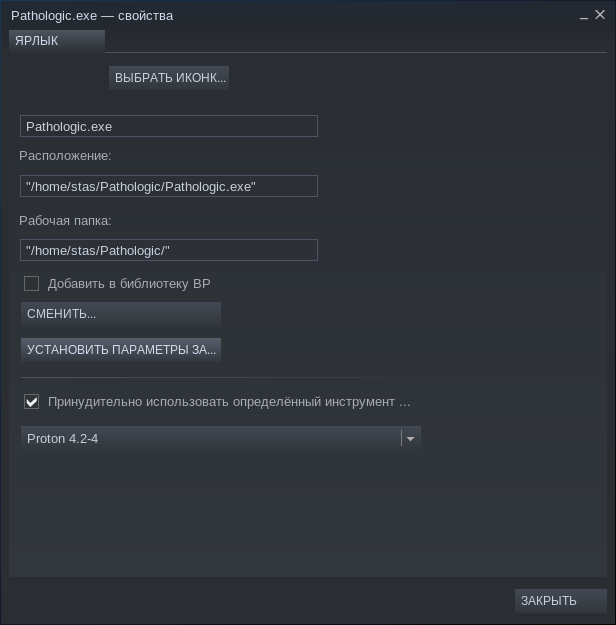
All seems correct?
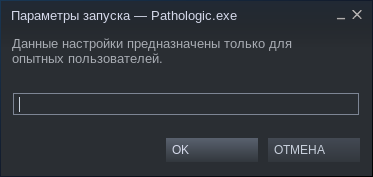
Hmm, it just seems that the problem was in
the way I was launching it: I was doing a right
click and in pop-up menu select "Launch".
This didn't work with the EXE. But occasionally
I double-clicked on it instead, and it launched. :)
It may be a bug in fact, because Right-click+Launch
works for all other games, but not for the EXE short-cut.
yeah wouldn't surprise me, I typically press the play button just to be sure.
There seems to be a bug in Steam launcher for non-steam games run via Proton. Steam doesn't seem to run proton inside Steam runtime.
Or.. it might attempt to run, but no Steam runtime libs are in LD_LIBRARY_PATH. At least that's what 'run' (game runner script that is exported when you enable PROTON_DUMP_DEBUG_COMMANDS=1) shows:
LD_LIBRARY_PATH="/home/maciek/.local/share/Steam/SteamApps/common/Proton 4.11/dist/lib64/:/home/maciek/.local/share/Steam/SteamApps/common/Proton 4.11/dist/lib/::"
but for successful library path propagation from steam-runtime's run.sh, it should have been:
LD_LIBRARY_PATH="$LD_LIBRARY_PATH:/home/maciek/.local/share/Steam/SteamApps/common/Proton 4.11/dist/lib64/:/home/maciek/.local/share/Steam/SteamApps/common/Proton 4.11/dist/lib/::"
And indeed, once I fix 'run' to append, not replace LD_LIBRARY_PATH, and manually call 'run' via steam-runtime's run.sh, it works. At least I was able to successfully install StarCraft remastered. (now trying to run it, for now having some issues with steam appId).
Evidence in steam-*.log:
9355.206:0016:0019:err:module:load_so_dll failed to load .so lib "/home/maciek/.local/share/Steam/SteamApps/common/Proton 4.11/dist/bin/../lib64/wine/winebus.sys.so": libudev.so.0: cannot open shared object file: No such file or directory
9355.206:0016:0019:err:ntoskrnl:ZwLoadDriver failed to create driver L"\\Registry\\Machine\\System\\CurrentControlSet\\Services\\WineBus": c0000142
9355.207:000c:000d:fixme:service:scmdatabase_autostart_services Auto-start service L"WineBus" failed to start: 1114
Thanks for the great work Valve! Much appreciated!
Looks like something that should be fixed ASAP!
Hello @reavertm, please open a new issue report.
I wasn't aware you could use Steam's proton in this way. I've looked for guides, failed to find any information whatsoever and deduced it can't be done yet. Could someone link to relevant information?
Related threads
- Steam Play don't launch any gamesprotonclosed same upstream bug
- Support non-steam gamesprotonclosed same upstream bug
- Install non-steam game?protonclosed same upstream bug
- [Question] Running .exe files under Protonprotonclosed same upstream bug
- Half-Life (70) - Mods under Protonprotonclosed same upstream bug
Proton versions
proton 4.11x1 2019-08
Launch options
PROTON_DUMP_DEBUG_COMMANDS=1)x1 2019-08
Upstream links
- ValveSoftware/steam-for-linux/issues/5677x1 2019-01
- ValveSoftware/Proton/issues/122x1 2018-08
Your system information
Please describe your issue in as much detail as possible:
It would be great to be able to launch other apps and games with Proton from Steam directly. There are many alternative vendor-specific stores around like Battle.NET, Origin, UPlay and such. Unfortunately, some franchises migrate there from Steam and while we have the first episodes on Steam the recent installations are somewhere else. One of such examples is the Mass Effect series, only two parts are on Steam and the third is on Origin. Origin and ME3 work quite well on Wine, I completed it years ago with all DLCs but now it's kind of a hassle to setup the prefix and such. Would be great to be able to "add a non-Steam game" for Windows so that a Proton prefix is created and used automatically. Maybe even an installer support to install the store program itself and run it, all using Steam and Proton.