Steam In-Home Streaming from Windows to Linux causes grey/green screen
Hello @Pobega, please give #5337 a read and compare it to your experience. Like that issue, are you able to take screenshots of those games without IHS involved?
Using the system screenshot tool? Here's a screenshot of it at the title screen with and without the debug overlay. I'm not familiar with screenshots during streaming, but using the Steam hotkeys seems to take screenshots on the host so I used a local screenshot tool to take these. If there's a hotkey I'm unaware of to take a screenshot from the client let me know.
Note: I couldn't recreate the green screen this time, but it seems to sometimes be green and sometimes be some sort of weird grey overlay.
Also this happens in all games I've tried, not just Capcom RE Engine titles. I even tried a few older games (Portal as an example) and it happened to all of them, so it doesn't seem to be related to the host/game.

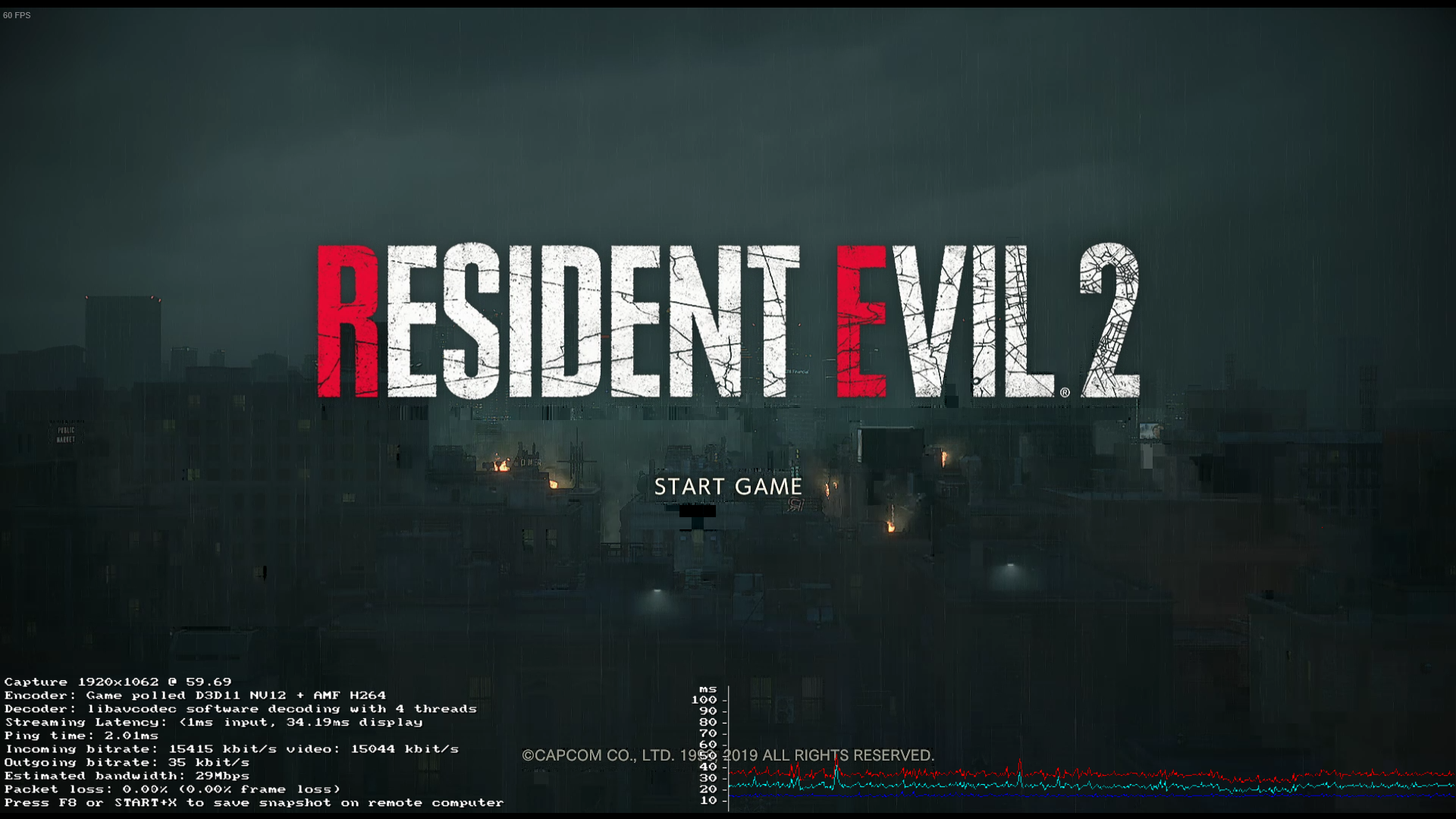
Again, to note, the settings are identical in both of these screenshots outside of the overlay.
Hello @Pobega, please give #5337 a read and compare it to your experience. Like that issue, are you able to take screenshots of those games without IHS involved?
I was the original reporter of #5337.
The new issue that @Pobega is having isn't limited to UE4 engines or Windows->Linux. I am streaming from Linux->Linux and I see the issue in all my games: native and non (Proton) with various engines.
- Stellaris (native client and proprietary paradox engine): Suffers from Green screen; hear audio in background
- Rimworld (native client and Unity engine): Suffers from inverted colors; hear audio in background
- Divine Divinity (proton): Suffers from inverted colors
- Helium Rain (native client and UE4 engine): Suffers from green screen; hear audio in background
- Hammerwatch (native client): Suffers from green screen; hear audio in background
- Firewatch (native client): Suffers from inverted colors; hear audio in background
To recap this is a MAJOR Linux streaming regression that affects all games from what I can tell.
However, it does not appear to affect my steam-link
Steam client version (build number or date): Jan 31, 2019 (1548979876)
Distribution (e.g. Ubuntu): Fedora 29
Opted into Steam client beta?: No
Have you checked for system updates?: Yes
Hardware: Nvidia GTX 1080 TI
Software: Mesa 18.2.8 / Nvidia 415.27
I have the exact same issue. Steam updated today (I was not enrolled in beta) and the problem emerged. Host is windows 10, client is ubuntu 18.04. Changing various options does not change the result, except for the performance monitor, as said above.
From the forums this seems to be a generalised issue: https://steamcommunity.com/groups/homestream/discussions/0/1743357605566991061/
In addition: colour distortion regression happens with many games and even "non-steam games" and apps.
Same issue. Just wanted to add that same happens with host as a linux system (tried both windows and linux on host, client is laptop with only linux).
Also because this happened after self updater updated steam I tried reverting to an earlier steam version still in my package managers cache (from steam 1.0.0.59-1 to 1.0.0.56-1), however that did not have any effect on the issue. Mb I'm missing something with were and how steam is installed.
edit: wtf I set new password using my reg email to sign in and comment here, but I never created a github account with this name, idk were this name is from, this is rly weird. Also totally unrelated to this issue, sorry.
Same issue here, streaming from Win 10 to Linux (elementary), the image is mostly green and badly distorted. Broke immediately after the client update on 1 Feb 2019.
Steam client application
Built: Jan 31 2019, at 23:11:14
Steam API: v018
Steam package versions: 1548979876
Processor Information:
CPU Vendor: AuthenticAMD
CPU Brand: AMD A10-7300 Radeon R6, 10 Compute Cores 4C+6G
CPU Family: 0x15
CPU Model: 0x30
CPU Stepping: 0x1
CPU Type: 0x0
Speed: 1900 Mhz
4 logical processors
4 physical processors
HyperThreading: Unsupported
FCMOV: Supported
SSE2: Supported
SSE3: Supported
SSSE3: Supported
SSE4a: Supported
SSE41: Supported
SSE42: Supported
AES: Supported
AVX: Supported
CMPXCHG16B: Supported
LAHF/SAHF: Supported
PrefetchW: Unsupported
Operating System Version:
elementary OS 5.0 Juno (64 bit)
Kernel Name: Linux
Kernel Version: 4.15.0-45-generic
X Server Vendor: The X.Org Foundation
X Server Release: 11906000
X Window Manager: Mutter(Gala)
Steam Runtime Version: steam-runtime-beta-release_2019-01-10
Video Card:
Driver: X.Org AMD KAVERI (DRM 2.50.0 / 4.15.0-45-generic, LLVM 6.0.0)
Driver Version: 3.0 Mesa 18.0.5
OpenGL Version: 3.0
Desktop Color Depth: 24 bits per pixel
Monitor Refresh Rate: 60 Hz
VendorID: 0x1002
DeviceID: 0x130a
Revision Not Detected
Number of Monitors: 1
Number of Logical Video Cards: 1
Primary Display Resolution: 1920 x 1080
Desktop Resolution: 1920 x 1080
Primary Display Size: 13.54" x 7.60" (15.51" diag)
34.4cm x 19.3cm (39.4cm diag)
Primary VRAM: 1024 MB
Sound card:
Audio device: ATI R6xx HDMI
Memory:
RAM: 6899 Mb
I identified this in the beta version and rolled back to non-beta. I regret not chiming in earlier.
Tested this afternoon. I loaded a streaming game before applying today's update and the game appeared fine. I applied the new Steam client update, loaded the exact same game, and was presented with a pure green screen. (Usually the colours have been inverted. Green was an interesting change.)
I play almost exclusively on my lower-end Linux laptop streaming from my Win10 gaming rig.

Steam client application
    Built: Jan 31 2019, at 23:11:14
    Steam API: v018
    Steam package versions: 1548979876

Computer Information:
    Manufacturer:  Unknown
    Model:  Unknown
    Form Factor: Laptop
    No Touch Input Detected

Processor Information:
    CPU Vendor:  GenuineIntel
    CPU Brand:  Intel(R) Core(TM) i5-5300U CPU @ 2.30GHz
    CPU Family:  0x6
    CPU Model:  0x3d
    CPU Stepping:  0x4
    CPU Type:  0x0
    Speed:  2900 Mhz
    4 logical processors
    2 physical processors
    HyperThreading:  Supported
    FCMOV:  Supported
    SSE2:  Supported
    SSE3:  Supported
    SSSE3:  Supported
    SSE4a:  Unsupported
    SSE41:  Supported
    SSE42:  Supported
    AES:  Supported
    AVX:  Supported
    CMPXCHG16B:  Supported
    LAHF/SAHF:  Supported
    PrefetchW:  Unsupported

Operating System Version:
    Ubuntu 18.04.1 LTS (64 bit)
    Kernel Name:  Linux
    Kernel Version:  4.15.0-44-generic
    X Server Vendor:  The X.Org Foundation
    X Server Release:  11906000
    X Window Manager:  GNOME Shell
    Steam Runtime Version:  steam-runtime-beta-release_2019-01-10

Video Card:
    Driver:  Intel Open Source Technology Center Mesa DRI Intel(R) HD Graphics 5500 (Broadwell GT2) x86/MMX/SSE2
    Driver Version:  3.0 Mesa 19.0.0-devel - padoka PPA
    OpenGL Version: 3.0
    Desktop Color Depth: 24 bits per pixel
    Monitor Refresh Rate: 60 Hz
    VendorID:  0x8086
    DeviceID:  0x1616
    Revision Not Detected
    Number of Monitors:  1
    Number of Logical Video Cards:  1
    Primary Display Resolution:  1920 x 1080
    Desktop Resolution: 1920 x 1080
    Primary Display Size: 12.20" x 6.69" (13.90" diag)
                                            31.0cm x 17.0cm (35.3cm diag)
    Primary VRAM Not Detected

Sound card:
    Audio device: Intel Broadwell HDMI

Memory:
    RAM:  7661 Mb

Miscellaneous:
    UI Language:  English
    LANG:  en_CA.UTF-8
    Total Hard Disk Space Available:  167983 Mb
    Largest Free Hard Disk Block:  58093 Mb
    VR Headset: None detected
Same thing affecting me. Host is AMD 580 and client is NVIDIA Quadro M2000M, Linux on both hosts. Just anecdotal, but the host was in the beta and the client wasn't; I started having issues when the client updated earlier today. Client-side bug?
EDIT: I've attached the output when running "steam" in the terminal and trying to stream. The only real thing of note is
ffmpeg verbose: Opened VA display via X11 display :0.0. ffmpeg error: Failed to initialise VAAPI connection: -1 (unknown libva error). CVAAPIAccel: av_hwdevice_ctx_create() failed libavcodec software decoding with 4 threads
Mostly full output here:
Running
Steam on debian 64-bit
STEAM_RUNTIME is enabled automatically
Pins up-to-date!
[2019-02-01 20:54:10] Startup - updater built Jan 31 2019 23:10:49
[2019-02-01 20:54:10] Opted in to client beta 'publicbeta' via beta file
You are in the 'publicbeta' client beta.
[2019-02-01 20:54:11] Verifying installation...
[2019-02-01 20:54:11] Verification complete
Initializing player
Refresh rate: 60.00
Effective rate: 59.75
Video size: 3840x2160, output size: 3840x2160
Video rect: 3840x2160 at 0,0
Texture rect: 3840x2160 at 0,0
Initialized player
Server available at address: ***
Connecting to server at address: ***
Session state Idle -> Connecting
Session state Connecting -> Handshake
Video size: 3840x2160, output size: 3836x2079
Video rect: 3696x2080 at 70,0
Texture rect: 3840x2160 at 0,0
Video size: 3840x2160, output size: 3840x2160
Video rect: 3840x2160 at 0,0
Texture rect: 3840x2160 at 0,0
Session state Handshake -> Authenticating
Got control packet k_EStreamControlServerHandshake
Session state Authenticating -> Negotiating
Got control packet k_EStreamControlAuthenticationResponse
Got control packet k_EStreamControlNegotiationInit
Session state Negotiating -> StreamStarting
Got control packet k_EStreamControlNegotiationSetConfig
Session state StreamStarting -> Streaming
Sending HID device 046d/c24a/0 at 0001:0013:00
Sending HID device 046d/c24a/1 at 0001:0013:01
Sending HID device 2516/001a/0 at 0001:0017:00
Sending HID device 2516/001a/1 at 0001:0017:01
Sending HID device 0765/5010/0 at 0001:0009:00
Sending HID device 056a/5051/0 at 0001:0007:00
Sending HID device 056a/5051/1 at 0001:0007:01
Got control packet k_EStreamControlSetQoS
Got control packet k_EStreamControlSetTargetBitrate
Starting audio stream: frequency=48000, channels=2
Opened audio device: format=2, channels=2, frequency=48000
Initialized audio decoder: codec=3, sample rate=48000, channels=2
Got control packet k_EStreamControlStartAudioData
Got control packet k_EStreamControlSetSpectatorMode
Got control packet k_EStreamControlSetActivity
Flushing audio, 190 ms queued, 50 ms maximum, delivery delay = 0
Video size: 3840x2160, output size: 3840x2160
Video rect: 3840x2160 at 0,0
Texture rect: 3840x2160 at 0,0
Got control packet k_EStreamControlStartVideoData
Got control packet k_EStreamControlVideoEncoderInfo
ffmpeg verbose: Opened VA display via X11 display :0.0.
ffmpeg error: Failed to initialise VAAPI connection: -1 (unknown libva error).
CVAAPIAccel: av_hwdevice_ctx_create() failed
libavcodec software decoding with 4 threads
ffmpeg verbose: Reinit context to 3840x2160, pix_fmt: yuv420p
Video size: 3840x2160, output size: 3840x2160
Video rect: 3840x2160 at 0,0
Texture rect: 3840x2160 at 0,0
Targeting 29.88 FPS
Got control packet k_EStreamControlSetTargetFramerate
Got control packet k_EStreamControlSetTargetBitrate
Video size: 3840x2160, output size: 3840x2160
Video rect: 3840x2160 at 0,0
Texture rect: 3840x2160 at 0,0
Video size: 3840x2160, output size: 3836x2079
Video rect: 3696x2080 at 70,0
Texture rect: 3840x2160 at 0,0
Marking frame 75 complete with status k_EStreamFrameResultDroppedLate
...
Marking frame 177 complete with status k_EStreamFrameResultDroppedLate
Session state Streaming -> StreamStopping
Stopped audio decoder
Streaming session complete, average network time: 0.06ms, stddev: 0.25ms, 0.00 percent frame loss, result: excellent
Session state StreamStopping -> Idle
[2019-02-01 20:54:53] Shutdown
Exact same issue after update.
Windows 10 Host
Linux Client
Same problem here. It was working perfectly fine until last update. Host Windows 10 (Nvidia 1060) - Client Linux (Manjaro Gnome - Intel Graphics).
Same problem here. Windows 10 host, Debian Linux client. Streamed games this morning perfectly, came back later to play more, on startup the Linux client updated, and this issue appeared. No other software or driver changes were made on the host or client in-between.
Nvidia 1070 on the host, 1050 on the client.
Exact same issue after update for me too
Windows 10 Host
Linux Client
Displaying performance turning it back to normal tho
Same issue here.
Since yesterday, bad quality streaming, washed out. It disappears if I turn on performance statistics.
Windows 10 host, NVIDIA GPU; I7
Ubuntu 18.04 client, intel graphics 655, i3
The issue is with ALL games.
Same issue, I had it on steam beta and needed to rollback to mainstream in order to fix it.
With the last update, it seam that the issue have been brought to main ...
Windows 8.1 host, Nvidia 1080Ti, i5
Linux Fedora 29 client Nvidia 1080, I7
streaming from Linux to Linux also shows this issue
Same issue after latest update. Issue emerges on 2 nodes. Switching between Beta and Stable release does not make a difference anymore.
Clent Node 1 openSUSe Leap 15.0 Radeon graphics
Client Node 2 openSUSe Leap 15.0 Intel Atom Graphics
Server Node Win 10 AMD R9 390 19.1.1
Enabling "Display Performance Information" confirmed as workaround.
It was a deployment to end user on a Friday, on a gaming platform with no end-user roll-back option.
Could I suggest to Valve to implement a #NoDeployFriday policy?
Your system information
Steam client version (build number or date): Jan 31, 2019 (1548979876)
Distribution (e.g. Ubuntu): Manjaro (64 bit)
Opted into Steam client beta?: No
Have you checked for system updates?: Yes
Hardware: i7 6500U, Intel HD 520
Software: 3.0 Mesa 18.3.2
Host Info:
Steam client version (build number or date): Jan 31, 2019
Distribution: Windows 10
Opted into Steam client beta? No
Hardware: 4790k, GTX 980
Please describe your issue in as much detail as possible:
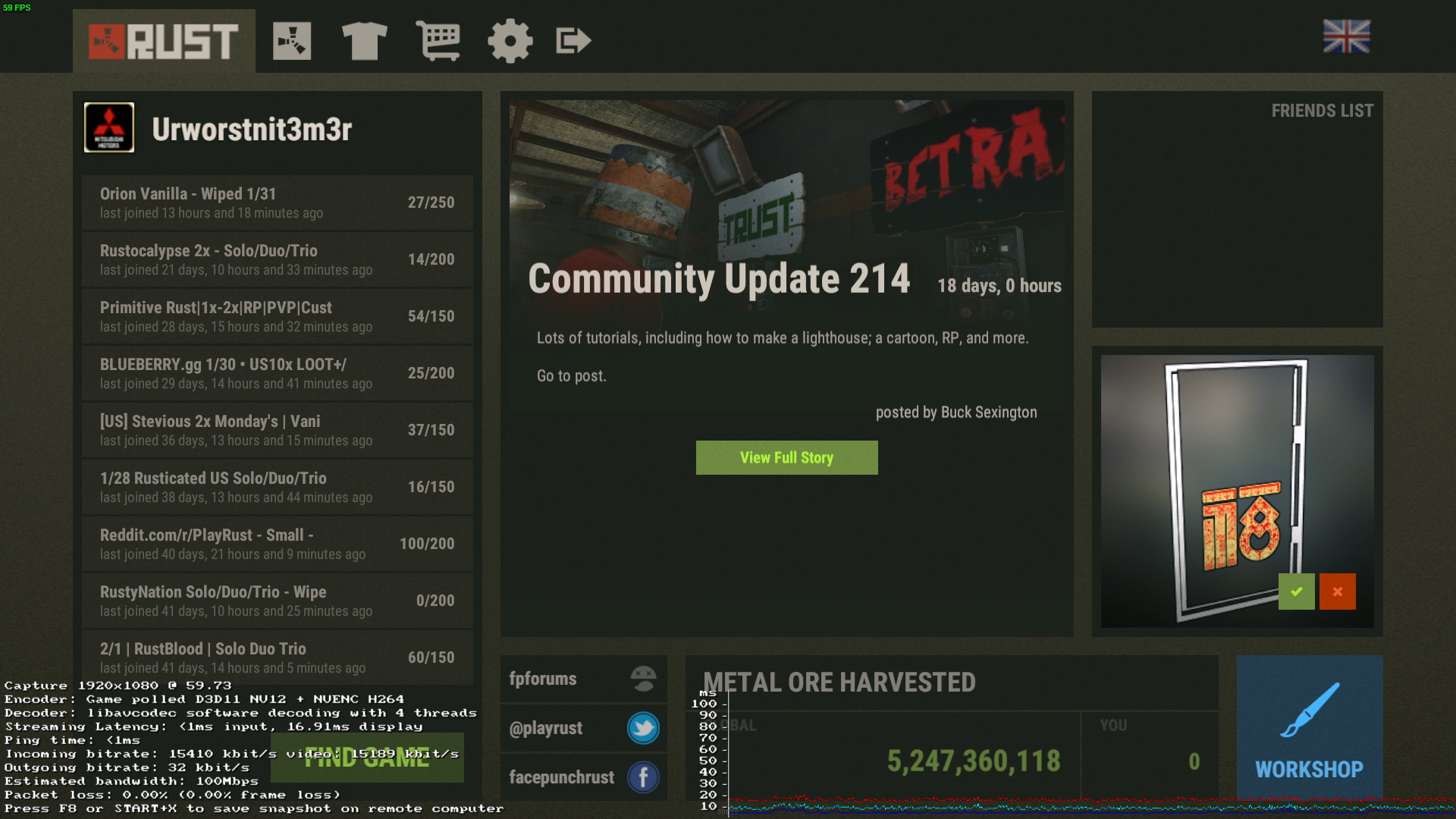
When I use In-Home streaming I get washed out colors when trying to stream from my Windows PC.

As others have said when you use the "Display Performance Information" option, it works perfectly fine.
Steps for reproducing this issue:
Use a Windows host to stream a game to a Linux client
Someone on the Steam Forums thread posted that they're experiencing this with the macOS Streaming Client too.
I am getting this issue as well, since yesterday. It's like YCrCb data is being drawn to an RGB surface or something.
I am streaming from Windows 10 to Ubuntu 16.04.
I can confirm this happens on Mac clients too.
TLDR; 2 near identical setups, one has the problem the other does not.
I have 2 different systems set up for streaming, for my wife and myself. My wife's system is experiencing this and mine isn't. The hosts are almost exactly the same.
Screenshot of the problem: https://imgur.com/a/6GYXvhr
Hosts: Intel CPUs (i7-4790K), Nvidia 970GTX, Windows 7 64bit
The only difference between hosts is 1 has a Fit-Headless (max 1080p) and 1 has a Fit-Headless-GS (set to 1440p).
Both hosts have latest Nvidia drivers.
Clients are different.
Without problem: Debian stable (9.7), Lenovo 450s (Intel CPU, Intel 5500 GPU), hardware decoding
With problem: Ubuntu 18.04, AMD Ryzen 5 1600, Nvidia 1050 GPU (using latest drivers), hardware or software decoding
I tried with and without hardware acceleration on both. Updated video drivers on both hosts and affected client. Nothing helped.
Note enabling the 'Display performance information' option does fix this as a workaround.
Just made an account to add my comment as well.
Win10-64 -> Mint 18.3 KDE
Exactly as everyone else has described above.
I don't think a list of my hardware is relavent as this (IMHO) has been confirmed as a Steam software regression issue. My screens look the same as above, including the work around screenshots.
- No issues streaming last night for literally years prior
- Steam updated this morning (JST)
- Tried to stream a game from the Win10 Host
- Got the ultra grey somtimes green screen
- Searched internet for options
- Tried with "Display performance information" - works with no display issues
Thank you in advance for fixing this as quickly as possible ^_^v
Happens for me with Linux host -> Linux client as well.
Client details:
Computer Information:
    Manufacturer:  Unknown
    Model:  Unknown
    Form Factor: Laptop
    No Touch Input Detected

Processor Information:
    CPU Vendor:  GenuineIntel
    CPU Brand:  Intel(R) Core(TM) i7-8550U CPU @ 1.80GHz
    CPU Family:  0x6
    CPU Model:  0x8e
    CPU Stepping:  0xa
    CPU Type:  0x0
    Speed:  4000 Mhz
    8 logical processors
    4 physical processors
    HyperThreading:  Supported
    FCMOV:  Supported
    SSE2:  Supported
    SSE3:  Supported
    SSSE3:  Supported
    SSE4a:  Unsupported
    SSE41:  Supported
    SSE42:  Supported
    AES:  Supported
    AVX:  Supported
    CMPXCHG16B:  Supported
    LAHF/SAHF:  Supported
    PrefetchW:  Unsupported

Operating System Version:
    Linux 4.x (64 bit)
    Kernel Name:  Linux
    Kernel Version:  4.18.8-2-surface4
    X Server Vendor:  The X.Org Foundation
    X Server Release:  12001000
    X Window Manager:  i3
    Steam Runtime Version:  steam-runtime-beta-release_2019-01-10

Video Card:
    Driver:  Intel Open Source Technology Center Mesa DRI Intel(R) UHD Graphics 620 (Kabylake GT2) x86/MMX/SSE2
    Driver Version:  3.0 Mesa 18.3.2
    OpenGL Version: 3.0
    Desktop Color Depth: 24 bits per pixel
    Monitor Refresh Rate: 59 Hz
    VendorID:  0x8086
    DeviceID:  0x5917
    Revision Not Detected
    Number of Monitors:  1
    Number of Logical Video Cards:  1
    Primary Display Resolution:  3000 x 2000
    Desktop Resolution: 3000 x 2000
    Primary Display Size: 10.63" x 7.09" (12.76" diag)
                                            27.0cm x 18.0cm (32.4cm diag)
    Primary VRAM Not Detected

Sound card:
    Audio device: Realtek ALC295

Memory:
    RAM:  15809 Mb

Miscellaneous:
    UI Language:  English
    LANG:  en_GB.UTF-8
    Total Hard Disk Space Available:  163722 Mb
    Largest Free Hard Disk Block:  136449 Mb
    VR Headset: None detected

Recent Failure Reports:
Experiencing the same discoloration with Arch Linux streaming client (last full system update on 2019-01-26) and Windows 10 streaming host.
For as long as I can remember, my beta status has been "Not participating" on both systems. This issue was not present on Friday, but was present starting Saturday. The performance information workaround suggested by others does prevent the discoloration when enabled.
Advanced client options (Linux side):
- Automatic bandwidth limit
- Limit to display resolution
- Stereo speakers
- Enabled hardware decoding
- Enabled display performance information (enabled as a workaround suggested by others)
Advanced host options (Windows side):
- Disabled changing host resolution to match client
- Disabled dynamic capture resolution
- Disabled NVFBC capture
- Enabled hardware encoding on all listed graphics card types
- Automatic encoding thread count
- Disabled network prioritization
Linux client's system information:
Computer Information:
    Manufacturer:  Unknown
    Model:  Unknown
    Form Factor: Desktop
    No Touch Input Detected

Processor Information:
    CPU Vendor:  AuthenticAMD
    CPU Brand:  AMD A10-7850K Radeon R7, 12 Compute Cores 4C+8G
    CPU Family:  0x15
    CPU Model:  0x30
    CPU Stepping:  0x1
    CPU Type:  0x0
    Speed:  3700 Mhz
    4 logical processors
    4 physical processors
    HyperThreading:  Unsupported
    FCMOV:  Supported
    SSE2:  Supported
    SSE3:  Supported
    SSSE3:  Supported
    SSE4a:  Supported
    SSE41:  Supported
    SSE42:  Supported
    AES:  Supported
    AVX:  Supported
    CMPXCHG16B:  Supported
    LAHF/SAHF:  Supported
    PrefetchW:  Unsupported

Operating System Version:
    Linux 4.x (64 bit)
    Kernel Name:  Linux
    Kernel Version:  4.20.4-arch1-1-ARCH
    X Server Vendor:  The X.Org Foundation
    X Server Release:  12003000
    X Window Manager:  Xfwm4
    Steam Runtime Version:  steam-runtime-beta-release_2019-01-10

Video Card:
    Driver:  X.Org AMD Radeon R9 200 Series (HAWAII, DRM 3.27.0, 4.20.4-arch1-1-ARCH, LLVM 7.0.0)
    Driver Version:  4.5 (Compatibility Profile) Mesa 18.3.1
    OpenGL Version: 4.5
    Desktop Color Depth: 24 bits per pixel
    Monitor Refresh Rate: 60 Hz
    VendorID:  0x1002
    DeviceID:  0x67b1
    Revision Not Detected
    Number of Monitors:  1
    Number of Logical Video Cards:  2
    Primary Display Resolution:  1920 x 1080
    Desktop Resolution: 1920 x 1080
    Primary Display Size: 62.99" x 35.43" (72.24" diag)
                                            160.0cm x 90.0cm (183.5cm diag)
    Primary VRAM: 4096 MB

Sound card:
    Audio device: ATI R6xx HDMI

Memory:
    RAM:  14962 Mb

Miscellaneous:
    UI Language:  English
    LANG:  en_US_custom.UTF-8
    Total Hard Disk Space Available:  2081091 Mb
    Largest Free Hard Disk Block:  2019124 Mb
    VR Headset: None detected

Recent Failure Reports:
Good day! I have three different computers, each of which is Windows 10 and Linux (1 PC) and Linux (2 PC). If you connect to the broadcast from a computer (Linux 1) to a computer (Linux 2), then there is a problem, as in the video. The same thing happens if you connect to the broadcast on Windows. If you connect to the broadcast from Windows to any Linux, then this problem is not observed. Everything worked until the last Steam update. Reinstalling (including manual removal of the Steam folder) on all three devices did not help.
The problem arose precisely after the last Steam update. I tried to arrange settings in Home Broadcast in a different order.
Specifications:
- Host: Windows 10 Pro (clean install, only Steam and nVidia drivers are installed)
(Geforce GTX 285) - Linux 1: Deepin 15.9.1 (based on Debian) nvidia-390.67 driver (driver has not changed) (Geforce GTX 650)
- Linux 2: Deepin 15.9.1 (based on Debian) nvidia-390.67 driver (driver has not changed)
(Geforce 940M)
Видео:
https://youtu.be/2wbYrnzwYJg
Suffering the same issue.
Host: Win7 SP2, nVidia GTX 970
Client: macOS Sierra 10.12, Intel HD 5000
I'm having the same problem. Looks like the color format of the codec is mismatched between the client and host. Like as if one side is interpreting YUV colors as RGB or something.
Host: Windows 10 Pro 64bit - NVIDIA GTX 1080 (Driver 417.71)
Client: Ubuntu 16.04 x86_64 (Kernel 4.13.0-40) - NVIDIA GTX 960 (Driver 415.27)
EDIT - I can also confirm that enabling the display of performance information sort of works as a work-around and the colors come through correctly.
Same issue
Host: Win10 Education 64bit - NVidia GeForce 1060
Client: Fedora 29 (kernel 4.20.5-200.fc29.x86_64) - NVS 5400M
@kisak-valve It might be that the glxChooseFBConfig call in streaming_client gets the wrong FB config with the steam updated version. It might be worthwhile to see what glxChooseFBConfig returns when performance stats are enabled, and when they are not, and then add some attributes to that call to restrict the returned list to a compatible FB config.
Same issue
Host: Win 10 Home 1809, 2x Nvidia GTX 780 SLI
Client: Kubuntu 18.10, AMD 5400k w/integrated Radeon 7450d
Connection: Wired Gigabit
Streaming worked great with the same basic setup 2-3 months ago
Enabling hardware decoding seems to fix this issue for me, as does enabling the performance stats.
The hardware decoding setting does not change anything for me. Only
showing performance stats corrects the problem.
For reference:
Host:
Custom-build
Windows 10
AMD Ryzen 7 processor
Nvidia GTX960 graphics card
Client:
Dell XPS13 (9350)
Debian unstable (last updated on the evening (EST) of Friday 01FEB)
On Mon, Feb 4, 2019 at 2:27 PM the123king [email protected] wrote:
Enabling hardware decoding seems to fix this issue for me, as does
enabling the performance stats.—
You are receiving this because you are subscribed to this thread.
Reply to this email directly, view it on GitHub
https://github.com/ValveSoftware/steam-for-linux/issues/6066#issuecomment-460378806,
or mute the thread
https://github.com/notifications/unsubscribe-auth/AAdfPcq_-N4x8t64ClxMdXm-VldsI7wnks5vKImYgaJpZM4adtrv
.
Same issue here
Host: Win 10 Home 1809, Nvidia GTX1060 (Running in VM, gpu passthrough from streaming client)
Client: Mint 19, Nvidia GTX1050. Runs host machine under KVM with vfio for pci passthrough
Connection: Virtual network bridge (Essentially wired, ~50Gbit)
Streaming worked perfectly in the past, now busted
Enabling the performance overlay corrects the colours. Noted with the overlay enabled it's using software decoding through avformat despite hardware decoding being enabled. Can't tell if hardware decoding is working without the overlay.
All hardware capture/decoding options are enabled in Windows, changing them makes no difference so likely on the decoding side.
Bump. Looks like chroma channels are messed up but it occurs ONLY if the performance metrics are disabled.
Host:
-
OS: Windows 7 SP1 x64
-
GPU: RX 580
-
Capture: Software only, 2 threads
Client:
-
OS: Ubuntu 32-bit
-
GPU: integrated Intel i945 chipset (using software decoder)
Same issue...
Client:
CPU: Dual core Intel Core i7-7600U (-MT-MCP-) arch: Kaby Lake rev.9
Graphics: Card: Intel HD Graphics 620 bus-ID: 00:02.0
Kernel: 4.15.0-20-generic x86_64 bits: 64 gcc: 7.3.0
Desktop: Cinnamon 3.8.9 (Gtk 3.22.30-1ubuntu1) Distro: Linux Mint 19 Tara
Host:
CPU: Ryzen 1800x
OS: Windows 10
Same issue. Glad it's not just me then.
Client:
CPU: AMD Athlon 8 9600
Graphics: Card: iGPU of Athlon 8 9600
Desktop: KDE Plasma
Distro: Antergos OS
Host:
CPU: Ryzen 2700x
GPU: RTX 2080 Ti
Windows 10 Pro
All software is at the latest stable version dated 04.02.19
Resolution and aspect ratio of the Host did not seem to change if i set everything to lower my resolution to 1080p (Originalle 21:9 1440p UWQHD). Gonna try that this evening.
Tested all streaming settings other than the "Show performance metric" thingy. Thanks for the temporary fix idea.
We've got a fix for this. The fix will be in the next Steam Beta update.
We've got a fix for this. The fix will be in the next Steam Beta update.
So, safe to assume we need beta participation enabled, specifically on the client side? Or both host and client?
Should be just on the client and yes requiring beta participation. CC @slouken to correct me if I'm wrong.
Please backport this hotfix to main Linux Steam client. This is a major regression, which deserve fast hotfix merge into release code branch.
Just came to confirm it was happening and the workaround works, but I see it's scheduled for the next update, so... cool! Looking forward to it.
Host PC Windows 10 -> Client Mac OSX 10.13 , same issue here. What seemed to have triggered it was prompting a stream of a game that was already open and running on the host.
Just mentioning that I literally have this bug bookmarked and check it every day to see if the fix is ported yet. The workaround is great, but having all the performance text on the screen really detracts from the experience, especially when playing HUD-heavy games.
If you press F6 on the client it reduces the amount of text to two lines.
Same issue:
Client: OSX 10.14, Steam with last updates
Host Window 10, RTX 2080Ti, Steam with last updates
Workaround doesn't work.
Same issue for last stable and last beta steam builds
Same issue with Linux to Linux
Same here with following setup:
Client:
- Steam client version: Feb 2, 2019 (1549129917)
- Distribution: Ubuntu 18.04.1
- Hardware: Laptop Asus, NVIDIA Corporation GeForce GT 730M/PCIe/SSE2
- Software: 4.6.0 NVIDIA 410.93
- CPU: Intel(R) Core(TM) i7-4500U CPU @ 1.80GHz
- Opted into Steam client beta?: No
- Have you checked for system updates?: Yes
Host:
- Distribution: Windows 7
- Hardware: AMD Radeon HD 6800 Series
- Software: 15.301.1901.0
- CPU: Intel(R) Core(TM) i5-2500K CPU @ 3.30GHz
Same here
client :
- Steam client version: Feb 2, 2019 (1549129917)
- Linux 4.19.18-1-lts "Arch Linux"
- nvidia 1060 GTX
Driver Version: 415.27
OpenGL Version: 4.6
-Opted into Steam client beta?: No - Have you checked for system updates?: Yes
Host:
- windows 10 pro 1803
- nvidia geforce 960m
- Steam client version: Feb 2, 2019 (1549129917)
Latest beta version is now released. Thank you, this has been resolved.
Oh, I was wondering whether or not it was fixed with the latest release. Great news then! Just didn't make it to the changelog. Thanks for the input @LenPayne !
Confirmed, fixed for me as well with the beta release of Feb 8th. Thanks!
Still an issue here even after changing both the client and host to the beta and restarting Steam, forcing a check for updates didn't help either. Windows 10 host with a nvidia 1050ti and Arch Linux client with a nvidia gt 730.
Still happens on Arch, with both computers running the beta version of Steam. Disabling hardware encoding on the host, or decoding on the client also doesn't work, neither does disabling Nvidia NVFBC or setting the host to use the client's desktop resolution.
The only thing that works is enabling "Display Performance Information" on the client.
Host computer: Windows 10 with an Nvidia GTX 970 (driver 399.24)
Client computer: Arch Linux (just updated 15 minutes ago) with an Intel HD Graphics 530 (mesa 18.3.3)
Fixed for me, beta on both host and client, all hw encoding options including NVFBC enabled on both host and client.
For me, enabling beta on client worked as well!
Confirmed as resolved on Leap 15.
Now resolved as of this morning for me as well.
Thanks. I only needed the linux beta. Then windows host is still running the regular version
Confirming it's fixed for me. Ubuntu 18.04 client, Windows 10 host, Steam beta client on both.
When this fix will be released in stable version?
Just throwing my 2c in here that, switching to the beta steam client on my linux computer (in my case, CentOS 7) and leaving the steam client on the Windows host on stable has resolved the color issues for me as well. Looking forward to this being back-ported or whatever to the stable release.
Just tried the latest Linux beta again, and it works correctly with hardware decoding enabled. Dunno why it didn't work a few days ago (sneaky update? CDN took a while to update?), but it looks good now.
I have a solution! The nvidia geforce experience game overlay was the culprit for me. on the server device i disabled the in-game overlay and it worked great.
Disabling the Nvidia Geforce Experience in-game overlay did not solve the problem for me. I still have a greyed-out display when streaming from Windows 10 to macOS Mojave (latest patches, latest non-beta Steam client on each, GeForce 970 with latest drivers).
Here's a screenshot of the Final Fantasy IV title screen; note there appear to be two or three copies of the logo and buttons.

Mac Mac Steam client updated itself to a new version, and it looks like that solved the problem for me.
The fix for this has reached Steam's stable release.
Related threads
- Regression in Remote Play: Certain games now have bleached/washed out colors in stream after Mar 4 updatesteamclosed same upstream bug
Your system information
Host Info:
Please describe your issue in as much detail as possible:
As the title says, when I use In-Home streaming I get a very grey screen or a full green screen when trying to stream from my Windows PC. Streaming works fine on my Link and Link App, so the host isn't the issue.
Keep in mind this is using the Steam Flatpak, but native gives me the same result.
What's strange is that when I use the "Display Performance Information" option, it seems to work perfectly fine. But I'd prefer not to play with all of that information cluttering my screen.
I've tried all combinations of disabling/enabling hardware decoding on the host and client, but the only thing that gets it to work at all is enabling the performance information overlay.
Note: Start+Y on the controller mostly disables the HUD which is nice for playing, but still doesn't solve the initial issue.
Steps for reproducing this issue: