Enabling Shader Pre-caching in steam casues issues with downloads for SteamPlay Titles
@Plagman Just want to add some info.
Every time when I start Steam Client there are "Shader Pre-caching Content" downloads available for many games, ranging from 0 bytes to 100 MiB or more.
When they are "downloaded" there is always a 0 on disk usage meter, but peak network usage meter indicates 8 MiB and total around 300 MiB. I have 100Mbit Internet connection, so I can't tell if this process wastes any Internet traffic or bandwidth of Steam content servers.
Any title is affected, it doesn't matter native client this is or Proton. This happens for each installed game, but only some of them randomly selected from the list.
If I restart Steam Client, games that were updated previously will eventually get "Shader Pre-caching Content" update again, possibly with different sizes.
I've experienced this issue for quite some time and there are no explanation and no way to tell if this is working as intended or a bug.
I've noticed this behaviour as well, every OpenGL/Vulkan (Native & Proton) game I have installed has had a Shader Pre-caching update at least twice in the last few days, some games are getting them every time I start up Steam, are these new updates replacing older files or just adding to the pile?
Also see https://github.com/ValveSoftware/steam-for-linux/issues/6291#issuecomment-496738314
Perhaps it is a small drop in the bucket, and not ultimately taking up more drive space, but with SSDs each write is one step closer to the death of the drive. These repeated downloads from the Steam client are slowly killing our hardware unnecessarily.
Disabling automatic updates has no effect.
Same here, every restart i have ~10 games that will do it....

This issue impact me very badly, i have a 2Mbps downstream bandwidth, and get at near every login 1 GB of Vulkan shaders to download is not funnier
I have same issue with Steam redownloading the Steamworks Common redistributable too when starting Killing Floor 2 after starting/restarting Steam client. Disabling the Shader Pre Caching in Steam settings fixed it for good. Hope this gets fixed soon.
I believe Path Of Exile is one of the games where this problem is most visible, at least in the games I've played on Steam Play.
My current installation has already accumulated 12GB in shadders and daily downloads 1 or 2 files ranging from 300mb to 1.4gb.
[edit] removed the dumb, made statement amendment.
Previously +1, but now it seems to have resolved.
Battlefield 2: Bad Company, Kubuntu 18.04 under steam with Proton 4.11
Turns out that I may have been damaging CRCs (or something) by unnaturally terminating steam because of dumb in the script I was using to manage steam/xbindkeys.... or the shader issue has been silently fixed.
I have not seen it happen since I removed the dumb, and exit steam via steam.
@Zorrototo I'm fairly sure it is helpful. Before I realised that shader downloads were paused in the background, there was very noticeable chop/latency in-game for the first time that I 'looked' at any new areas/things, for each and every map change. However when I allowed the steam shaders to download there was no such disruptions.
TL:DR; by always exiting steam through it's own menu, and realising that shader downloads often queue themselves when I thought nothing was queued, I no longer experience this issue.
Confirming here. Steam tries to download a 1.2GB update to Deep Rock Galactic every time I launch Steam, among other things. Turning off Shader Pre-Caching prevents this.
EDIT: This bug is actually unrelated to SteamPlay for me. It's been turned off for a couple days for me and I just launched Steam and had to download the 1.2GB update again.
Yep it is sad we can not use this feature I also disabled it, hope for a fix one day. Not even sure this can improve performance in games actually.
Sheesh. It's now 2021 and I just realised I'm still getting this.
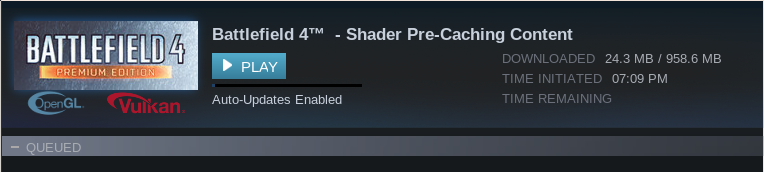
Recent BF4/BFV/BV1 installs now all want multi-gigabyte shader downloads pretty much every single time i restart steam.
Given that I don't leave always it running when I'm not gaming this can be several times a day.
Just wow.
I'm going to allow vulkan background processing (defaults off) and shader precaching, let them all download, and try it once more, but the first time something tries to silently download a gigabyte before it even starts the game it's getting turned off and swearing will occur.
Don't make me come back here and whine about it!
The issue with all games shaders and redistributables redownloading every time you launch steam is fixed in theory. However it may be possible that these games got regular updates to their shader caches? I mean enabling this feature will lead in additional downloads this is inevitable.
No, it's broken.
If I disable shader download the games don't start.
If I enable it this happens almost every time I start steam

When BF4 gets to the head of the queue it will probably want 900MB of stuff. Like yesterday:

And given that I have had BFBC2 (a 2010 title with no updates) locked on proton 4.11-9 rc for months, if not years; PLUS i often see a "pre-processing vulkan shaders" dialog before I start BFBC2: it seems unlikely that shader downloads for this game are required at all, much less this regularly, or exactly the same filesize every time.
I don't specify any compatibility tool for any of the other BF titles, and yet there they are, downloading mass data for no apparent reason.
If I start any of these games, the shader download pauses and afaik all of the games work fine.
Shader caches in the order of a gigabyte plus each.... downloading as often as these try to... thats just ludicrous.
UPDATE: After all shader downloads finishing, steam needed to restart to update (like it also does at least once a day), and no further shader downloading occured. I'm hoping they simply werent competing and this is now the end of it.
PLUS i often see a "pre-processing vulkan shaders" dialog before I start BFBC2
Just that indicates your shaders are not even processed so something is not completing I guess.
Also even a dead game can have shader update as it is not files from the game creator but Steam users.
Just that indicates your shaders are not even processed so something is not completing I guess.
The only thing I can think of that might be causing that is when i kill BFBC2 or steam rather than gracefully exiting it via it's menu.
Also even a dead game can have shader update as it is not files from the game creator but Steam users.
Of course.
But given that I only really play on 2 servers, that always have the same map cycle. Of which I know every part of them intimately, and sometimes play for enough hours in a day to see the entire map list cycle at least once, it seems unlikely that anyone elses shaders would be of any use to me. Never mind 400MB+ of them.
I don't know what's going on for you, but that specific issue about Steam redownloading shaders and/or redistributables every time you restarted Steam when you had Shaders Pre Caching enabled (and the other issue with excessive amount of RAM used while processing the shaders), all these issues to my knowledge are fixed. I still have random updates to my shader caches sometimes, but that doesn't seem abnormal like it was before.
However, maybe Steam manages shaders differently than game files for examples, and it might redownload the whole shaders instead of delta patching the cached shaders (which would lead in excessive download size instead of small patches). I think this is probably what happens if maybe when there is a slight changes in the shader cache Steam refreshes it all.
Maybe there are still some odd cases for specific games but that sounds unlikely to me.
@Lyle-Tafoya something to add to the conversation? Some relevant info?
//EDIT: that's what I thought..Only barking like a stray dog.

I don't know, try to reset your Steam steam --reset I have dozens of Proton games installed, and I just recently got one update to Phasmophobia shaders recently.. can't remember other downloads. The only issue I notice is that it processes shaders everytime I start Steam but this is another issue.
Without more information I think this is useless to post your screenshots.
it's just a reminder that no matter what the people not experiencing it might continue to argue.. it is happening, far too regularly.

OK if you want to continue to post your screenshot for your game go ahead. I'm sure it will help raise concern about a potential issue......
or not.
I guess if it was a widespread issue at least some other people would report it. Some other could try to reproduce it.
I can confirm I do not have the issue. You can continue to post your same screenshot over and over. Where does it go? How does it help?
It's on you to try to troubleshoot if nobody else does.
Maybe start to provide relevant information about your system, the games you have installed in Steam, the games that have issues, your Steam configuration, and so on.. but seriously, posting your screenshot over and over does nothing at all.
It's disappointing that you assume everyone is an idiot, and yet keep posting when really you are not helping at all.
Quite honestly silence would be better.
The screenshots I'm posting are new, every time I notice it happening.
ie: ...if I post one, it has just happened again...and thats the payload size.
And yet you failed to provide once a relevant information. I'm not assuming everyone is an idiot, I explain basic principles you still have to assimilate apparently. Issues don't get fixed magically, and before that issues have to be confirmed, reproduced, and so on.
So keep going send more screenshots, it will help :100:
Please don't send the kind of information I talked about, because it is assuming you're an idiot, and doesn't help at all.
OK.
PS: I see @Lyle-Tafoya is still lurking putting thumbs down emoticon to my posts, and you now joined him, really mature, and also really helping the thread.
//EDIT: and I see people at Steam are evil too, they assume everyone is an idiot and ask for relevant information when opening an issue! Evil Steam!
here for Steam:
Your system information
- Steam client version (build number or date):
- Distribution (e.g. Ubuntu):
- Opted into Steam client beta?: [Yes/No]
- Have you checked for system updates?: [Yes/No]
Please describe your issue in as much detail as possible:
Describe what you expected should happen and what did happen. Please link any large code pastes as a Github Gist
Steps for reproducing this issue:
here for Proton:
Compatibility Report
- Name of the game with compatibility issues:
- Steam AppID of the game:
System Information
- GPU:
- Driver/LLVM version:
- Kernel version:
- Link to full system information report as Gist:
- Proton version:
I confirm:
- [ ] that I haven't found an existing compatibility report for this game.
- [ ] that I have checked whether there are updates for my system available.
Symptoms
Reproduction
You just have to make a little effort, you can do it. You can also reply to the suggestion I made but whatever.. I'm done with you, it's on you to have your issue fixed (looking forward to more screenshots!).

I'll add some details later (playing BF4 in a few minutes) but theres nothing special.
Kubuntu 20.04, i9, RTX2060, nvidia driver 460.91.03, Proton 6.12-GE-1
This just seems to happen every time I start steam to play BF4
I can play BC2 just fine, but BF4 I have to wait almost every time.
Hello @BETLOG, if the shader pre-cache update is changing size every time it updates, then you're seeing the current intended behavior.
I agree that there's room for future improvements, but some kind of delta patching is not yet implemented for the shader pre-cache. The size of that update is fairly irrelevant. Eventually, all the shaders used by the game will be discovered and at that point shader pre-cache updates will become rare for the specific game.
Sorry if I meddle in the quarrel, i have ignored the whole thread after my post some months ago until now
@kisak-valve
The size of that update is fairly irrelevant.
This is my DSL connection (and i don't have anything other that), I am living in Italy, so not a third world underdevelop country, and the same situation happen even in the USA and in Europe .
    Latency:    11.17 ms   (0.50 ms jitter)
   Download:     3.84 Mbps (data used: 5.4 MB)
     Upload:     0.64 Mbps (data used: 980.1 kB)
An 1GB every week or even less for a single game (imagine if you have 2-3 games) for downloading precached shaders would be absolutely not feasbile, i leave my pc turned on bights and days to download a modern AAA games, sometime i give up playing a game when is more than 10 GB to download, say "the size of that update is irrelevent" mean to be out of touch, i would like to have the same connection you have at Valve HQ. A delta patching would be very useful, instead i deactivated the precaching to be able to play a game during my limited free time instead of wasting almost 1 hour
but some kind of delta patching is not yet implemented for the shader pre-cache
Yes that is what I was trying to explain before:
However, maybe Steam manages shaders differently than game files for examples, and it might redownload the whole shaders instead of delta patching the cached shaders (which would lead in excessive download size instead of small patches). I think this is probably what happens if maybe when there is a slight changes in the shader cache Steam refreshes it all.
I agree that it is not convenient if you have slow connection but if this is how it works, you have no choice if you want this feature for now. We can only hope for improvement.
We know its probably not our specs, so posting them feels futile. We know its work in progress, so prodding is all we can really do.
The fact that me posting a screenshots apparently annoys some people should be some indication of how it feels to the users experiencing it.
We don't all have unlimited bandwidth and data where a gigabyte is considered trivial, nor do we all leave steam sitting there using resources while not in use.
The most annoying part for me is that starting BF4 can take several minutes, origin seems to be extremely slow to initiate under proton, and it gives almost no indication that the process is even underway. So when I get tired of waiting and then (several minutes later) discover that BF4 is waiting for a shader download I dont seem to be able to opt out of (the game simply doesnt start if i do) ... then I'm not impressed.
Similarly, after a false start as above, BF4 may ultimately refuse to start at all until i reboot. Given that I am encoding video 100% of the time (and only pause it to play games) this reboot often means killing an encode that has been running for half a day. And lets face it, linux users consider a requirement to reboot before software will function as a serious software failure. One to be scoffed at profusely. Even if it does involve wine which we usually have some sympathy for. But the reboot also just cost me several cents in electricity, and several hours in encoding time.
FYI: These shader downloads are sometimes 'finishing' before they show 100%, so either there is some kind of failure, or the delta patching is in play. (images not related, just the last two times Iv'e seen it happen)

2021-07-25--15-01-12

2021-07-24--13-24-10
Not particularly onerous; just for visual/timing reference "when it all works perfectly and I have already finished downloading ~1GB of shaders"
I'll try to remember to record next time i start steam. Hopefully I'll be able to share the tedium of a classic "delayed-by-1GB-shader-download causing failure to launch requiring reboot".
https://bittube.tv/post/32afc0b0-b790-47d0-b7b8-30fa180310cd
Eventually, all the shaders used by the game will be discovered and at that point shader pre-cache updates will become rare for the specific game.
Feels like we are crypto mining.
...ShaderCoin
To clarify my previous comment, I stated that the download size of the update is irrelevant, not trivial. In terms of troubleshooting, the main detail that matters there is that there was a change in the size of the shader cache, which indicates that there was a legitimate change and not an identical, duplicate download.
@BETLOG, Fossilize is an open source tool, which you can inspect at https://github.com/ValveSoftware/Fossilize. If there's foul play like cryptocurrency mining going on there, I'd like to hear about it.
(Dealing with the Aug 11 2021, 17:14:33 build, on Arch - repo ver 1.0.0.71-1)
I'll report that the way I'm experiencing the issue seems to be consistent with the same data being redownloaded - the sizes are the same (at least up-to the coarse info that Steam's downloads tab will give me). Checking the Nioh 2 appmanifest file (because Nioh 2 requires two different downloads in sequence, the file contents change to reflect the size of each download - this is how I judge that it's reflecting the present download, not some prior one) indicates that the size of the download is the same down to the byte.
Additionally, the size indicator beside the checkbox for Enable Shader Pre-Caching goes down to 0 on every restart of Steam - it goes up as downloads complete in the expected way.
The specific way this manifests on my system is that data is redownloaded after launching & closing a given game for the first time after a Steam restart.
Long shot, but possibly worth mentioning that my system has an hdd that's disproportionately slow compared to all the other components.
Hello @scanstone, the behavior you've described sounds more like #7972 than this issue report.
Hello @scanstone, the behavior you've described sounds more like #7972 than this issue report.
I see - I am not making use of additional library folders, which is why I think the issue may not be the same as #7972 (or if the issue is the same, the reported cause is incorrect). Navigating to Settings > Downloads > Steam Library Folders shows me that I have everything on the same drive, which has (to my knowledge) always been the case on my system.
Being forced to watch this download crawl along every 2nd or 3rd time I play bf4 is extremely tedious, even more so now that it's not even saturating my download speed.

If the game completely stopped micropausing, making mouse input feel weird in a very subtle way, or completely disabling keyboard every so often I might be slightly more tolerant. But it doesnt even stop the game micropausing till ive played for long enough to look at the whole map (and die 20 times while micropaused), so it's really, really tedious.
2nd time i've started it since prior post.
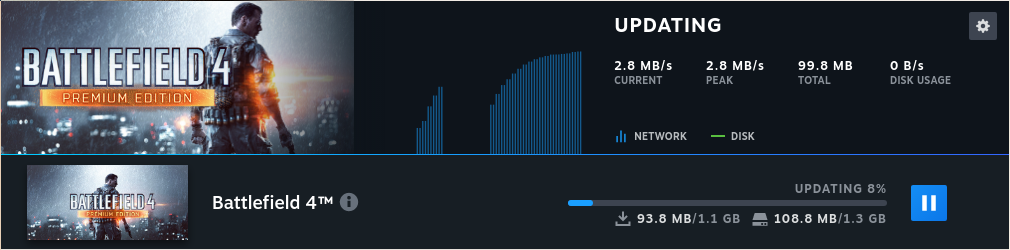
Hello again, it looks like my previous assessment at https://github.com/ValveSoftware/steam-for-linux/issues/6299#issuecomment-885609828 regarding delta patching was incorrect. Instead of that, it looks like steampipe has a threshold for when single files are too large to efficiently use delta patching and that optimization gets disabled resulting in larger file downloads for minor changes.
"Reduced sizes of Vulkan pre-caching datasets by splitting and versioning them according to Proton versions and graphics driver capabilities. As a result, the datasets will start from scratch after updating." in the 2021-10-06 Steam client update is relevant here because it significantly reduced the single file sizes involved and got the shader cache files below the threshold which disables delta patching.
There should still be regular adjustments to shader pre-cache files, but the commonly seen download sizes should be more reasonable than before that update. At this point it looks like the shader pre-cache system is behaving as intended. Please retest.
Your system information
Please describe your issue in as much detail as possible:
Enabling Shader Pre-caching in steam causes my client to download or schedule.
Multiple games with 0 byte updates
Large downloads for games (Risk of Rain 2) often downloads a 460mb update but its not a game patch.
Steamworks Common Redistributables per game
Native games are fine just proton/steamplay games
Steps for reproducing this issue: