Steam update changelog is black until you click on it
I have a hard time knowing if there's something in my system that causes this.
You were able to use the computer enough to file an issue so probably Steam should also work correctly. If it did something so different that it breaks when all other windows work then I would say Steam is at fault for doing something that different. What extent Valve agrees with that, you will find out.
I can confirm this is happening on my system as well. I also use nVidia, but have KDE instead.
Same as @AdamSzopa
neofetch --stdout | xclip -selection clipboard:
OS: Ubuntu 19.04 x86_64
Model: Manual build Rev:xxx
Mainboard: X99-PRO/USB 3.1 Rev 1.xx (ASUSTeK COMPUTER INC.)
Bios: 2017-08-10 AMI Ver:3801
Kernel: 5.0.0-25-generic
Uptime: 2 days, 6 hours, 55 mins
Packages: 2485 (dpkg), 2 (snap)
Shell: zsh 5.5.1
Resolution: 1680x1050 @ 59.88Hz
DE: KDE
WM: KWin
Theme: Breeze Dark [KDE]
Icons: breeze-dark [KDE]
Terminal: konsole
Terminal Font: Hack 16
Font: [KDE]
Locale: en_US.UTF-8
Memory: 3880MiB / 32075MiB [37m[-==============[37m]
CPU: i7-5820K (12) @ 4.0GHz [49.0°C]
GPU: GeForce GTX 1080 Ti
GPU: GeForce 210
GPU Driver: NVIDIA 418.56
CPU Usage: 3%
Disk (/): 12G / 146G (9%)
Disk (home): 50G / 63G (83%)
Disk (efi): 7.7M / 511M (2%)
I'm also experiencing: https://gist.github.com/nightsky30/bbf79a56c1b1e87f3a4ed279c0ea3212
I have the same issue:
https://gist.github.com/Termuellinator/e7a7d27c2ebaad492c0c82ade1035981
had it also on my last system (i5 3550+rx580, also Manjaro KDE), so it's not installation-specific.
I've got the same issue with the Settings-Window in SteamVR (although not always), probably related?
for reference, this i the SteamVR-Issue: https://github.com/ValveSoftware/SteamVR-for-Linux/issues/100
Same issue here on Linux Mint https://gist.github.com/jug007/fdc8b864e6e7142979c2bcb37889493b
Happening to me to, EndeavourOS (Arch), KDE 5.18, Mesa 19.3.3, RX 580. It shows briefly when I update but the windows closes.
https://gist.github.com/wantija/4b5308167dac3eaad658dc81bb2d4d06
As mentioned ^, this has been happening consistently for years on multiple (4+) systems running KDE Plasma + nVidia (plasma-desktop on top of various Ubuntu releases - not Kubuntu) in my house. I've never paid attention to whether or not it also happens when I'm using Gnome on the systems, as I use Plasma most of the time.
Oddly, no other program (or even other parts of Steam) exhibits the issue. So, I suspect something in the way Steam instantiates this particular dialog - especially since clicking in it makes it start redrawing correctly.
Judging by the responses (and the fact that I also have this issue with KDE Plasma) I wonder if this has to do with kwin's compositor? Does anyone have this issue with GNOME or with another window manager/compositor?
EDIT: Also, just the other day when I tried clicking on the contents of the window to make the changelog appear, it stayed black this time.
EDIT2: This is continuing to happen, now. I can't read update notes anymore.
I regularly (not always) have the problem on Muffin (Cinnamon) which is a fork of Mutter (Gnome 3)
Same issue with XFCE on Xubuntu 20.10 w/ Nvidia. And honestly, over the past week or two it has gotten worse. It used to start off black, and when I clicked in the details pane the details and links would show. Now, if I click inside the pane, it remains black. It no longer redraws at all.
After the 30Nov2020 update it seems the 1Dec2020 update displayed the details pane correctly. This is in the beta client. Not sure if fixed or not.
I've been using the beta client, and the update details I was met with this morning (Dec 2) still displayed all black for me. (KDE plasma desktop)
KDE Plasma here and from the latest beta update I can confirm that the changelog no longer stays black.
And now the latest update 3Dec2020 on XFCE is black, and not redrawing again:
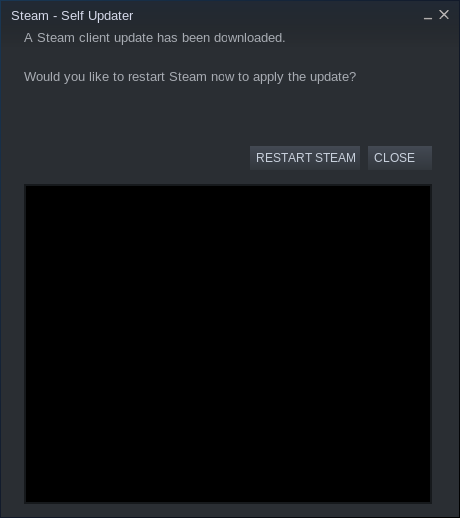
Used to be able to at least click on the black part to make it render correctly, but now that even doesn't work. Seems to show the contents of the first third of the changelog window for me.
I retract my statement.
Annnnd it works again...
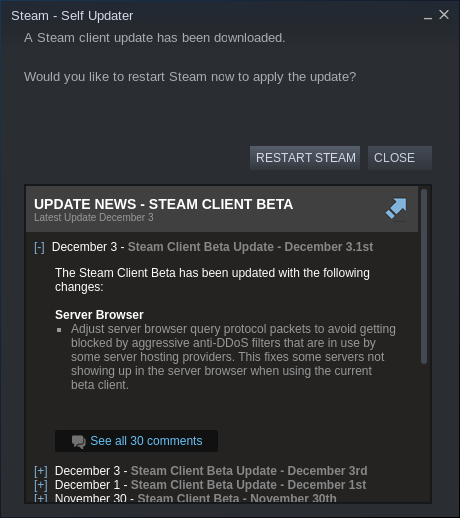
Maybe this is happening after the client has been running a long while? When it showed the changes this time, I had just started the client.
Still black for me at the start. Clicking around in the windows, tabbing out, tabbing back in, clicking+dragging more eventually gets the text to show up. It used to be that it was black and a simple click+drag in the window would cause the text to show immediately.
I recreated it this morning. I edited out about 1-2 minutes of me clicking around trying to get the window to display properly. Click the image below to see the video.
Latest update tonight still does this. The weird thing is you can tell elements are in the window by mousing over them but the text and background remain black. No amount of clicking nor dragging causes it to refresh, it just randomly appears.
after a new install of my PC, it's back again, too - now clicking into it doesn't help anymore, it is only shown once i click on "restart steam"
I can't even get it working with clicking, weirdly when clicking "restart steam", it does appear, so I can get glimpse of it if I'm really quick. KDE Plasma 5.20.4
System Information
- GPU: RX 5700
- GPU Driver: Mesa 21.0.0-devel (git-9ef2c44 2021-01-02 focal-oibaf-ppa)
- Kernel version: 5.8.0-33-generic
- Distro version: Mint 20 (64 bit) (Cinnamon)
I can confirm this problem.
I had the original problem with "Steam update changelog is black until you click on it" issue since around 2019 (back then on Mint 19, but the problem remained with Mint 20 even after full system reinstallation). Now as of recent updates the changelog remains black even when you click on it.
Steam API: v020
Steam package: 1613176728
Steam Runtime: steam-runtime_0.20201203.1
GPU: nVidia GeForce RTX 2060
nVidia Driver: 450.80.02
Kernel: 5.8.0-26-lowlatency
OS: Ubuntu Studio 20.10
Xfce: 4.14
I have the same problem: after wake up from hibernation the Steam Self Updater window has a black rectangle in place of the changelog information.
Workaround that currently works:
pkill -f steamwebhelper.*type=gpu-process- after that - open main Steam window from the tray
- profit - Changelog becomes readable
This is only the first time I have managed to solve the problem - I will try to check again when the problem reappears.
upd: the workaround tested another time and solves the problem again.
Similar to @almaceleste if I simply close the window with its close button and open it a 2nd time by having the client check for steam updates the 2nd window renders fine.
Yeah! :tada:
I got a buggy Updater window again and test my workaround solution - and it temporarily solves the problem like the first time. Simply pkill ... - no visible result - then open main window... and viola :v: - changelog becomes visible.
I want to try adding a resume script to test workaround - I'll write here if I get any result.
I can confirm this for KDE Plasma 5.21 with NVIDIA but it only occured to me lately, so I didn't have this issue back in 2019 when the original report was issued.
The behavior changed, tho: First, when this happened, I was still able to click into the webview to make its contents visible, meanwhile this does nothing and the webview stays blank until I click the "Restart" button (it will then reveal the webview, only to close the window one blink of an eye later).
I can also confirm this, System:
OS: Linux Mint 20.2 x86_64
Host: MS-7972 2.0
Kernel: 5.8.0-59-generic
Packages: 3208 (dpkg), 13 (flatpak)
Shell: zsh 5.8
Resolution: 2560x1440, 1920x1080, 1920x1080
DE: Cinnamon
WM: Mutter (Muffin)
WM Theme: Mint-Y-Dark (Mint-Y-Dark)
Theme: Mint-Y-Dark [GTK2/3]
Icons: Mint-Y [GTK2/3]
Terminal: gnome-terminal
CPU: Intel i7-7700K (8) @ 4.500GHz
GPU: AMD ATI Radeon RX Vega 56/64
Memory: 4195MiB / 32060MiB
Steam client application
Built: Jul 2 2021, at 18:54:20
Steam API: v020
Steam package versions: 1625258093
for me, the behavior is either completely black (clicking it does not change it) or only half black or rarely completely rendering (no black) and clicking anything within it does nothing
Note: this behavior is for the automatically opened "Restart Steam" window
Update:
when closing the update window and then re-opening it from within steam (toolbar-Steam -> Check For Steam Client Updates)
it fully renders and also responds to any clicks or input within it (like scrolling or minimize / maximize changelog notes)
Today I got an update changelog that was actually fully visible. I am on the beta branch.
Yep, since a few beta versions, it sometimes works, but sometimes doesn't.
Yes, at least the last two updates have been visible here as well. Before then I was consistently getting black screens.
The November 19th changelog included an item "Fixed a blank screen when loading some announcements", which seems to correspond to when things started working for me. So, hopefully this can be closed now.
Tentatively closing as fixed.
Since January i didnt have any black changelog window anymore, so it is fixed on my side
I can confirm, it's working since some time now
Always nice to see bugs getting solved without a mention/reference of which MR solved it... :disappointed:
(Most likely something outside of steam that "fixed" it)
edit it seems mentioned in https://github.com/ValveSoftware/steam-for-linux/issues/6451#issuecomment-985500188
Got this today

Clicking on the black does not make the content appear.
Manjaro 21.3.3
KDE 5.24.6
Kernel 5.18.11-1-MANJARO
Mesa 22.1.3

pkill -f steamwebhelper.*type=gpu-process helped, thanks to @almaceleste
Hello @L1Q, please open a new issue report so that your issue can be tracked properly.
Related threads
- Update changelog is blacksteamclosed same upstream bug
- Settings/Status window often blacksteamvrclosed same upstream bug
Your system information
Please describe your issue in as much detail as possible:
Steam update changelog is black until you click on it. Highlighted on this webm.
Peek 2019-08-13 18-04.webm.zip
I have a hard time knowing if there's something in my system that causes this.
Steps for reproducing this issue: