libcef fontconfig - undefined symbol: FcConfigGetSysRoot
Hello @PeterMX, in Steam -> Settings -> Interface, is Enable GPU accelerated rendering in web views (requires restart) checked, and if it is, does unchecking it make a difference?
Hello @PeterMX, in Steam -> Settings -> Interface, is
Enable GPU accelerated rendering in web views (requires restart)checked, and if it is, does unchecking it make a difference?
yes, it is checked. So I unchecked it and I was not able to reproduce the issue.
I don't know if this is useful but related to this issue sometimes I get this for long times:

What video card and driver version are you using?
Nvidia RTX 2060 with driver: 418.56
just in case it is useful I got those files in /tmp/dumps
assert_20190917111816_55.dmp.txt
crash_20190917153317_12.dmp.txt
For reference, both attached minidumps are DUMP_REQUESTED in crashhandler.so.
Same problem here (Gentoo)
Launching Steam from the command line shows repeated spam of:
STEAM_RUNTIME_HEAVY: ./steam-runtime-heavy
./steamwebhelper: symbol lookup error: ./libcef.so: undefined symbol: FcConfigGetSysRoot
Same problem on Arch linux after the most recent Beta update. However, after restarting two or three times this issue might not appear.
Disabling GPU accelerated rendering fixes the issue but I am left with abysmal performance (not that it's adequate with it enabled, either).
I see this error when lauching through a terminal with acceleration disabled:
[*1641.769862:INFO:crash_reporting.cc(245)] Crash reporting enabled for process: gpu-process
[*1641.800316:INFO:crash_reporting.cc(268)] Crash reporting enabled for process: renderer
And this with acceleration enabled:
[*1750.312126:WARNING:x11_util.cc(1422)] X error received: serial 80, error_code 3 (BadWindow (invalid Window parameter)), request_code 4, minor_code 0 (X_DestroyWindow)
[*1750.312174:WARNING:x11_util.cc(1422)] X error received: serial 82, error_code 3 (BadWindow (invalid Window parameter)), request_code 4, minor_code 0 (X_DestroyWindow)
RegisterForAppOverview: 883
RegisterForAppOverview 1: 8ms
RegisterForAppOverview 2: 10ms
[*1756.435253:WARNING:url_request_job_manager.cc(91)] Failed to map: chrome-extension://invalid/
[*1756.439658:WARNING:url_request_job_manager.cc(91)] Failed to map: chrome-extension://invalid/
Setting STEAM_RUNTIME_PREFER_HOST_LIBRARIES to 1 fixed it for me, which is very strange because I don't even have libcef installed on my system. I suspect there is some issue with setting up the library paths in the latest beta.
I can confirm that STEAM_RUNTIME_PREFER_HOST_LIBRARIES=1 permits the library to work.
I typically have this set but disabled it to debug a game that didn't work.
While I was unable to make it work with libcef yet (on NixOS), I'd like to add a small workaround; It seems to work just fine in "Big Picture Mode" as it seems to not rely on libcef for rendering in this mode.
I'd like to chime in that I probably have the same problem. Changing between the community and library tabs makes those clicks actually do something.
ASD.webm.zip
I can trigger this by simply opening Dota 2.
EDIT: System info gist: https://gist.github.com/Managor/28cb5d96c832e97efcda6d1c902ec87c
I think that the basis for this problem existed before the New Library was implemented. Ever since the new version of the Friends List came into the game, it would occasionally blank out and I had no idea why. I worried that the problem might affect the New Library and I was right. I think I can assume, then, that the framework that drives the New Friends List and the New Library is one and the same, and is pivotal to the issue that we are having.
I saw this issue appear yesterday on OpenSuse 15.0.
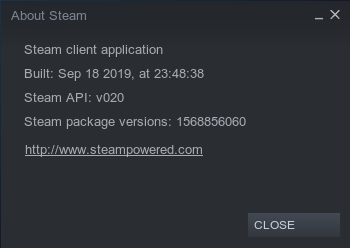
About Steam:
Built Sep 23 2019
Steam API: v020
Steam Package Versions: 1569270763
Using STEAM_RUNTIME_PREFER_HOST_LIBRARIES=1 allows the library and other pages to display.
I'm also experiencing this issue.
Your system information
- Steam client version (build number or date): Sep 30
- Distribution (e.g. Ubuntu): Ubuntu 19.04
- Opted into Steam client beta?: [Yes/No] Yes
- Have you checked for system updates?: [Yes/No] Yes
System info: Here
Would have been better to let us have some sort of browser-plugin to launch the games directly from the webpage. Or even better create a SDK that we could use to build our own ui's... The client is terrible in every way possible... And with this new beta it's worse than ever... Sorry Valve but it's fact.
Happened after going to Inventory
-
Steam client version (build number or date): Built: Oct 7 2019, Steam API v020 Steam package versions: 1570492308
-
Distribution (e.g. Ubuntu): Ubuntu 19.04 64-bit, Kernel Version: 5.0.0-31-generic
-
Opted into Steam client beta?: Yes
-
Have you checked for system updates?: Yes (10/08/2019)
-
Processor Information: CPU Brand: AMD A8-3850 APU with Radeon(tm) HD
-
Graphics Card: Nvidia GefForce GTX 650 Ti BOOST (Kepler)
-
NVIDIA Driver 435.21
Please describe your issue in as much detail as possible:
With enabled "GPU accelerated rendering in web views" mouse clicks within the new UI do not work at all - no response - but ONLY within the web elements. Top bar Steam Client elements (STORE LIBRARY COMMUNITY and top-top drop down menu: Steam View Friends Games ... all work with the mouse. Only the elements INSIDE the 'web view'(?!) trigger no response with mouse clicks.
Turning GPU Acceleration off(!), allows for regular mouse use and all elements in the 'new view' are responsive, again.
Steps for reproducing this issue:
- User New Steam UI. NOT Big Picture Mode - Standard mode.
- GPU Acceleration active (on)
- Switch to the user library "Collections" tab.
- Try to click on anything(!) within the left side list view and/or on anything on the main/right side view elements.
- GPU Acceleration turned off
- Try to click on anything(!) within the left side list view and/or on anything on the main/right side view elements.
- Steam client version (build number or date): Oct 7 2019, at 22:46:25, Steam API v020, Steam package versions 1570492308
- Distribution (e.g. Ubuntu): Arch Linux
- Opted into Steam client beta?: Yes
- Have you checked for system updates?: Yes
I'd like to add that the new library is unusable when Steam is down. It happened today when Steam went under maintenance and the library UI wasn't responsive. I could browse the store, my profile, but anything I did in the library tab didn't work, like if the whole client was stuck. I had to restart Steam for it to work again.
Just adding a reference here:
https://steamcommunity.com/groups/SteamClientBeta/discussions/3/1629665087681729148/
So i at least could fix this issue (tried changing tabs, starting games, seems to be gone now) by unchecking the smooth scrolling in Settings > Interface. I had GPU acceleration turned off before, but i tried with it being on. This resulted in the freeze.
So my guess is: disabling smooth scroll AND gpu acceleration will probably fix it. But thats just a workaround
Edit
Specs:
- Client Version: Oct 7 2019 Build, API v020, Steam package versions 1570492308
- Distro: Opensuse Leap 15.0, Version 19.1.0
- Steam Beta: Yes
- Checked for System Updates: Yes
- CPU: 16x AMD Ryzen 7 2700x
- GPU: Nividia GTX 1080Ti
- Nvidia driver: 435.21
I believe one of the recent updates fixed these issues, on my part anyway; Everything seems to be running perfectly on my end right now and we have some cool "Low Performance Mode" options too!
I just downloaded version 1571182697, buit Oct 15 at 18:19:51.
Unfortunately, I still have the same problem with Blank/Black Library/Store etc.
@d-goldin I'm new to nixos and haven't figured out how to fix it too, but managed to find out that ~/.steam/steam/ubuntu12_64/libcef.so has FcConfigGetSysRoot marked as "U" i.e. external. On my other machine that uses Mint this function is imported from /usr/lib/x86_64-linux-gnu/libfontconfig.so.1.10.1
Adding fontconfig and libcef packages to steam (pkgs.steam.override) with or without STEAM_RUNTIME_PREFER_HOST_LIBRARIES didn't help and now I'm stuck too.
@insideone did you find a proper solution for NixOS?
@qrilka I found that current stable branch had issue & PR, however it wasn't relevant to our issue. I ended up with cloning packages repository and updating from release-19.09 branch and it helped. However, I will switch to 19.09 channel when they build it with this fix
I have same issue. Intel integrated graphics card. Switched to full picture mode and it works fine. Even sounds in steam started to work.
Just had this happen.
A reboot fixes the problem. Maybe killing Steam will as well but an exit does not. You should not need to do anything special to fix this.
This is not with beta anymore however so its also in the release build as of today and previously. I was actually looking for another issue for this that was created previously but this one will do.
Looks like it happened for me after a Feb 2020 Nvidia driver update actually.
I just installed steam for a account on an existing linux computer and the issue has arisen. A different account, with two computers, (the same computer as the new account, and the second account on a separate computer) do not exhibit the issue. All are running the same Linux distro, OpenSuse 15.1
Let's try to move this forward - if you are still experiencing this problem, please provide a complete steam runtime diagnostic, obtained via Help > System Information (wait for the "Steam Linux Runtime Information" to populate and provide that especially!).
Current diagnostic is that on your linux distribution Steam is pinning a newer fontconfig library than the steam runtime which - although newer - is incompatible with CEF (Steam embedded web browser).
@TTimo still experiencing this and also having CClientJobGatherRuntimeInformation: read output failed in System Information.
@TTimo however downgrading fontconfig from 2.13.1 to 2.13.0 fixes the issue on my machine
Also having CEF issues, currently on my machine I have:
local/fontconfig 2:2.13.94-1
    Library for configuring and customizing font access
local/lib32-fontconfig 2:2.13.94-1
    Library for configuring and customizing font access
it seems to be preferring the system libraries over the libraries included in steam
Hello, is anyone still experiencing this issue on an up to date system?
Haven't encountered it in ages. It stopped happening some time after reporting it.
I haven't had it since using: https://archlinux.org/packages/multilib/x86_64/steam-native-runtime/
I uninstalled and ran the steam binary from you. No issues.
I noticed you compare now binary versions and force certain versions or use updated versions. :+1:
Thanks for retesting, closing as fixed some time ago.
Nothing extracted yet.
Your system information
Please describe your issue in as much detail as possible:
Library screen gets freezed when you switch screen(to profile screen for example), then Library screen doesn't respond to mause input, for example you click on a game in the list and it does nothing, but then you switch to other screen(profile for example) then you go back to library and it will be on the game you clicked before you went to profile screen.
Steps for reproducing this issue: