[Library Beta] Games installed via Family Share doesn't get listed when "Installed on this computer" filter is selected
This is how it displays on my machine:
When the installed game is unshared:
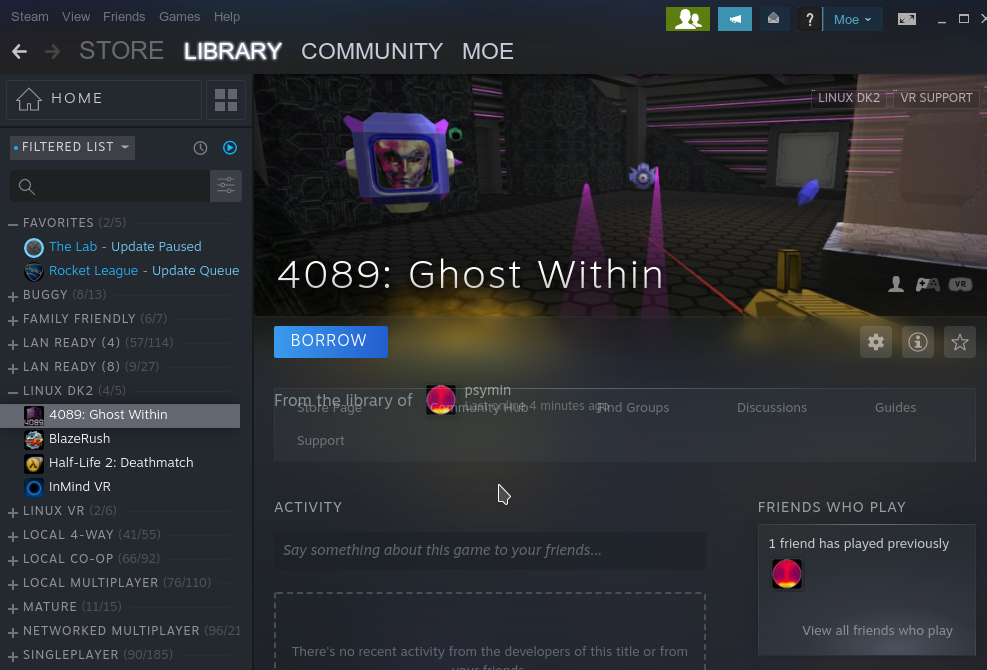
When the shared game is installed on the box:

When the shared game is uninstalled:

Steam System Information:
https://gist.github.com/psymin/862d6c92430b26bfbe93562f263b3547
@psymin
I think instructions were not clear , my bad.
Can you see them listed at left side of library view when you filter as " Installed on this pc "?
Old ui was sorting them like ; "shared account xyz's games" but it doesn't do anymore nor list them as just installed at left side of library list view.
I might not be understanding you properly.
This game 20XX is shared and installed. Is this the way it looks on yours when shared?


@psymin Basically this:

Can you see how games that are shared with me listed as " Games of Creeping Death " while my games are listed on top?
Yes. I think I understand.
Are you hoping to have some of the functionality from the old library interface that is missing from the new library interface? You want the ability to group the games in your inventory based on who is sharing them with you?
On old Steam UI , the screenshot i just posted a moment ago was on " Installed on this PC " filter. It was ( by default ) seperating games by ownership. So i think lack of that view on same " Installed on this PC " filter at new UI is simply a regression.
Hello @Leopard1907, @psymin, per "Fix play bar drawing over the links bar on game details when library sharing is active" in the 2019-09-23 Steam client beta update, please retest this issue.
@kisak-valve I tested it now , that play bar issue is solved. However other issue ( which is about functionality more than cosmetics ) still remains.
Hello @Leopard1907, are you still experiencing this issue on an up to date system?
@kisak-valve Yes, client beta.
https://github.com/ValveSoftware/steam-for-linux/issues/6519#issuecomment-534190779
Like i described in this message back then, this " Games of XYZ ( shared account random name )" section is missing.

8 Bit Boy in this screenshot is installed from shared account.
Currently it just tucks in everything to "uncategorized" which includes both my games and shared account games mixed. Only way to know which account owns that particular game (s) is clicking to each game on library and seeing this:

Only improvement i noticed ( but not so relevant ) is i can add a new shelf like this on this new UI kinda thingy.

But it still not the pre UI revamp behaviour.
On my Library games get listed but as "purchase".
This happened to me several times and every time we had to reshare the games which is very annoying.
I can not trace back when this happens but my guess is after an update from steam client or system update.


Since i created issue too many changes happened and with new way of things handled in this area now, this issue is redundant so closing.
Your system information
Please describe your issue in as much detail as possible:
Just like i said at the title ; "installed on pc" filter just doesn't include those games and says " X number items hidden due to your preferences" which X= installed games count via Family share.
Yet , they can be seen and accessed via " Library Main Page " but with oddly misplaced text that say's it is being shared.
Display size for library user interface elements is set to " Auto" which is the default behaviour.
Example screenshot:
Steps for reproducing this issue: