Steam deletes all files on secondary drive used as steam library on network error
You might want to check out this article in the meanwhile https://wiki.archlinux.org/index.php/File_recovery
Regarding the issue: does it mean that steam wipes all of the library folders it knows about?
I do not believe so, the regular default steam library folder ~/.steam/steamapps that had proton and compatibility information for proton installed to it was not affected. I think it was something to do with the download stalling, then trying to delete the temporary file and for some reason deleting all files in the folder that was assigned as a steam library folder, which was /steam so included /steam/storage, so I need to ensure in the future that I do not place anything else in that folder at all, I thought it would only touch stuff in /steam/steam, the folder it created.
Could Steam have gotten the paths confused & thought your parent /steam directory was actually the /steam/steam directory?
I'm glad I don't hear about this issue more often. I just got my external hard drive set up; so I hope my suspicions prove correct. This is the scariest issue I've read here. Wishing you the best @NolanSyKinsley; nobody deserves to have this happen to them.
bump, I have the same problem. External steam lib mounted under mountpoint /steam in dir steamlib.
Full path: "/steam/steamlib/". This happend to me twice now. First on an old NTFS partition I carried over from Windows, now on an ext4 fs.
- Newes Steam Build from Arch Repository (API: v20, Steam Package Versions: 1588983104)
- Distro: Arch
- Steam Client Beta: YES
- Checked for System Updates: YES
@NolanSyKinsley I may be experiencing the same issue as you in issue #7398. Did you ever resolve this?
I formatted my drive again with a btrfs fs and took snapshots as a precaution shortly after.
Didn't happened to me again since.
Hmm. Perhaps it is the reformat of your partition, which would wipe the library metadata, or simply an update which fixed it. I updated to Steam Client Beta, and wiped my partitions, so hopefully that was enough to fix it :/
@Ominitay are you using a /steam mount path also?
@TTimo I have a game drive, which is automatically mounted at /steam/hdd, yes.
for the record, my steamlib is still under /steam/steamlib without probs
I would cautiously say that Steam hasn't deleted my library yet after doing as I said in #7398, so that's a thing. Presuming that it doesn't happen again, either A: a Steam Client update caused it or B: some sort of metadata corruption happened in the library folder. I would guess at the former, but I would not be able to say.
Update: As of 2020/10/14, my library remains intact, so I may say with reasonable certainty that the issue is resolved for me.
Appears steam just did the same thing to me on a second library, killed everything in /games
For me, it happened only on the non-default libraries (not sure whether being on separate drives was a factor). It didn't happen to me again. I'd recommend opting into the client beta though, because that seemed to stop it from happening once it started.
Client beta was enabled at the time :D Im not entirely sure of what exactly caused it if I'm honest. hence me popping up in a few different issues. For now Ive moved the steam library on that disk to another directory (as it seemed to kill .. but nothing above that)
Perhaps then opt out of the beta. My bet is that it is some sort of error in updating the client.
This has just happened to me again after a client update (it would seem), and given that both my intentionally nested /steam/steamlibraryextradepth/steamlibrary library and /games on my / disk (which is distinct from my home), I now believe that steam is recursively removing everything it can touch on / so long as it doesnt cross filesystem boundaries
This is obviously a major issue that needs to be fixed before it bricks someone's machine.
Actually after poking about this is even stranger. While all my files in /games are gone, only some files in that steamlibrary are gone. wine prefixes are toast but other things and chunks of the games are still there. as are shader caches. so I have no idea what is doing this. But there is obviously some logic running around it that therefore makes me think its "intentional" in its behavior (i,e, the code is doing as instructed, but the instructions were incorrect, or at the wrong level)
... I now believe that steam is recursively removing everything it can touch on
/so long as it doesnt cross filesystem boundaries
In my case steam wiped everything in my steam lib on my secondary hard drive. The default lib location under ~/.steam, which resides on the disk my os is installed on, was still in tact.
In my case steam wiped everything in my steam lib on my secondary hard drive. The default lib location under ~/.steam, which resides on the disk my os is installed on, was still in tact.
Yep, similar thing here, but my secondary disk is on /, as my home dir is a different disk. As I said in my second message, its not quite as cut and dry as that made it out to be, but its still pretty bad as its a completely unrelated path to the library.
So far the reproduction for this problem has always happened to folks with a /steam mount path. Reports from @NolanSyKinsley @littlecoce @Ominitay all fall into that category. My suspicious is that this may be confusing some steam library lookup logic somewhere.
@A-UNDERSCORE-D:
- Is it the case for you as well, steam or a steam library installed under a
/steammount point?
(EDIT: ok I see in your comments you're using a/steammount as well) - Did this happen while running the current Steam beta or while running Steam production?
...My suspicious is that this may be confusing some steam library lookup logic somewhere.
Thats about what it feels like, though I feel (at least my) version of this issue involves steam update as well. Im not sure on that though, which is why I went about a bit and looked for all related "steam deletes stuff" issues
* Is it the case for you as well, steam or a steam library installed under a `/steam` mount point?
  (EDIT: ok I see in your comments you're using a `/steam` mount as well)
Yes and no; it has happened to me with a /steam but its not its own mount, its a plain dir on the disk mounted at /, and the library itself is another subfolder down;
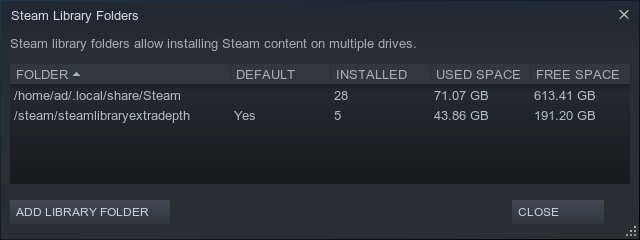
I've also had this issue with a steam library in /games. Both times some but not all of the data in /games was clobbered as well (it completely removed my MultiMC instances)
* Did this happen while running the current Steam beta or while running Steam production?
Beta, every time Ive had it
This issue persisted as long as I didn't delete and reinstall the Steam client. It could be of value to archive the entire installation when this occurs in an effort to reproduce this.
Possible. I have a very old steam install
This happened for me on two installs, one a year or so old, and one only a month or so. I unfortunately didn't take the initiative to archive it with tar to try to reproduce it.
After todays update Ive had no lost files, even though I spent a while doing clever hardlink magic
Hello, is anyone still experiencing this issue on an up to date system?
I have not experienced this since my most recent reinstall. However with how difficult it is to reproduce.
It seems to happen very rarely, and I don't think anyone even knows how to reproduce it.
Though I have not experienced it again, and it's been a year since I last did.
Closing per the last several comments.
Nothing extracted yet.
I think this may be a regression and resurfacing of an old bug, #3677
Please describe your issue in as much detail as possible:
Expected steam not to delete files it has no reason to touch
Steps for reproducing this issue:
Have second drive mounted as /steam for steam to use as a library folder, which it places under /steam/steam while also using secondary drive as a general storage device by using a folder like /steam/storage
Line up a bunch of games to install, around 300GB of downloads, on top of the 200GB or so of games already in the steam library in that folder.
Realize there is a network issue and restart steam thinking it was my system.
Steam cannot start and suddenly ALL files on secondary drive are gone, nothing left but the folders, all files in /steam/storage are hard deleted as well as all game files under /steam/steam/steamapps
I had a lot of files in that storage folder, all told my steam library and files in storage were over a terabyte and steam deleted them ALL in the blink of an eye.