[Library Beta] Unable to set custom artwork from default browser directory
Hello @Vthyarilops, the custom artwork option you've described doesn't appear to be a stock Steam client feature? Are you using some kind of mod that adds it?
The file selection window you've described should be the same one that pops up when selecting a profile picture to upload. Can you check if that has the exact same behavior?
@kisak-valve No it is the new feature to set artwork in the Beta client's new UI, the file selection window is the same as when uploading a profile picture.
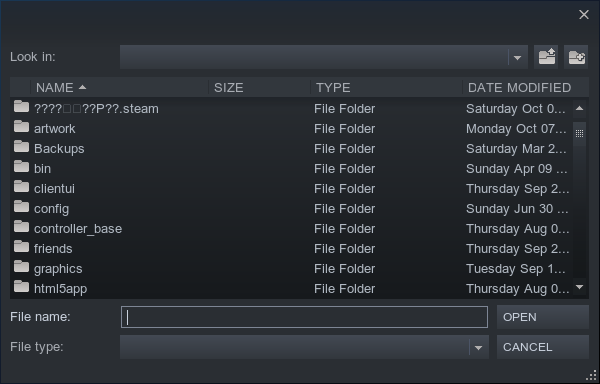

Thanks for clarifying, I was looking at individual games instead of a Collection view.
@kisak-valve No problem, hopefully this gets fixed as it is rather tedious browsing manually through the entire hierarchy (especially if you have a lot of dot folders), simple trick is to copy the path and paste it in the "file name" box and hit open, saves having to browse manually.
The Steam filepicker needs a complete rewrite anyways.
This is probably not an issue any more as steam uses native filepickers now.
Closing per the last comment.
On arch linux, I'm unable to set custom artwork at all using the file picker.
KDE Plasma
file picker that's opened is xdg-desktop-portal-kde.
A friend also had this issue on Fedora KDE
A friend also had this issue on Fedora KDE
I also have this issue, on Fedora KDE, right now.
I never tried before because it wasn't a priority, I was busy doing other things, but put simply:
I can select whatever image, but no matter the format or re-size, they don't apply on anything.
The file in question.
Nothing extracted yet.
Your system information
Please describe your issue in as much detail as possible:
I placed my artwork into a folder i made in ~/.steam/artwork/, when I right click a game and choose custom artwork the browser starts in the path ~/.steam/ if I just browse to the "artwork" folder and choose the picture it will not set, I must first browse to / then manually browse back to /home/$USER/.steam/artwork, it must be something related to the relative path that the file explorer starts in.
Steps for reproducing this issue: