Scrollbar grip invisible until hovered over
steamopen
Steam clientWeb Component
confirmed, this only occurs in certain areas of the steam website
such as when you go to steam news/blog, and click the article
steamcommunity.com
then once you go to discuss
somewhere in here the steam app is calling a scrollbar overlay which is ignoring your linux system wide settings
opening these same webpages in chromium does not change the scrollbar
Hello @codingthat, @arrowgent, are either of you still experiencing this issue on an up to date system?
Yes, still happening here! Tested just now on Linux Mint 20.3 Una 64-bit.
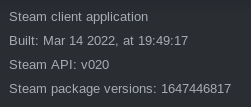
(When I check for updates from within Steam, it says that's up-to-date, but just to be sure...)
Nothing extracted yet.
This is frankly a bit difficult to use:
Your system information
Please describe your issue in as much detail as possible:
I expect that viewing discussions has a scroll bar whose grip is not invisible, but it is.
Steps for reproducing this issue: