Client interface unreadable with high resolution display
Hello @iduno8912, you should be able to use GDK_SCALE=2 to override Steam's HiDPI logic.
Try completely closing Steam, then running GDK_SCALE=2 steam from a terminal.
Hello @iduno8912, you should be able to use
GDK_SCALE=2to override Steam's HiDPI logic.Try completely closing Steam, then running
GDK_SCALE=2 steamfrom a terminal.
This solution works, but this bug is very bad for the UX when you're coming from Windows 10 and checking if the latest Ubuntu would work as my main desktop for the first time in years. See attached screenshot, I'm running with 3 monitors and everything else works scale-wise, which is the first time I can say that for a Linux desktop, but the tiny Steam window really made me squint and feel that all too familiar "Linux papercut" stinging sensation.
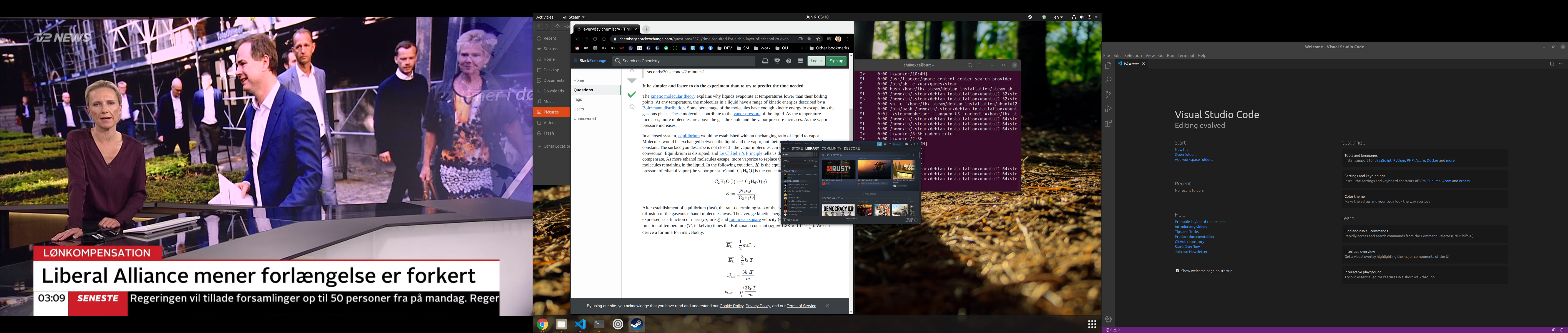
For me personally it's not that big a deal, as I was able to find this bug report and the workaround suggested by @kisak-valve did the trick; but most users would likely just give up at this stage and go back to MSFT.
I'm using HiDPI displays and using display scaling. Most applications render scaled fine, but applications that don't support scaling render super blurry.
This can't be hacked around; it needs to be implemented by steam.
Try completely closing Steam, then running GDK_SCALE=2 steam from a terminal.
This makes everything render twice the size -- so it's only really a solution if you're NOT using any form of display scaling.
I have encountered this same issue on every Linux distro I've used. I have a 1440p monitor, which isn't rare. I have tried every suggested fix, including GDK_SCALE=2. The UI for Steam is always either far too large or far too small. There isn't a way for me to comfortably use it. I don't know how this hasn't been fixed despite the first issues being opened over 2 years ago. The login window on 4K monitors is almost impossible to use as well.
This is still a bug. GDK_SCALE=2 does nothing. Linux Mint 20.
I can confirm that GDK_SCALE=2 does work. Could this be automatic?
Before:

After:

As can be seen in a previous issue: #5460 setting GDK_Scale=2 will ONLY work if you don't use fractional scaling (e.g. via GNOME) or don't have 2+ monitors with different resolutions.
Restated, the workaround only works if the HiDPi monitors are the same resolution, and without fractional scaling.
Coming here after seeing a ticket for an issue I created was closed and referenced this one. It seems like this dates back 2 years, thats a bit of a bummer. I hope this gets fixed soon because from a user experience standpoint it's pretty essential.
Lol you closed the other one as a duplicate of this, and this as a duplicate of the other. Get the process right! Please reopen one of the bugs without circular reference 😅
Closing as a duplicate of #6410.
See my message below. You cross-closed two bugs with reference to each other. The bug still remains. Please reopen one of the tickets.
Nothing extracted yet.
Your system information
Please describe your issue in as much detail as possible:
Using a resolution of 2880x1620 the steam client is so small it is almost unreadable. I have installed the driver packages: nvidia-driver nvidia-driver-libs-i386 nvidia-vulkan-icd nvidia-vulkan-icd:i386. All other dependencies are installed. I have the setting checked to allow Steam to increase the size of icons and text and have restarted the computer and steam multiple times. Using big screen mode works better, but looks lower resolution.
Steps for reproducing this issue: