Controller support is broken mint 19
I had a similar issue on Manjaro, where alot of my games would stop working with the controller (mainly triggers and the buttons would get swapped). Big picture seemed to work fine.
For me, I set a sdl controller config in my profile and then the controller started to work again.
thanks d10sfan, Are you talking about setting a personal binding in the users home folder with a tool like AntiMicroX? I have tried that this morning.
Build Date: Dec 7 2020
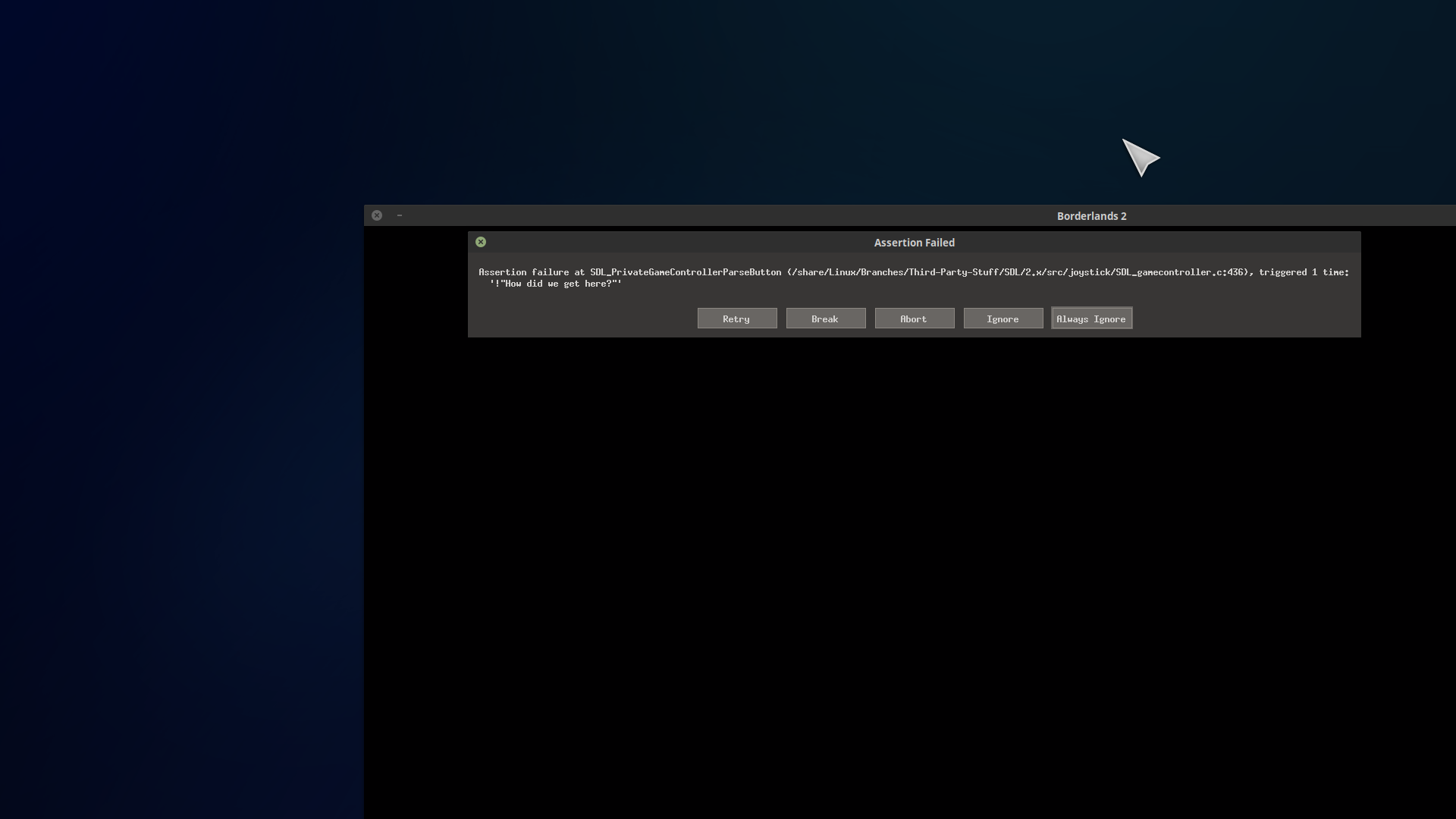
I have some screenshots of some crashes in BL2. First is with steam controller:

and for ps5 controller in BL2:
FO4, Skyrim and Assassins Creed 1 controller not working but overlay does.
Bioshock infinite: Oddly enough, controller works with reverse axis Y for look but cant access Steam Overlay to fix using PS5 controller.
Both controllers recognized in AntiMicroX.
For me, it was based on this ticket: https://github.com/ValveSoftware/steam-for-linux/issues/7200
I ended up setting this (export SDL_GAMECONTROLLERCONFIG=03000000c62400003a54000001010000,PowerA XBox One Controller SDL2,a:b0,b:b1,x:b2,y:b3,back:b6,guide:b8,start:b7,leftstick:b9,rightstick:b10,leftshoulder:b4,rightshoulder:b5,dpup:h0.1,dpdown:h0.7,dpleft:h0.8,dpright:h0.2,leftx:a0,lefty:a1,rightx:a3,righty:a4,lefttrigger:a2,righttrigger:a5,platform:Linux) in my profile setup and that made it work. That one is specific to the PowerA Xbox One controller.
Hello @d10sfan, sounds like something to be recommended to upstream SDL to get included in SDL_gamecontrollerdb.h.
@kisak-valve I've created a ticket there, thanks: https://bugzilla.libsdl.org/show_bug.cgi?id=5383
No change. on FO4, Skyrim controller still broken
Actually I figured out what's going on with the screen resolution being messed up and running in windowed in different games, my saved game data for Borderlands 2 has been deleted by steam. Just gone. That explains Bioshock infinite and BL2 and possibly why BL-pre sequel jsut crashed with missing executable error and is downloading the entire BL-PS again but I stopped that. Just gone! BL2 is saved in a really hard to delete plaice on linux and I know I didnt delete anything in $USER/.local
BL2 ps5 controller kills program with Assertion error SDL_PrivreGameControllerParse bla bla '!"Support hat as axis"'
Ark started and ran till a dino ran by and went all physics funky and crashed with extra bytes before file and I sent the 1000th error message to ARK.
Im sure there is more that doesn't work just to mad to test anymore.
I gave up testing on ps5 controller altogether. It was more just to make sure steam controller wasn't totally broken and to see if I like the way it feels. Guess the steam controller is no longer supported though, huh probably why I'm having all these problems. Shooting in the dark as no one has said a thing in months! And no one has addressed me directly besides what appears to be a genuinely helpful person.
You should at least say we're looking into it.
Or here try this ___.
Or we need more information?
Or ha ha sucks to be you shit bag! At least then I'd know I've been straight up robbed and I'd move on.
Anyway Im still here in hopes that not the case but almost everything I've bought still doesn't really work at all so im not really sure.
Steam controller errors
Borderlands 2.

Proton games no change. Broken.
Dying Light. Flawless!
ARK 13 GB download. maybe??
I'm also seeing this issue or at least something very similar on Devuan Daedalus, which has the same versions of everything as Debian Bookworm (aka. current testing, soon to be current stable) so I expect this is probably broken there too. What's different for me is that if I click "Always Ignore" the game starts up fine and Steam Controller support and the Steam overlay even works while I'm in the main game menu, but the Gearbox SHiFT login fails, I have to manually select my character from the default one, (which isn't necessary when SHiFT login succeeds) and then the game crashes when I try to continue my save. If I don't power on my Steam Controller at all everything works right except that I still get that SDL pop-up error and still have to click "Always Ignore" to proceed without crashing or getting more SDL pop-up errors. Just as a test I tried loading a different Steam Controller profile but that didn't help.
EDIT: update, clarification: I'm only seeing this happen for the Linux native builds of "Borderlands 2" and "Borderlands: The Pre-Sequel." Steam Controller support is working fine in my Linux native copy of "Bioshock Infinite," and the other games you mention I don't have here to test. I am not opted-in to the beta.
EDIT2: new info: I also just discovered that everything works fine when I launch the games through remote play to my Steam Link. There is no sign of the SDL error at game launch even.That's weird, right? I didn't think that would be possible since the error is related to SDL, but maybe it's a clue.
having the same issue nowadays on linux mint, steam itself doesnt even recognise the controller, let alone any individual games (under main settings -> controller, it shows nothing detected. of note, i am using a bluetooth connection)
Launch options
SDL_Px1 2020-12SDL_GAMECONTROLLERCONFIG=03000000c62400003a54000001010000,PowerAx1 2020-12
Your system information
Please describe your issue in as much detail as possible:
majority of my game library games are having issues using Steam Controller and PS5 controller. Big picture is working in both controllers but no input recognized in games. This effects both games that run in linux and ones ran through proton.
Bioshock infinite, no controller working : intermittent but will fail without resolution ultimately broken. Overlay OK
Fallout 4, no controller working, Overlay OK
Skyrim, no controller working. Overlay OK
Assassins Creed 1, controller broken intermittent but can fix by hot (un-re)plugging steam dongle, no fix for ps5., Overlay OK
Borderlands 2, Controller works but fullscreen doesn't, only running in windowed mode and cant change error that you cant copy about controller error ending in >> "! How did we get here?" Overlay: Couldn't get to run fullscreen so whats the point.
Dying light camera y axis always scrolls down Steam controller and ps5. Overlay OK
And that is almost every game I have installed on this machine.
Steps for reproducing this issue:
Side note ARK survival wont get past loading screen and sometimes crashes with extra bytes in files causing errors. Verified game files but nothing works. Might be related because all this started happening the update before the most recent. Like two or three weeks ago ish?
I bought the PS5 controller to help trouble shoot and verify that it was not just a faulty Steam controller.
Also controller configs get broken when using offline mode, No fix I've found. You will always have to set your config each game start. This has been happening since the previous update and I noticed it when Assassins creed, Borderlands was still working till this morning when I updated steam.