Install button greyed out for Far Cry 3 - Blood Dragon
Hello @alex9k1, this reads like a config issue with the Steam client and not Proton itself, so I've transferred this issue report to the steam-for-linux issue tracker.
In general, this is the expected behavior for any non-native game that has not been whitelisted for use with Proton.
If you want to test a game with Proton, the user needs to opt-in to that behavior, either in the per-game settings or the Steam-wide global settings. Can you confirm what settings you have in Steam -> Settings -> Steam Play and/or if you've told Steam to force the use of a specific Steam Play compatibility tool in the Compatibility section of the per-game properties.
If you click the ⓘ on the right side of the game, does it show a line like "Runs on this computer via Steam Play. Proton # selected by you for this title"?
Hi @kisak-valve , thanks for moving the issue. I wasn't too sure where to post this.
My SteamPlay settings look like this:
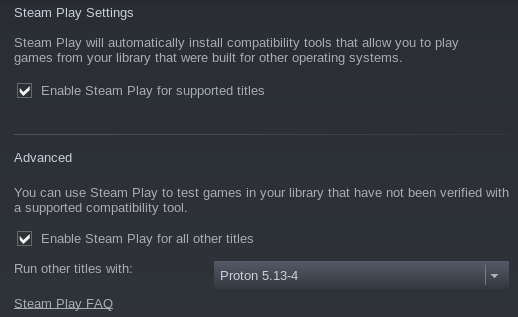
It does not say "Runs on this computer via Steam Play". I've checked this on a few other random games, and everywhere else this information actually appears.
Ok, it seems to affect multiple games now. Same thing with Serious Sam 4, although I already have it installed but now I can't launch it :D Just shows me a grayed out INSTALL button.
Got it resolved. Disabled SteamPlay in settings and unchecked the per game force option. Restarted Steam and re-enabled both. Now it's working again. Guess I can close the issue then.
Nothing extracted yet.
Compatibility Report
System Information
I confirm:
Symptoms
Steam client wouldn't let me install the game. The install button is grayed out:
I've been using Steam's Proton since it got out and IIRC this is the first time I'm encountering this issue.
Reproduction
Just try to install the game