Steam client getting stuck at some thread after selecting a specific game
steamopen
Steam client
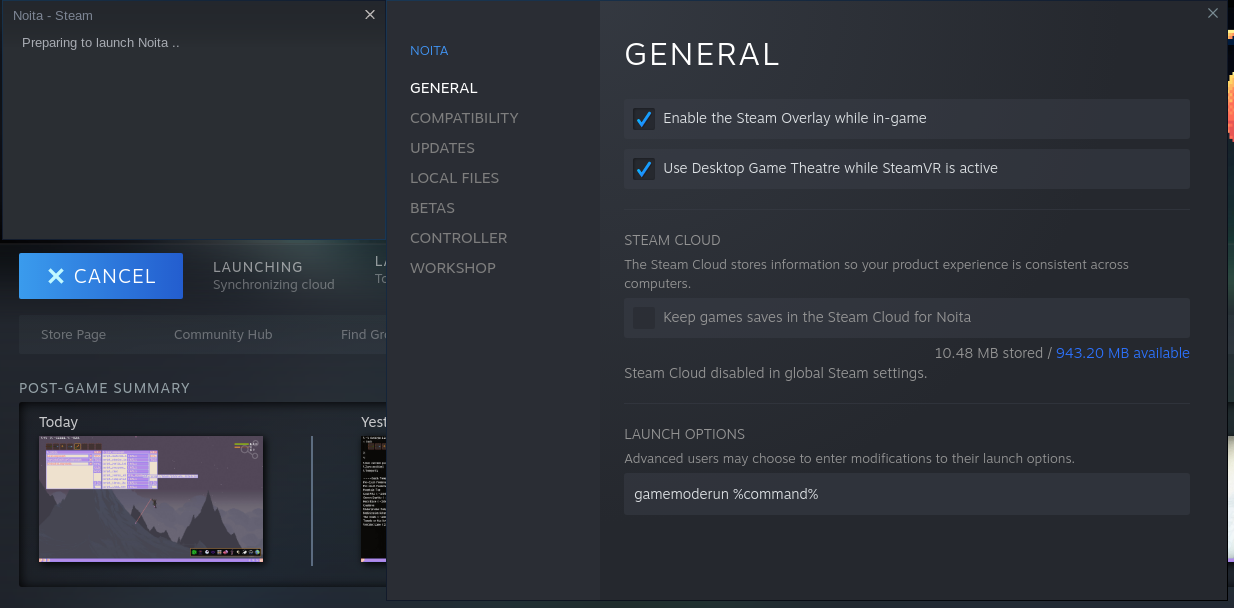
Possibly same issue here, but with Noita.
Steam already takes a long time synchronizing cloud, even though syncing is disabled in the game properties AND global steam settings...
~Now it won't launch at all.~ Okay it does launch, just takes an insane long amount of time. Launching the game directly through Wine works almost instantaneously.
Nothing extracted yet.
Your system information
Please describe your issue in as much detail as possible:
After installation of Farming Simulator 19 first time the game launched normally, but after I quit a game the synchronizing cloud started and never ended until I killed the client (SIGKILL). Now every time I select this game in a steam client the endless cloud sync starts again and I'm not able to start Farming Simulator or any game because of that. I think it cannot be the problem of my bandwidth because I've waited for an hour or more and my bandwidth is pretty good. Restarting/reinstalling steam doesn't help as well, as trying both the Debian repository and steam repository builds.
I have tried:
I bit of exploration showed the following, when I select the game:
gettid() = 3578
gettid() = 3578
gettid() = 3578
gettid() = 3578
gettid() = 3578
gettid() = 3578
kill(3586, 0) = 0
access("/home/username/.local/share/Steam/userdata/167164840/config/librarycache", F_OK) = 0
lstat64("/home/username/.local/share/Steam/userdata/167164840/config/librarycache", {st_mode=S_IFDIR|0755, st_size=4096, ...}) = 0
access("/home/username/.local/share/Steam/userdata/167164840/config/librarycache/787860.json", F_OK) = 0
openat(AT_FDCWD, "/home/username/.local/share/Steam/userdata/167164840/config/librarycache/787860.json", O_WRONLY|O_CREAT|O_TRUNC|O_LARGEFILE, 0777) = 127
write(127, "[["badge",{"version":1,"data":{""..., 10751) = 10751
close(127) = 0
futex(0xef6624a4, FUTEX_WAKE, 1) = 1
futex(0xef6624a4, FUTEX_WAKE, 1) = 1
futex(0xef6624a4, FUTEX_WAKE, 1) = 1
access("/home/username/.local/share/Steam/userdata/167164840/config/librarycache", F_OK) = 0
lstat64("/home/username/.local/share/Steam/userdata/167164840/config/librarycache", {st_mode=S_IFDIR|0755, st_size=4096, ...}) = 0
access("/home/username/.local/share/Steam/userdata/167164840/config/librarycache/787860.json", F_OK) = 0
openat(AT_FDCWD, "/home/username/.local/share/Steam/userdata/167164840/config/librarycache/787860.json", O_WRONLY|O_CREAT|O_TRUNC|O_LARGEFILE, 0777) = 127
write(127, "[["badge",{"version":1,"data":{""..., 10751) = 10751
close(127) = 0
futex(0xef6624a4, FUTEX_WAKE, 1) = 1
futex(0xef6624a4, FUTEX_WAKE, 1) = 0
futex(0xef6624a4, FUTEX_WAKE, 1) = 0
getpid() = 3578
getpid() = 3578
mmap2(NULL, 1866816, PROT_READ|PROT_WRITE, MAP_SHARED, 90, 0x83e000) = 0xdeb38000
madvise(0xdeb38000, 1866816, MADV_DONTFORK) = 0
munmap(0xdeb38000, 1866816) = 0
poll([{fd=35, events=POLLIN}], 1, 0) = 0 (Timeout)
recvmsg(28, {msg_namelen=0}, 0) = -1 EAGAIN (Resource temporarily unavailable)
recvmsg(28, {msg_namelen=0}, 0) = -1 EAGAIN (Resource temporarily unavailable)
poll([{fd=28, events=POLLIN}, {fd=29, events=POLLIN}], 2, 50) = 1 ([{fd=29, revents=POLLIN}])
read(29, "\1\0\0\0\0\0\0\0", 8) = 8
getpid() = 3578
poll([{fd=28, events=POLLIN|POLLOUT}], 1, -1) = 1 ([{fd=28, revents=POLLOUT}])
writev(28, [{iov_base="\3\0\2\0!\0`\3\16\1\2\0!\0`\3", iov_len=16}, {iov_base=NULL, iov_len=0}, {iov_base="", iov_len=0}], 3) = 16
poll([{fd=28, events=POLLIN}], 1, -1) = 1 ([{fd=28, revents=POLLIN}])
recvmsg(28, {msg_name=NULL, msg_namelen=0, msg_iov=[{iov_base="\1\0\352\v\3\0\0\0'\0\0\0\1\0\1\1\377\377\377\377\0\0\0\0\0\0\2\0 \0`\3"..., iov_len=4096}], msg_iovlen=1, msg_controllen=0, msg_flags=0}, 0) = 76
getpid() = 3578
getpid() = 3578
getpid() = 3578
getpid() = 3578
getpid() = 3578
getpid() = 3578
getpid() = 3578
getpid() = 3578
Steps for reproducing this issue:
System information:
https://gist.github.com/Blinkop/57ab12b6b8f457c4110bb5b457b6db11