libc.so.6 issue on Linux Mint 20.1
Hello @apuntigam, can you run steam from a terminal and share the terminal spew? Also, just to check, what does apt policy libc6:i386 give you?
It may also be interesting to check if any 32 bit OpenGL application works. I used to recommend a 32 bit build of glxinfo from mesa-utils:i386, however, Ubuntu no longer provides a 32 bit build of this since 20.04, which Linux Mint 20.x is based on.
No problem, here is the terminal output

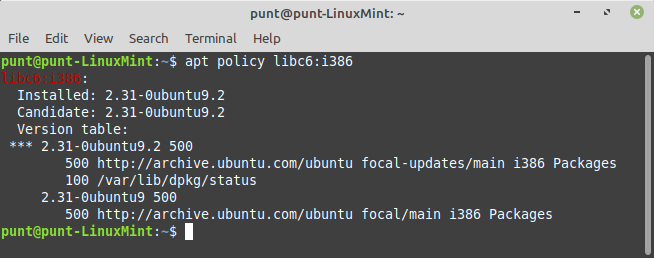
Thanks, I've got a couple disjointed ideas to ponder.
First, you've mentioned that you've installed and tried the Valve-provided Steam package, which puts the Steam client in ~/.local/share/Steam, but your terminal output has ~/.steam/debian-installation which is what the distro-modified Steam package uses. Historically, there's been trouble when switching between the two package variants due to folder layout differences. If that's the case, moving ~/.steam and ~/.local/share/Steam somewhere out of the way should let the Steam client do a fresh bootstrap. Afterwards, if it's working, then you can close Steam, then copy/move the steamapps folder from your previous Steam install, which you set aside, into the newly bootstrapped Steam install to get the downloaded games back into Steam.
Second, I suspect that something went wrong with unpacking and/or updating the Steam client. If that's the case, you should be able to run steam --reset to tell Steam to re-bootstrap the Steam client. Alternatively, you could try manually opting into Steam's beta client to trigger an update with something like echo "publicbeta" > steam_install_folder/package/beta
Between those two ideas, I'd check if ~/.local/share/Steam exists and has a semi-recent timestamp on some files. Maybe check if it has games in ~/.local/share/Steam/steamapps/common. If it does exist and is the older Steam install, then that hints to us that apt decided to swap Steam package variants under your feet and proceed with the first idea mentioned above, otherwise, a less aggressive approach can be tried with the second idea.
Thank you, that really was a wonderful reply, full of useful info! I checked and there is no ~/.local/share/Steam folder. So I used steam --reset and it's working again.
Nothing extracted yet.
Last week, my Steam was working perfectly. Then there was an update to the Steam launcher and it no longer opens. I receive the following error:
"Error: you are missing the following 32-bit libraries, and Steam may not run: libc.so.6"
When I try to launch from the terminal, after I get the error popup I get the following line:
"Steam client's requirements are satisfied"
I have checked my system, and there are symbolic links to libc.so.6 in the /lib/i386-linux-gnu and /lib/x86_64/-linux-gnu folders. I have made no changes to my system since the last time Steam launched successfully, apart from the usual distro updates.
I then downloaded the above version from the Steam website and installed, the same error persists.
Steps for reproducing this issue: