Hello @olagarde, testing with the system installed glxinfo tells us that the 64 bit OpenGL render path seems sane, but for troubleshooting the Steam client, we're generally interested in checking if the 32 bit OpenGL render path is also sane. Can you check that with any 32 bit OpenGL application like glxinfo from a 32 bit build of mesa-utils work? Unfortunately, Ubuntu doesn't provide a 32 bit builds of this package on 20.04, so maybe try unpacking https://packages.ubuntu.com/bionic/i386/mesa-utils/download with an archive utility and using the utility without installing it to the system.
Also, can you share the output of apt policy libnvidia-gl-460 libnvidia-gl-460:i386?
Same problem here with Pop os 20.04.
libnvidia-gl-460:i386 | Installed: (none) tells us you do not have nVidia's 32 bit userspace installed. Please run sudo apt install libnvidia-gl-460:i386and retest.
Running the i386 ELF glxinfo repeats the same error as in the original wrapper script output. But then, that's what should happen? Because the steam runtime LD_PRELOAD's and has it's own i386 glx, while this ... doesn't? Note that the issue began after an update inside of and by the working steam client, not an update in the base operating system. I've since tried reinstalling and removing/installing the entire GL/GLX stack but there are no dpkg changes between the last successful steam client run and the first failure.
glxinfo_i386.txt
So, that confirms that you do not have a sane 32 bit OpenGL render path outside of Steam. While the Steam runtime provides makes sure most libraries are available to itself and Steam games, we still need the system to provide libc and a sane video driver.
For the nVidia proprietary driver, it needs for the running kernel module, 32 bit userspace, and 64 bit userspace all be installed and have exactly the same version to work properly.
I've flipped the versions, policies flipped correctly, steam works but as expected all my cuda codes requiring x86_64 nvgl are now failing. Apt doesn't allow both x86_64 and i386 GLX, installing one uninstalls the other per dependency metadata in the packages.
Obvious question: why is forcing the base operating system into 32bit GLX required now but wasn't required from ~Feb 2020 through this morning?
libnvidia-gl-460:i386|Installed: (none)tells us you do not have nVidia's 32 bit userspace installed. Please runsudo apt install libnvidia-gl-460:i386and retest.
I've tried this, but it removes the x64 version of the package libnvidia-gl-460 and libnvidia-ifr1-460, nvidia-driver-460 system76-driver-nvidia along with it, making the nvidia driver unavailable after reboot.
If I remove the steam deb package and install it using flatpak it works without any problem, so I'm not sure if it was an update of the os or the steam runtime...
Flatpaks run in their own sandbox, so to speak; they effectively container-ize the execution stack. I've been using the stock dpkg provisioning, I'll try the flatpak approach and see...
@olagarde, Steam for Linux has always required a sane, working 32 bit OpenGL driver. How it was working before is the anomaly.
@davidarias, did apt force an older version? Maybe try if telling apt to install both the 32 bit and 64 bit variants at the same time picks a common version between them with something like sudo apt install libnvidia-gl-460 libnvidia-gl-460:i386, otherwise you might need to check what package versions are available with apt policy and explicitly ask for the specific version that is available for both.
@davidarias, what flathub ref do you have working, and just to clarify: you have a flatpak steam client working when the base os has the x86_64 libnvidia-gl-XX?
@kisak-valve I've checked nv main and transitional debs back through -400, each violates their other-arch dependency. It's possible you can do this with nouveau, but I think it's not possible with nvidia drivers.
@kisak-valve Thanks for the advice! but after fighting the package manager and break the the gui two times I couldn't get to work the drivers and Steam at the same time... so I used the flatpak package instead
@olagarde this is the package I installed https://flathub.org/apps/details/com.valvesoftware.Steam and yes I reverted my system to the original state with the x86_64 libnvidia-gl-460 installed
Confirmed, flatpak-isolated exec stack works with no i386 libnvida-gl or glx on the BOS, but both in flatpaks. Which means dockers should also work fine. This is the better solution, thanks @davidaria for bringing it up!
Root cause of change unknown but issue mitigated/resolved by running steam client sandboxed via flatpak instead of deb/dpkg. Thanks @kisak-valve for the research/time!
For future reference: as a test I've spun a system clone and tried purging the i386 packages and arch just to see if a pure 64-bit BOS will still run the 32-bit steam client via flatpak without any significant flailing. This is an EXPERIMENT ONLY. I DO NOT RECOMMEND THIS outside of experimentation.
Result is success(?)
The steam client sandboxed via flatpak does not appear to need, interfere with, or be bothered by the presence of lack thereof of a conflicting arch for the GL, OGL, GLX, or NV-proprietary drivers.
$ sudo dpkg --print-foreign-architectures
i386
$ sudo apt-get purge ".*:i386" 2>&1 |tee ~/apt-get.purge.i386.log
$ sudo dpkg --remove-architecture i386
$ reboot
$ wget https://dl.flathub.org/repo/appstream/com.valvesoftware.Steam.flatpakref
$ flatpak install com.valvesoftware.Steam.flatpakref
$ flatpak run com.valvesoftware.Steam
<verify steam client login-or-create-new-account dialog opens, exit dialog>
<if using gnome3 a Steam launcher should have been added to the Applications GUI, launch that>
<re-verify steam client login-or-create-new-account dialog opens, exit dialog>
Nothing extracted yet.
Your system information
Please describe your issue in as much detail as possible:
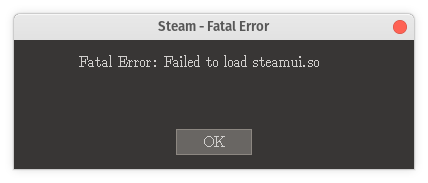
Client was working successfully this morning but started failing after updating for the first time in several months. Started via the convenience wrapper script the client throws a BadValue error for X_GLXCreateContext and a modal with "Fatal Error: Failed to load steamui.so", see "wrapper_script_output.txt" and "error_modal.png". Issue is most similar to 2017 & 2019 issues with glx x86_64 libs being selected at runtime instead of i386 libs but steam-runtime glx appears consistent and symstab appears ok AFAIK.
wrapper_script_output.txt
Manually setting up the env and running the ELF produces the same plus an enofile for steamui.so (could be error in setting up env but I've yet to find a delta), see "direct_run_output.txt".
direct_run_output.txt
GLXgears runs clean, see "glxgears_test_output.txt". GLXInfo is also attached, "glxinfo.txt".
glxgears_test_output.txt
glxinfo.txt
Base system has current x86_64 glx et. al. and i386 glx in the usual locations for steam-runtime, but timestamps are very old (Oct 23 and Apr 3, 2019), see "steam_client_glx_so_list.txt".
steam_client_glx_so_list.txt
I've tried updating the client package, resetting the client, reinstalling the client package, deleting the client package and wiping the installdir and reinstalling the client per various prior forum posts for similar issues, 2017 to present, and per the troubleshooting FAQ for Ubuntu.
Steps for reproducing this issue: