Various drop down menus stuck on screen
I tested on Wayland and the bug occurs then as well.
This happens on most dropdowns, not just achievements,. It's also present on the stable client, not just beta.
Similar report on the Steam beta Discussions board: https://steamcommunity.com/groups/SteamClientBeta/discussions/0/3106901665842520541/
I am also experiencing this. As @HanFox mentioned, it appears to happen with most dropdowns that are displayed inside Steam's web browser window. This issue is very annoying because I have to completely close and reopen Steam to make the dropdown go away.
Your system information
- Steam client version (build number or date): 1624329075
- Distribution (e.g. Ubuntu): Debian Testing
- Opted into Steam client beta?: Yes
- Have you checked for system updates?: Yes
Please describe your issue in as much detail as possible:
Desktop environment: Cinnamon Desktop on X11. Any dropdown menus rendered inside Steam's browser window do not close and get stuck on the screen, requiring a client restart to go away.
Steps for reproducing this issue:
- Click on a dropdown menu inside the Steam browser window. Ex. age check dropdowns
- The dropdown menu will become "stuck" on the screen
- The only way for the dropdown to go away is to restart the Steam client
Also happens on Arch Linux with i3-gaps, however I have found two workarounds that make the dropdown menu disappear:
- Hover the cursor over one of the options above browser window (Store/Library/Community/[nickname]) - does not seem to be working consistently,
- Switch between tiling/floating mode - this, however, makes the webpage freeze, so a refresh is needed.
Can confirm that this happens in Manjaro, too and I am using the Steam Runtime client.
This also happens on all drop down menus in Linux Mint. Also noticed that resizing Steam's window from the top can cause the stuck drop down menu to disappear, however the page does not function after and needs to be refreshed in order for the page to work again.
There's too many separate examples of drop down menus getting stuck on screen in libcef rendered sections for this to be a one-off issue. Since this is the first report of the issue, let's use this issue report to track it.
Reported examples:
#7864 Age confirmation
#7931 Searching discussions
#7943 Drop down menus in the marketplace
Currently experiencing this on Pop! OS 20.04 and 21.04.
Just noticed this in the age verification page, on Arch Linux and with all the window managers I have installed, namely i3, Openbox and bspwm.
I can get rid of the drop-down by moving the Steam client's window.
This issue is likely upstream in CEF
SO many bugs come from CEF. I don't know why they don't switch to qtWebKit, KHTML or GTK-WebKit instead. All three of these are also more lightweight than CEF, and allow attaching your choice of javascript interpreters so you can choose one nice and light and tune the GC not to interfere with gameplay.
Same issue for me on all drop down menus on Steam.
Experienced this on both PopOS 20.04 and Ubuntu 20.04, mainly via the age confirmation. However, the dropdowns at checkout for payment information don't seem to have the same problem.
Confirmed. System information:
Steam client version (build number or date): 1626824053
Distribution (e.g. Ubuntu): Ubuntu 20.04.3
Opted into Steam client beta?: No
Have you checked for system updates?: Yes
NVIDIA GM107M [GeForce GTX 960M] driver: nvidia v: 460.91.03
Drop down stuck on screen even after Steam client was closed.
In order to make stuck drop down disappear:
- Change size of Steam client window so that it no longer takes whole screen,
- Move Steam client window.
I am also experiencing this issue. Dragging the Steam window around a bit does work, as does completely quitting Steam.
Distro: Arch Linux
Steam package versions: 1626824053
Graphics: NVIDIA 2070 Super on driver version 470.63.01-4
Kernel Version: 5.13.13.arch1-1
Window Manager: GNOME 40 on X11
Plasma user, same problem. I'll keep the previously posted workarounds in mind, but it remains a nuisance.
Distro: KDE Plasma 5.22
Graphics: AMD Radeon RX 480
Ubuntu 21.04 here, very annoying to have to restart Steam for the stuck menu to go away.
Artix Linux here. Same issue. Even during payment. The drop down just overlays everything... can't even pay. This is a very old issue but it seems to be getting worse.
Yup, also using Manjaro, but I believe I've noticed this in any KDE interface. Not sure if it happened on ubuntu gnome or not
this happens for me too on age verification, fedora 34 stock gnome
opening a new dialog box closes the previous but one always stays on top of everything
Happening for me on Pop!_OS 21.04 running Gnome, have been experiencing this for a few months now at least.
edit:
Steam package versions: 1633666232
Graphics: NVIDIA GTX 1080 driver version 470.63.01
Kernel Version: 5.13.0-7614-generic
UPDATE: When you pop one of the main drop downs on the steam window (store, library, community etc) the stuck drop down menu disappears, but the web page is unresponsive and needs to refresh.
Happens for me with Manjaro KDE - 5.13.19-2-MANJARO - Plasma 5.22.5 on Age Verification drop downs. Can confirm moving the window removes the unwanted lingerers.
Still having this issue. It's been around since forever. Is this dead or something?
Arch Linux, Gnome 40, Wayland, Nvidia 1080ti.
I have it on Manjaro Plasma with both STEAM stable and beta
OS: Manjaro 21.1.6 Pahvo
Kernel: x86_64 Linux 5.14.10-1-MANJARO
Uptime: 3h 35m
Packages: 1624
Shell: bash 5.1.8
Resolution: 1920x1200
DE: KDE 5.87.0 / Plasma 5.22.5
WM: KWin
GTK Theme: Breath [GTK2/3]
Icon Theme: breath2
Disk: 9.3T / 115T (9%)
CPU: AMD Ryzen 7 3800X 8-Core @ 16x 3.9GHz
GPU: AMD Radeon RX 5700 XT (NAVI10, DRM 3.42.0, 5.14.10-1-MANJARO, LLVM 12.0.1)
RAM: 9714MiB / 15943MiB
I have the same here... Lite Linux, i need close and reopen Steam.... This seems be a very old issue but no solve... oh man, i have more than 100 games/applications in this store and are migrating for Linux :-(
Lite Linux (Ubuntu Based)
Desktop Enviroment: XFCE
Window Manager: XFWM4
Window System: X11
GTK Theme: Adwaita
MOBA: Compaq Presario CQ-25
CPU: Intel(R) Pentium(R) CPU N3700 @ 1.60GHz
GPU: Atom/Celeron/Pentium Processor x5-E8000/J3xxx/N3xxx Integrated Graphics Controller
RAM: 4096MiB
I have the same here... Lite Linux, i need close and reopen Steam.... This seems be a very old issue but no solve... oh man, i have more than 100 games/applications in this store and are migrating for Linux :-(
My friend, don't restart Steam, just resize the window, i know this MUST be fixed asap, but the resizing workaround is easy as 123.
just resize the window
oh my god you're a savior
just tested now and the bug is gone (at least for me)
Operating System: Manjaro Linux
KDE Plasma Version: 5.22.5
KDE Frameworks Version: 5.87.0
Qt Version: 5.15.2
Kernel Version: 5.14.10-1-MANJARO (64-bit)
Graphics Platform: X11
Processors: 16 × AMD Ryzen 7 1700 Eight-Core Processor
Memory: 15,6 GiB of RAM
Graphics Processor: Radeon RX 570 Series
@Belloch Hearing your news I open the Grand Theft Auto V store page, then there is an ugly menu on my screen now...
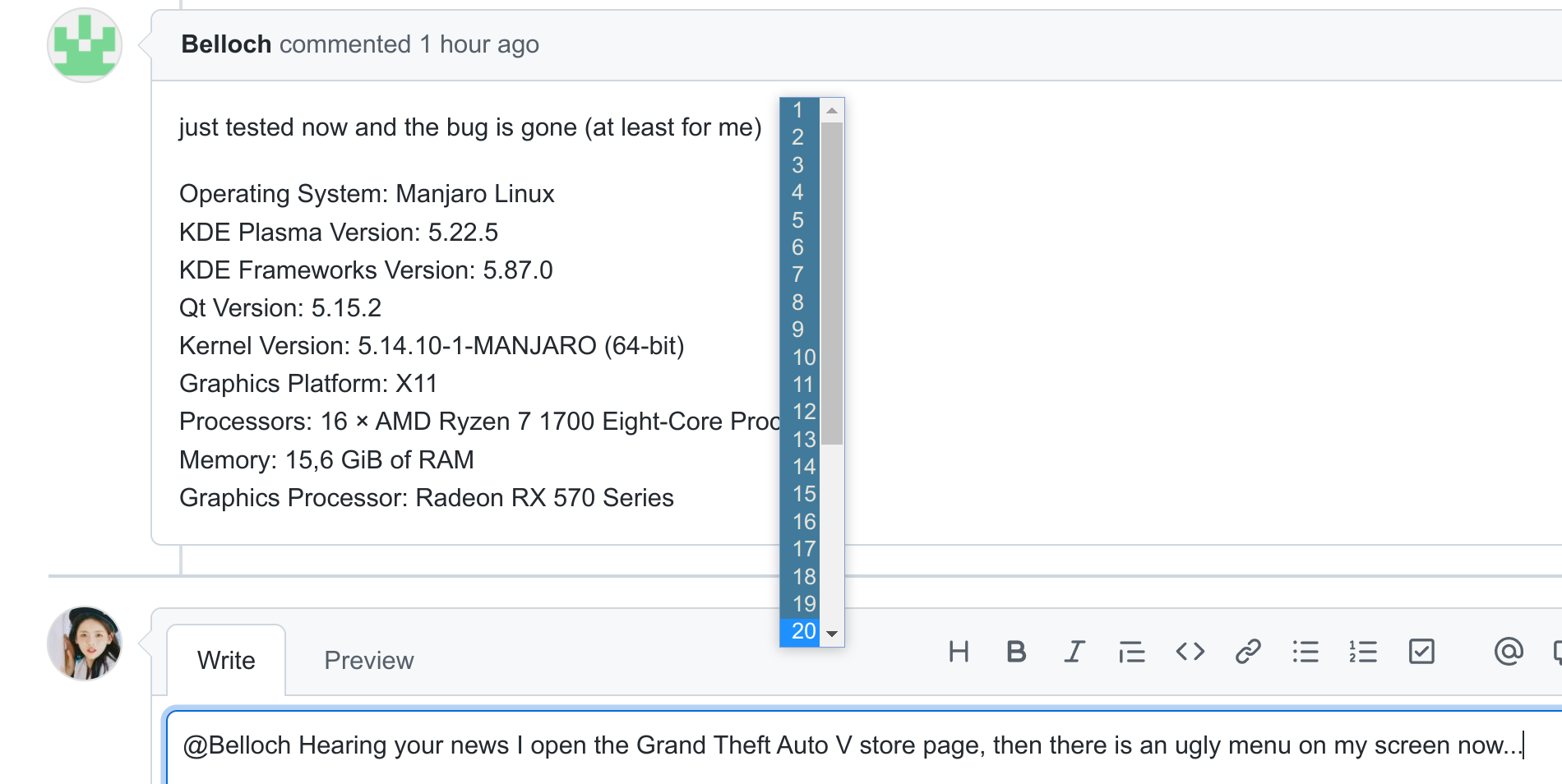
I'm on Gnome 41, Wayland, Nvidia 495 beta driver.
I think I'd like to ask a question that might help diagnose the issue.
If someone is NOT experiencing this bug, could they please give complete system information, including themes, distro, and anything added that does not ship with the distro and would affect how windows render.
If not everyone is getting this issue it is likely a theme engine related issue.
Another question: Has valve released the source of the OS for SteamDeck yet? If so does this bug not occur on it.
If this is the case does someone want to see what is different in the setup?
If someone is NOT experiencing this bug, could they please give complete system information, including themes, distro, and anything added that does not ship with the distro and would affect how windows render.
If not everyone is getting this issue it is likely a theme engine related issue.
I am not experiencing the issue, and never have.
I am using i3 on Arch Linux with an Nvidia video card, with current kernel and drivers.
I am not using a Steam theme of any kind, and never have.
Fixed for me, after latest beta update.
Most likely due to Updated embedded Chromium build in Steam to 84.0.4147.105 in the 2021-10-22 Steam client beta update.
Please opt into Steam's client beta and retest.
Issue with stucking drop down menu was gone on Fedora too.
Just installed the beta and yeah... seems fixed on my Artix install.
just updated to the newest beta, fixed for me too
Fixed on Arch as well with that beta update, thanks.
I am happy to say it is fixed in Beta for me too! I guess I'll stick to the beta build until this feature gets pulled to stable.
Also:
I am not using a Steam theme of any kind, and never have.
I meant GTK and QT themes, not Steam themes. However, that is moot now that the bug is fixed. Thanks anyway for the information.
Same issue here in Kubuntu current version. Switching to Beta Steam participation is not an option because of issue #8226. The joysticks are on an endless cycle of being detected then not detected which is also causing Kubuntu problems in addition to Steam Client not closing and having to send a kill signal to terminate the app. Switching to Big Picture Mode in Steam on the Nov 11 Beta resolves the issue of Steam not exiting correctly but does not resolve the joystick issue #8226.
which is also causing Kubuntu problems
Doesn't sound like a Steam problem
which is also causing Kubuntu problems
Doesn't sound like a Steam problem
Yes it's a steam issue. This did not occur until the Nov 11 update.
Steam issues shouldn't be affecting your whole OS like that. I'm not experienced in this field, though, so take my words with a huge grain of salt.
Nothing extracted yet.
Your system information
Steps for reproducing this issue:
I'm using X11.
Workaround
Resize the steam window and the menu will be gone. However, the page will be unresponsive.
or
Pop one of the main drop downs on the steam window (store, library, community etc) and the stuck drop down
menu will disappear. However, the web page will be unresponsive and will need to refresh.