Steam prompts Network Manager without admin permissions
I can confirm both issues:
- Steam wants to mess with the network settings for unknown reasons
- When rejected, the dialog pops up again and again
Possible workarounds:
- click it away a zillion times. Steam seems to work fine afterwards
- use alt+ctrl+f2 to switch to text console and kill Steam with -9. There are still a couple dialog boxes to click away
The really bad thing here, that you cannot do anything else, use any other application while the permission dialog is up.
VERSION="20.04.2 LTS (Focal Fossa)"
PRETTY_NAME="Ubuntu 20.04.2 LTS"
Want to highlight: unlike @nhnb it doesn't lock up my system, nor does it prevent me from doing anything else, it just sticks around annoyingly. [Closing repeatedly also didn't work for me, but maybe I didn't close it enough times.]
Also, an addendum: I use Unity rather than Gnome (when Ubuntu made the swap I stuck to what I was used to), in case that ends up mattering. I don't believe my machine has anything else relevantly distinct from a standard Ubuntu install.
I've seen this on OpenSUSE Leap 15.2 since the recent Steam update and it persisted after upgrading the OS to 15.3. I've worked around it by writing the following to /etc/polkit-default-privs.local although this may be SUSE-specific and I shouldn't have to do it:
org.freedesktop.NetworkManager.settings.modify.system yes
I suspect it wouldn't happen if the connection didn't have the "All users may connect to this network" flag set but I didn't try changing that. Again, I shouldn't have to.
I'm also seeing this since the update before the update that takes you to runtime 0.20210518.3 (June 8th 2021).
I can also confirm the steam client specifically trips the polkit rule for org.freedesktop.NetworkManager.settings.modify.system, which in turn asks the user to enter an admin password.
For some distribution set-ups (such as default Ubuntu 20.10) this blocks the desktop environment.
I can also confirm that if you click "cancel" a sufficiently large number of times (order of 50 or so), the message eventually goes away and the client runs normally --- suggesting it really doesn't need the privileges it is requesting.
I would like to reiterate the concerns of others:
- There is already a network connection, Steam should have no need to modify it (and certainly not at a system-wide level).
- Moreover a user should not need sudo privileges to run the Steam client.
Please please revert to the normal behaviour or at least provide a justified reason for the new behaviour together with a better workaround than clicking cancel 50 times. I do not wish to give sudo access to users on my system just so that they can run Steam games, nor do I wish to unnecessarily modify polkit default policies.
I just wanted to share something I noticed monitoring the dbus communication:
What steam is doing (and is triggering the "modification of network settings for all users") is a call to org.freedesktop.NetworkManager.Settings.Connection.GetSecrets passing in '802-11-wireless-security', which I understand as trying to get the wifi password. I have no idea why it does that.
Well that's concerning...
I can confirm this steam behavior on Ubuntu 20.04.2 LTS
It's very very very annoying.
I'm also affected on Debian 10.
Don't know when it started; haven't used Steam in a while.
Very disconcerting behavior from an application that has no business with my system's network configuration.
I worked around it with a file at /etc/polkit-1/localauthority.conf.d/90-silence-steam.conf with these contents:
[Stop steam user from prompting for network permissions]
Identity unix-user:steam
Action org.freedesktop.NetworkManager.settings.modify.system
ResultActive no
ResultInactive no
ResultAny no
Change the steam in the second line to match the user that runs Steam in your system.
- Steam client version: Jul 16 2021, at 18:05:04
- Opted into Steam client beta?: yes
- Distro: Debian 10 "buster" GNU/Linux amd64
- Have you checked for system updates?: Yes
@joaormatos does this allow or reject the request from steam?
If this rejects, you are my hero.
@joaormatos does this allow or reject the request from steam?
If this rejects, you are my hero.
Yes, it rejects the request without prompting.
See the man page pklocalauthority(8)
But it's rejecting all requests from the specified user, not just Steam.
The presumption is that you're running Steam with a user named "steam."
There's probably a better way to do this by more thoroughly isolating Steam from the rest of the system.
Well, ideally Valve puts a setting in somewhere for whatever it is they think they need this access for.
But I'll take what I can get.
So this bug still exists. Why does this page even exist if it is being ignored? Or is there any word from Valve somewhere else about this serious security issue?
@kisak-valve - as you are apparently monitoring this, you can please specify why steam needs to modify network settings?
Looking at https://github.com/flathub/com.valvesoftware.Steam/blob/9f376cf5adf73d5d1777c55d0283ea48567b3e4b/com.valvesoftware.Steam.yml#L23 this may be some stray SteamOS functionality leaking through.
I can confirm that on NixOS, the flatpak version (as well as regular version) of Steam also shows this behavior.
I can also confirm that with the flatpak version, you can selectively block dbus access from steam to networkmanager, by running
flatpak override --system --system-no-talk-name=org.freedesktop.NetworkManager com.valvesoftware.Steam
without compromising other dbus-based functionality.
When asking around, I have learned that on fedora no admin popup has been observed (probably due to more relaxed security), which would explain the lack of larger interest on this ticket.
This whole debacle suggests to me that it would be prudent to increase and tighten the sandboxing for steam and other proprietary software across all distribution mechanisms.
This is related to a startup slowdown in case of missing NM https://github.com/ValveSoftware/steam-for-linux/issues/4979
Flatpak actually enabled NM access to work around https://github.com/flathub/com.valvesoftware.Steam/commit/b56d7b72bc1d71ba9d8dc9d3c45dd80255bd7362
@kisak-valve please help us get this fixed properly, ~we want to keep operating under a good-faith assumption and keep accepting your help with mainstreaming the Linux desktop. But Valve is going to have to realize that shit like this doesn't fly here the same way it flies on Windows and Mac.~ this is a very bad look for Valve, security-wise.
EDIT: Everybody, please excuse the previously strong wording. That was written in the heat of the moment.
This is annoyingly still occurring on a fresh Steam + Debian install I set up for my son.
The Steam client should simply detect the system policy and disable its network management features, if need be, rather than pop up admin authentication requests, IMO.
Anyhow, thanks for the workarounds mentioned, whoever mentioned them.
Another workaround for experienced users: if you use NetworkManager with iwd backend then you can simply remove wifi password from NM config and it should still work as iwd can connect with only pre-shared key. This way you don;t have to block dbus access and shouldn't get the aforementioned startup delay.
I stumbled upon this problem recently on OpenSUSE Tumbleweed and it was very annoying. However there are two simple workarounds: a temporary one and a permanent one (i.e. a possible solution) with security implications that are not entirely clear to me:
Method 1: Start Steam with Wifi disabled, then enable it afterwards. It will not ask for admin rights anymore for that session (but it will next time).
Method 2: In KDE Plasma 5, in the NetworkManager GUI (System Settings > Network > Connections), Disable "All users may connect to this network" for your Wifi connection, and add your own user to the allowlist in Advanced. Steam will not ask for admin rights anymore.
This seems to have gotten worse with the latest Steam client update.
Now it's asking me periodically (at random, it feels) when Steam is running.
Encountering this issue on current OpenSuSE Tumbleweed. I tried to resume from suspend after my wifi went out during a storm (knocked down some power lines) and steam began continuously asking for password. I couldn't get it to stop, so I had to switch to a tty and reboot. I don't have any nonstandard wifi configuration, so simply put: how is this still an issue? It's been almost a year with multiple confirmations and suggested workarounds, but this is clearly an issue with the steam client's own code. With all the work put into proton and Vulcan, how are we messing up the little things?
Edit: I now see that there are 2000 open issues. I retract my statement.
Still have this issue. With the latest update Steam even couldn't connect to the network even though my network was fine.
Yeah, I'm having this problem on Ubuntu 20.04 after an update today. Even if I enter my password for sudo it just keeps popping up. I can't do anything unless I hit cancel a lot.
Update: I was having a problem with sudo in any GUI dialog, which I fixed with sudo usermod -aG sudo $USER (my user is also in /etc/sudoers with nopasswd). I also opted into the Steam client beta. One of these things stopped the Steam prompt. I think it was the usermod, though I thought I was already in the sudo group before...
Happening on lubuntu 22.04 LTS fresh install. Can't let anyone else play on it without me being around to enter password..
Happening on lubuntu 22.04 LTS fresh install. Can't let anyone else play on it without me being around to enter password..
Yeah, this is the critical problem. Steam is on the computer connected to my TV so that the kids can play games. No way am I giving them sudo access!
Don't forget the workaround I mentioned. It's still working here.
+1 for wanting an answer of why Steam is doing this. I also assume misunderstanding/bug/incompetence over malice, but being not open source means we rely on trusting Valve about their software, and they wouldn't be the first company to snoop on wifi passwords and later go, "oh no! I'm sure we didn't mean to do that, it was... a mistake"
I'm very much in favour of this being fixed correctly -- which I, in my limited wisdom presume means either Steam not doing this, or having a very clearly documented reason -- not by smoothing it over for convenience (say by bypassing the policykit restriction willy-nilly by default)
They seem to be iterating over the saved WiFi connections. If even one is set to be usable from all users, the dialog is triggered (as all users settings can't be modified without root credentials). Removing all "all users" ticks will skip the dialog. I guess this comes from SteamOS, where they need to manage its connections.
But outside of SteamOS, Steam should not be managing WiFi connections. Perhaps this behaviour can be disabled for when the system's not running SteamOS.
all users settings can't be modified without root credentials ... Removing all "all users" ticks will skip the dialog.
This is exactly what we don't want: giving Steam easier access to system things it shouldn't be touching. If Steam insists on meddling with wifi connections, then IMHO we should treat it as an untrusted app, and all swtich to using it within Flatpak/similar and having Flatpak block that stuff.
After hitting this on my daughter's OpenSUSE system, I'm now hitting it on my wife's, except the workaround I applied previously doesn't seem to work here. I can't figure out why. I wish they'd just fix it already.
EDIT: Ah, I forgot to note that you also need to run /sbin/set_polkit_default_privs.
As a "workaround" I ignore the pop-up. Steam will start eventually as normal.
I do agree it should be treated as an untrusted app if they don't fix this though.
It's happening on a fresh install of ubuntu 22.04, but I noticed on 20.04 as well.
My son just got a fresh install of Ubuntu 22.04 LTS up and running with steam and was having this same exact issue. We can confirm the same symptoms (Steam wants access to the network stack; click cancel about fifty-ish times and it goes away) are present. Trying @joaormatos suggesting for overriding with policy kit; we'll report back if that doesn't work.
More than anything I just wanted to add another "concerned user" note regarding why Steam thinks it needs access to our network configuration. Really not impressed with this. I wonder how many people inadvertently give Steam permission to access this info when it's installed on Windows/MacOS?
Replying to https://github.com/ValveSoftware/steam-for-linux/issues/7856#issuecomment-883386818
Thank you for this solution to block the requests made by steam @joaormatos. Best one I have found yet. Small fix: You actually have to use '=', like this:
[Stop steam user from prompting for network permissions]
Identity=unix-group:steam
Action=org.freedesktop.NetworkManager.settings.modify.system
ResultActive=no
ResultInactive=no
ResultAny=no
Otherwise it just breaks (which also frees you of these annoying steam pop up windows, but also all the others, for example the ones you actually want, like when starting up gparted).
EDIT:
Put this config in
/var/lib/polkit-1/localauthority/90-mandatory.d/silence-steam.pkla
The '.pkla' is important.
(putting the config in /etc/polkit-1/localauthority.conf.d/ does NOT work.)
This will block the requests for users, who are in a group called "steam". You have to add the group and add the users to the group. Alternatively, you can use "Identity=unix-user:" with the username, as @joaormatos has done.
Tested on Ubuntu 22.04
@kisak-valve could we please have entire network manager usage of Steam disabled through environment variable? That would allow us to shut down the sandbox hole without downsides.
Also happening here to on OpenSUSE Tumbleweed with KDE Plasma desktop. The password dialog box opens every couple of minutes and interrupts games. Extremely annoying :(
Operating System: openSUSE Tumbleweed 20221030
KDE Plasma Version: 5.26.2
KDE Frameworks Version: 5.99.0
Qt Version: 5.15.6
Kernel Version: 6.0.5-1-default (64-bit)
Graphics Platform: X11
Steam client: Nov 3 2022
For all of us using openSUSE (Tumbleweed in my case), the location of polkit is not located in /var/lib/. It seems many of the rules and policies are written in /usr/share/polkit-1/, but contains no existing directory localauthority. I have yet to get this Polkit solution from above to work.
Fortunately for me, I am always hard-wired into my router, but this issue did come up for me when the NetworkManager app tried using wifi. Luckily, disabling wifi solves this for me, but I am still invested into getting a work around for openSUSE.
@Best-HeyGman When suggesting a solution like this, please post which distro you are using, since this is highly distro-dependent.
Turning off the Wi-Fi also works good. Download everything then turn off the Wi-Fi :D
Also steam may you fix this please?
Steps to reproduce:
- Install Ubuntu
- Connect Wi-Fi
- Install steam from deb package
- Add non-root user
- Switch non-root user
- Run steam
here is the console output if you ever needed:
E: No packages found
E: No packages found
These packages are not available:

- steam-libs-amd64:amd64
- steam-libs-i386:i386

The Steam client may have limited functionality.
steam.sh[11616]: Running Steam on ubuntu 22.04 64-bit
steam.sh[11616]: STEAM_RUNTIME is enabled automatically
setup.sh[11752]: Steam runtime environment up-to-date!
steam.sh[11616]: Steam client's requirements are satisfied
[2022-11-20 03:37:12] Startup - updater built Nov 17 2022 02:42:14
[2022-11-20 03:37:12] Startup - Steam Client launched with: '/home/ediosa/.local/share/Steam/ubuntu12_32/steam'
Installing breakpad exception handler for appid(steam)/version(1668654564)
[2022-11-20 03:37:12] Loading cached metrics from disk (/home/ediosa/.local/share/Steam/package/steam_client_metrics.bin)
[2022-11-20 03:37:12] Using the following download hosts for Public, Realm steamglobal
[2022-11-20 03:37:12] 1. https://client-update.akamai.steamstatic.com, /, Realm 'steamglobal', weight was 1000, source = 'update_hosts_cached.vdf'
[2022-11-20 03:37:12] 2. https://cdn.cloudflare.steamstatic.com, /client/, Realm 'steamglobal', weight was 1, source = 'update_hosts_cached.vdf'
[2022-11-20 03:37:12] 3. http://media.steampowered.com, /client/, Realm 'steamglobal', weight was 1, source = 'baked in'
Installing breakpad exception handler for appid(steam)/version(1668654564)
[2022-11-20 03:37:12] Verifying installation...
[2022-11-20 03:37:12] Verification complete
Loaded SDL version 2.25.0-p7648887
Gtk-Message: Failed to load module "gail"
Gtk-Message: Failed to load module "atk-bridge"
XRRGetOutputInfo Workaround: initialized with override: 0 real: 0xe98ea370
XRRGetCrtcInfo Workaround: initialized with override: 0 real: 0xe98e8cc0

(steam:11819): Gtk-WARNING **: Unable to locate theme engine in module_path: "adwaita",
/usr/share/themes/Yaru-olive-dark/gtk-2.0/main.rc:775: error: unexpected identifier `direction', expected character `}'

(steam:11819): Gtk-WARNING **: Unable to locate theme engine in module_path: "adwaita",
/usr/share/themes/Yaru-olive-dark/gtk-2.0/hacks.rc:28: error: invalid string constant "normal_entry", expected valid string constant
ComputeStartupMode: found registry default startup mode: 0steamwebhelper.sh[11836]: Runtime for steamwebhelper: defaulting to /home/ediosa/.local/share/Steam/ubuntu12_64/steam-runtime-heavy
steamwebhelper.sh[11836]: glibc >= 2.34, partially disabling sandbox until CEF supports clone3()
Installing breakpad exception handler for appid(steam)/version(1668654564)
Fontconfig warning: line 5: unknown element "its:rules"
Fontconfig warning: line 6: unknown element "its:translateRule"
Fontconfig warning: line 9: unknown element "description"
Fontconfig warning: "/etc/fonts/conf.d/10-hinting-slight.conf", line 4: unknown element "its:rules"
Fontconfig warning: "/etc/fonts/conf.d/10-hinting-slight.conf", line 5: unknown element "its:translateRule"
Fontconfig warning: "/etc/fonts/conf.d/10-hinting-slight.conf", line 8: unknown element "description"
Fontconfig warning: "/etc/fonts/conf.d/10-scale-bitmap-fonts.conf", line 4: unknown element "its:rules"
Fontconfig warning: "/etc/fonts/conf.d/10-scale-bitmap-fonts.conf", line 5: unknown element "its:translateRule"
Fontconfig warning: "/etc/fonts/conf.d/10-scale-bitmap-fonts.conf", line 8: unknown element "description"
Fontconfig error: "/etc/fonts/conf.d/10-scale-bitmap-fonts.conf", line 76: non-double matrix element
Fontconfig error: "/etc/fonts/conf.d/10-scale-bitmap-fonts.conf", line 76: non-double matrix element
Fontconfig warning: "/etc/fonts/conf.d/10-scale-bitmap-fonts.conf", line 84: saw unknown, expected number
Fontconfig warning: "/etc/fonts/conf.d/11-lcdfilter-default.conf", line 4: unknown element "its:rules"
Fontconfig warning: "/etc/fonts/conf.d/11-lcdfilter-default.conf", line 5: unknown element "its:translateRule"
Fontconfig warning: "/etc/fonts/conf.d/11-lcdfilter-default.conf", line 8: unknown element "description"
Fontconfig warning: "/etc/fonts/conf.d/20-unhint-small-vera.conf", line 4: unknown element "its:rules"
Fontconfig warning: "/etc/fonts/conf.d/20-unhint-small-vera.conf", line 5: unknown element "its:translateRule"
Fontconfig warning: "/etc/fonts/conf.d/20-unhint-small-vera.conf", line 8: unknown element "description"
Fontconfig warning: "/etc/fonts/conf.d/30-metric-aliases.conf", line 4: unknown element "its:rules"
Fontconfig warning: "/etc/fonts/conf.d/30-metric-aliases.conf", line 5: unknown element "its:translateRule"
Fontconfig warning: "/etc/fonts/conf.d/30-metric-aliases.conf", line 8: unknown element "description"
Fontconfig warning: "/etc/fonts/conf.d/40-nonlatin.conf", line 4: unknown element "its:rules"
Fontconfig warning: "/etc/fonts/conf.d/40-nonlatin.conf", line 5: unknown element "its:translateRule"
Fontconfig warning: "/etc/fonts/conf.d/40-nonlatin.conf", line 8: unknown element "description"
Fontconfig warning: "/etc/fonts/conf.d/45-generic.conf", line 4: unknown element "its:rules"
Fontconfig warning: "/etc/fonts/conf.d/45-generic.conf", line 5: unknown element "its:translateRule"
Fontconfig warning: "/etc/fonts/conf.d/45-generic.conf", line 8: unknown element "description"
Fontconfig warning: "/etc/fonts/conf.d/45-latin.conf", line 4: unknown element "its:rules"
Fontconfig warning: "/etc/fonts/conf.d/45-latin.conf", line 5: unknown element "its:translateRule"
Fontconfig warning: "/etc/fonts/conf.d/45-latin.conf", line 8: unknown element "description"
Fontconfig warning: "/etc/fonts/conf.d/49-sansserif.conf", line 4: unknown element "its:rules"
Fontconfig warning: "/etc/fonts/conf.d/49-sansserif.conf", line 5: unknown element "its:translateRule"
Fontconfig warning: "/etc/fonts/conf.d/49-sansserif.conf", line 8: unknown element "description"
Fontconfig warning: "/etc/fonts/conf.d/50-user.conf", line 4: unknown element "its:rules"
Fontconfig warning: "/etc/fonts/conf.d/50-user.conf", line 5: unknown element "its:translateRule"
Fontconfig warning: "/etc/fonts/conf.d/50-user.conf", line 8: unknown element "description"
Fontconfig warning: "/etc/fonts/conf.d/51-local.conf", line 4: unknown element "its:rules"
Fontconfig warning: "/etc/fonts/conf.d/51-local.conf", line 5: unknown element "its:translateRule"
Fontconfig warning: "/etc/fonts/conf.d/51-local.conf", line 8: unknown element "description"
Fontconfig warning: "/etc/fonts/conf.d/60-generic.conf", line 4: unknown element "its:rules"
Fontconfig warning: "/etc/fonts/conf.d/60-generic.conf", line 5: unknown element "its:translateRule"
Fontconfig warning: "/etc/fonts/conf.d/60-generic.conf", line 8: unknown element "description"
Fontconfig warning: "/etc/fonts/conf.d/60-latin.conf", line 4: unknown element "its:rules"
Fontconfig warning: "/etc/fonts/conf.d/60-latin.conf", line 5: unknown element "its:translateRule"
Fontconfig warning: "/etc/fonts/conf.d/60-latin.conf", line 8: unknown element "description"
Fontconfig warning: "/etc/fonts/conf.d/65-fonts-persian.conf", line 34: unknown element "its:rules"
Fontconfig warning: "/etc/fonts/conf.d/65-fonts-persian.conf", line 35: unknown element "its:translateRule"
Fontconfig warning: "/etc/fonts/conf.d/65-nonlatin.conf", line 4: unknown element "its:rules"
Fontconfig warning: "/etc/fonts/conf.d/65-nonlatin.conf", line 5: unknown element "its:translateRule"
Fontconfig warning: "/etc/fonts/conf.d/65-nonlatin.conf", line 8: unknown element "description"
Fontconfig warning: "/etc/fonts/conf.d/69-unifont.conf", line 4: unknown element "its:rules"
Fontconfig warning: "/etc/fonts/conf.d/69-unifont.conf", line 5: unknown element "its:translateRule"
Fontconfig warning: "/etc/fonts/conf.d/70-no-bitmaps.conf", line 4: unknown element "its:rules"
Fontconfig warning: "/etc/fonts/conf.d/70-no-bitmaps.conf", line 5: unknown element "its:translateRule"
Fontconfig warning: "/etc/fonts/conf.d/70-no-bitmaps.conf", line 8: unknown element "description"
Fontconfig warning: "/etc/fonts/conf.d/80-delicious.conf", line 4: unknown element "its:rules"
Fontconfig warning: "/etc/fonts/conf.d/80-delicious.conf", line 5: unknown element "its:translateRule"
Fontconfig warning: "/etc/fonts/conf.d/90-synthetic.conf", line 4: unknown element "its:rules"
Fontconfig warning: "/etc/fonts/conf.d/90-synthetic.conf", line 5: unknown element "its:translateRule"
Could not connect to X session manager: None of the authentication protocols specified are supported
Installing breakpad exception handler for appid(steam)/version(1668654564)
Installing breakpad exception handler for appid(steam)/version(1668654564)
Installing breakpad exception handler for appid(steam)/version(1668654564)
Installing breakpad exception handler for appid(steam)/version(1668654564)
Installing breakpad exception handler for appid(steam)/version(1668654564)
Installing breakpad exception handler for appid(steam)/version(1668654564)
Installing breakpad exception handler for appid(steam)/version(1668654564)
Installing breakpad exception handler for appid(steam)/version(1668654564)
Installing breakpad exception handler for appid(steam)/version(1668654564)
Installing breakpad exception handler for appid(steam)/version(1668654564)
Installing breakpad exception handler for appid(steam)/version(1668654564)
CAppInfoCacheReadFromDiskThread took 81 milliseconds to initialize
Installing breakpad exception handler for appid(steam)/version(1668654564)
Installing breakpad exception handler for appid(steam)/version(1668654564)
Installing breakpad exception handler for appid(steam)/version(1668654564)
Installing breakpad exception handler for appid(steam)/version(1668654564)
Installing breakpad exception handler for appid(steam)/version(1668654564)
Installing breakpad exception handler for appid(steam)/version(1668654564)
Installing breakpad exception handler for appid(steam)/version(1668654564)
Could not connect to X session manager: None of the authentication protocols specified are supported
Could not connect to X session manager: None of the authentication protocols specified are supported
Installing breakpad exception handler for appid(steam)/version(1668654564)
Installing breakpad exception handler for appid(steam)/version(1668654564)
MESA-INTEL: warning: Performance support disabled, consider sysctl dev.i915.perf_stream_paranoid=0

MESA-INTEL: warning: Performance support disabled, consider sysctl dev.i915.perf_stream_paranoid=0

Installing breakpad exception handler for appid(steam)/version(1668654564)
Could not connect to X session manager: None of the authentication protocols specified are supported
Could not connect to X session manager: None of the authentication protocols specified are supported

(steam:11819): Gtk-WARNING **: gtk_disable_setlocale() must be called before gtk_init()
BRefreshApplicationsInLibrary 1: 1ms
roaming config store loaded successfully - 300 bytes.
migrating temporary roaming config store
Could not connect to X session manager: None of the authentication protocols specified are supported
Could not connect to X session manager: None of the authentication protocols specified are supported
Could not connect to X session manager: None of the authentication protocols specified are supported
Could not connect to X session manager: None of the authentication protocols specified are supported
Could not connect to X session manager: None of the authentication protocols specified are supported
Could not connect to X session manager: None of the authentication protocols specified are supported
Could not connect to X session manager: None of the authentication protocols specified are supported
Could not connect to X session manager: None of the authentication protocols specified are supported
Could not connect to X session manager: None of the authentication protocols specified are supported
Could not connect to X session manager: None of the authentication protocols specified are supported
Could not connect to X session manager: None of the authentication protocols specified are supported
Could not connect to X session manager: None of the authentication protocols specified are supported
Could not connect to X session manager: None of the authentication protocols specified are supported
Could not connect to X session manager: None of the authentication protocols specified are supported
Installing breakpad exception handler for appid(steam)/version(1668654564)
Could not connect to X session manager: None of the authentication protocols specified are supported
Could not connect to X session manager: None of the authentication protocols specified are supported
Could not connect to X session manager: None of the authentication protocols specified are supported
Could not connect to X session manager: None of the authentication protocols specified are supported
Could not connect to X session manager: None of the authentication protocols specified are supported
Could not connect to X session manager: None of the authentication protocols specified are supported
Could not connect to X session manager: None of the authentication protocols specified are supported
Could not connect to X session manager: None of the authentication protocols specified are supported
Could not connect to X session manager: None of the authentication protocols specified are supported
Could not connect to X session manager: None of the authentication protocols specified are supported
Could not connect to X session manager: None of the authentication protocols specified are supported
Could not connect to X session manager: None of the authentication protocols specified are supported
Failed to init SteamVR because it isn't installed
Could not connect to X session manager: None of the authentication protocols specified are supported
Could not connect to X session manager: None of the authentication protocols specified are supported
Could not connect to X session manager: None of the authentication protocols specified are supported
Could not connect to X session manager: None of the authentication protocols specified are supported
Could not connect to X session manager: None of the authentication protocols specified are supported
Could not connect to X session manager: None of the authentication protocols specified are supported
Could not connect to X session manager: None of the authentication protocols specified are supported
Could not connect to X session manager: None of the authentication protocols specified are supported
Could not connect to X session manager: None of the authentication protocols specified are supported
Could not connect to X session manager: None of the authentication protocols specified are supported
Could not connect to X session manager: None of the authentication protocols specified are supported
Could not connect to X session manager: None of the authentication protocols specified are supported
Could not connect to X session manager: None of the authentication protocols specified are supported
Could not connect to X session manager: None of the authentication protocols specified are supported
Could not connect to X session manager: None of the authentication protocols specified are supported
Could not connect to X session manager: None of the authentication protocols specified are supported
Could not connect to X session manager: None of the authentication protocols specified are supported
Could not connect to X session manager: None of the authentication protocols specified are supported
Could not connect to X session manager: None of the authentication protocols specified are supported
Could not connect to X session manager: None of the authentication protocols specified are supported
Could not connect to X session manager: None of the authentication protocols specified are supported
Could not connect to X session manager: None of the authentication protocols specified are supported
ExecCommandLine: "'/home/ediosa/.local/share/Steam/ubuntu12_32/steam'"
System startup time: 6.41 seconds
Store/Community web auth request failed: Auth error
BuildCompleteAppOverviewChange: 231 apps
RegisterForAppOverview 1: 2ms
RegisterForAppOverview 2: 2ms
Installing breakpad exception handler for appid(steam)/version(1668654564)
For anyone that needs javascript polkit rules, I'm using this to block only steam requests because else it prevents legit prompts from other software:
polkit.addRule(function(action, subject) {
  if (action.id === "org.freedesktop.NetworkManager.settings.modify.system") {
    var name = polkit.spawn(["cat", "/proc/" + subject.pid + "/comm"]);
    if (name.includes("steam")) {
      polkit.log("ignoring steam NM prompt");
      return polkit.Result.NO;
    }
  }
});
Put it on /etc/polkit-1/rules.d/10-steam.rules (arbitrary filename), on NixOS it's under security.polkit.extraConfig
For anyone that needs javascript polkit rules, I'm using this to block only steam requests because else it prevents legit prompts from other software:
Doesn't seem to be working for me. I know polkit is seeing the rules, because the number of rules parsed when the daemon is started or restarted has incremented, but the prompt still appears and the polkit.log() output is nowhere to be found. I've even added a bit more logging, including one outside of the initial if and I'm still coming up with no output. Frustrating, because this looks like it should be working. I've also tried having the rule numbered as 00 and 99, to rule out "load order" being a problem (first rule wins, in polkit).
If I take the PID from the prompt and run cat /proc/PID/comm it returns steam as expected, and the action ID matches as well. I'm at a complete loss as to why it's not working. Even loosened your === down to == to no avail.
OpenSuse Tumbleweed, here.
For anyone that needs javascript polkit rules, I'm using this to block only steam requests because else it prevents legit prompts from other software:
polkit.addRule(function(action, subject) {
  if (action.id === "org.freedesktop.NetworkManager.settings.modify.system") {
    var name = polkit.spawn(["cat", "/proc/" + subject.pid + "/comm"]);
    if (name.includes("steam")) {
      polkit.log("ignoring steam NM prompt");
      return polkit.Result.NO;
    }
  }
});
Put it on
/etc/polkit-1/rules.d/10-steam.rules(arbitrary filename), on NixOS it's undersecurity.polkit.extraConfig
I implemented this on NixOS exactly as written, and it does work around the issue for now. It's an absolutely awful solution, but it does work, so thanks!
It doesn't work for ubuntu neither. ubuntu uses older version of polkit. They think javascript can have vulnerabilities for polkit (I agree with that)(Also I edited steps to reproduce)
Look: CVE-2021-3560
Referenced from: https://discourse.ubuntu.com/t/use-of-javascript-rules-in-polkit/13892/10
I've been using bubblewrap like this
bwrap --dev-bind / / --ro-bind /var/empty /run/dbus steam
I'm not sure how portable this is (I'm on NixOS), and it will completely block steam and child processes from using the system bus, but it works for me.
Or just DBUS_SYSTEM_BUS_ADDRESS= steam
@kisak-valve could we please have any comment whether Valve is intending to make it possible to cleanly opt out of this Steam usage of NetworkManager secrets? This access seems like something that should normally not be done.
hi just an update i recently updated steam and this auth window keeps popping up if i close it it pops up again about 5 secs later,
this is a real pain if anyone has a way to stop this from happening that would be greatly appreciated.
ps i am not root so anything to do with accesing the root files i can not do
Minimize the prompt as a workaround. Polkit won't raise another while one is still there.
@LinuxGamernotexe
https://github.com/ValveSoftware/steam-for-linux/issues/7856#issuecomment-1339896091
should work without root.
for nix people, you can use (steam.override { extraProfile = "export DBUS_SYSTEM_BUS_ADDRESS="; })
Iirc that will break other things.
@draeath i can't minimise the prompt i am on ubuntu 22.04
@LinuxGamernotexe Use a DM that doesn't do stupid things :P
More seriously: You could try stopping the polkit daemon but that might really mess up your environment until you reboot
@draeath i can't minimise the prompt i am on ubuntu 22.04
Try some of the things already suggested, if you haven't already. It's not a solution, but it may work around the issue until Valve finds a way to resolve this.
They seem to be iterating over the saved WiFi connections. If even one is set to be usable from all users, the dialog is triggered (as all users settings can't be modified without root credentials). Removing all "all users" ticks will skip the dialog. I guess this comes from SteamOS, where they need to manage its connections.
This is an easy workaround for me on Tumbleweed.
They seem to be iterating over the saved WiFi connections. If even one is set to be usable from all users, the dialog is triggered (as all users settings can't be modified without root credentials). Removing all "all users" ticks will skip the dialog. I guess this comes from SteamOS, where they need to manage its connections.
This is an easy workaround for me on Tumbleweed.
Note, you are essentially giving a blanket grant to access all network secrets (not only WLAN, but also eg. VPN) to Steam.
Ouch, tks, I overlooked, seemed harmless to untick that thing.
RoGryza's work for me on Tumbleweed as well: https://github.com/ValveSoftware/steam-for-linux/issues/7856#issuecomment-1327053152
Nice. So sounds to me like autoconnect should simply not be enabled by default beyond Steam OS.
for nix people, you can use
(steam.override { extraProfile = "export DBUS_SYSTEM_BUS_ADDRESS="; })
This seems to be working great for me. For those slightly less comfortable with nix, you would use this like programs.steam.package = (steam.override /* ... */)
I just ran into this issue. It is completely ruining my gaming experience.. it pops up every minute and forces me to click into the game again. Valve please fix .
I'm also encountering this issue on NixOS.
I'm also encountering this issue on NixOS.
Did the NixOS workaround work for you?
Yep, I fixed it by adding the polkit rule.
I just ran into this issue. It is completely ruining my gaming experience.. it pops up every minute and forces me to click into the game again. Valve please fix .
Create and sh file containing THIS command "DBUS_SYSTEM_BUS_ADDRESS= steam" Then put it on your desktop and use THAT to start steam it worked great for me
That system bus blocking solution may break at least Wine (which enumerates disk drives over system bus) and power management.
My recommendation is to look into Flatpak and Snap. They both have issues on their own, but work well. For Flatpak you can remove the NetworkManager permission using flatseal to remove the popup. Snap doesn't even show the popup (but Factorio doesn't run :sob: (luckily Factorio works on Flatpak)).
Installing Steam using Snap
sudo snap install --edge steam
Installing Steam using Flatpak
flatpak install com.valvesoftware.Steam
flatpak install com.github.tchx84.Flatseal # to configure steam to not have access to NetworkManager
Flatseal for Steam
Press the cross to remove the NetworkManager permission for Steam using Flatpak
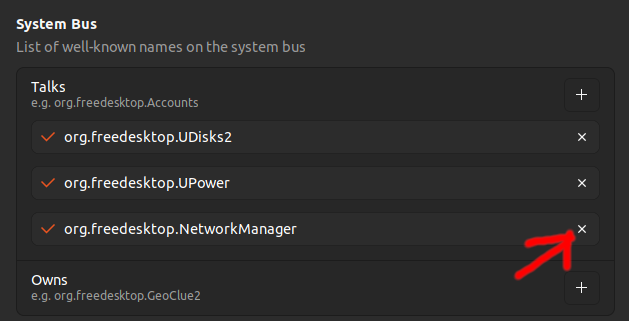
My recommendation is to look into Flatpak and Snap. They both have issues on their own, but work well.
I tried various combinations of the other solutions above, but without success (I'm using pop os). Switching to flatpak seems to have resolved it.
happening on PopOS with Steam both deb and Flatpak. Going to try the Flatseal solution.
edit to add that the Flatseal solution seems to be working well. Just need to redownload all the games now.
So it looks like Valve just rolled out an update that should be resolved now. Does this resolve your issue? @Stirdix
@necrophcodr if you use the flatpak, its sandbox was just hardened to block this access from Valve Steam by default.
Hello @necrophcodr, @nanonyme, "Big Picture Mode only supports modifying network settings when running on SteamOS / Steam Deck." in the 2023-01-30 Steam client beta update could be directly related to this issue. Please retest.
Okay. If using flatpak, please ensure that you have that dbus access allowed for testing Valve change.
After removing the polkit rule and updating steam, it no longer asks me for Superuser access upon starting the steam client. So it appears to work for me at least.
Ive changed it on a different device, and unfortunately the issue persist on that one. It does not appear to have been resolved entirely yet.
Hello @necrophcodr, @nanonyme, "Big Picture Mode only supports modifying network settings when running on SteamOS / Steam Deck." in the 2023-01-30 Steam client beta update could be directly related to this issue. Please retest.
Update to beta version had not resolved this issue for me.
Ubuntu did release a "snap" with steam, in beta preview. In that "snap", the problem is not present anymore.
I don't know if it has other problems or anything (it is a beta, anyway).
shouldn't this be labeled a bug / security issue? harvesting network secrets seems pretty fucking shady.
I cannot believe it is still here in 2023.
My workaround:
I found the start menu item (/usr/share/applications/steam.desktop) starts steam via /usr/games/steam script so I edited it to contain line export DBUS_SYSTEM_BUS_ADDRESS=steam near the top of the file as suggested earlier. This mutes the annoying popup for me.
Using flatpak repackage of Steam does not exhibit this issue FWIW.
I got same error on opera too(I swithced wired network after issue btw) I think it is not about steam It is about something in freedesktop api or gnomes itself. When you connect to the wifi in any account other accounts get this error. Just connect wifi in that account and issue will be resolved.
Adding the user to the netdev group seems to have worked for me on Ubuntu 22.04
@kxmas be aware that doing so grants steam the (inappropriate) access to your Wi-Fi secrets, and widens your attack surface as it allows anything you run direct access to your network stack, for example capturing packets between daemons running locally.
Adding the user to the netdev group seems to have worked for me on Ubuntu 22.04
Only because it no longer needs to ask permission for access to network secrets and passphrases.
For anyone that needs javascript polkit rules, I'm using this to block only steam requests because else it prevents legit prompts from other software:
Doesn't seem to be working for me. (...)
OpenSuse Tumbleweed, here.
Works for me on current Tumbleweed!
@tvogel thanks for that, I'll have to give it another go, myself. It's a fast-moving distro, as we both know :P
Issue confirmed on Debian 10.7
So Valve didn't give a shit about issue already 2 years? I just wanted to show my son how I used to play and this popup just ruined everything!
There is a workaround here:
https://steamcommunity.com/app/221410/discussions/0/3106901665845459558/
Looks like Valve wants to open "server" ports on clients.
easy work around i found that does not break anything inside steam:
litteraly just create an sh file (call it whatever you want) and put this command inside: 'DBUS_SYSTEM_BUS_ADDRESS= steam' you can then link it to a .desktop file and add an icon to it and then its just like launching steam off of the desktop
'DBUS_SYSTEM_BUS_ADDRESS= steam'
And what is that command actually doing?
steam installer deb should make this modification. Why there is nobody assigned to fix this?
'DBUS_SYSTEM_BUS_ADDRESS= steam'
And what is that command actually doing?
it starts steam without dbus access, but at least for me doesn't allow me to sign in. It's especially weird considering steam didn't do that until today for me. I mean the prompting for modifying a system connection
The only workaround that worked for me was the dbus variable. Fixes the issue completely and it's still working as intended.
Also occurs on Debian 12 with Gnome and a non-admin user. Multiple popups that will not go away whether a password is provided or not. Disabling DBUS for Steam via envvar appears to be a workaround, and this appears to be the best way to do that.
Come on, Valve!
Folks who this occurs to, please subscribe to and put a +1 on this issue.
So far we have these distros:
- Debian 10
- Debian 12
- Ubuntu 20
- Ubuntu 22
- OpenSuse 15
and these WMs:
- Unity
- Gnome
-KDE
I think the problem has been sufficiently described...
Also occurs on Debian 12 with Gnome and a non-admin user. Multiple popups that will not go away whether a password is provided or not. Disabling DBUS for Steam via envvar appears to be a workaround, and this appears to be the best way to do that.
I think the problem has been sufficiently described...
Also occurs on KDE on Debian 12
This is not a distro or desktop environment specific issue.
Anyone who has dbus and a network management tool (perhaps just NetworkManager) that listens on it is at risk.
Polkit just makes the violation of expectations (and data privacy) obvious.
I can confirm that this workaround seems to work on an up to date OpenSUSE tumbleweek
Recently, I was getting the authentication prompt not just at Steam startup but periodically when running games. After implementing the disabling DBUS workaround, both instances have gone away.
I have also coming the same issue on ubuntu 22 version twice once i had triple boot then i deleted the kali then it resolved but agian it show to me after booting my system, idk what should i do?
Is this not because of the internet tab in big picture mode that allows you to select and add wifi networks?
Is this not because of the internet tab in big picture mode that allows you to select and add wifi networks?
For selecting, you typically don't need admin permissions.
Admin permissions are only required iff the network settings are changed. There is no need to grant these in advance, and in general.
Is this not because of the internet tab in big picture mode that allows you to select and add wifi networks?
For selecting, you typically don't need admin permissions.
Admin permissions are only required iff the network settings are changed. There is no need to grant these in advance, and in general.
I think you should be able to disable it but granting them in advance does make a lot of sense if you are using big picture mode. If you have a device that autostarts steam with big picture mode and you navigate the menus with a controller, having the pop up only when you want to change your WiFi settings breaks that. You would need a keyboard surely?
Good lord, this issue is still open?
Your system information
Please describe your issue in as much detail as possible:
Whenever I start Steam on my non-admin account, I get a prompt from NetworkManager to change global network settings [which I can't, because I don't have permission]. This prompt cannot be removed so long as Steam is open - closing the window or killing the process just reopens another prompt. Closing the window continues to make a new prompt even after Steam is closed. [Exiting Steam, then killing the process does remove the prompt though.]
Steam then boots up and runs games seemingly just fine. I think there are then issues with cloudsaves, but am not easily able to confirm that. [I tried a fresh reinstall to see if it resolved the issue, but (a) it did not and (b) that caused other problems that I would need to resolve first.]
This is new since something like Monday or Tuesday, so presumably an update (but IDK if it's Steam or Ubuntu). [Also, it's not just me; see also this recent post: https://steamcommunity.com/app/221410/discussions/0/3106901665845459558/]
Steps for reproducing this issue:
Boot Steam on Ubuntu 20.04 on non-admin account [if there are more conditions, I don't know them]