Steam Input doesn't create the virtual device / creates non-functioning device
Hello @ivyl, are you using linux 5.12.x with hid_playstation loaded (either as a kernel module or built-in)? I suspect you've encountered #7791.
Hey @kisak-valve
Yes, hid_playstation was used for my DualSense testing, this may explain the extra oddity with DualSense.
I still see the mapping issue with Xbox Series X though.
I've unplugged DualSense controller, rebooted, plugged in only Xbox controller and made sure that hid_playstation is not loaded:
$ lsmod | grep hid
hid_logitech_hidpp     53248  0
hid_logitech_dj        28672  0
usbhid                 65536  1 hid_logitech_dj
mac_hid                16384  0
Steam Input enabled
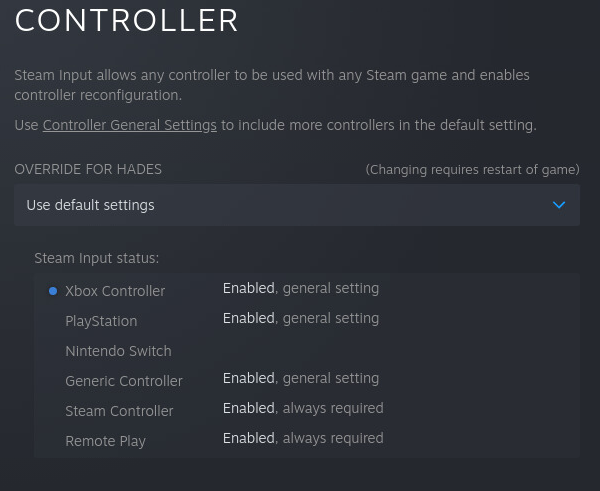
Mapping

And I still get no inputs in the game.
I've tried:
$ ls /sys/class/input/input61/
capabilities  event18  id  inhibited  js1  modalias  name  phys  power  properties  subsystem  uevent  uniq

$ cat /sys/class/input/input61/name
Microsoft X-Box 360 pad

$ jstest /dev/input/js1
Driver version is 2.1.0.
Joystick (Microsoft X-Box 360 pad) has 8 axes (X, Y, Z, Rx, Ry, Rz, Hat0X, Hat0Y)
and 11 buttons (BtnA, BtnB, BtnX, BtnY, BtnTL, BtnTR, BtnSelect, BtnStart, BtnMode, BtnThumbL, BtnThumbR).
Testing ... (interrupt to exit)
Axes:  0:     0  1:     0  2:-32767  3:     0  4:     0  5:-32767  6:     0  7:     0 Buttons:  0:off  1:off  2:off  3:off  4:off  5:off  6:off  7:off  8:off  9:off 10:off
# moving sticks / pressing buttons has no effect on values

$ cat /dev/input/event18
# remains silent
I've also tested those special files from the terminal spawned with PRESSURE_VESSEL_SHELL=instead, still no luck.
I've done some more testing.
The setup:
- Arch (pacman -Syu + reboot just before testing)
- KDE (Xorg)
- fresh Steam install (I've nuked
.steamand.local/share/Steam) - Proton 6.3-5
- Xbox Series X controller (model 1914) over USB, no other controllers plugged in
Games used:
- GJ = Genital Jousting (469820)
- Ori = Ori and the Blind Forest: Definitive Edition (387290)
Steam non-beta (8th Jun), no Steam Input:
- GJ: works
- Ori: works
same as above, but Steam Input enabled:
- GJ: starts working after about ~60s wait, next launch - it works right away, next launch after that ~60s wait required, and so on... tested that about 10 launches in a row
- Ori: same 60s wait required, but we have to wait each time
I've sshed into machine so the game doesn't lose focus and checked the virtual controller stream creates (cat /proc/bus/input/devices and look for vendor 28de).
evtest /dev/input/eventXX as the game launches shows us few things:
- the list of supported events is only displayed after ~30s
- it takes another ~30s for input events to make it through
- after the game closes the device remains, that's why the second launch works right away
- after the game closes for the second time the device disappears
- the device is re-created on the third launch, and the wait is required again
The controller disappears each time for Ori though. What's even weirder is that after testing Ori I've re-checked with GJ and the virtual controller started to disappear each time.
Steam beta (12th Jul), no Steam Input:
- GJ: works
- Ori: works
same as above, but Steam Input enabled:
- GJ: sometimes only 30s wait is enough - the events start arriving right as evtest enumerates supported events, sometimes there's also that extra 30s wait after that like with the non-beta client. The device disappears after each launch though.
- Ori: same as GJ.
Extra observation from beta (not sure about non-beta): if you alt+f4 out of the game and the virtual controller device is created but not responsive yet the Steam UI is frozen. It unfreezes itself after the 60s wait is complete. It looks like something in Steam itself is getting stuck.
I hope that helps.
Possibly related to https://gitlab.steamos.cloud/steamrt/steam-runtime-tools/-/issues/38.
Possibly related to https://gitlab.steamos.cloud/steamrt/steam-runtime-tools/-/issues/38
We initially though this was a bug related to the pressure-vessel containers, which is why it was reported there; but we were able to reproduce the same thing with Proton 5.0 (which didn't use pressure-vessel) and with some native Linux games (no pressure-vessel and also no Proton), implying that the root cause is more likely to be in Steam itself.
My colleague was able to reproduce this reliably with native Linux game Absolute Drift (320140), and I've also seen it intermittently when using a Steam Controller with Stardew Valley (413150), with similar symptoms.
There's some debugging info on the steam-runtime-tools issue that might be useful to a Steam developer looking into this, notably the results of attaching strace to Steam.
I may be experiencing this problem with a DualSense controller & Elite Dangerous on Proton 5.0-10.
My DualShock 4 controller works fine with Steam Input, using either bluetooth or USB, after the game is restarted once.
With the DualSense, the game launches and Steam Input creates the Microsoft X-Box 360 virtual device, but that device produces no events and the game behaves as though no controller is connected. Meanwhile, jstest-gtk, evtest, Wine's joystick control panel, and Steam Big Picture Mode all respond to events from the real device.
(Corrections made above after more observation. I'll add a new comment with my findings.)
Unlike #7791, unloading the hid_playstation module doesn't seem to make a difference for me. I get the same results on kernel 5.13 with and without hid_playstation, and on kernel 5.4.0 without hid_playstation.
Distro: Ubuntu 20.04.3
Steam client:
Built: Oct 13 2021 at 19:47:24
API: v020
Package versions: 1634158817
I also notice that Steam's General Controller Preferences for the DualSense include Controller Light Color/Brightness/Saturation and Player Slot LED settings, but none of those seem to do anything.
Meanwhile, the light color settings do work on the DualShock 4.
(I mention this just in case it's related to the no-event problem; I don't know if Steam's light settings have ever worked on the DualSense, though, so I suppose this could be a red herring.)
New observations:
I was mistaken about Steam's X-Box 360 virtual device not producing events. It is producing events on both the event* and js* virtual devices, but only when the game is in the foreground. I had to put the game in windowed mode to see the events flowing in my evtest/jstest terminal window. (They stop flowing when I alt+tab to the terminal.)
It turns out the DualShock 4 and DualSense are being handled more similarly than I thought:
DualShock 4:
- The virtual device appears when launching the game.
- The game ignores the controller the first time it is run.
- The virtual device remains after exiting the game.
- The game sees & responds to the controller once it is run again.
- Button mappings appear correct, including square & triangle as X & Y respectively.
- Artificial Steam Input events work. (I have the touchpad mapped as up/down/left/right arrow keys, and the gyro mapped as a mouse when the right stick is depressed.)
DualSense:
- The virtual device appears when launching the game.
- The game ignores the controller the first time it is run.
- The virtual device disappears after exiting the game.
- The virtual device appears again when launching the game again.
- The game still ignores the controller.
- Exiting the game and immediately re-launching it prevents the virtual device from disappearing.
- The game sees & responds to the controller when run another time, if the virtual device never disappeared after the previous run.
- Some button mappings are wrong: Square & triangle are swapped as Y & X respectively.
- Artificial Steam Input events do not work. (The game does not respond to my touchpad up/down/left/right arrow key mappings, nor to my gyro when the right stick is depressed.)
Summary:
- Steam removes the virtual device after the game exits when the DualSense is used, but leaves it intact when the DualShock 4 is used.
- The game ignores the controller the first time it is run, but responds to it when run again quickly enough that Steam hasn't removed & recreated the virtual device.
- Steam Input mappings work with the DualShock 4, but some are broken with the DualSense.
I got the DualSense gyro motion, touchpad, and light bar working in Steam, by adding this rule to udev:
KERNEL=="event*", SUBSYSTEM=="input", ATTRS{name}=="*Motion Sensors", MODE="0660", TAG+="uaccess
(I expect there's a better way to write that rule, using manufacturer & device ID instead of name, but this was good enough for troubleshooting progress.)
These two DualSense-related rules from the steam-input package's 60-steam-input.rules were already installed, but were insufficient:
KERNEL=="hidraw*", ATTRS{idVendor}=="054c", ATTRS{idProduct}=="0ce6", MODE="0660", TAG+="uaccess"
KERNEL=="hidraw*", KERNELS=="*054C:0CE6*", MODE="0660", TAG+="uaccess"
I still don't know how to make Steam's virtual controller device work reliably. I still have to launch the game, exit the game, and quickly launch it again before Steam's virtual device disappears. Perhaps Steam's device setup code is failing to detect some error condition that only occurs when first creating the device?
I just noticed that the controller problem (not working until game is launched a second time) occurs in Elite Dangerous (Proton 5.0) and Stardew Valley (native linux), but it works fine in Antichamber (native linux) on the first try.
All three games are set for "use default settings" in Steam's Properties: Controller settings. I wonder what Antichamber is doing differently to allow it to work properly.
I can get it to work slightly more reliably if I turn on the controller after the game has started, previously I was getting intermittent behaviour in both Minecraft Dungeons and Cuphead where the controllers were not recognised at all
Proton versions
proton 5.0x2 2021-12proton 5.0-10x1 2021-11proton 6.3-5x1 2021-07
Your system information
Please describe your issue in as much detail as possible:
Whenever I try to use Steam Input it either doesn't create the virtual device or creates one but it receives no inputs.
At first I have thought that it may be Wine failing to detect/handle the controller but I've poked around more (including using
PRESSURE_VESSEL_SHELL=instead) and it turns out that the virtual input device is either not created or is created but doesn't work.Steps for reproducing this issue:
With DualSense
input: Microsoft X-Box 360 pad as /devices/virtual/input/input41in the dmesg) and gets detected by Winecaton the even or js confirms that there's nothing happeningWith Xbox Series X/S controller the virtual device gets created immediately (no replug needed) but the inputs do not work just like described above.