Steam slows computer down and crashes it after reaching login screen on ArcoLinux
Hello @MegaKeon, no OpenGL application including Steam should be capable of taking down the entire system, which hints that a system issue of some kind is happening. A corrupted log file from the basic command line redirection you're doing is also strange.
I suspect I personally won't be able to help here, but out of mild curiosity, can you share some basic system specs, like CPU, total RAM available and GPU/driver in use. The symptom's you've described sounds similar to a system bogging down while it waits for the kernel to manage swap. Also, while the system is misbehaving, are you able to access the system remotely with SSH?
Intel(R) Core(TM) i7-4500U CPU @ 1.80GHz
7,7 Gb RAM
8Gb Swap
00:02.0 VGA compatible controller: Intel Corporation Haswell-ULT Integrated Graphics Controller (rev 09) (prog-if 00 [VGA controller])
Subsystem: Lenovo Device 3800
Flags: bus master, fast devsel, latency 0, IRQ 49
Memory at b5000000 (64-bit, non-prefetchable) [size=4M]
Memory at c0000000 (64-bit, prefetchable) [size=256M]
I/O ports at 6000 [size=64]
Expansion ROM at 000c0000 [virtual] [disabled] [size=128K]
Capabilities: [90] MSI: Enable+ Count=1/1 Maskable- 64bit-
Capabilities: [d0] Power Management version 2
Capabilities: [a4] PCI Advanced Features
Kernel driver in use: i915
Kernel modules: i915
09:00.0 3D controller: NVIDIA Corporation GK208M [GeForce GT 730M] (rev a1)
Subsystem: Lenovo Device 3800
Flags: bus master, fast devsel, latency 0, IRQ 16
Memory at b3000000 (32-bit, non-prefetchable) [size=16M]
Memory at a0000000 (64-bit, prefetchable) [size=256M]
Memory at b0000000 (64-bit, prefetchable) [size=32M]
I/O ports at 3000 [size=128]
Expansion ROM at [disabled]
Capabilities: [60] Power Management version 3
Capabilities: [68] MSI: Enable- Count=1/1 Maskable- 64bit+
Capabilities: [78] Express Endpoint, MSI 00
Capabilities: [100] Virtual Channel
Capabilities: [128] Power Budgeting Capabilities: [600] Vendor Specific Information: ID=0001 Rev=1 Len=024
Kernel driver in use: nvidia
Kernel modules: nouveau, nvidia_drm, nvidia
However when I run nvidia-smi I get No devices were found
I cannot access it remotely with SSH after it breaks, and if i'm connected it doesn't allow me to do anything else when it does.
Hypothetically, if Steam is trying to use an unreasonable amount of ram, then temporarily disabling swap should show a change in behavior and stop the kernel from thrashing the hard drive. Ideally, I think we'd want to see the kernel OOM kill Steam, as that would at least be a hint to ponder.
Completely unrelated to Steam, but on a particularly low spec system which I pushed way past it's capabilities, and was setup to use zswap, instead of OOM killing the offending application, it pushed everything it could into swap including the X server which stopped the screen from rendering, and spent about 15 minutes trying to reorganize and compact memory to fit a few kilobytes more onto the swap partition, then accept a few characters in an existing SSH session before resuming the thrashing the swap partition again, repeating for a painful amount of iterations.
Disabling swap didn't work.
It also started at around the same time as issue #7813, but was not solved with the update, nor did any of the solutions from it worked, the difference is that it only crashes steam and not the whole computer. Also tried using the beta nvidia drivers and it also didn't work.
It worked again when I did a full system upgrade, but only for the same session, after restarting the computer it crashed again. Reproduced it twice during this period, and the one similarity from the updates I had noticed was the update of an nvidia package. There was also a message on the teminal about not being able to launch Vulkan while launching Steam or something similar that I unfortunately forgot to save when it worked. I tried reinstalling the nvidia drivers with pacman -S nvidia but couldn't reproduce the fix. I will document it more thoroughly next time I am able to reproduce it, probably next time the drivers are updated.
Edit: This happened while testing right after I finished posting this.
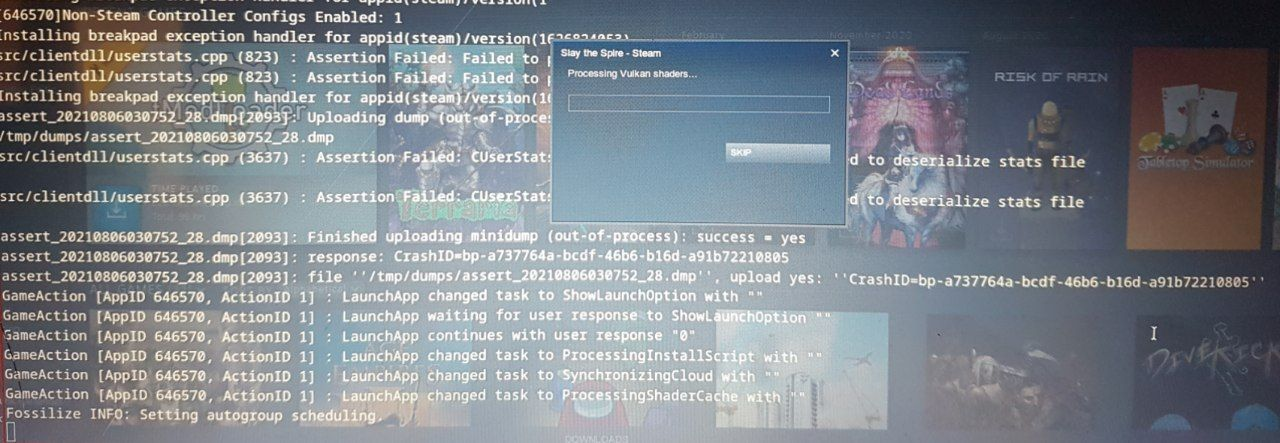
I opened steam to see if there was any difference in the logs between last time and now, and to be able to copy them I press ctrl+c to stop it when it starts to slow down. However when I did it this time Steam was able to launch, but as soon as I tried to open a game and the "Processing Vulkan shaders" screen appeared it crashed again. I was able to reproduce this multiple times.
Here is the log of Steam until I opened an app:
https://gist.github.com/MegaKeon/441d667d665b547bd3e4c426f40878ae
And here is a picture I took from the screen after it crashed. Happened nearly instantly when I tried to open a game (Slay the Spire in this case) since I couldn't copy the output.
Nothing extracted yet.
Your system information
Please describe your issue in as much detail as possible:
After an update Steam stopped working on my machine, I tried it on a clean install of both EndeavourOS and ArcoLinuxS with the same result. It updates and gets to the screen that asks me to create or login into an account, causes my computer to slow down over the course of 5 seconds (the mouse starts to stagger while moving in the screen) and freezes my computer forcing me to restart. Trying to get a log with
steam &> steam.logorsteam | tee steam.logdoesn't get it past the first 5 lines and corrupts the rest of the file. It worked again for a single day and stopped working again. Has been happening for about a month.The only way I found to get a log was by quitting right when it is about to crash and copying it from the command line. Got about everything I saw before my computer crashed before so this is all of the relevant information.
https://gist.github.com/MegaKeon/93ab95e0ad89db3abe76da12fe26fd89
Tried steam --reset, removing ~/.steam/registry.vdf, and removing every steam file and installing it again.
Steps for reproducing this issue: