protonscr

Games can not be launched with hikari

steamclosed Window manager
ValveSoftware/steam-for-linux#8045 · opened 2021-09-07 by cinerea0 · updated 2022-06-16 · 5 comments · github
Ccinerea0 2021-09-07 github

Your system information

Please describe your issue in as much detail as possible:

Upon launching a game, I expected that the game window would open. Instead, the game immediately closed itself and produced the following terminal output:

GameAction [AppID 200900, ActionID 1] : LaunchApp changed task to ProcessingInstallScript with ""
GameAction [AppID 200900, ActionID 1] : LaunchApp changed task to SynchronizingCloud with ""
GameAction [AppID 200900, ActionID 1] : LaunchApp changed task to SiteLicenseSeatCheckout with ""
GameAction [AppID 200900, ActionID 1] : LaunchApp changed task to CreatingProcess with ""
GameAction [AppID 200900, ActionID 1] : LaunchApp waiting for user response to CreatingProcess ""
GameAction [AppID 200900, ActionID 1] : LaunchApp continues with user response "CreatingProcess"
Opted-in Controller Mask for AppId 200900: 0
/bin/sh\0-c\0/home/nemesis/.local/share/Steam/ubuntu12_32/reaper SteamLaunch AppId=200900 -- '/home/nemesis/.local/share/Steam/steamapps/common/Cave Story+/CaveStory+'\0
Game update: AppID 200900 "", ProcID 7658, IP 0.0.0.0:0
ERROR: ld.so: object '/home/nemesis/.local/share/Steam/ubuntu12_32/gameoverlayrenderer.so' from LD_PRELOAD cannot be preloaded (wrong ELF class: ELFCLASS32): ignored.
Starting app 200900
>>> Adding process 7658 for game ID 200900
GameAction [AppID 200900, ActionID 1] : LaunchApp changed task to WaitingGameWindow with ""
ERROR: ld.so: object '/usr/lib/libgtk3-nocsd.so.0' from LD_PRELOAD cannot be preloaded (wrong ELF class: ELFCLASS64): ignored.
ERROR: ld.so: object '/home/nemesis/.local/share/Steam/ubuntu12_64/gameoverlayrenderer.so' from LD_PRELOAD cannot be preloaded (wrong ELF class: ELFCLASS64): ignored.
GameAction [AppID 200900, ActionID 1] : LaunchApp changed task to Completed with ""
ERROR: ld.so: object '/usr/lib/libgtk3-nocsd.so.0' from LD_PRELOAD cannot be preloaded (wrong ELF class: ELFCLASS64): ignored.
ERROR: ld.so: object '/home/nemesis/.local/share/Steam/ubuntu12_64/gameoverlayrenderer.so' from LD_PRELOAD cannot be preloaded (wrong ELF class: ELFCLASS64): ignored.
>>> Adding process 7661 for game ID 200900
>>> Adding process 7663 for game ID 200900
Game update: AppID 200900 "", ProcID 7663, IP 0.0.0.0:0
RecordSteamInterfaceCreation (PID 7663): SteamUser016 / User
RecordSteamInterfaceCreation (PID 7663): SteamFriends013 / Friends
RecordSteamInterfaceCreation (PID 7663): SteamUtils005 / Utils
RecordSteamInterfaceCreation (PID 7663): SteamMatchMaking009 / Matchmaking
RecordSteamInterfaceCreation (PID 7663): SteamMatchMakingServers002 / MatchmakingServers
RecordSteamInterfaceCreation (PID 7663): STEAMUSERSTATS_INTERFACE_VERSION011 / UserStats
RecordSteamInterfaceCreation (PID 7663): STEAMAPPS_INTERFACE_VERSION005 / Apps
RecordSteamInterfaceCreation (PID 7663): SteamNetworking005 / Networking
RecordSteamInterfaceCreation (PID 7663): STEAMREMOTESTORAGE_INTERFACE_VERSION008 / RemoteStorage
RecordSteamInterfaceCreation (PID 7663): STEAMSCREENSHOTS_INTERFACE_VERSION001 / Screenshots
RecordSteamInterfaceCreation (PID 7663): STEAMHTTP_INTERFACE_VERSION001 / HTTP
Setting breakpad minidump AppID = 200900
Steam_SetMinidumpSteamID:  Caching Steam ID:  76561198041059019 [API loaded no]
Game removed: AppID 200900 "", ProcID 7663 
Game 200900 created interface STEAMAPPS_INTERFACE_VERSION005 / Apps
Game 200900 created interface STEAMHTTP_INTERFACE_VERSION001 / HTTP
Game 200900 created interface STEAMREMOTESTORAGE_INTERFACE_VERSION008 / RemoteStorage
Game 200900 created interface STEAMSCREENSHOTS_INTERFACE_VERSION001 / Screenshots
Game 200900 created interface STEAMUSERSTATS_INTERFACE_VERSION011 / UserStats
Game 200900 created interface SteamFriends013 / Friends
Game 200900 created interface SteamMatchMaking009 / Matchmaking
Game 200900 created interface SteamMatchMakingServers002 / MatchmakingServers
Game 200900 created interface SteamNetworking005 / Networking
Game 200900 created interface SteamUser016 / User
Game 200900 created interface SteamUtils005 / Utils
Game 200900 method call count for IClientUserStats::StoreStats : 1
Game 200900 method call count for IClientUtils::RecordSteamInterfaceCreation : 11
Game 200900 method call count for IClientUtils::GetAppID : 12
Game 200900 method call count for IClientUser::GetSteamID : 1
Uploaded AppInterfaceStats to Steam
Exiting app 200900
No cached sticky mapping in ActivateActionSet.Installing breakpad exception handler for appid(steam)/version(1626824053)

Given that I am also encountering the issue detailed in #4924 where clicking on headings in the Steam client such as "STORE" does not result in any response, I think this is due to my use of a Wayland compositor.

Steps for reproducing this issue:

  1. Begin a session with any non-desktop-environment (i.e. GNOME or KDE) Wayland compositor. I'm using hikari, however I've heard that the problem also exists on sway.
  2. Launch Steam under this environment.
  3. Install any game (I used Cave Story in my example above, but I could not find any games that worked) and attempt to launch it.
Kkisak-valve maintainer 2021-09-07 github

Hello @cinerea0, please copy your system information from Steam (Steam -> Help -> System Information) and put it in a gist, then include a link to the gist in this issue report.

Your log doesn't really give any decent hints besides mentioning libgtk3-nocsd, which has a history of causing random trouble. Can you remove that package from the mix?

Is there a particular reason why you think that wayland (the protocol) is at fault? There isn't a central compositor for Wayland. Each desktop environment gets to build their own compositor how they see fit, so if there is a DE-specific quirk, then it could be specific to hikari. Can you test how Steam behaves with a different desktop environment?

Ccinerea0 2021-09-07 github

@kisak-valve I have created a gist containing my system info and I have placed a link to it in my initial comment. I have also disabled libgtk3-nocsd, and I've created another gist that contains the terminal output from when Steam starts here: https://gist.github.com/cinerea0/f2b96c2b8c2adc42c947aedfe592fb2e.

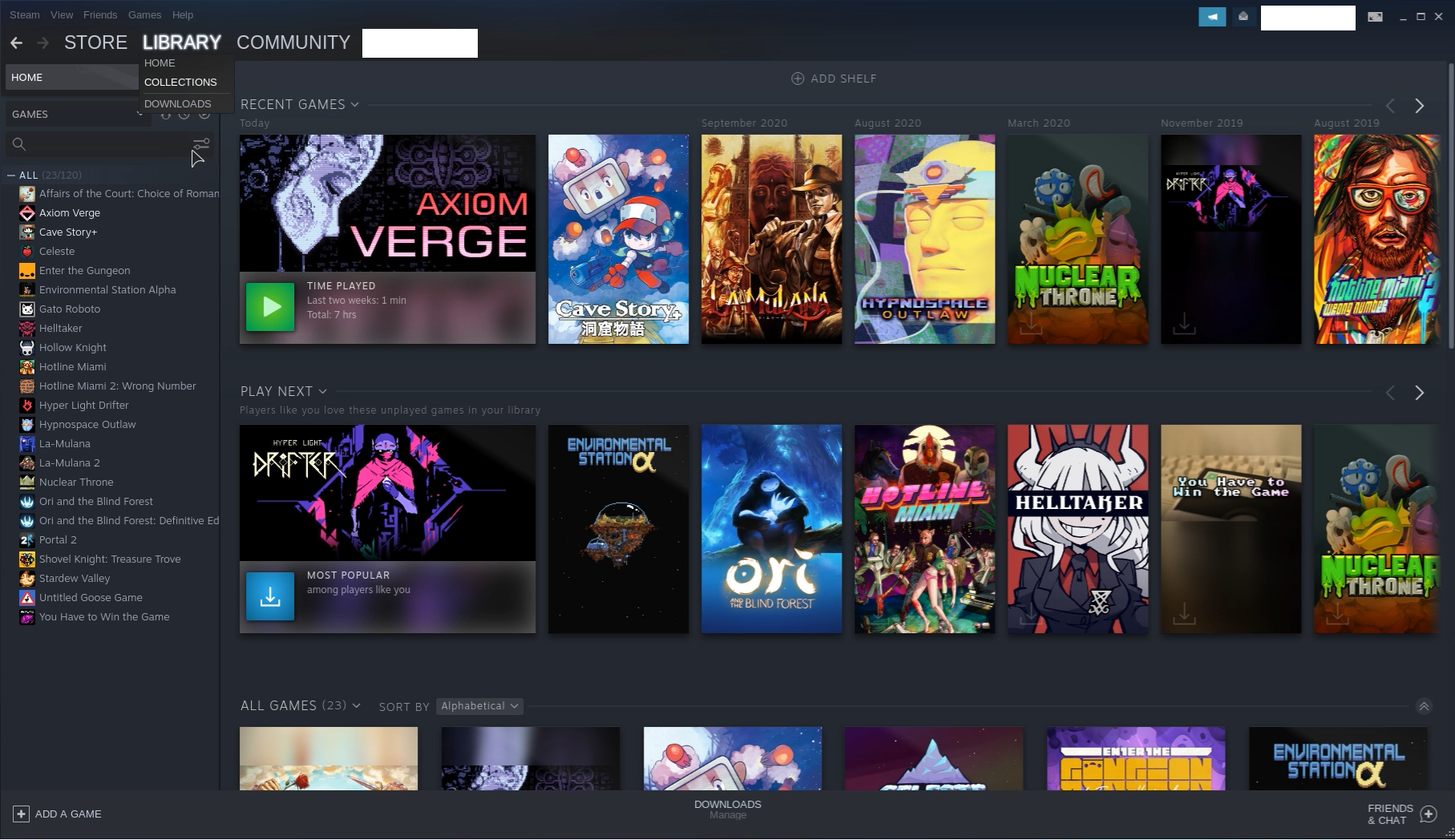
I thought that Steam's performance under Wayland was the problem because I'm also experiencing the issue mentioned above where Steam doesn't respond to mouse input correctly. I had incorrectly described this earlier as "clicking on headings in the Steam client such as "STORE" does not result in any response", but after further investigation it's registering input further down than it should be. Here's a screenshot as an example:
steam_censored
This shows that my cursor is selecting "Collections" under the "LIBRARY" heading despite my cursor being further down the screen.

I tested Steam under a different Wayland compositor (wayfire), and neither the problem with games being unable to launch nor the mouse issue were present. Do you see anything in the gists that I posted that indicates that this could be a failure of some setting on my part or a missing package? If not, then you're right that this is probably a hikari issue.

Kkisak-valve maintainer 2021-09-08 github

Thanks, https://gist.github.com/cinerea0/76a22362061004559b9dc1efa1a288da#file-steam_info-json-L44 looks like a relevant detail in your system information. If hikari uses wlroots under the hood, then it could share some behavior with sway since we know that sway is also built on top of wlroots.

Ccinerea0 2021-09-08 github

What's weird is that wayfire, which worked fine, is also built on wlroots. It could be that wayfire implements some kind of extension to wlroots that hikari doesn't.

Ssnakedye 2021-09-10 github

It's either an issue in Xwayland or Wlroots/Hikari's implementation of it. Obviously the best solution would be to just make the Steam client be a Wayland client but I feel like we are still years away from that.

Nothing extracted yet.