Shader Cache is Being Downloaded and Compiled After Every Single Reboot
Hello @gardotd426, this reads like the current intended behavior of the Steam client. These shader pre-cache updates were happening before, but with less visibility.
Since you've opened this issue report, we might as well ponder the finer details. Please attach ~/.local/share/Steam/logs/shader_log.txt as a file.
Been happening for a month for me. Never ending downloading.
What I'm mostly seeing in the log is:
[timestamp] [AppID <AppID #>] Starting Shader Swarm download job.
[timestamp] [AppID <AppID #>] Target manifest <target manifest #> of size <larger size>.
[timestamp] [AppID <AppID #>] Source manifest <source manifest #> of size <smaller size>u.
[timestamp] Committed bucket <#> (AppID <AppID #>) from <source manifest #> to <target manifest #>.
[timestamp] [AppID <AppID #>] Finished Shader Swarm download job: No Error
These look like legitimate pre-cache delta-patch update, and not a duplicate download.
There's also:
[2021-09-17 03:52:20] Queuing depot manifest 4256548600728534165 (2159391403 bytes) for bucket ID 1027610, type SteamSwarm/G7:CompatVideoTCMediaV1 (AppID 883710).
[...]
[2021-09-17 04:13:54] Committed bucket 1027610 (AppID 883710) from 0 to 4256548600728534165.
[2021-09-17 04:13:54] [AppID 883710] Finished Shader Swarm download job: No Error
[2021-09-17 03:52:20] Queuing depot manifest 1000222499080350120 (4542080587 bytes) for bucket ID 731639, type SteamSwarm/G7:CompatVideoTCMediaV1 (AppID 397540).
[...]
[2021-09-17 04:23:47] Committed bucket 731639 (AppID 397540) from 2385576768023649330 to 1000222499080350120.
[2021-09-17 04:23:47] [AppID 397540] Finished Shader Swarm download job: No Error
To me, Commited bucket # from 0 to <target manifest #> reads like Resident Evil 2 (883710) did full download of transcoded video content, and Borderlands 3 (397540) got an update to the transcoded video it uses with Proton, and that could account for the larger download sizes for those games.
(Speculation) I'm guessing that there's a single file size limit to delta patching with steampipe and the transcoded video .foz files easily exceed that limit, causing a full download in both cases.
Again, important detail here is that these aren't duplicate updates. Steam's pre-caching system is slowly discovering more shaders being used by the games in the wild, and adjustments are being made to the sets of transcoded video to improve in-game video playback of some games.
I just got another update for every game in my library, this is the third time today that every game I have has had a shader cache update. Is that really intended behavior?
Yeah it is 100% broken imo.
My cache is almost 10GB and I see it PROCESSING the same games over and over again for months now. This doesn't seem right to me! (My games list has barely changed, I'm not buying games constantly)
Thanks @kisak-valve those log messages are interesting. Grepping my shader_log.txt and shader_log.previous.txt files I can see that only a single game ever downloads deltas (936790: Life is Strange True Colours) all the other ones (36 unique app ids) always download the full shader cache (and none of those contain the 'Source manifest' line). This definitely feels like an issue with the content delivery system not knowing about the existing shader content and mistakenly downloading the whole thing every time.
I just deleted all my shadercache folder on all my drives and reconsolidate via symlink to the .steam folder. See if that helps, so far it seems ok. I feel steam for linux should just do this automatically...
Same thing here. Since the new download UI was added I've noticed Steam downloads a metric fuckload (that's a technical term) of data every time I start it - so this behavior has probably been present way longer than that. I start Steam once every day after work, and then it runs until I shut down around bedtime.
EDIT: I'll get a screenshot tomorrow or the next day.
The downloads almost never have any information tagged on. I have no idea why Steam does it or what it is. Luckily I don't pay for bandwidth.
https://gist.github.com/folknor/73fcc0b5d229c86af44c4dfe9b409f8a

Here we go, only 18 downloads today, and most of them quite small.
Just noticed that BFV has a shadercache of 1.9GB!! Some of these games just have massive caches!

(@kisak-valve said): this reads like the current intended behavior of the Steam client. These shader pre-cache updates were happening before, but with less visibility.
Is it intended that the shader downloads are not tagged as such in the downloader? You put in the effort to make it so the download could have a little info icon telling you what sort of update it is, these should clearly be marked as shader updates, but they are not.
"A new (i) icon next to the game's title will reveal a tooltip displaying the types of content that is included in that update. Types consist of: Game Content, Downloadable Content, Workshop Content, and Shader Pre-caching. This icon only appears if the update is not solely game content." -- https://store.steampowered.com/oldnews/88497
Yet the "(i)" icon is nowhere to be seen:
The fact that it's not there, makes it seem like the updates are, by implication, "solely game content" which is clearly false. It would solve a lot of confusion to fix this minor issue.
Once everyone understrand what these updates are, you could go on to perhaps offer an option to filter them out, but for that to work they must be properly tagged.
Also same problem on my end too. RDR2 downloads 141 MB shader cache at every Steam client run. Doesn't happen right away, requires booting the game. After quitting from the title, download begins.
Hello @Leopard1907, looking at your log and described symptoms, I think you're seeing a separate issue from this issue report. Please open a new issue report.
The Steam Client Beta from Sept 28 has really helped!
https://steamcommunity.com/groups/SteamClientBeta/announcements/detail/2874976428915672907
I thought it had helped me as I was no longer getting the download after the game exits but after doing a bit more investigation it seems that it still does it but only for the transcoded_video.foz file but not the swarc file. However now most games now no longer downloads the shaders at all (even if I've deleted the directory or I turn shader caching off and back on again) and the amount shown in settings is still reset to 0 every time so the issue changed for me but still not working as expected.
I'm seeing small amounts of files being downloaded but having a custom version of Proton installed stops it in it's tracks.
After digging around a bit more (and turning caching off and on, deleting the cache folders, opting out and back into the beta etc) I now have 12 games which it downloads the caches for on every steam start but they all fail to process with the error Cannot find impl for original cache type 7 from depot. and no other downloads are taking place either in the background or after a game exits. It also now saves and uploads a minidump file on every steam start.
I guess the lack of downloads might be due to the datasets starting over in this new beta and it will take time for the shaders to be recollected and become available for download again. I'll give it a few days and see if I'm getting anything.
My latest log says I've been uploading shaders as well as downloading. The client is still reporting nothing pre-cached but I can live with that as long as the caching is actually happening.
I'm seeing those too but the upload always fails with server busy
[2021-10-01 18:55:16] Register Shader request for 1162ba8b973ec4b6 / L2:b40f80f34cf78f091a6da598b73981d7 shader 0 failed with server reply: Busy
[2021-10-01 18:55:16] Register Shader request for 1162ba8b973ec4b6 / L2:b40f80f34cf78f091a6da598b73981d7 shader 1 failed with server reply: Busy
[2021-10-01 18:55:17] Register Shader request for 1162ba8b973ec4b6 / L2:b40f80f34cf78f091a6da598b73981d7 shader 2 failed with server reply: Busy
[2021-10-01 18:55:17] Register Shader request for 1162ba8b973ec4b6 / L2:b40f80f34cf78f091a6da598b73981d7 shader 3 failed with server reply: Busy
[2021-10-01 18:55:18] Register Shader request for 1162ba8b973ec4b6 / L2:b40f80f34cf78f091a6da598b73981d7 shader 4 failed with server reply: Busy
[2021-10-01 18:55:18] Register Shader request for 1162ba8b973ec4b6 / L2:b40f80f34cf78f091a6da598b73981d7 shader 5 failed with server reply: Busy
[2021-10-01 18:55:18] Register Shader request for 1162ba8b973ec4b6 / L2:b40f80f34cf78f091a6da598b73981d7 shader 6 failed with server reply: Busy
Today's beta update has helped a little though, the Cannot find impl for original cache type 7 from depot. error has been resolved. The 12 caches that it now downloads on every steam client start are at least replaying properly. Unfortunately the initial bug is still present, its downloading the full shader cache for them each time (1.5Gb in total). Some games do now download a cache after they finish (RDR2 does), still the full unchanged file though.
Attached is the result of opening steam, waiting for the downloads and replays to finish then closing and re-opening it (identical downloads and replays happen).
Can you try today's Client Beta?
I just got the update, it's only downloading shaders for Proton 6.3 & experimental, ignoring all other versions I have installed. This is the message I get for all the others...
Attempting to find current bucket (compat tool: 'proton_316'); temporary dir: /home/user/.local/share/Steam/shader_cache_temp_dir_d3d11_64
[2021-10-02 07:20:40] Unknown shader cache type, ignoring
@Plagman today's beta resolves the downloads issue for me ! I'm only getting the expected downloads and replays now. All uploads still fail with server busy but that could very well be legit since the caching was started over. Thank you everyone who worked on resolving this issue !
Myself and others have reported that Borderlands 3 is getting 4-6GB shader precache updates literally every day. That game specifically, and multiple people are experiencing it.
Same thing to me too.
After steam client get this new UI update, i got often checking games or download chache.
I'm lucky that i play only few games.
I imagine if i had my full library, how many time i need to wait every time i stars steam client.
With old client all was so much better.
Every time i restart steam it tries to download a 700MB "Shader pre-caching update" for No Man's Sky.
Verifying the integrity of files moves the game to completed. I am on the latest steam beta.
I just watched Borderlands 3 update and process it's shader cache twice in
a row. Like literally back to back. And the overall shader cache jumped 3
GB up to 20GB total.
This is going to destroy battery life on the Steam Deck if it stays this way.
Hello @gardotd426, now that the shader pre-cache reset which was connected to the 2021-10-06 Steam client update has had some time to warm up, are you still seeing large shader pre-cache updates with Borderlands 3 on a regular basis?
@kisak-valve, not like... two and three times a day, but still pretty regularly. Though in the past couple days I feel like I've seen it less? I'll take the next day or so to actually look and try and measure in a more scientific way and report back.
Here's how it looks for me this morning, after the client being shut down overnight, roughly 10 hours (note that Factory Town actually had a patch, and RimWorld is workshop updates; all the others are weird - they're not workshop or game updates, and they're not marked as shader updates):


This happens every day. The number of games that it happens to changes every day. Obviously I'm on beta, and I realise that most of these updates are tiny in size - I just think they're strange.
Oh yeah I'm still getting every game updating at least once a day, for sure. @kisak-valve, I've gotten 2 Borderlands 3 shader cache updates in the past couple hours (one just now), but the download sizes are dramatically smaller (2-3MB vs 1-3GB before). The disk size (like what it says the disk usage will be after downloading) is still like 2GB for each download but anyway, yeah the downloads are way smaller.
Are daily shader cache updates for every game intended behavior? Just not giant multi-gigabyte updates? If that's the case then yeah I think we can close.
Thanks for checking. I was specifically asking about the large, repeated downloads. It sounded like transcoded video for running Borderlands 3 with Proton was changing.
Since Steam's shader pre-cache is crowd sourced, those small updates should be progressively less common shaders seen with the games as they are discovered, independent of game updates.
Okay, since the multiple-times-per-day Gigabyte+ downloads seem to have stopped, I guess I'll close this for now. If the issue crops back up I'll reopen or at least comment here. Thanks Kisak.
We shouldn't have closed the bug report.
On my systems keep downloading updates in size very similar to the shader cache.


What other proof is needed?
@NTMan those are all tiny. Most of them are in the kilobyte range, with only a few more than a couple MB, and none that are 100MB or more. Like Kisak said, he was concerned about daily (or multiple times a day) re-downloads of gigabyte-or-more shader cache downloads. It's expected to have regular small updates.
Thanks for checking. I was specifically asking about the large, repeated downloads
As he also says:
Since Steam's shader pre-cache is crowd sourced, those small updates should be progressively less common shaders seen with the games as they are discovered, independent of game updates.
So yeah, the issue can be closed.
In my case, the total update volume was 1Gb (113 games).
Updates that have exceeded 100MB:
-
Forza Horizon 5 - 485.5MB

-
Mass Effect Legendary Edition - 179.9MB

According to your screenshots you have no updates for Mass Effect and only
one 11MB update for Forza. The total size from the screenshots is nowhere
near 1GB. If you have other updates that weren't in the screenshots, I
don't know how anyone is expected to know about those.
Also, more importantly, you have several BRAND new games (some of which
don't even work on Linux so I don't know why they're installed, like
Battlefield 2042 and Halo Infinite), and as Kisak literally said - the
shader cache updates are crowd sourced, and so obviously the newer the
game, the more updates you'll get, and the larger they'll be, as more
players contribute to the shader cache and it "learns" more. Of course
Forza is going to have sizable updates because it's a brand new game.
This is exactly what one would expect for brand new games.
On Sun, Nov 21, 2021 at 11:15 AM Mikhail @.***> wrote:
In my case, the total update volume was 1Gb.
Updates that have exceeded 100MB:
- Forza Horizon 5 - 485.5MB
- Mass Effect Legendary Edition - 179.9MB
—
You are receiving this because you modified the open/close state.
Reply to this email directly, view it on GitHub
https://github.com/ValveSoftware/steam-for-linux/issues/8076#issuecomment-974847054,
or unsubscribe
https://github.com/notifications/unsubscribe-auth/AM5Y33YKGRRJP2SZZUPWXTTUNELJXANCNFSM5EGOUWIQ
.
Triage notifications on the go with GitHub Mobile for iOS
https://apps.apple.com/app/apple-store/id1477376905?ct=notification-email&mt=8&pt=524675
or Android
https://play.google.com/store/apps/details?id=com.github.android&referrer=utm_campaign%3Dnotification-email%26utm_medium%3Demail%26utm_source%3Dgithub.
@kisak-valve, I believe this actually might need re-opening. I've seen 4 updates to Borderlands 3 in the past 18 hours, and they've all been over 1GB (3 of them were 3-4GB). Once I had 3GB update complete and immediately go right into a 1GB update (I don't mean it completed, then 2 seconds later started a new one. I mean it never even left the "Downloading" section, it immediately completed and started a new shader update).
@kisak-valve is an liar.
For months he has said the problem will be fixed. No, even after 3 months it was not fixed.
EVERY time I start Steam, I have to download 20GB of shaders.
LINUX! Not Windows.
Windows works well.
I am now waiting until February and for the Steam Deck.
If nothing changes then it goes back to Windows.
I want to start Steam, play a game. No, Steam loads 20GB with shaders and I have to wait an hour for Steam to start.
Replying to https://github.com/ValveSoftware/steam-for-linux/issues/8076#issuecomment-994914000
Hi are you using experimental? Not 100% sure but I think every time an update to that is pushed (which depending on your settings could be quite often) it results in the shader cache data being downloaded again? Is that the issue?
Somebody please ban that guy. https://github.com/ValveSoftware/steam-for-linux/issues/8076#issuecomment-994914000
Somebody please ban that guy. [#8076 (comment)](https://github.com/ValveSoftware/steam-for-linux/issues/8076#issuecomment-994914000)
Why? that is the incorrect way to handle Windows enthusiasts having frustrating issues under Linux!!
By scorning frustrated newbies to Linux whenever they have a minor outburst, we're just telling everyone to go back to windows and let Linux gaming go away! Also these issues NEED to be resolved before Steam Deck is in peoples hands.
For months he has said the problem will be fixed. No, even after 3 months it was not fixed.
EVERY time I start Steam, I have to download 20GB of shaders.
Make sure your not running games off NTFS partitions, if you are then be sure to symlink their compat and shadercache folders under SteamLibrary directories back to default USER .steam locations (never run those off ntfs).
Second of all I recommend exiting Steam, and deleting shadercache folders and reload steam. You should also disable the shadercache options in steam-settings before doing this just to be sure. Re-enable them afterwards.
This helped in my case a little bit, steam will download that initial bunch of cache again but afterwards should only download a little bit for each game. Its not a full fix bit it did appear to reduce the amount it was grabbing!
Somebody please ban that guy. [#8076 (comment)](https://github.com/ValveSoftware/steam-for-linux/issues/8076#issuecomment-994914000)
Why? that is the incorrect way to handle Windows enthusiasts having frustrating issues under Linux!! By scorning frustrated newbies to Linux whenever they have a minor outburst, we're just telling everyone to go back to windows and let Linux gaming go away! Also these issues NEED to be resolved before Steam Deck is in peoples hands.
That's not a minor outburst.
Literally calling kisak a liar and going on some ridiculous rant is not what this issue thread is for. Nor is it for discussion about such topics.
As kisak said, this system is relatively new. It improves by learning, and takes time. @Eisenvaddi provided zero actual relevant information (e.g. what games are repeatedly downloading GB+ precaching updates, literally anything else useful, etc).
The system will improve over time, and large GB+ downloads should become more infrequent as the system learns and becomes more effective. This is the nature of such a crowdsourced technology.
And as far as the Steam Deck goes, Steam Decks all have identical relevant hardware (CPU+GPU), the shadercache will be identical for every SD. Anyone that thinks SD shader precaching updates will work the same way that it works for people on regular Linux desktop is likely sorely mistaken. They only need to target one GPU for their shader caches, it will not be remotely like it is for regular desktop users.
Literally calling kisak a liar and going on some ridiculous rant
Yes well that is a bit much, kisak is doing his/her best. BUT the rest of his comment isn't a ridiculous rant iyam...
YOUR hostile response however... just chill, don't overreact! kiask doesn't need your protection! END OF DISCUSSION........
There's no overreaction, calling valve employees liars for no reason on a GITHUB REPORT THREAD is uncalled for.
This is not a discussion thread (again), this discussion is over.
@kisak-valve I'm being forced to reopen this issue. I've had five 2-3GB+ shader precaching updates for Borderlands 3 in the past 3 days. And it's back to downloading updates for every single game I have installed on almost every launch. Warframe is also getting GB+ updates.
It's to the point where I only even launch Steam if I know I don't need to be doing anything else remotely taxing for the next 30 minutes, and that I have to launch 30 minutes before I actually want to play any games, because otherwise performance will be horrible because of all the CPU usage.
I have a 5900X. Not some weak or even midrange CPU. This is kind of ridiculous.


For a while, when it was seemingly "fixed," I'd still get regular updates every day but they would be 1-2 MB, and the "processing" time for each game would take just a few seconds, up to a minute.
Now it's up to 10-15 minutes for most games. Waframe has been processing for 15 minutes. And it's on 56%.
@gardotd426 you still have few games installed by my standards.

I have 601 games installed and a daily download package happens every day for 150 games.
But what upsets me most of all is not the download volume, it really may not be a large 1Gb, but how much information has to be saved to the hard disk.
For example, the update for "Prefator: Hunting Grounds" weighs 7.2Mb, but 31.3Gb will be written to the disk (write amplification), and this often happens.

Hello @NTMan, the example you've given is a game content update, not a shader pre-cache update. We're able to tell because currently the disk activity graph at the top of Steam's download view works with game content updates right now, but not shader pre-cache updates.
In the past I've been able to just hover over the 3 vertical lines icon to see if its a cache update or game/content update.
Hello @kisak-valve I want to raise awareness of the write amplification issue. This is when the volume of downloaded bytes needed be multiplied by 1000 ... 2000 for understand how many bytes were actually written to the disk. And this is true for shader cache updates as well. It turns out, according to my formula, 500MB of downloaded updates actually wrote 500GB ... 1TB of data to the disk.
Below are three screenshots where my formula works exactly. Unfortunately Steam does not have a separate counter of bytes written to disk.


This is getting beyond stupid at this point:

THAT'S AN 8GB SHADER CACHE UPDATE. 24 hours after I had a 3-4GB one.
Borderlands 3 shader pre-caching update system is objectively broken at this point.
This is getting beyond stupid at this point:
THAT'S AN 8GB SHADER CACHE UPDATE. 24 hours after I had a 3-4GB one.
Borderlands 3 shader pre-caching update system is objectively broken at this point.
When you hover over the (!) it says shader cache?
When you hover over the (!) it says shader cache?
Yes of course, I wouldn't be posting this otherwise. It's 100% shader cache.
Every single day:

Yeah I typically see Ark download 1+ GB regularly of 'shader cache'. The steam server is either updating them regularly or can't seem to verify the local data correctly.
Does not happen for all games, but certainly a whole bunch of them.,
I get shader cache updates for every game in my library at least once a day (sometimes twice), but Borderlands 3 is the only one that's almost always between 3 and 8GB. There's one more that I can't recall right now that's also pretty regularly like 1GB, but that's it.
Honestly if fossilize let us configure how many cores it uses, so I could use 100% of my 5900X, I wouldn't mind nearly as much. But since it won't use more than like 30-40% of the CPU, once the shader cache downloads finish, I have to then wait for what seems like forever for the shaders to actually compile. If I want to play anything in the meantime I have to disable the background compiling of shader cache option and then re-enable it when I'm done.
I've had FOUR 4GB-7GB shader cache updates for Borderlands 3 in the last 18 hours
Hi there,
i was too seening that shader updates after new UI update of steam client.
Most of the time it was just checking the games for integrity, and that was maybe always same games.
Sekiro, Shadow of The Tomb Rider.
I don't see other games i have to check for integrity.
All others are like 5-15GB games. And i don't see steam checking them for integrity.
For a instance i have some games with Lutris, witch have some shader pre-chache files.
I never see shader updating process or game check for integrity, and i have game that are 30GB, and always i start it in no time with no checks or updates.
Maybe Valve should see something from Lutris.
@deathxxx123 You're mistaken here. Some Lutris games distribute a DXVK State Cache with their games. They 'don't distribute all the stuff that Valve does with their shader precaching system, they don't distribute any shader caches/Valves fossilize-created .foz caches.
Not to mention the fact that Valve also already DO provide a DXVK State Cache in their shader precaching if the game uses DXVK (which is the only type of cache Lutris ever distributes).
Still more people are reporting it on Reddit
Same issue for me: Skyrim Special edition downloads cache of 1.2 Gb every day, mostly several times - after every game restart!
I think you could experience some cache updates after a system update of kernel or mesa etc.. Which is almost daily for me.
Some of my games still like to regularly download shader cache but its normally 100-200MB which is fine. All I can recommend is check your steam shader cache folders for read and write permissions and also manually flush them.
I think you could experience some cache updates after a system update of kernel or mesa etc.. Which is almost daily for me.
Cache updates after driver updates are to be expected. That's not what the bug report is over. The bug report is over daily 1, 2 or even 4GB cache updates (sometimes even more than once a day) for some seemingly "problem" games (like Borderlands 3).
I've seen Borderlands 3 get two 3-4GB shader cache updates in one day. With zero system updates.
All I can recommend is check your steam shader cache folders for read and write permissions and also manually flush them.
You can easily check the size of your entire shader cache for all installed games by going to Steam -> Settings -> Shader Pre-Caching, and it will tell you the size. It being non-zero means that there aren't read/write issues, but more than that, manually deleting your shader cache will immediately trigger Steam to rebuild the entire thing (which if you have a lot of games, can easily be 20+ GB, right now my shader cache is 30GB). It will then require you to recompile all those shaders from scratch, which even on a powerful CPU like a 5900X can take hours (especially since Steam won't allow you to tweak the compilation to use your CPU's full power/all cores).
TL;DR I wouldn't recommend it at all.
A warning on using Shader Cache may incur increased bandwidth usage is not enough to indicate how broken this feature is.
Steam should have metered connection detection. This supposedly broken feature can easily burn through somebody's monthly data cap...
I think you could experience some cache updates after a system update of kernel or mesa etc.
No, no updates - they don't arrive so frequently. I use Manjaro, it updates itself onse in a week or two, but shader cache is being updated once every few hours. So these events are not connected at all.
All I can recommend is check your steam shader cache folders for read and write permissions
Of course, all permissions are correct - it's in .steam folder inside my home folder.
You can easily check the size of your entire shader cache for all installed games by going to Steam -> Settings -> Shader Pre-Caching, and it will tell you the size.
1354 MB. Seems correct to me - I have only two games installed, and one of them (Skyrim Special) downloads 1.2 Gb every time.
I'm still having this issue, what's going on then?
Same here, Skyrim downloads 1.2G every single day I reboot ... that is crazy.
On latest steam update. Shaders Cache downloads not for all installed games, and do full download.
Some games cannot be moved upper or down

1.5GB for The Long Dark? hmmmm.

Same problem, shader cache is redownloaded and rebuilt for every game every time Steam is started (w/o reboot). And that issue has been going on for years now, without apparent fix.
I had also opened a thread on Reddit about this bug. https://www.reddit.com/r/SteamDeck/comments/tqzxff/steam_downloads_too_many_shader_precaching/
This is a bigger problem in Deck. I don't want to waste my Deck's precious battery life on downloading shady shader updates over Wifi. Some of these updates can be as big as 800 MB (Disco Elysium and Skyrim SE has the biggest updates as I observed). Also there is no way to disable shader precaches in Steam Deck Game Mode.
I recently cleared my shader cache then re-enabled it to download the stuff again. But each day I boot up, I can see a re-download of shader cache of up to 4.4GB worth!
Is the shader cache updating every time mesa is being updated? I run mesa-git which updates regularly so maybe that triggers it? I have NO IDEA. But it downloads shader cache continously each day I boot up like its starting from fresh.
I think Valve need to loosen up on the requirements for shader cache updating if it is indeed needing a update per micro git update or sub mesa release. I have no idea how bad it is for NVIDIA users since their drivers don't update as often.
I don't think it has anything to do with Mesa updates. I haven't updated Mesa in weeks and I have been suffering over 10GB of shader downloads each and every day.
@jarrard I have an NVIDIA GPU, and this issue persists since this feature was introduced.
To add insult to injury, it's all done on an NVME drive, so it's practically burning money away.
Based on the hundreds (if not thousands) of reports that prove it's broken, I'm not sure why this feature is enabled by default in the Linux client in the first place.
I have a game installed but not setup with a prefix yet called CALL OF JUAREZ GUNSLINGER and it downloads 500-600MB of shader cache each day even tho I have never played it yet.
It seems some games are fine, they download a little bit like a few MB which I can deal with, but some games just want huge giant piles of shader cache downloaded regularly if not daily. Is quite weird.
Call of Juarez ---- 582MB (no prefix)
Planetside 2 ------ TBA (no prefix)
Space Engineers - 414MB (no prefix)
Elite Dangerous -- 263-539MB (no prefix)
These are not once off numbers but a daily routine for these games in regards to shader cache downloading!
Based on the hundreds (if not thousands) of reports that prove it's broken, I'm not sure why this feature is enabled by default in the Linux client in the first place.
Because without shader caching, many games stutter badly and are unplayable for some. Like Elden Ring.
"Fixed an issue where updating graphics drivers would re-download media pre-caching files" in the 2022-03-31 Steam client beta update should help with some of the larger downloads.
"Fixed an issue where updating graphics drivers would re-download media pre-caching files" in the 2022-03-31 Steam client beta update should help with some of the larger downloads.
Progress!
"Fixed an issue where updating graphics drivers would re-download media pre-caching files" in the 2022-03-31 Steam client beta update should help with some of the larger downloads.
Progress!
"That is the sound of progress, my friend."
Switched to Beta branch and so far does not appear to be downloading quite like it was before, but it is re-rendering shader cache each time I log in, or something along those lines. Annoying...
I currently have a steam version from Mar 31 2022 23:11:12.
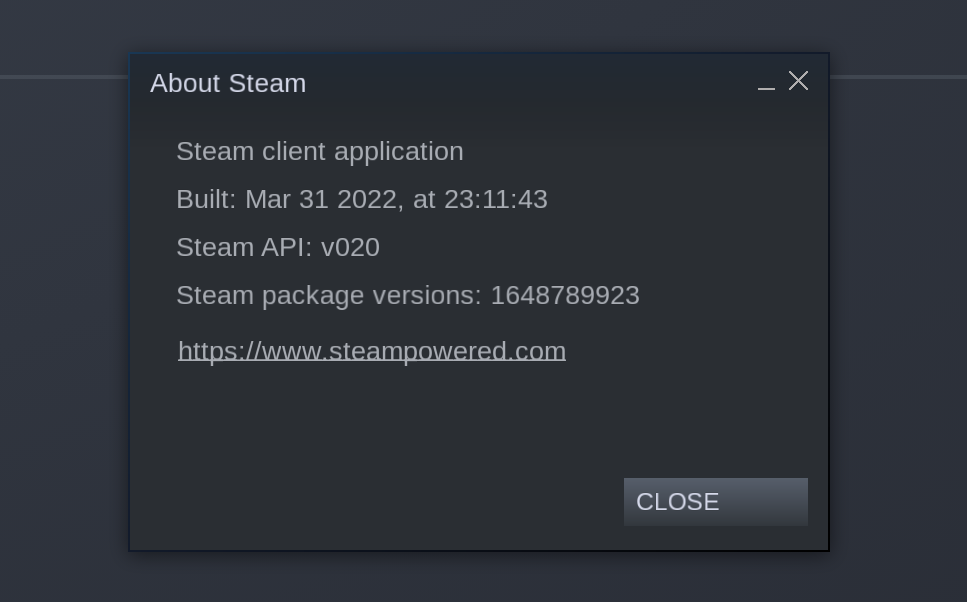
And this update did not help me much.
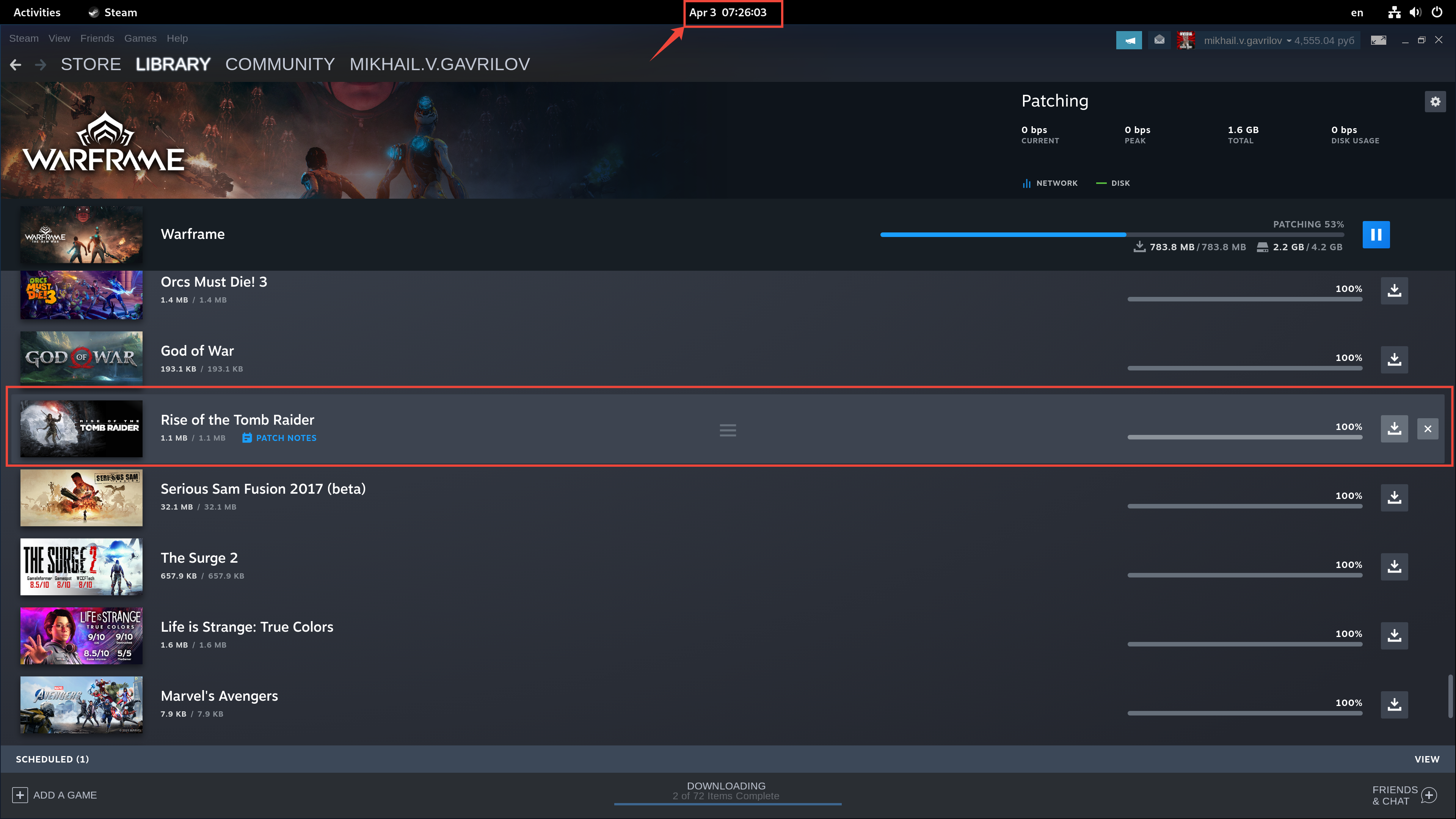
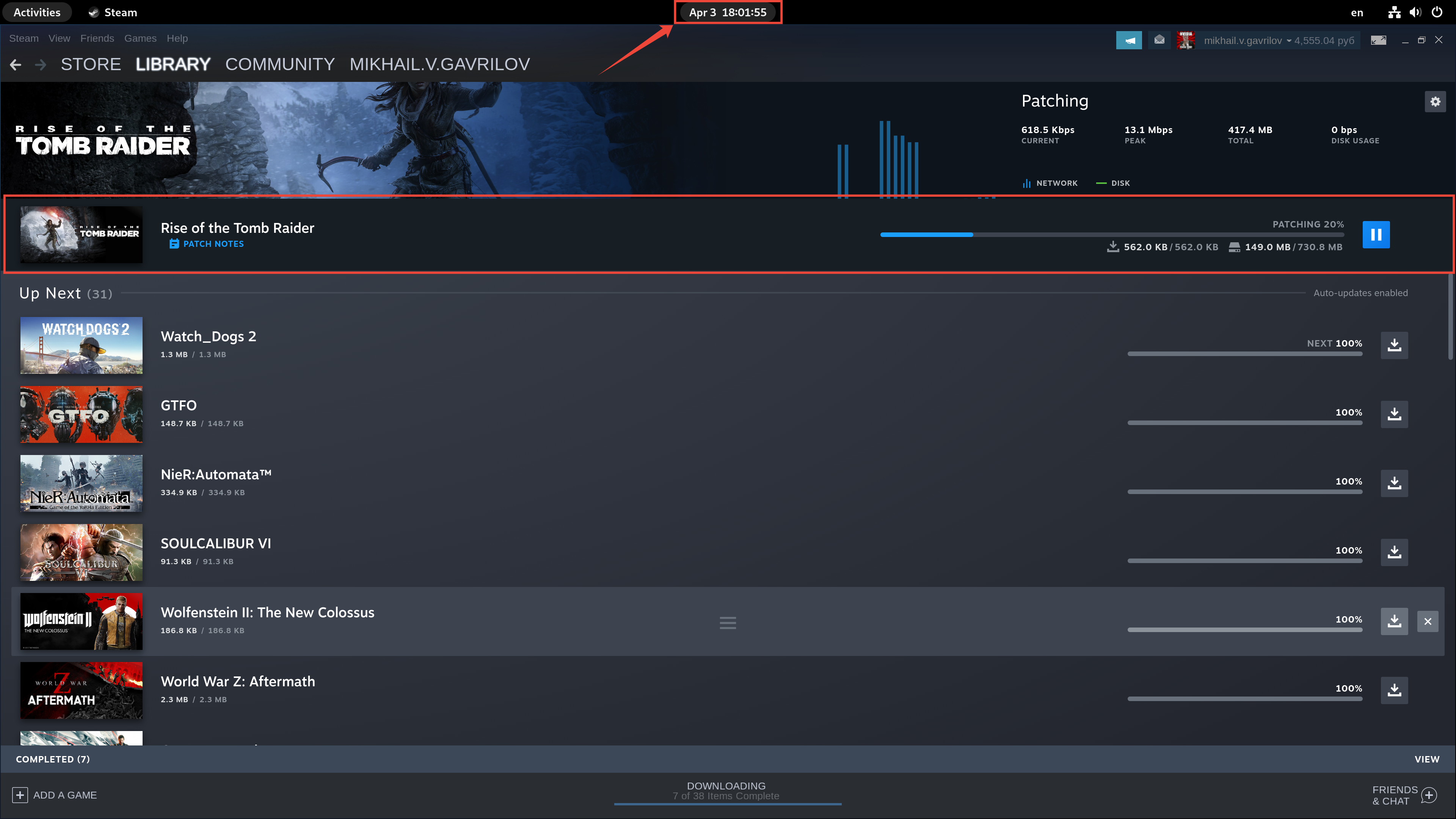
I want to use the example of one game to show how often it is updated by Steam.
1. steam updates the game Rise of the Tomb Raider - Apr 2 13:31
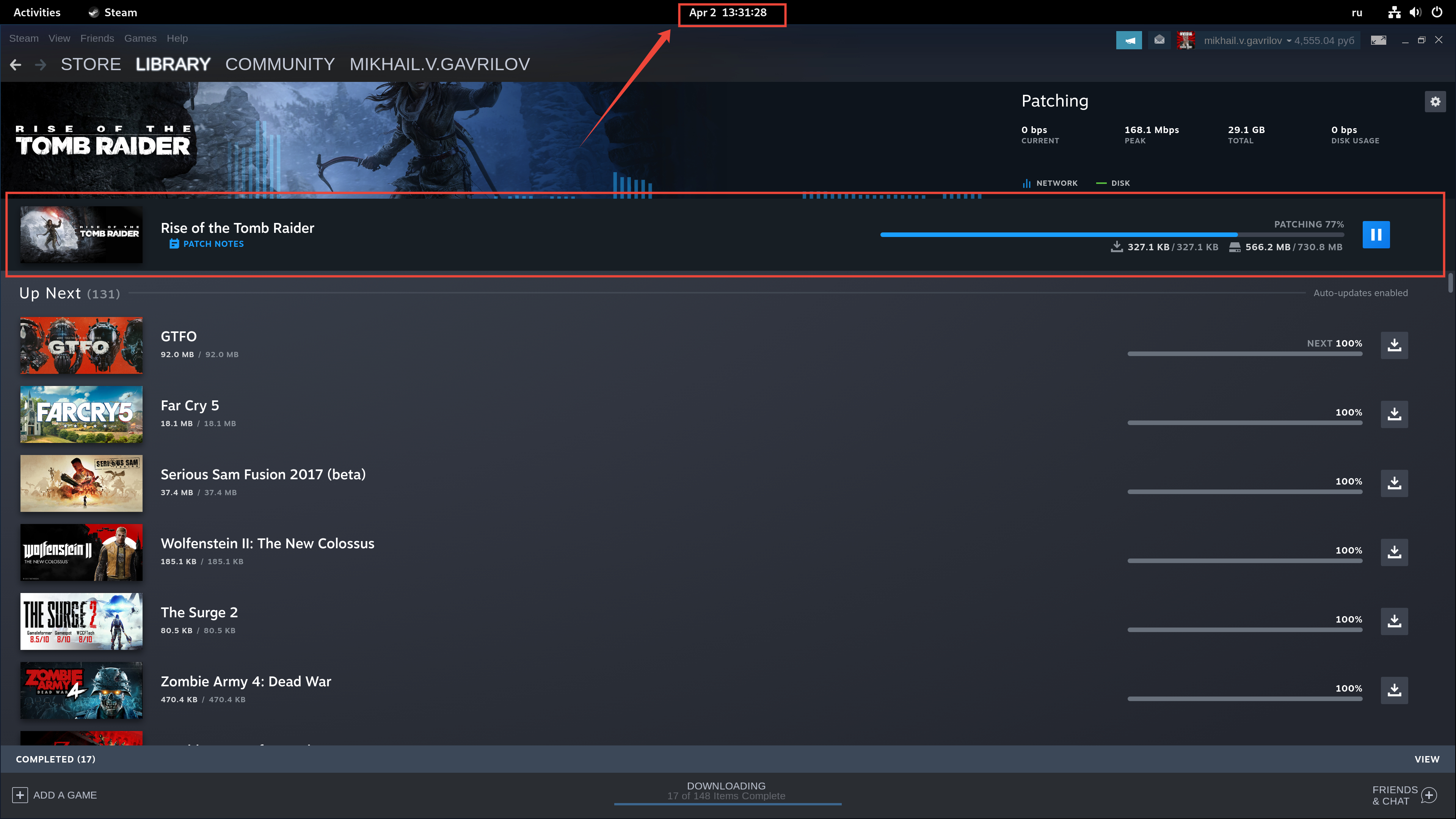
2. 9 hours later, steam updates Rise of the Tomb Raider again - Apr 2 22:17

3. after 9 hours steam updates again Rise of the Tomb Raider - Apr 3 07:26
4. 11 hours later, steam updates Rise of the Tomb Raider again - Apr 3 18:01
5. 2 hours later, steam updates Rise of the Tomb Raider again - Apr 3 19:56
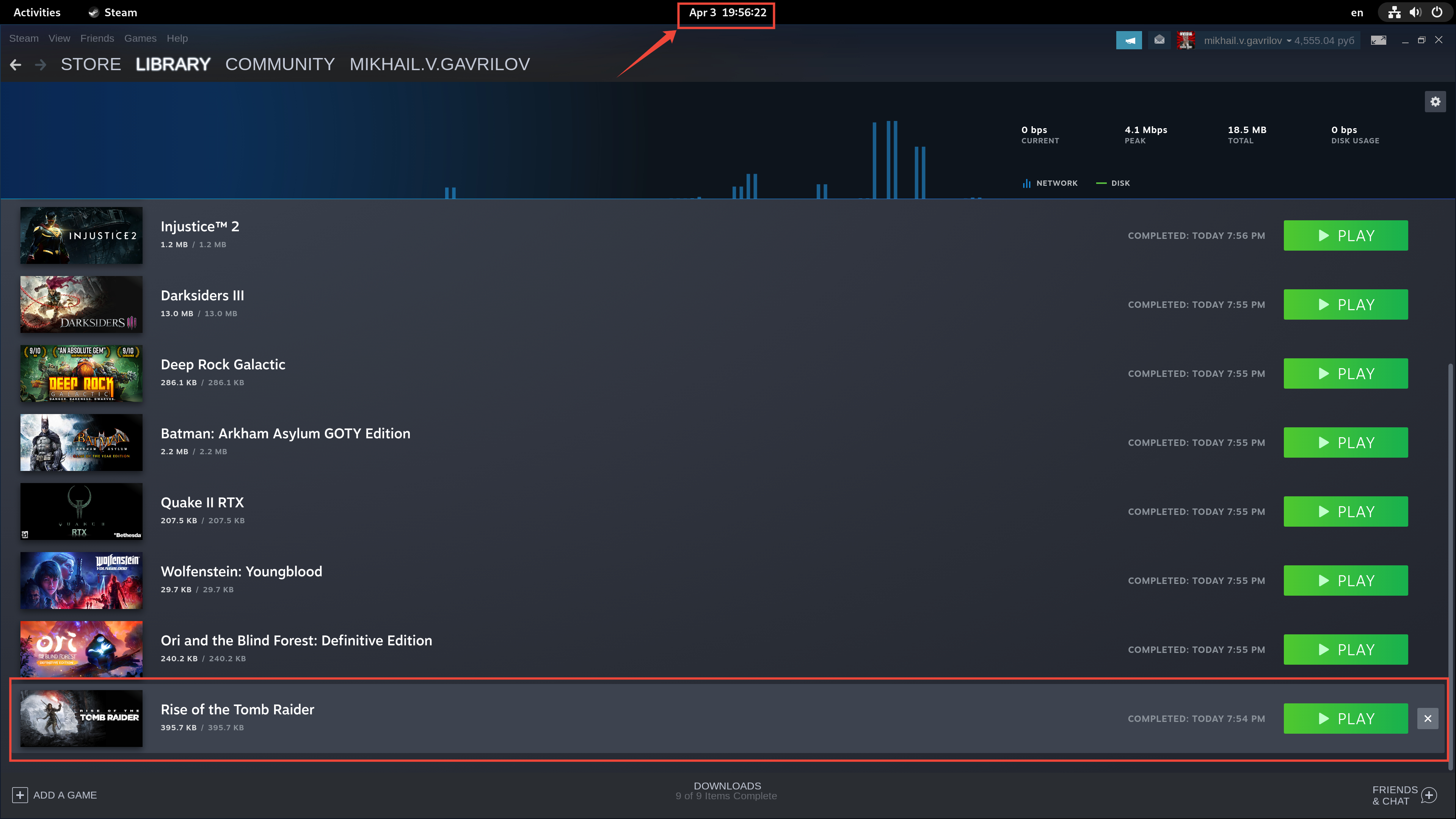
In total, the game has been updated five times in two days, is this normal?
P.S. Maybe it's not the shaders that are updated, but Steam has problems with updating games for owners of large libraries.
Pay attention to the shader cache size its downloading (not applying). Mine have reduced considerably which is fine when its just a few kb or few mb. It was the shader cache re-downloads of 300MB-2GB that were puzzling.
Feels like not much has changed for me too. It still seems to download a lot of updates for the same games over and over. I am in Stable channel. Here is my version info:

There is another weird bug where a game seems completed even though it is still downloading.

And if you click "Clear All", it will be cleared from the list but still keep downloading as seen in the banner.

At the moment, every start of Steam i load 15GB of Shaders.
Steam on Linux is the slowest Application on Earth.
After 3 years, i hoped, Linux will come. No! With Linux, explicit with Steam,
you will only have problems but you will not be able to play.
You start Steam, you want to play... NO! You have to download 20G of Shaders! Thats the trouth!
Maybe ~20GB of Shaders, at the Moment more then 30GB of Shaders with MSFS2020.
Maybe ~20GB of Shaders, at the Moment more then 30GB of Shaders with MSFS2020.
When was the last time you purged the shadercache folder and started fresh?
Pay attention to the shader cache size its downloading (not applying). Mine have reduced considerably which is fine when its just a few kb or few mb. It was the shader cache re-downloads of 300MB-2GB that were puzzling.
- Why update shaders if there is no difference?
- Why, when updating shaders, show the game changelog of four months ago?

Even if the update size is small, when there are many games on a large slow HDD, it takes a long time.
Maybe ~20GB of Shaders, at the Moment more then 30GB of Shaders with MSFS2020.
When was the last time you purged the shadercache folder and started fresh?
Why doesn't STEAM have a method for this for those that don't know where it exists?
Some debugging:
I found that this occurs on my machine where I have an encrypted home drive gets unlocked at every boot and then created as /dev/mapper/home.
On my friend's PC who has the steam library at a drive mounted by /etc/fstab but no disk encryption, this doesn't happen. It does happen if he removes the /etc/fstab entry and manually mounts it in a new directory every time. I suspect what this means is that steam detects if the drive or the mount folder is new and something bad happens. On the other hand with drives/mount points that don't change no redownloads occur.
I am not sure if this is related to the above but I have my Steam library in a ZFS dataset and thus no fstab entry. I get huge downloads every time I start Steam and they get larger the more time passes between starts of Steam.
My whole library with 32 installed games got a shader update today. I wonder if Valve is not able to reproduce this issue, or if they don't care. This is a highly disturbing issue and should be top priority imo.
I still get daily shader cache updates but most are only a few MB in size which is fine. I don't think I have too many games doing big continuous shader updates, maybe max size atm is 35MB.
The shader caching system I believe is dynamically and continuously updated on Valves end so some of the shader files will probably experience daily updates to cover more driver/compiler versions..
I really don't know what the shader cache servers look like but I presume their a archive of pre-compiled shaders per driver per kernel/compiler/driver versions. So quite large at Valves end.
Still, without kernel, driver or proton changes it downloads shaders every other day, often 3-4 times a day. That also requires the shader cache to be rebuilt for those games (at a library of 36 games installed, about 20 update daily, some more than once a day).
That makes me wonder - how do they identify those new downloads? I deem it unlikely that they find and precompile certain shaders more than once a day especially on games where we have not seen game updates in ages (DA:O, The Witcher 1&2, Mount&Blade: Warband etc.).
I've cleared my whole shader cache and let it recompile, still facing this issue. I think they have some issue with the validation, thus re-downloading stuff they don't need to, and within that triggering the re-building.
That makes me wonder - how do they identify those new downloads? I deem it unlikely that they find and precompile certain shaders more than once a day especially on games where we have not seen game updates in ages (DA:O, The Witcher 1&2, Mount&Blade: Warband etc.).
My theory is that new downloads happen because of changes to any field of the game. That includes store information like prices, tags, description etc. Maybe that causes the hash to change and that is why Steam tries to download entire shader cache again. Sound stupid but as is this bug.
Replying to https://github.com/ValveSoftware/steam-for-linux/issues/8076#issuecomment-1114264947
Actually, it does not download the entire cache again, it downloads some small chunk (at least since the fix of the steam client), but that still seems to trigger processing the whole shaders.
Anyway, something must happen that the cache gets deemed invalid in some parts at least, at the what this could be .. your guess is probably as good as mine since we don't really know how the validation process works.
Can we get an option to download shaders only on game launch? I know for some games this will be problematic (like AAA games) but many games will greatly benefit from this.
Another option is to have a "smart download" where only recently played games are updated. For example, I have many games installed that haven't been played in months, so these pointless daily updates aren't doing anything beneficial. All they do is slow down steam start times and make the system slow and unresponsive (especially so on non SSD drives). For example, on my system (5600X with 32GB of RAM) steam takes about 5 minutes to load. All the shader updates bring my system to a halt due to most of my games being kept on an older 4TB non SSD drive. Trying to open anything at that point takes upwards of TWO MINUTES. Firefox with a complete blank/fresh profile? ~2.5 minutes. Dolphin? about 67 seconds.
This is ridiculous to the point that I just don't bother opening steam anymore. I now delegate my steam chats to my phone and only play games on my Deck on the rare occasion (again because of pointless shader updates).
So I guess congratulations are in order for driving away users and customers.
I can only hope this doesn't take over a decade to resolve like supporting IBUS did.
Can we get an option to download shaders only on game launch? I know for some games this will be problematic (like AAA games) but many games will greatly benefit from this.
This is ridiculous to the point that I just don't bother opening steam anymore. I now delegate my steam chats to my phone and only play games on my Deck on the rare occasion (again because of pointless shader updates).
@HellishINC as a workaround to tide us over until fixed, you may want to setup a download schedule on your Deck and Linux desktop, and pick a time you're usually asleep / not gaming. Not only will this cause shader downloads to be delayed until manually started or on game launch (same for game updates though), on the Deck at least you will find that it stops the troublesome repeats of shader cache downloads from appearing at all.
I went from daily same size shader cache downloads for my dozens of installed games, to only an occasional shader cache download for some of the games, ever since setting this up on my Deck months ago.
No one is answered how today's shader cache differs from yesterday's. If there is no difference, then why download it only on the basis of the fact that today it was rebuilded?
I have handful games. Apex Legends needs shader upgrade (~ 200MB) every time I start steam Linux. Even I shut off steam seconds after shader upgrade. Fortunately I don't play other 3A games otherwise my bandwidth would be gone in days.
Hey, I'm kinda tired of seemingly re-downloading gigs every time steam restarts (for games that just sit on my harddrive already played). Please give me the option to restrict shader cache download to game launch. This is now problematic enough that I'm turning of Shader Pre-Caching entirely and hoping I fare fine.
I've found out using Steam Beta causes the shader compilation to happen after every Steam update, which might happen multiple times a day. So stop using Steam Beta to reduce your game launch times considerably.
Biggest problem with Linux gaming for me, making a quick 15 minute game take 30-45 minutes with the shaders, and 30-60 minutes of massive stutters while the rest of the shaders "fall in place" as you first encounter something new.
So, right now to get an enjoyable round of Apex for example, it's 15-30 minutes of waiting for the shaders, 10-15 quite unenjoyable laggy games spinning around to look at many things to get rid of the stutters (~60-120 min with its massive maps), totaling to 1-3 hours of preparation which is something that should not exist in modern gaming.
Annoying but not annoying enough to get content with Windows.
It really should not be anything that bad, plus windows has shader compilation issues also at times.
Either your running on rather slow hardware to begin with or have the game mis-configured or something.
certain games have astonishingly huge shader caches that are updated what seems like several times a week.
like for example Warframe consistently has a 7-6GiB shader update nearly every day.
the worst culprits from warframe are, by a huge margin, just 2 files
(Steam_Folder)/steamapps/shadercache/230410/fozpipelinesv6/steamapprun_pipeline_cache.904f69d2b1b44b65/steam_pipeline_cache.foz is 7GiB, (Steam_Folder)/steamapps/shadercache/230410/fozpipelinesv6/steamapprun_pipeline_cache.904f69d2b1b44b66/steam_pipeline_cache.foz is 5.9GiB
so if one is changed every other day my poor DSL internet(1.5 Megabytes per Second or 12 Megabits per second) has to download 13 GiB every 2 days not counting the shaders from literally any other game in my library nor any updates they may have.
Back when all i could get was satellite internet(2013-2014), we received an allotment of 20GiB anytime data and 20GiB for between 10PM to 5AM
13GiB in 2 days is painful when i have effectively nothing to show for it
TL;DR
at the bare minimum, ad a toggle per game to "only update shaders when i launch the game" similar to the bas****ized version of "never update my game" we are stuck with.
unless turning on "Only update this game when i launch it" also affects shaders(will be testing it over the next couple of days to find out), in which case, tell me to stuff a sock in it and toggle the option

That's what greets me every day. Every day God of War, Battlefield V, Battlefield I, and a bunch of really old games which shouldn't have seen changes at all (Vampires? Stalker? The Witcher 2? M&B Warband?).
I've 21.5 GB of shader caches by now:
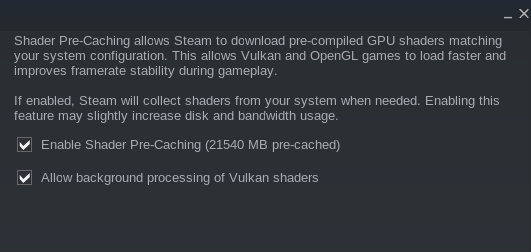
Downloading more than 10 GB every day. Sometimes 2-3 times a day.
I'd really prefer the option to disable it for single games or just give us the option to only download and build caches when we actually launch the game. I don't play all the games I have installed constantly, I probably want 1-2 to get updates while others can wait for month at a time.
A real fix would be preferred, but that would do for me as a workaround.
It seems to get triggered by Steam "verifying" the game, which is I guess to verify the shader cache. Is it required to download it multiple times a day to verify a shader cache? I doubt it.
It does not seem to do a lot on the disk either, just network traffic... downloading.

I've one question for others having this issue: I see mostly do have a NVidia card here, is anyone experiencing this with AMD?
I've one question for others having this issue: I see mostly do have a NVidia card here, is anyone experiencing this with AMD?
I have a laptop with a AMD 6800M, as well as a desktop with a AMD 6900 XT, and have experienced this on both systems
Well there is some future updates coming in the drivers to reduce this sort of need of cache downloading but who knows how far it will be deployed.
Also are you booting into windows then back to linux? that can reset some data. Additionally shadercache folder permissions and location could be a factor.
I do get some but not to the extent of 10GB+ Normally just a few hundred mb at most.
Replying to https://github.com/ValveSoftware/steam-for-linux/issues/8076#issuecomment-1426776799
Thanks, that gives clarity that it's not just an issue with shader caches invalidating with NVidia. That's "good to know" or bad, however you see it ;-).
Replying to https://github.com/ValveSoftware/steam-for-linux/issues/8076#issuecomment-1426776908
I only have linux installed (F37 in my case). I do get kernel updates and security updates, that's why I thought it could be related to the driver (akmod rebuilds the driver after kernel updates), but as others from probably non-rolling releases are experiencing this on AMD, that seems to be a broader issue (and Mesa isn't updating that often in rolling release either, at least for sure not daily, if you get it in a release cycle for a new driver that would be acceptable). And I do not see any development in the drivers at the moment to solve this (at least not in Mesa, NVidia hasn't dropped anything to that accord either).
As I see it, you can't change the shader cache folder. It's always in your home directory. In my case, it's on my SSD which is dedicated to be my /home. Usually, files do not change in your ~/ when you dual boot either... so shaders invalidating must have some other reason.
Try not updating the kernel or drivers for a while and see if that reduces the need to compile shaders.
Replying to https://github.com/ValveSoftware/steam-for-linux/issues/8076#issuecomment-1425094527 https://github.com/ValveSoftware/steam-for-linux/issues/8076#issuecomment-1426918452 https://github.com/ValveSoftware/steam-for-linux/issues/8076#issuecomment-1426776908
Almost for me in my desktop is every time I shutdown and open again steam, all the games, the bigger one is ARK with 1GB but in the Steam Deck only downloads 64MB and not always.
No Windows boots, don't matters also drivers versions or proton.
And I feel the games better with the shader cache so what I did is having manual updates.
I hope we can find a fix for that.
Try not updating the kernel or drivers for a while and see if that reduces the need to compile shaders.
You think fedora updates the kernel and drivers 3x a day or that I even reboot or update 3x a day? That's certainly not the issue there.
I didn't update since yesterday, I only rebooted - Battlefield V downloading 2.9 GB again. And God of War. And Vampire: The Masquerade - Bloodlines again, and M&B Warband again...
There certainly is an issue with invalidating shader caches for no reason. There is no chance that those old games get daily shader cache updates. Especially I should have built them all in M&B Warband having 1800 hours played time on that one.
I just did the test, I just updated the caches for Battlefield V, rebooted - and there we go again, downloading BF5 Shader Caches...
unless turning on "Only update this game when i launch it" also affects shaders(will be testing it over the next couple of days to find out), in which case, tell me to stuff a sock in it and toggle the option
Just reporting back to say that "Only update this game when i launch it" does in fact also affect the download of shaders
Shader cache downloads are designed to be incremental. Reports here indicate a daily download of the full shader cache file size, which is inconsistent with expectations - a small download and full disk write is expected instead.
After looking at the logs shared on this issue and on https://github.com/ValveSoftware/steam-for-linux/issues/9200, we've investigated and found a server-side problem with the system that keeps track of the ordering of shaders in those updates.
We've just rolled out an initial fix and will continue to monitor the situation. If the issue persists, please comment on this report and attach your shader_log[.previous].txt as indicated above.

That looks a lot better, not downloading 3gb but only 160kb and having to rebuild the shader cache, which is to be expected.
As a side-note for others: I had to re-download the full shader cache once, and after that I got increments, which was to be expected too.
Replying to https://github.com/ValveSoftware/steam-for-linux/issues/8076#issuecomment-1430641159
Hi! Can anyone explain what is differences between today and yesterday shader cache? May be I am too old but I get used to read changelogs.
And it bothers me when something is downloaded constantly, and slows down HDD or wears SSD.
If no notable changes why doing this useless updates?
That looks a lot better, not downloading 3gb but only 160kb and having to rebuild the shader cache, which is to be expected.
As a side-note for others: I had to re-download the full shader cache once, and after that I got increments, which was to be expected too.
I can confirm that it seems to be working as intended now.
i had to download 7 GiB once for warframe after the server side change.
but since then it's been ~20-40 MiB any time it updated.
Still facing this issue on Apex Legends, downloading 8 GB of cache on startup. Added logs from $USER/.steam/steam/logs/ folder. Also the processing progress or at-least the displayed progress seems to reset on starting the game. With background processing enabled, settings window was displaying "Apex Legends (x%)", then when I launched the game, the progress starts again from 0.
Is it just my impression or did this issue recently come back even worse?
Is it just my impression or did this issue recently come back even worse?
Not on me.
Working perfectly with a ton of games installed.
Working good for me either, I lately installed Fedora 38 beta fresh install and had to re-initialize the shader cache, and realized i'm getting several smaller patches for the games, and since that I get 20+ shader cache updates a day, but all are small in size.
They are not flagged shader cache updates, but that's probably a different issue.
@TiagoTiago which game(s) does that happen on for you?
Doesn't seem to be any game in specific, I just see a bunch of "downloads" each time I open Steam on my computer or wake up my Deck. I just closed and reopened Steam on the computer right now to test, and it went thru like 4 shaders when I opened it again even thought the app was open just seconds before.
Re-reading OP's description I guess it's not really "worse", but definitely way more frequent than it used to be in recent times.
I'm getting it with a few games, 5-6 at random when I fire up steam, it's nowhere near as bad as it was, I did change my video drivers yesterday so all of the supported games I have installed went through the cycle 150+, totally expected I'd say.
NVIDIA 530.41.03, Manjaro.
Presumably after a driver update it's now again processing Vulkan shaders for a long time (needs about 1.5 hours) every day. Steam does this in the background, and then again when launching the game.
shader_log.txt
shader_log.previous.txt
There are suspicious messages in the log: failed with server reply: Busy
I'm still getting this issue too, it did seem to get somewhat better after the initial fix comment in February, but it didn't last long. I even completely reflashed SteamOS on my deck last week and the issue persists, so it's a server issue I would guess. It's really frustrating to turn on my deck and have 20-30GB of shader cache downloads happen, which on my connection takes around 90 minutes to 2 hours, only for me to need to restart for some reason, or steam to crash and reboot, only for these downloads, even the ones that had already completed to start again when the deck reboots.
I am avoiding to turn on my Deck for short playing sessions (like 30 minutes) because I know there will be hours long shader updates. It makes the device stutter while playing too. For the god's sake please bring an option to download updates for a game only on launch. Deck is missing the settings for the control over downloads.
It makes the device stutter while playing too
That shouldn't be happening. I tested about 10 times in a row, and even with my steam_dev.cfg file set to enable shader compilation on ALL threads, every time I launch a game fossilize_replay instantly stops and does NOT compile during gameplay. You should be able to launch games without them stuttering because of shader pre-caching.
For the god's sake please bring an option to download updates for a game only on launch. Deck is missing the settings for the control over downloads.
Are you saying that the Steam Deck's big picture UI doesn't have the "Allow background processing of Vulkan shaders" option at all? It should be in Settings -> Downloads -> Shader Pre-Caching.
That shouldn't be happening. I tested about 10 times in a row, and even with my
steam_dev.cfgfile set to enable shader compilation on ALL threads, every time I launch a gamefossilize_replayinstantly stops and does NOT compile during gameplay. You should be able to launch games without them stuttering because of shader pre-caching.
My use case is simpler actually. The stutter happens while downloading the updates. Probably not while compiling them. I guess it happens because of disk read/writes. It doesn't happen when I turn off "Allow downloads during gameplay".
Are you saying that the Steam Deck's big picture UI doesn't have the "Allow background processing of Vulkan shaders" option at all? It should be in Settings -> Downloads -> Shader Pre-Caching.
Yeah, seems like it doesn't exist for me.
It's below the "Allow transfers from my own PC" dropdown. You gotta scroll
man.
On Mon, May 22, 2023 at 6:51 PM Gökhan Kurt @.***>
wrote:
That shouldn't be happening. I tested about 10 times in a row, and even
with my steam_dev.cfg file set to enable shader compilation on ALL
threads, every time I launch a game fossilize_replay instantly stops and
does NOT compile during gameplay. You should be able to launch games
without them stuttering because of shader pre-caching.My use case is simpler actually. The stutter happens while downloading the
updates. Probably not while compiling them. I guess it happens because of
disk read/writes. It doesn't happen when I turn off "Allow downloads during
gameplay".Are you saying that the Steam Deck's big picture UI doesn't have the
"Allow background processing of Vulkan shaders" option at all? It should be
in Settings -> Downloads -> Shader Pre-Caching.Yeah, seems like it doesn't exist for me.
[image: WhatsApp Image 2023-05-23 at 01 47 58]
https://user-images.githubusercontent.com/6034931/240061990-97604aed-d2d4-4ff0-a21c-9cff47d3c966.jpg—
Reply to this email directly, view it on GitHub
https://github.com/ValveSoftware/steam-for-linux/issues/8076#issuecomment-1558144236,
or unsubscribe
https://github.com/notifications/unsubscribe-auth/AM5Y33ZJOMVN2OMGC65EQ53XHPUWBANCNFSM5EGOUWIQ
.
You are receiving this because you were mentioned.Message ID:
@.***>

It's below the "Allow transfers from my own PC" dropdown. You gotta scroll man.
It is not there. Stop gaslighting me 😑
It's below the "Allow transfers from my own PC" dropdown. You gotta scroll man.
It is not there. Stop gaslighting me 😑
You have to go to desktop mode to see the option.
@ryukk stay the hell on topic dude, Jesus Christ. This isn't some subreddit. This is a bug report thread.
@kisak-valve please mark that nonsense as off-topic.
It seems as though whether fossilize has to process pre-cached shaders for a game or not is based somewhat on how many proton versions one has installed, like each separate Proton version you have installed (including custom ones) have to have shaders compiled, I noticed this the other day. Is this true?
no wonder software went to shit with all these bloat apologist online
Bloat apologist? Genius: I am the one who filed this bug report
Not to mention I constantly get accused of being a Valve hater (for some reason) on r/linux_gaming.
Stop being ridiculous. This whole terminally-online nonsense of IMMEDIATELY assuming anyone who disagrees with you is "an apologist" or a "fanboy" or some other nonsense. Stop it.
Your comment was as off-topic as it gets. Lmao @ the narcissism of saying "jeezus valve u guyz sux" and me saying it's off-topic and you responding that I'm trying to sweep problems under the carpet so no one can see them. News flash: Your comment doesn't mention a SINGLE "problem" being swept under the carpet, and I'm the one who actually REPORTED the real problem.
Back on topic, I don't see this issue in the latest beta (1685483787).
I went into Settings > Downloads > Shader pre-caching, and turned off Enable Shader Pre-Caching to delete the local cache. Then turned it back on and sure enough Steam started downloading the cache again.
I've downloaded a lot of games to try and trigger the issue (Borderlands 3 included). My issue previously was that it was using all the memory available. Now it isn't.
After completion, I restarted steam to see if it triggered any cache rebuilds. I sew no downloads, and no extra activity from the CPU, and the memory stayed the same. 30582 MB of cache
Have you rebooted your system a couple times to try and trigger it?
On Wed, May 31, 2023 at 2:17 PM Alvaro @.***> wrote:
Back on topic, I don't see this issue in the latest beta (1685483787).
I went into Settings > Downloads > Shader pre-caching, and turned off
Enable Shader Pre-Caching to delete the local cache. Then turned it back on
and sure enough Steam started downloading the cache again.I've downloaded a lot of games to try and trigger the issue (Borderlands 3
included). My issue previously was that it was using all the memory
available. Now it isn't.[image: image]
https://user-images.githubusercontent.com/2722773/242368712-021ba3f1-55f6-489a-9787-62752e1750ed.png
[image: image]
https://user-images.githubusercontent.com/2722773/242369432-daa3c6f6-8b56-4a17-852c-4ce5076b6e32.pngAfter completion, I restarted steam to see if it triggered any cache
rebuilds. I sew no downloads, and no extra activity from the CPU, and the
memory stayed the same.—
Reply to this email directly, view it on GitHub
https://github.com/ValveSoftware/steam-for-linux/issues/8076#issuecomment-1570698918,
or unsubscribe
https://github.com/notifications/unsubscribe-auth/AM5Y332VKXWX34E5ZUQM4IDXI6DL3ANCNFSM5EGOUWIQ
.
You are receiving this because you were mentioned.Message ID:
@.***>
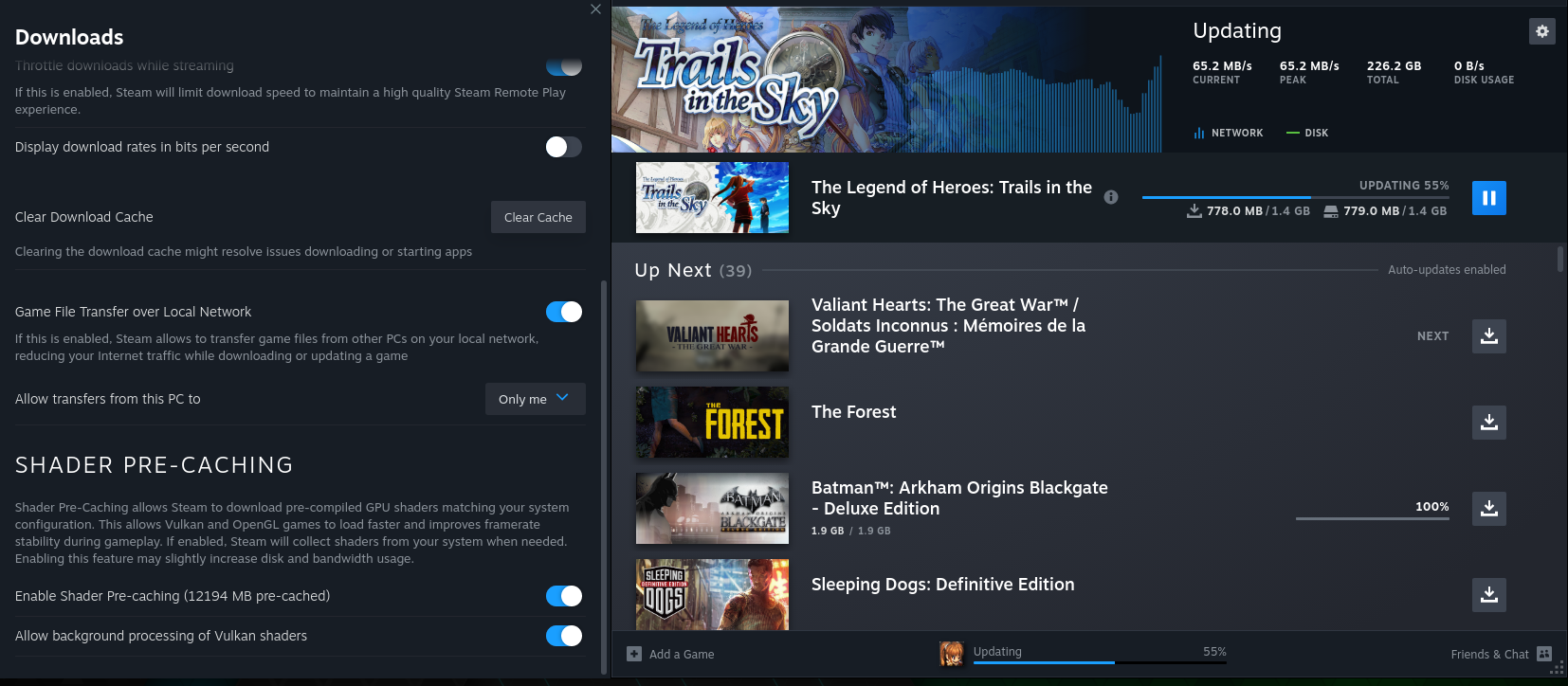
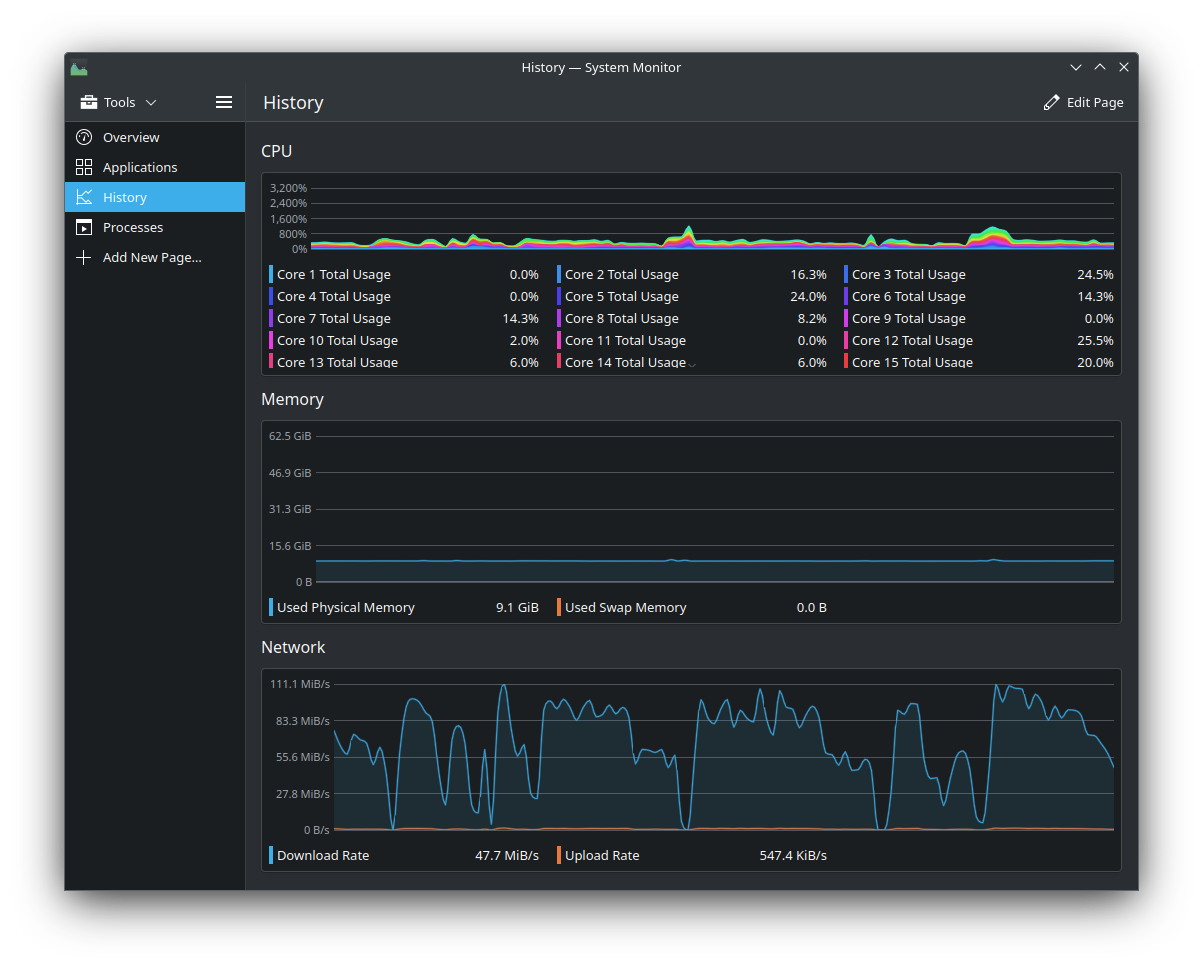
Have you rebooted your system a couple times to try and trigger it?
I've disabled steam from running on startup, and rebooted. Before starting steam, I launched system monitor to see resource usage. It processed some shaders, it seems, but not more than 5 MB:
Now I only have 30586 MB in my cache, just 4 MB more since last time. So yeah, this looks good to me.
EDIT: note that I check for any dumps after this, and fossilize_replay only seems to have crashed with Fallout New Vegas, but the game runs just fine :man_shrugging:
Yeah after I changed my GPU drivers (which usually triggers a full rebuild
of the shader cache), I only saw like 5 min of processing. Hopefully it's
actually fixed this time, though as you may be able to tell from how long
ago this issue was posted, this has happened before, where it was "fixed"
and then broke again a couple weeks later.
On Wed, May 31, 2023 at 4:47 PM Alvaro @.***> wrote:
Have you rebooted your system a couple times to try and trigger it?
I've disabled steam from running on startup, and rebooted. Before starting
steam, I launched system monitor to see resource usage. It processed some
shaders, it seems, but not more than 5 MB:
[image: image]
https://user-images.githubusercontent.com/2722773/242406347-93047eb3-0914-4351-970b-d6dbd6c50520.png
[image: image]
https://user-images.githubusercontent.com/2722773/242406484-bf144b62-2866-4cac-a683-5c046b118997.png
[image: image]
https://user-images.githubusercontent.com/2722773/242406846-87767929-345e-407c-afc3-ad10ec57da1f.pngNow I only have 30586 MB in my cache, just 4 MB more since last time. So
yeah, this looks good to me.—
Reply to this email directly, view it on GitHub
https://github.com/ValveSoftware/steam-for-linux/issues/8076#issuecomment-1570929292,
or unsubscribe
https://github.com/notifications/unsubscribe-auth/AM5Y33ZKTD6H3IHVNO7MT5LXI6U5HANCNFSM5EGOUWIQ
.
You are receiving this because you were mentioned.Message ID:
@.***>


It takes hours again on Apex Legends (nvidia 530.41.03): yesterday and today. Didn't get shader logs, it has overwritten both shader_log and shader_log.previous for some reason.
You can monitor it in real time with:
tail -f ~/.steam/root/logs/shader_log.txt
while it's compiling. It often wipes those logs once it's done or when it
starts another build. At least that's what I've seen.
But yeah, it didn't take me "hours" today, but it took 20-30 minutes. It's
weird, my friend Intelligent Gaming just told me while we were on his
podcast on Thursday that his shader compilation on Linux usually only takes
like 10 minutes or something like that (I'll have to check again when he
publishes the video exactly what he said), even though he has a far weaker
CPU (3600 vs 5900X) and I've even enabled mine to use 20 threads out of 24
(by default it can't use that many). GPU doesn't compile the shaders so
that should be irrelevant but I have a 3090 vs his 3060 or 3060 Ti (can't
remember which one exactly he has).
On Sat, Jun 3, 2023 at 1:13 PM Velkan @.***> wrote:
It takes hours again: yesterday and today. Didn't get shader logs, it has
overwritten both shader_log and shader_log.previous for some reason.—
Reply to this email directly, view it on GitHub
https://github.com/ValveSoftware/steam-for-linux/issues/8076#issuecomment-1575078105,
or unsubscribe
https://github.com/notifications/unsubscribe-auth/AM5Y3355NKKOM7IQR2NVNTDXJNWETANCNFSM5EGOUWIQ
.
You are receiving this because you were mentioned.Message ID:
@.***>
@gardotd426 I usually watch the files during the shader processing. There are tons of warnings that may or may not be relevant.
What do they look like? I will sometimes get some like invalid cache file
errors at the beginning or end of processing but then it just redoes it and
it's pretty rare.
On Sat, Jun 3, 2023 at 4:01 PM Velkan @.***> wrote:
@gardotd426 https://github.com/gardotd426 I usually watch the files
during the shader processing. There are tons of warnings that may or may
not be relevant.—
Reply to this email directly, view it on GitHub
https://github.com/ValveSoftware/steam-for-linux/issues/8076#issuecomment-1575166036,
or unsubscribe
https://github.com/notifications/unsubscribe-auth/AM5Y334QQDLKE2KGU4K3TJ3XJOJYJANCNFSM5EGOUWIQ
.
You are receiving this because you were mentioned.Message ID:
@.***>
Those are the exact same errors I'm getting, but I'm not seeing 1.5 hours
of processing (though I will see 30 minutes sometimes, and if I change
driver versions I may see an hour or two).
@kisak-valve, are those mismatched key and other errors (the other errors
come later in the log) expected?
On Mon, Jun 5, 2023 at 7:49 AM Velkan @.***> wrote:
1.5 hours of processing.
nvidia 530.41.03
Logs:
shader_log.txt
https://github.com/ValveSoftware/steam-for-linux/files/11652167/shader_log.txt
shader_log.previous.txt
https://github.com/ValveSoftware/steam-for-linux/files/11652168/shader_log.previous.txt—
Reply to this email directly, view it on GitHub
https://github.com/ValveSoftware/steam-for-linux/issues/8076#issuecomment-1576640622,
or unsubscribe
https://github.com/notifications/unsubscribe-auth/AM5Y335J432AM3NG3GT2KE3XJXBWDANCNFSM5EGOUWIQ
.
You are receiving this because you were mentioned.Message ID:
@.***>
This still seems to happen a fair bit.
Titanfall-2 cache is 1GB! NoManSky is 3.6GB!
Could we perhaps look into the games that have a larger then 300MB precache? flag them as suss!
Can't wait for the day a solution is found to this caching business and we can just ditch it all together.
Games that have more than 300MB? Um, my shader cache is like 50+ GB and I
have like 25 games installed.
On Mon, Jun 5, 2023 at 8:36 PM jarrard @.***> wrote:
This still seems to happen a fair bit.
Also Titanfall 2 cache is 1GB! Could we perhaps look into the games that
have a larger then 300MB precache? flag them as suss!Can't wait for the day a solution is found to this caching business and we
can just ditch it all together.—
Reply to this email directly, view it on GitHub
https://github.com/ValveSoftware/steam-for-linux/issues/8076#issuecomment-1577730202,
or unsubscribe
https://github.com/notifications/unsubscribe-auth/AM5Y335U4KDZEDYEEBHHXMTXJZ3R3ANCNFSM5EGOUWIQ
.
You are receiving this because you were mentioned.Message ID:
@.***>
Yeah that is terrible.
The re-download and compile cycle after each reboot is fixed now, at least for me. My shader cache is at 30GB, most of it being Apex Legends at 22 GB.
My Apex Legends cache is also 22GB
On Tue, Jun 6, 2023 at 8:56 AM mayukhc @.***> wrote:
The re-download and compile cycle after each reboot is fixed now, at least
for me. My shader cache is at 30GB, most of it being Apex Legends at 22 GB.—
Reply to this email directly, view it on GitHub
https://github.com/ValveSoftware/steam-for-linux/issues/8076#issuecomment-1578716649,
or unsubscribe
https://github.com/notifications/unsubscribe-auth/AM5Y334WM3XWT33Z3OXCWN3XJ4SG5ANCNFSM5EGOUWIQ
.
You are receiving this because you were mentioned.Message ID:
@.***>
I am experiencing the same issue with Apex Legends for a long time. The process itself usually takes multiple hours to run anywhere close to completion, and gets stuck around 63% (which is where i often just stop it because it's been multiple hours). Not sure if this is relevant, but skipping compilation and playing in the game's training range for a couple minutes makes the game perfectly playable without any issues whatsoever.
I am currently checking monitoring my shader_log and shader_log_previous, the compilation also seems to get stuck at 61%-63% during background or active processing. Is this normal?
For the last bit: I accidentally closed the steam window during background processing. Reopening and starting Apex let me start it as if I skipped the shader processing step (and seemingly made use of the cache produced). It still took a while until the training range was playable (altho it felt a bit faster than when you skip all of it). Why is it so much faster to process shaders while the game is running anyway?
shader_log.txt
shader_log.previous.txt
From my shader_log_previous:
[2023-07-13 15:35:19] Still replaying 1172470 (61%, 3145066/3697507).
[...]
[2023-07-13 16:00:40] Still replaying 1172470 (61%, 3146346/3697507).
In my current shader log (and the rollover):
[2023-07-16 19:49:10] Still replaying 1172470 (63%, 4116215/4623168).
[...]
[2023-07-16 20:12:28] Still replaying 1172470 (63%, 4866506/5334698).
[2023-07-16 20:12:28] Still replaying 1172470 (63%, 4866506/5334698).
[2023-07-16 20:12:38] Still replaying 1172470 (63%, 4873024/5338397).
[2023-07-16 20:12:48] Still replaying 1172470 (63%, 4877809/5340212).
[2023-07-16 20:12:58] Still replaying 1172470 (63%, 4882259/5349464).
[2023-07-16 20:13:08] Still replaying 1172470 (63%, 4888509/5356871).
System:
OS: ArchLinux
Kernel: 6.4.3-arch1-1
CPU: Ryzen 2700X
Nvidia: RTX 3070 on 535.54.03-8
Steam: 1.0.0.78-1 from official multilib repositories
Steam build: 1689034492 (Steam Client Build Date: Tue, Jul 11 1:59 AM UTC -08:00)
Can confirm Apex Legends triggers this behaviour on my machine, too.
@Zulleyy3 the stuck shader processing can be unstuck by finding the fossilize_replay process that got suspended and unblocking it with kill -CONT <pid>. I think that there is a process management bug in Steam that causes it to miss the unsuspend command.
For Apex I prefer to set up the launch options to use DX12 and then skip the shader processing on launch. There are several minutes of waiting in-game for "compiling shaders" and about a minute of the "processing" for every map before matchmaking. That's probably longer than using DX11 and loading the firing range to compile the stuff, but it's less of a janky experience. Most importantly, the DX12 doesn't seem to have this issue that sometimes causes you to enter the match with fixed 40fps.
Where to start? With large libraries of games, this 'feature' is annoying at best, debilitating at its worst. I see 2 viable approaches for the 'large library' scenario:
- Only update said caches on a per-game launch, which as a new convert to Linux, (thanks, Chrome) seems to happen, regardless.
- An option to update these shader caches all at once. Yes, it could take days (!?!), but if it stopped the '~50+ per Steam launch' (for me at least) every time Steam boots up, it'd be worth it.
Personally, I'm leaning towards option 1. To actually need these shaders to play more than 10 different games per Steam launch would rarely, if ever, happen. Hell, Steam knows (or could track) the games I do play regularly and prioritize those in a much shorter queue. Or, even prioritize by what I've marked as a 'Favorite'.
Side note--just counted the number of games listed in the most recent round being updated and it damn near hit 100! 8-o C'mon, Steam, all my datas and internets are not belong to you! ;-D
Hard to believe that this is still an issue after almost 2 years.
It's mostly a minor issue now. Most games may only download a few MB in data. Only a few have massive cache sizes.
Also there are compilers that can make the whole shader cache downloading system obsolete.
I'm having largely the same issue, and also takes literal hours to complete the processing job. If I skip it, it simply gets stuck on startup, I have to cancel the entire Launch, start it again, and hope for the best.
Shader cache downloads are designed to be incremental. Reports here indicate a daily download of the full shader cache file size, which is inconsistent with expectations - a small download and full disk write is expected instead.
After looking at the logs shared on this issue and on #9200, we've investigated and found a server-side problem with the system that keeps track of the ordering of shaders in those updates.
We've just rolled out an initial fix and will continue to monitor the situation. If the issue persists, please comment on this report and attach your
shader_log[.previous].txtas indicated above.
Still happens today. I've downloaded a hat in time's same 6.5GB of shader updates 4 times now past 3 days. It's like when i quit steam, it deletes the cache.
And same with 22 other titles as i have a 2TB nvme in mine. Always daily redownload it seems.
Versions for dev:
SteamOS: 3.4.8
KDE framework: 5.99.0
QT version: 5.15.6
kernel: 5.13.0-valve36-1-neptune(64bit)
Replying to https://github.com/ValveSoftware/steam-for-linux/issues/8076#issuecomment-1674656211
Do you happen to have proton versions installed from outside steam? Like proton-ge?
Replying to https://github.com/ValveSoftware/steam-for-linux/issues/8076#issuecomment-1674917070
I do. Could it be why? As I only have one GE version installed. Would steam need to download shader cache for every proton version I use? Like experimental getting updates almost daily, as well as earlier versions
Replying to [#8076 (comment)](https://github.com/ValveSoftware/steam-for-linux/issues/8076#issuecomment-1674917070)
I do. Could it be why? As I only have one GE version installed. Would steam need to download shader cache for every proton version I use? Like experimental getting updates almost daily, as well as earlier versions
Seems to be. At least on my machine, if I stick to Steam proton versions (8, experimental), this doesn't seem to happen. Can you try?
Still occurs for myself on my SteamDeck, though recently it has lessened to redownloading all once every few reboots (some of which are large) (only those on SSD and the connected SD card on boot).
Some of my games are set as GE proton, but most of the downloads are occuring on default setups (no compatibility set).
Trying out the limit download times now to see if it helps now.
Main OS channel, Beta on client update channel.
Os 3.6, steam version 1695679261 (latest version as of today on these channels).
I can confirm that this is still an issue with Valve's proton. It will hog about anywhere between 25% - 60% of my cpu for at least an hour (sometimes more) every reboot and often recompiles at game launch for around 30min. My shadercache folder is now sitting at 44GB for about 10 games installed
OS: Arch Linux
Kernel: linux-6.5.5.arch1-1
CPU: Ryzen 5600
GPU: AMD RX 6650 XT
steam-1.0.0.78-2 from official repository
I have a similar system, and don’t get that behavior. I would like to help narrow this down as to help Valve debug this.Could you tell which games, and proton versions you have on your system?
My installation:
OS: Arch Linux
Kernel: 6.5.5-arch1-1
CPU: Ryzen 7900X
GPU: Radeon 7900XTX
Installed games: 122
Shadercache: 90.5 gb
ProtonUp-QT shows only Proton-EAC
Steam only shows Proton 6.3, 7.0, Hotfix, Experimental, and EAC.
My current (12) installed games are:
DOOM Eternal, DOOM, Apex Legends (which I've seen is a common culprit for issues), Armored Core VI, Elden Ring, Warframe, Team Fortress 2, Bioshock Remastered, Rain World, BattleBit Remastered, Terraria, and Skyrim SE (no mods)
My installed proton versions are:
Experimental, 8.0, 6.3, Hotfix, BattleEye, and EAC
OS: Arch Linux
Kernel: linux-6.5.5.arch1-1
CPU: Ryzen 5600
GPU: AMD RX 6650 XT
steam-1.0.0.78-2 from official repository
Installed games: 12
Shadercache: 44.87 GB
Undoubtedly the single worst aspect of Steam on Linux for me.
Why don't the downloaded shaders persist after closing Steam?
Why download it all over again?
They do,
You Don't.
If those things are happening for you then there is a major configuration issue happening. Perhaps your shadercache folder is readonly or not in the default Linux path and on a different drive with wrong permissions?
@jarrard except there are ton of others who have the same issue, as it's been mentioned almost daily on r/linux_gaming on top of the 50 people in this issue thread.
And it's still happening. And I'm seeing TONS of errors in EVERY log during almost every game's shader pre-cache processing, as I watch them ever time with tail -f ~/.steam/root/logs/shader_log.txt. As I'm looking at them right now I'm seeing them, and they're not damn "configuration issue," nor are they any of your other suggestions, because they are literally completely nonsensical. Shadercache directory is read-only? That's impossible, because unless you manually went in there and removed write permissions yourself on JUST the steamapps/shadercache folder, then you wouldn't be able to download any games either. It's literal nonsense.
On a different drive with wrong permissions? It sounds like you just decided to come up with crazy explanations to make @dMailonG seem wrong or like their claims are their fault, but didn't think for two seconds about the fact that a ton of other people are experiencing this and most of them don't use multiple drives. And even if they did, you realize it wouldn't just redownload every time, right? It would FAIL to download IN Steam itself. There'd be a download error. Programs don't just download stuff to unwritable directories and fail but act like they're downloading properly. That's one of the most outrageous things I've ever heard.
And the errors are ALL obviously not configuration-related in the logs themselves. You get shit like this:
[2023-12-07 04:32:28] Mismatching key! Entry 586582738/3060.
[2023-12-07 04:32:28] Mismatching key! Entry 586585818/4007.
[2023-12-07 04:32:28] Mismatching key! Entry 586589845/3062.
[2023-12-07 04:32:28] Mismatching key! Entry 586592927/4003.
[2023-12-07 04:32:28] Mismatching key! Entry 586596950/4062.
[2023-12-07 04:32:28] Mismatching key! Entry 586601032/98790.
[2023-12-07 04:32:28] Mismatching key! Entry 586699842/99945.
[2023-12-07 04:32:28] Mismatching key! Entry 586799807/110510.
[2023-12-07 04:32:28] Mismatching key! Entry 586910337/98881.
[2023-12-07 04:32:28] Mismatching key! Entry 587009238/99109.
[2023-12-07 04:32:28] Mismatching key! Entry 587108367/98604.
[2023-12-07 04:32:28] Mismatching key! Entry 587206991/105312.
[2023-12-07 04:32:28] Mismatching key! Entry 587312323/100047.
[2023-12-07 04:32:28] Mismatching key! Entry 587412390/106605.
[2023-12-07 04:32:28] Mismatching key! Entry 587519015/100783.
[2023-12-07 04:32:28] Mismatching key! Entry 587619818/99515.
[2023-12-07 04:32:28] Mismatching key! Entry 587719353/105172.
[2023-12-07 04:32:28] Mismatching key! Entry 587824545/99941.
[2023-12-07 04:32:28] Mismatching key! Entry 587924506/111917.
[2023-12-07 04:32:28] Mismatching key! Entry 588036443/112675.
[2023-12-07 04:32:28] Mismatching key! Entry 588149138/99879.
only those are just the last of 2726 straight Mismatching key! Entry errors.
Then there's these:
[2023-12-07 04:32:28] Processing FOZ cache file at /home/matt/nvme/steamroot/steamapps/shadercache/1172470/fozpipelinesv6/steamapprun_pipeline_cache.9e5e734e71f5f9d4/replay_cache.95723918e6a3988532d8781543e802f0.1.foz
[2023-12-07 04:32:28] Can't read enough bytes for cache file header, skipping.
[2023-12-07 04:32:28] Processing FOZ cache file at /home/matt/nvme/steamroot/steamapps/shadercache/1172470/fozpipelinesv6/steamapprun_pipeline_cache.9e5e734e71f5f9d4/replay_cache.95723918e6a3988532d8781543e802f0.20.foz
[2023-12-07 04:32:28] Can't read enough bytes for cache file header, skipping.
[2023-12-07 04:32:28] Processing FOZ cache file at /home/matt/nvme/steamroot/steamapps/shadercache/1172470/fozpipelinesv6/steamapprun_pipeline_cache.9e5e734e71f5f9d4/replay_cache.95723918e6a3988532d8781543e802f0.21.foz
[2023-12-07 04:32:28] FOZ underflow, file truncated?
[2023-12-07 04:32:28] Processing FOZ cache file at /home/matt/nvme/steamroot/steamapps/shadercache/1172470/fozpipelinesv6/steamapprun_pipeline_cache.9e5e734e71f5f9d4/replay_cache.95723918e6a3988532d8781543e802f0.22.foz
[2023-12-07 04:32:28] Can't read enough bytes for cache file header, skipping.
[2023-12-07 04:32:28] Processing FOZ cache file at /home/matt/nvme/steamroot/steamapps/shadercache/1172470/fozpipelinesv6/steamapprun_pipeline_cache.9e5e734e71f5f9d4/replay_cache.95723918e6a3988532d8781543e802f0.23.foz
[2023-12-07 04:32:28] Can't read enough bytes for cache file header, skipping.
[2023-12-07 04:32:28] Processing FOZ cache file at /home/matt/nvme/steamroot/steamapps/shadercache/1172470/fozpipelinesv6/steamapprun_pipeline_cache.9e5e734e71f5f9d4/replay_cache.95723918e6a3988532d8781543e802f0.24.foz
[2023-12-07 04:32:28] Can't read enough bytes for cache file header, skipping.
[2023-12-07 04:32:28] Processing FOZ cache file at /home/matt/nvme/steamroot/steamapps/shadercache/1172470/fozpipelinesv6/steamapprun_pipeline_cache.9e5e734e71f5f9d4/replay_cache.95723918e6a3988532d8781543e802f0.25.foz
[2023-12-07 04:32:28] FOZ underflow, file truncated?
As for the re-downloading every reboot? Why don't you look at this image of my downloads taken after me opening Steam just now as I was typing this:
Every SINGLE one of those has a shader precaching update, even the 2 or 3 that had game content updates. That's every game I have currently installed in Steam. My shadercache size is 58.2GB. That is absolutely unbelievable, that's half an entire Call of Duty.
There is a bug here, I see those same mismatching key and not enough bytes (and also too many bytes at end of file) errors every day I've watched the logs as the shaders compile.
I would just disable shadercache downloading in such a situation.
There are some realtime shader compiler solutions now also. Can't remember the name of the latest one however.
@gardotd426 have you enabled or disabled background compiling? For me the issue mostly disappeared after disabling background compiling. It seemed to me (opinion piece) like the caches get invalidated by compiling - at least that was the case for me. And would actually play into that I need to re-download a lot more often for games I play :D.
@gardotd426 Ohh Apex Legends! That's a big game that usually repeats in this thread. From what I've seen in this thread, this behaviour is mostly seen in combinations of games and proton versions. Here's a couple of ideas:
- Do you happen to have a non steam Proton version installed in your system? (i.e. ProtonGE). If so, can you try removing these?
- Do you have Apex Legends installed? If so, can you try setting this game to use Proton Experimental?
EDIT: Also, try cleaning your shader cache. Steam Settings > Downloads, Disable and Enable this:
I would just disable shadercache downloading in such a situation. There are some realtime shader compiler solutions now also. Can't remember the name of the latest one however.
Yeah right. Apex Legends is unplayable without it with all the new gamemodes and maps and shit they've added.
Also, My cache was 50GB before I even installed Apex.
Also, I run Experimental on just about every game but that shouldn't even matter.
Nobara has some baked in fixes for shadercache, maybe that distro would work better?
Also with proton-GE you can try disabling shadercache and just use its baked in pipeline cache system. (not present in normal proton I do believe)
This seems fixed now for me, finally, after 2 years of daily downloads of gigabytes of shader cache updates and unnecessary processing.
I am running the Steam Beta. I'm not sure exactly when it stopped doing the shader downloads every startup, but it's quite recent.
Can confirm, in the last 1-2 weeks I did noticed it stopped re-downloading shaders every steam launch. I actually never thought this is a bug, but a normal behavior. Good, now my SSD's shall finally rest after unneeded shader processing...
Running Fedora 39 KDE Spin + Steam Flatpak
I actually never thought this is a bug, but a normal behavior.
Hundreds of mb for some games hardly seemed normal to me. Stopped here as well though a week or so ago.
This seems fixed now for me, finally, after 2 years of daily downloads of gigabytes of shader cache updates and unnecessary processing.
Well. It was fixed for 2-3 weeks. It started up again after the January 3rd steam beta update. Every day, every game, gigabytes of data. 7GB yesterday, and I believe the total will be 7GB today as well. Mostly by No Man's Sky downloading 5GB of shader cache data.
I also start notice this bug since a few days, steam downloads 1-3Gbyte each time (only 10 installed games) i open steam and it does it again and again, the OP is talking about reboot but thats not true... a normal steam restart is enough that lead to this downloads. Valve please fix this bug.
maybe check the logs to see what it says. I think it may be something like the below.
tail -f ~/.steam/root/logs/shader_log.txt
Thanks, will try disabling "Allow background processing of Vulkan shaders", cause i'm really tired of these downloads. And it's also additional TBW for SSD.
Thanks, will try disabling "Allow background processing of Vulkan shaders", cause i'm really tired of these downloads. And it's also additional TBW for SSD.
I never activated Background processing and i had this infinity downloads too.
But i found a workaround for now: I disabled Shader Pre-Caching and enabled it again and the endless downloads stopped... atleast in the last 24hours it reduced alot.
I'm also having this problem, but specifically with No Man's Sky. I have other games with large shader caches installed, but Steam only downloads small files for them (possibly slices or deltas), while Steam downloads 5GB of shaders for No Man's Sky each time Steam starts and sometimes after I exit No Man's Sky.
In case it helps, here's the tail of ~/.steam/root/logs/shader_log.txt. The first entry is when I launched No Man's Sky; the rest are after I closed it and Steam started to download the shaders again. I closed Steam shortly after the download started. I have a Radeon 6800 XT.
[2024-01-12 01:26:18] Setting MESA_GLSL_CACHE_DIR=/home/jbosboom/.local/share/Steam/steamapps/shadercache/275850 MESA_DISK_CACHE_READ_ONLY_FOZ_DBS=steam_cache,steam_precompiled,steam_precompiled_904f69d2b1b44b65,steam_precompiled_4518a77083782f4d
[2024-01-12 01:50:01] AppID 275850 exited.
[2024-01-12 01:50:01] Finding FOZ pipeline cache files for archive version 6, base directory: /home/jbosboom/.local/share/Steam/steamapps/shadercache/275850/fozpipelinesv6.
[2024-01-12 01:50:01] Finding Mesa SF caches, base directory: /home/jbosboom/.local/share/Steam/steamapps/shadercache/275850.
[2024-01-12 01:50:01] Processing FOZ cache file at /home/jbosboom/.local/share/Steam/steamapps/shadercache/275850/mesa_shader_cache_sf/3479ec0e0ad4345b58765b63bc57b2fb/AMD RADV NAVI21/foz_cache.foz
[2024-01-12 01:50:02] Crawling complete, found 2 different buckets:
[2024-01-12 01:50:02] SteamSwarm / G7:VulkanPipelinesV6_904f69d2b1b44b65: 0 shaders.
[2024-01-12 01:50:02] AMD RADV NAVI21 / L7:3479ec0e0ad4345b58765b63bc57b2fb: 147331 shaders.
[2024-01-12 01:50:02] /data/src/clientdll/shadercachemanager/shadercachemanager.cpp:3877: RegisterShader: call failed. elapsed time 223707 us, transport OK (1), method Busy (10), message
[2024-01-12 01:50:02] Register Shader request for AMD RADV NAVI21 / L7:3479ec0e0ad4345b58765b63bc57b2fb shader 0 failed with server reply: Busy
[2024-01-12 01:50:02] Done; 0 already registered, 0 succeeded, 0 failed, 1024 busy.
[2024-01-12 01:50:02] Server requested 0 shaders; uploading is enabled.
[2024-01-12 01:50:02] [ AppID 275850 ] Queuing depot manifest 8020464106737368608 (5482899421 bytes) for bucket ID 1538947, type SteamSwarm/G7:VulkanPipelinesV6.
[2024-01-12 01:50:03] [AppID 275850] Starting Shader Swarm download job.
[2024-01-12 01:50:03] [AppID 275850] Target manifest 8020464106737368608 of size 5482899421 key SteamSwarm / G7:VulkanPipelinesV6.
[2024-01-12 01:50:03] [AppID 275850] Source manifest 5438625746102649184 of size 5482829280.
[2024-01-12 01:50:08] [AppID 275850] Update canceled: Disabled (Suspended)
[2024-01-12 01:50:08] [AppID 275850] Finished Shader Swarm download job: Suspended
Thanks, will try disabling "Allow background processing of Vulkan shaders", cause i'm really tired of these downloads. And it's also additional TBW for SSD.
I never activated Background processing and i had this infinity downloads too.
But i found a workaround for now: I disabled Shader Pre-Caching and enabled it again and the endless downloads stopped... atleast in the last 24hours it reduced alot.
I did this yesterday, which wipes the cache. Today, after work, starting Steam again downloads 7gb+. Mostly 5gb from No Man's Sky, like the previous commenter.
@folknor @jbosboom does this workaround eliminate the repeated NMS shader cache downloads from appearing at all in the download list, for you?
https://github.com/ValveSoftware/steam-for-linux/issues/8076#issuecomment-1247833611
Looks like enormous download shaders somehow related to Proton update.
[2024-01-30 00:54:32] Destroyed compile job 1433140.
[2024-01-30 01:00:56] Attempting to find current bucket (compat tool: 'proton_experimental'); temporary dir: /home/mikhail/.local/share/Steam/shader_cache_temp_dir_d3d11_64
[2024-01-30 01:01:08] Finding FOZ pipeline cache files for archive version 6, base directory: /home/mikhail/.local/share/Steam/shader_cache_temp_dir_d3d11_64/fozpipelinesv6.
[2024-01-30 01:01:08] Processing FOZ cache file at /home/mikhail/.local/share/Steam/shader_cache_temp_dir_d3d11_64/fozpipelinesv6/steamapprun_pipeline_cache.904f69d2b1b44b65/steamapprun_pipeline_cache.c0ffd49400cea2ae.1.foz
[2024-01-30 01:01:08] Processing FOZ cache file at /home/mikhail/.local/share/Steam/shader_cache_temp_dir_d3d11_64/fozpipelinesv6/steamapprun_pipeline_cache.904f69d2b1b44b65/steamapp_pipeline_cache.foz
[2024-01-30 01:01:09] Attempting to find current bucket (compat tool: 'proton_experimental'); temporary dir: /home/mikhail/.local/share/Steam/shader_cache_temp_dir_d3d12_64
[2024-01-30 01:01:18] Finding FOZ pipeline cache files for archive version 6, base directory: /home/mikhail/.local/share/Steam/shader_cache_temp_dir_d3d12_64/fozpipelinesv6.
[2024-01-30 01:01:18] Processing FOZ cache file at /home/mikhail/.local/share/Steam/shader_cache_temp_dir_d3d12_64/fozpipelinesv6/steamapprun_pipeline_cache.6a3fb86fd0e4dff0/steamapprun_pipeline_cache.eaab9ab209851ccc.1.foz
[2024-01-30 01:01:18] Processing FOZ cache file at /home/mikhail/.local/share/Steam/shader_cache_temp_dir_d3d12_64/fozpipelinesv6/steamapprun_pipeline_cache.6a3fb86fd0e4dff0/steamapp_pipeline_cache.foz
[2024-01-30 01:01:19] Found 2 buckets for AppId 2320 CompatTool: proton_experimental:
[2024-01-30 01:01:19] SteamSwarm / G7:VulkanPipelinesV6_904f69d2b1b44b65
[2024-01-30 01:01:19] SteamSwarm / G7:VulkanPipelinesV6_6a3fb86fd0e4dff0
[2024-01-30 01:01:19] Found 2 buckets for AppId 19680 CompatTool: proton_experimental:
[2024-01-30 01:01:19] SteamSwarm / G7:VulkanPipelinesV6_904f69d2b1b44b65
[2024-01-30 01:01:19] SteamSwarm / G7:VulkanPipelinesV6_6a3fb86fd0e4dff0
[2024-01-30 01:01:19] Found 2 buckets for AppId 19900 CompatTool: proton_experimental:
[2024-01-30 01:01:19] SteamSwarm / G7:VulkanPipelinesV6_904f69d2b1b44b65
[2024-01-30 01:01:19] SteamSwarm / G7:VulkanPipelinesV6_6a3fb86fd0e4dff0

***

[2024-01-30 01:01:19] SteamSwarm / G7:VulkanPipelinesV6_6a3fb86fd0e4dff0
[2024-01-30 01:01:19] Found 2 buckets for AppId 2520870 CompatTool: proton_experimental:
[2024-01-30 01:01:19] SteamSwarm / G7:VulkanPipelinesV6_904f69d2b1b44b65
[2024-01-30 01:01:19] SteamSwarm / G7:VulkanPipelinesV6_6a3fb86fd0e4dff0
[2024-01-30 01:02:39] [ AppID 19680 ] Queuing depot manifest 4555874184418877081 (406184492 bytes) for bucket ID 10917686, type SteamSwarm/G7:VulkanPipelinesV6_904f69d2b1b44b65.
[2024-01-30 01:02:39] [AppID 19680] Starting Shader Swarm download job.
[2024-01-30 01:02:39] [AppID 19680] Target manifest 4555874184418877081 of size 406184492 key SteamSwarm / G7:VulkanPipelinesV6_904f69d2b1b44b65.
[2024-01-30 01:02:39] [AppID 19680] Source manifest 2029064335450900454 of size 391831896.
[2024-01-30 01:02:39] [ AppID 8140 ] Queuing depot manifest 9077998043364760172 (182520712 bytes) for bucket ID 10871596, type SteamSwarm/G7:VulkanPipelinesV6_904f69d2b1b44b65.
[2024-01-30 01:02:39] [ AppID 19900 ] Queuing depot manifest 5203303272880018842 (210729206 bytes) for bucket ID 10903376, type SteamSwarm/G7:VulkanPipelinesV6_904f69d2b1b44b65.
[2024-01-30 01:02:39] [ AppID 21100 ] Queuing depot manifest 318830758097873265 (29919370 bytes) for bucket ID 10893180, type SteamSwarm/G7:VulkanPipelinesV6_904f69d2b1b44b65.
[2024-01-30 01:02:40] [ AppID 8000 ] Queuing depot manifest 8330253644239249276 (2515916 bytes) for bucket ID 10951434, type SteamSwarm/G7:VulkanPipelinesV6_904f69d2b1b44b65.

***
And again I repeat question why I need re-download all shaders after Proton update?
Ok so uhhh... this is a huge thread and I've tried to go through some of it but... I usually have "Enable shader pre-caching on, and "Enable background processing of Vulkan shaders" off (because I don't want Steam constantly churning in the background.) The new popular survival game "Enshrouded" took multiple hours of pre-caching when I launch it (I have an Nvidia GPU and using Proton-GE) and STILL didn't finish... each percentage point was taking exponentially longer time and I just hit "Skip" after 2 hours of being at 99%.
I don't even know if any of this is necessary, since I use Proton for every game I play. I know there's some auto-on-the-fly-shader-stuff baked into that, but I'll admit I don't understand this shader stuff. I am also seeing the multi-gigabytes of stuff downloaded each day for most of my installed games IN ADDITION to the "Processing" when I launch, which usually goes pretty quickly unless it's Enshrouded, which I just "skip."
Can someone tell me what the normal behavior is, and will things work "ok" if I a) stick to Proton and b) just turn off both "Precompile shaders" and "Background processing"? Sorry for the newb-ish question, but I'm a 30+ year Linux veteran who really doesn't give a flying f*$% about learning the intricacies of GPU shader compilation. I just wanna play the video games I have installed with the least pain possible. Thank you for any clues given.
Replying to https://github.com/ValveSoftware/steam-for-linux/issues/8076#issuecomment-1916651488
If you turn the pre-caching off normal behavior can be anywhere from no noticeable difference to micro-stutters to hard freezes as assets are encountered. It depends on the game.
I got fed up with the randomly giant downloads for specific games so I turned it off and haven't really noticed any difference. Shaders are one thing, they should not be shipping video this way... and certainly not every single day like they have been doing.
I understand the need for them, but there needs to be a way to keep them on while limiting the frequency of the download. For example, Warframe has 1.79 Gb precaching update every single time the game is closed regardless of playtime.
How to check game to already downloaded and compiled shader, I want to play but want prepared before. Some takes a lot of time. Maybe add indicator in game config options.
Steam still running and download shaders for some game, after restart steam again downloading it, what changed? Maybe add time life for shaders and not download again and again.
I'm testing steam without shader precompilation, and games are running ok, no noticeable stutters. What's your experience?
I had mixed results while testing with no shader cache, some games are OK some will have stutters.
A game frequently mentioned here is Warframe (daily 2gb+ downloads) and I have had zero issues running it with shader precache off. The gameplay is fine and the pre-rendered cutscenes are fine too.
The problem is that it's not a per game setting.
A game frequently mentioned here is Warframe (daily 2gb+ downloads) and I have had had zero stuttering issues running it with shader precache off.
Yeah if I could turn it off for certain games that'd be great (I have many Steam games installed.) As far as I know, it's just a global setting... if I am mistaken let me know.
Is anyone having any luck with anything? My games redownload various sized shader updates every day, which is annoying, but by far the worst is apex legends, which takes about 4-8 hrs to process vulkan shaders, only to get wiped either by a giant 6.8gb download or a tiny 64mb download for some reason every day. I've just been messing with various settings trying to get it to work but it's pretty unplayable right now, with shader cache off it seems to have micro stutter which I'm trying to avoid, plus I like the cache on for my other games. (my other games take 10 mins max, even big ones)
I also have it set to skip GL cleanup globally in /etc/environment, this only seems to effect the dx12 cache from resetting when steam cache is turned OFF, not on
Running DX12 launch option, with proton-GE (was still having problems last week on experimental)
I also seem to get a lot of this in the shader_log:
[2024-04-02 17:38:43] Can't read enough bytes for cache file header, skipping.
[2024-04-02 17:38:43] Processing FOZ cache file at /home/peter/.steam/debian-installation/steamapps/shadercache/1172470/fozpipelinesv6/steamapprun_pipeline_cache.904f69d2b1b44b65/replay_cache.5dca4214ea7f54db1ce9fe254fbdcede.236.foz
maybe that has something to do with it.
I have it set to run in the background and it seems to be stuck in some kind of loop now.
Anyone had luck recently turning them off and back on? I don't want to recache again just for it to not work, but maybe it needs a refresh.
EDIT: little update, so turning the cache on and off doesn't actually delete any of the files within the /steamapps/shadercache folder, but it did re-download every game's shader update again on restarting? I don't know what that means, maybe I need to delete them all manually and restart, maybe they are already fully compiled and it's a bug, or maybe I need __GL_CACHE_SKIP_CLEANUP off? Idk
@Freddycat specifically for Apex Legends: you should enable the DX12 launch option and always skip the Steam Vulkan shaders processing. That way after a game update you only get a 5-minute shader compile just before the game menu and 2-minute processing before queuing for each unprocessed map.
- edited out long message
So I ended up turning off the steam cache, if anyone else is having trouble with this concept for some reason like I was, MOST dx games now can process the shaders IN the game starting in the menu, and is generally done before starting a game so there shouldn't be stutters anymore in-game. Also in apex using dx12, I don't think the steam shaders are even compatible as the game wants to use it's own shaders anyway.
...this reads like the current intended behavior of the Steam client.
As a long-time Steam-on-Linux user, I've been accustomed to these (I assumed they helped with performance somehow), although mainly only on start-up of Steam. I was a bit surprised, though, why I was playing just fine yesterday and then about to play today somehow triggered a caching update of nearly all my titles. I can only guess it's related to an update that got pushed to Proton 9.0-3. I'm not sure how Steam Deck users find this experience, particularly ones who may not otherwise be used to Steam on Linux.
Also, these caching updates seem to be mainly for titles using Proton? eg I don't think I've seen them for native Linux titles.
Steam Deck here; since a few months ago, the behavior seems to have shifted mostly to only downloading shader-only updates after a game has already been launched, which seems to generally be an improvement.
Steam Deck here; since a few months ago, the behavior seems to have shifted mostly to only downloading shader-only updates after a game has already been launched, which seems to generally be an improvement.
Linux desktop user here; shaders are constantly being rebuilt whenever I launch a "heavy" title.
Linux desktop user here; shaders are recompiled when the game gets an update. No update, no rebuilt shaders. It's annoying, but... it is what it is. You can safely 'skip' and they'll be built during gameplay, I think. I wish there was a GUI to control, for each individual game, whether to do this or not.
I wish there was a GUI to control, for each individual game, whether to do this or not.
I see shaders being recompiled all the time, but that might be because the games are being updated all the time.
I compiled all the shaders from a bunch of games, rebooted the system, and launched them again, and I don't see the notification to compile the shaders.
This is on the latest version of Arch Linux. I think this might have been an issue in the past, but it probably is not any more. This issue should probably be closed.
I compiled all the shaders from a bunch of games, rebooted the system, and launched them again, and I don't see the notification to compile the shaders.
This is on the latest version of Arch Linux. I think this might have been an issue in the past, but it probably is not any more. This issue should probably be closed.
When those games are updated, the shaders will recompile.
When those games are updated, the shaders will recompile.
Yeah, and that has nothing to do with this bug report: "shader cache is being downloaded and compiled after every single reboot".
When those games are updated, the shaders will recompile.
Yeah, and that has nothing to do with this bug report: "shader cache is being downloaded and compiled after every single reboot".
I think if you read the issue fully, it is that these games are updating often, unbeknownst to the end user, and this is why the shader caches are being rebuilt. People want an option in Steam UI to control this behavior (i.e., exempt a game from rebuilding shader cache.) Users are often not great at writing bug reports...
EDIT: typo
This issue should probably be closed.
Also a bit presumptuous to recommend closing the issue because you don't see anything wrong.
I think if you read the issue fully, it is that these games are updating often
No, the description of the issue clearly mentions after a reboot.
Also a bit presumptuous to recommend closing the issue because you don't see anything wrong.
That is how issue trackers work. This ticket (#8076) is about one particular issue, other issues should be tracked in different tickets.
What you don't do in issue trackers is to have one ticket for all issues.
But it's up to the developers to decide what this ticket is about, not you.
But it's up to the developers to decide what this ticket is about, not you.
Back atcha! Thanks for your input!
Been noticing that No Mans Sky wants to download its huge 5.5GB shader cache every couple of system reboots. Very weird behaviour.
Happening to me, with Apex Legends, it will download content "Shader Cache" of 14.7G, every day, after doing that most times the games also compiles shaders. So I have to wait twice.
I don't think I've seen them for native Linux titles.
I stand corrected: I've been playing Left 4 Dead 2 again lately. Native Linux, Vulkan renderer, every single day I start the game (no reboots), several hundred megabytes - approaching a gigabyte - is being downloaded. I don't think I see anything explicitly stating it's related to 'shader cache', but I can't think of any other reasonable explanation for this. I really wonder why it has to do this every single day. (Reiterating: no reboots, no updates.)
There's an icon you can hover over and it'll show its for shader cache
updates
On Tue, Nov 5, 2024, 2:10 AM Wedge009 @.***> wrote:
I don't think I've seen them for native Linux titles.
I stand corrected: I've been playing Left 4 Dead 2 again lately. Native
Linux, Vulkan renderer, every single day I start the game (no reboots),
several hundred megabytes - approaching a gigabyte - is being downloaded. I
don't think I see anything explicitly stating it's related to 'shader
cache', but I can't think of any other reasonable explanation for this. I
really wonder why it has to do this every single day. (Reiterating: no
reboots, no updates.)—
Reply to this email directly, view it on GitHub
https://github.com/ValveSoftware/steam-for-linux/issues/8076#issuecomment-2456399047,
or unsubscribe
https://github.com/notifications/unsubscribe-auth/AM5Y337NKJVIU2H7IG4OUELZ7BVPNAVCNFSM6AAAAABOXSRL5SVHI2DSMVQWIX3LMV43OSLTON2WKQ3PNVWWK3TUHMZDINJWGM4TSMBUG4
.
You are receiving this because you were mentioned.Message ID:
@.***>
Yeah, I've seen that sometimes with other games, it doesn't happen in this case. Today's 'update' is 674.6 MiB. Weird.
Over three years later, the issue as describe persists.
- Boot computer
- Open Steam
- Observe while 26G of data is downloaded, pretending it's a shader cache update.
- Note that no disk activity is occurring at this time. Note that there's nothing new to write to disk. Note that, oh, it did decide to write 14kB to disk.
- Most importantly, note that Warframe does not update multiple times per day, even through its own launcher -- it's more like every couple of weeks.
- Feel sad that this bug, which can cause delays of minutes to hours (depending on user bandwidth) continues to exist.
Maybe I spoke too soon when I said it was working fine.
I deleted my home directory, and now the shaders take forever and never work correctly.
I only installed Deadlock, I've left the dialog of processing Vulkan shaders open for hours, and it never ends. It can reach 99% and remain there hours.
This makes me believe in my previous Steam installation I must have configured something to make it work. Maybe I set __GL_SHADER_DISK_CACHE_SKIP_CLEANUP in the environment or maybe it was a different Xorg configuration. I vaguely remember reading somewhere that NVIDIA drivers have a maximum cache size, so perhaps I changed that somewhere.
My laptop has both NVIDIA and AMD GPUs, and I've used different configurations over the years to make PRIME work on Steam, and different screens. Maybe that has something to do with it.
Either way right now it's pretty much unusable.
I could try a bunch of things to fix it for me, but it would be better if a Valve developer comments so we can narrow down the issue. I'm a developer too, so I can follow up very technical details.
NMS still doing this. Cache is on linux drive. This is after disabling it for a while, happens when you enable proton on the game and after a reboot computer.
tl;dr this may be a GPU driver/graphics library issue and not Steam
Setup: ArchLinux + NVIDIA 565.57.01 + Proton 9.0
Adding the following to /etc/environment and rebooting actually solved this issue for me as well as Overwatch 2 compiling shaders after every game start which took ~5 minutes with horrible stuttering:
__GL_SHADER_DISK_CACHE_SIZE=100000000000
Things I've noticed:
- Overwatch's ~1.7G shader cache in ~/.cache/nvidia/GLCache/ no longer gets purged after restart
- Steam no longer repeatedly downloads the same shaders
- I no longer see a flood of unnecessary fossilized_replay processes (likely due to point 2)
I've tried to replicate the issue again by playing games, restarting both the Steam client and the machine, and nothing. From my uneducated point of view it seems what is happening is something like:
- Steam downloads a bunch of shaders (~22G worth for my installed library)
- Shader cache grows past the default disk cache limit and something invalidates or purges it
- Steam notices the cache is missing or no longer valid and downloads the shaders again
I'll give that a go with NMS. I always thought the steam shader cache was untouched by NVIDIA.
I'm having this issue with Satisfactory (Vulkan enabled; -vulkan in startup flags) on Ubuntu 22.04
Doesn't seem to add any files to my ~/.cache/nvidia/GLCache directory at all, so I don't think the above workaround using an environment variable will have any effect
Now every day flash game "Codename Gordon" downloads shaders, interesting thing happens.
Just came here to say that this is also happening on my Steam Deck, which seems to make it definitely a Steam issue. I haven't messed with the Deck in any way, I wouldn't know how, and it's been happening from when I got it (last month). The main culprit game-wise is No Man's Sky, though that's one of the few graphics-heavy games I play on there right now.
Weirdly, it doesn't seem to happen to me on the PC, only the SD.
Every single day, No Man's Sky downloads 6,4 GB of data. The file is:
steamapps/shadercache/275850/downloads/fozpipelinesv6/steam_pipeline_cache.foz
It's absolutetly horrendous.
Same here with my No Man's Sky, in Manjaro you'll find the file here:
~/.local/share/Steam/steamapps/shadercache/275850/fozpipelinesv6/steam_pipeline_cache.foz
It's updated every day. 😒
Overwatch showed a ~400MB bugfix update, but instead hit me with a 12GB shader download, this can't be expected behaviour...
This has been happening for me aswell. For maybe well over a year or more.
Constantly downloading the 8.5GB pre- shader cache.
I read that Rocket league and some other games that run under Proton Wine need their own seperate shader cache.
I dont know.
(I'll try to find the link to where I read that and submit a correct report.)
The nVidia Driver somehow exposes this bug.
EDIT:
SOLVED! maybe.
By adding:
__GL_SHADER_DISK_CACHE_SKIP_CLEANUP=1
__GL_SHADER_DISK_CACHE_SIZE=100000000000
to :
sudo nano /etc/environment
then I deleted my user [ .nvidia-settings-rc ]
After this I recreated my [ .nvidia-settings-rc ] by opening nvidia-settings as root.
Then in nvidia-settings applications profiles one of the variables I enabled was:
[GLSHADERDISKCACHE ] which I set to [ true ]
I updated initramfs and rebooted.
Rocket League again downloaded the entire 8.5Gb cache.
After this everything has been great.
I set Rocket League to download updates immediately.
Rocket League has downloaded a couple of 200Mb downloads.
There is 100% improvement.
Working perfectly and as expected.
Very happy. Hope this helps.
If your reading this then this config is still working great otherwise I will remove this comment.
https://us.download.nvidia.com/XFree86/Linux-x86_64/570.86.16/README/index.html
https://forums.developer.nvidia.com/c/gpu-unix-graphics/linux/148.
Update 25/03/2025. So the nvidia driver (dkms) rebuilt after a new kernel update and steam started redownloading the entire Rocket League cache again. Immediately as the nvidia driver was being rebuilt. I happened to see it happen side by side in real time. That said the above workaround / triage is still a vast improvement with regard to reducing the frequency of redownloading the entire cache.
Same with War Thunder and Enshrouded. Load 10+ Gb in Enshrouded every time. War Thunder is more forgiving.
Linux 6.13.6-200.fc41.x86_64
Fedora 41
Gnome 47
Wayland
Ready to provide any information necessary
Got same problem now with Overwatch 2. 14 GB download every time I want to start the game. I barely play anymore because of this. Also, it seems like Steam won't download these shaders until I launch the game.
So, I start the game, join a match, get kicked because steam maxed out my connection fetching shaders and I timed out.
Also, what's the purpose of these updates if I'm gonna wait for shader compilation for 10 minutes?
Got same problem now with Overwatch 2. 14 GB download every time I want to start the game. I barely play anymore because of this. Also, it seems like Steam won't download these shaders until I launch the game.
So, I start the game, join a match, get kicked because steam maxed out my connection fetching shaders and I timed out.
I'd recommend playing Overwatch on Battle.Net via Lutris instead. Setup is easy. You will have to compile your shader cache at runtime, which means frame stutter until compilation is complete. However, the cache will be stored locally (not updated from the Internet!) and you'll generally only need to recompile if something is added or changed. You didn't specify your setup, but YMMV on weaker hardware, especially Steam Deck which struggles to compile shaders in a reasonable time.
If I haven't mentioned it before, I'd like to know what things trigger a rebuild of a cache. A cache implies that something is relatively stable and only needs to be updated infrequently. If hardware isn't changing and (for example) Mesa drivers aren't changing, and large commercial games are often quite stable, what is it that triggers a new cache, whether downloaded from Steam or regenerated locally?
While I don't play the big games mentioned here that are downloading several gigabytes in 'cache updates', on the occasions I've played Counter-Strike 2 recently, I notice it very often downloads a cache update of 2 GiB or more.
Same here with my No Man's Sky, in Manjaro you'll find the file here:
~/.local/share/Steam/steamapps/shadercache/275850/fozpipelinesv6/steam_pipeline_cache.fozIt's updated every day. 😒
Multiple times a day for me, everytime I boot my Deck or wake up from sleep it starts downloading the NMS 6GB update, and I haven't even played the game for over a week, I'm actually worried about the wear on my SSD
i am in pop os, installed deb package for steam and it keeps re downloading shader cache everyday and while i have a high end pc my internet is the opposite and it takes 40 min to 1 hr every day to re download cache
How is this still not fixed? I have same problem with Rocket League on Linux Mint. 7.3Gb update every system restart just to be able to launch the game! I have VDSL bandwidth not fiber!!!
Multiple times a day for me, everytime I boot my Deck or wake up from sleep it starts downloading the NMS 6GB update, and I haven't even played the game for over a week, I'm actually worried about the wear on my SSD
i am in pop os, installed deb package for steam and it keeps re downloading shader cache everyday and while i have a high end pc my internet is the opposite and it takes 40 min to 1 hr every day to re download cache
How is this still not fixed? I have same problem with Rocket League on Linux Mint. 7.3Gb update every system restart just to be able to launch the game! I have VDSL bandwidth not fiber!!!
Honestly it might just be worth disabling the shader pre-cache download and just having it compile on your machine, I ended up doing that for Overwatch and it was so much nicer to not worry about having download literal gigabytes when going to play
Supposedly there's a way to increase the amount of cores the shader compilation uses, although I didn't bother setting that up for my system
I disabled the shader pre-caching a long time ago and everything works fine. For the longest time I kept it enabled in the hopes that some day it would be fixed, but it never was.
If this feature works horribly in pretty much every setup, it shouldn't even exist in the first place. Just remove this feature so we don't all have to disable it.
Disabling the cache unfortunately breaks some games from booting properly, like Hogwarts Legacy that just shows a black screen while the shaders are getting compiled, and it also breaks games with transcoded wmv video.
The only think that actually solved it for me was that "5-6AM schedule" hack
By the way, the new No Man's Sky 6.0 version changelog mentions this at the very end of the page:
Further reduced the number of shaders used by the game, improving load times.
My Shader cache for Overwatch has grown to 200GB's before I noticed. I personally don't notice the downloads or rebuilding, I notice the issue when I need to restart a game though - it re-validates files after it's closed and that can be quite annoying when you have a team waiting for you...
Happened twice in two hours.
Very quality.
If it's a nuisance and a cause of misunderstandings for 4+ years straigth, then maybe, just maybe, it's worth changing.
If it's a nuisance and a cause of misunderstandings for 4+ years straigth, then maybe, just maybe, it's worth changing.
Simple fix is to disable Shader Pre Caching. No more downloads of Shader Cache. I don't use it since years now and it doesn't change anything performance wise, it is the same.
If it's a nuisance and a cause of misunderstandings for 4+ years straigth, then maybe, just maybe, it's worth changing.
Simple fix is to disable Shader Pre Caching. No more downloads of Shader Cache. I don't use it since years now and it doesn't change anything performance wise, it is the same.
That is not a 'fix".
That is not a 'fix".
Well, Valve in their infinite wisdom did removed global Proton usage switch.
So this is how things might end up in this case as well.
I'm afraid that shader precaching will receive same treatment.
ALSO stuck in "always ON" position.
Good luck. o7
The point is that it is NOT a fix, so you probably shouldn't call it that:
- "this feature doesn't work"
- "the fix is to disable that feature altogether!!!"
- ...that clearly doesn't "fix" the feature...
This is your regular reminder that every comment judicating on what is and isn't a fix ends up notifying the +71 participants and uncounted subscribers on this issue.
As much as I like a good internet argument, this is noise for the devs and those who care about getting notified when something actually develops on the issue ^^'
I wish Github would just copy the netiquette banner from Refined Github already:
We live in a society.
Defending flawed solutions which pester end user for no reason is a common practice.
Not only in IT, unfortunately. Adjacent industries caught this rot too.
Not if like I was trying to support this flow of bs offtopic, no.
I just don't see any point in sticking to common sense if nothin good would gonna come out of it anyway.
Valve had all the time in the world since September, 2021 to make something good out of it.
Steam-for-Linux us still shit.
Six months until potential Steam Machine preorder start is clearly not enough to put it out of wheelchair, especially when decent native Linux games are still scarce, Windows games install refuse to work randomly since December 2025 and noone gives a FUCK, December update to PC and Mobile Steam kicked me out of my account, forcing to recover my Steam Guard, for absolutely 0 reason, another attempt to negotiate permaban removal in one Community has failed because noone bothers with listening...
...but hey! Good things were implemented to Steam recently too!
Default content area in Steam Store has been increased to IIRC 900px, redundant Wishlist button (one of three) has been removed!
And on top of that Clown award (for Steam Points) has been removed!
It sure will help us play games better and buy more games.
Jesus Fucking Christ.
Yes, let's stick our tongues into where it belongs, disable that blasted switch on our own, and buy more games on Steam.
Note to moderation team:
[] Do something to have this finally solved, so users aggravated by this cease to appear.
[] Ban the perpetrator.
Nothing personal. I even pity poor people which will have to live with this.
As of me potentially getting permaban here too... well, at least it will be justified, for a change.
Axes high!
Hey as someone with years of professional open source experience, I'd welcome this kind of feedback instead of banning for it. My two cents. It's valid and speaks for volumes of users - pretty much everyone hits this issue in one way or another, whether they've noticed or not is another problem (many people have good hardware and they won't even notice that it happens)
In other words, if nobody talks about this (or any other) issue, it will not be visible, it will not be considered priority, it will be forgotten and never resolved.
I wish Github would just copy the netiquette banner from Refined Github already:
No, this issue is not highly active - it's been mostly idle since 2021. Two valid comments in 3 months is not something you should be backseat-moderating about, or even using notifications as an argument to discourage people from contributing - everyone can manage their notification subscription (the giant button to the right of this comment, click it to stop the notifications) - you shouldn't try to manage peoples voices.
No, this issue is not highly active - it's been mostly idle since 2021. Two valid comments in 3 months is not something you should be backseat-moderating about, or even using notifications as an argument to discourage people from contributing - everyone can manage their notification subscription (the giant button to the right of this comment, click it to stop the notifications) - you shouldn't try to manage peoples voices.
I'd get it if this was a forum or Twitter, but there's like over 200 comments collapsed from the chatter that has happened on this issue, and the soapboxing goes into random people's inboxes.
I don't think there's much to say that hasn't already been written on here (the downloads are annoying users, the workaround is to disable the shader cache, there's no conclusive data but anecdotally disabling it has no performance impact).
I'm upset about this too, but I want to know when this gets fixed, not the soapbox to boycott Valve (over shader compilation out of all things).
There's no stale bot, you don't have to hammer the issue for triage, if someone wants to pick up an issue to work on, they'll find it, ideally without drowning out the technical discussion
There's no stale bot, you don't have to hammer the issue for triage, if someone wants to pick up an issue to work on, they'll find it, ideally without drowning out the technical discussion
Which leads to only one logical conclusion: no one is trying to fix the issues.
Proton versions
proton 9.0x1 2024-11proton 9.0-3x1 2024-09proton experimentalx2 2024-01proton 6.3x2 2023-10
Launch options
__GL_SHADER_DISK_CACHE_SIZE=100000000000x1 2025-03__GL_SHADER_DISK_CACHE_SKIP_CLEANUP=1x1 2025-03__GL_SHADER_DISK_CACHE_SIZE=100000000000`x1 2024-11__GL_SHADER_DISK_CACHE_SKIP_CLEANUPx1 2024-11__GL_CACHE_SKIP_CLEANUPx1 2024-04MESA_DISK_CACHE_READ_ONLY_FOZ_DBS=steam_cache,steam_precompiled,steam_precompiled_904f69d2b1b44b65,steam_precompiled_4518a77083782f4dx1 2024-01MESA_GLSL_CACHE_DIR=/home/jbosboom/.local/share/Steam/steamapps/shadercache/275850x1 2024-01
Upstream links
- ValveSoftware/steam-for-linux/issues/8076x23 2024-11
- ValveSoftware/steam-for-linux/issues/6486x1 2024-09
- ValveSoftware/steam-for-linux/issues/9200x1 2023-02
Your system information
Please describe your issue in as much detail as possible:
Every time I launch Steam after restarting my computer, Steam re-downloads and compiles the shader cache for every game. I have "Allow background processing of Vulkan shaders" enabled, and every time I launch Steam after a reboot, I have several downloads for shader caches, and opening the Settings and going to "Shader Pre-Caching" shows that the shaders are being compiled. After they're done, if I exit Steam and re-launch it without rebooting, nothing happens, but I can reliably reproduce it by simply rebooting.
Before this started a couple weeks ago, this was not an issue, and shaders would be downloaded and compiled only periodically or after an Nvidia driver update. Also, the size of the shader cache has ballooned to 15.5 GB, before it was only about 7 or 8 GB, and it consistently stayed around that size for months and months. I haven't installed any new games since then, the only thing that's changed is Doom Eternal added Ray Tracing and DLSS support.
I don't think this is the same as #6299, as it's not limited to Steam Play titles, it's all games. Also, it doesn't happen every time I launch Steam, only every time I reboot.
All of the updates are between 100 KB and 50 MB, except the Resident Evil 2 Remake which was just 2 GB, and Borderlands 3 which was 4.2 GB. Neither were game updates.
EDIT: After the latest round of downloads the shader cache has jumped up to 18 GB. Weirdly enough though, Disk Usage in the Download Manager shows 0 B/s throughout the downloads:
Steps for reproducing this issue:
Hardware/System Info
Ryzen 9 5900X
Nvidia RTX 3090
Nvidia Driver Version: 470.63.01
Arch Linux
5.14.3-tkg-cfs
Steam System Info: https://gist.github.com/gardotd426/3aa96697991bcc8d796be45814435a83