protonscr

Steam doesnt open in Ubuntu 20.04.3 LTS

steamclosed NVIDIA driversDistro Family: UbuntuDistro-provided steam package
ValveSoftware/steam-for-linux#8137 · opened 2021-10-11 by pablohenriquemg · updated 2021-10-11 · 5 comments · github
Ppablohenriquemg 2021-10-11 github

Your system information

  • Steam client version (build number or date): download for first time in website
  • Distribution (e.g. Ubuntu): Ubuntu 20.04.3 LTS
  • Opted into Steam client beta?: [No]
  • Have you checked for system updates?: [Yes]

Steps for reproducing this issue:

  1. open terminal and run steam command
Running Steam on ubuntu 20.04 64-bit
STEAM_RUNTIME is enabled automatically
Steam runtime environment up-to-date!
Steam client's requirements are satisfied
WARNING: Using default/fallback debugger launch
/home/pablo/.steam/debian-installation/ubuntu12_32/steam -nominidumps -nobreakpad
[2021-10-11 11:33:31] Startup - updater built Oct  6 2021 18:50:44
SteamUpdateUI: An X Error occurred
X Error of failed request:  BadValue (integer parameter out of range for operation)
Major opcode of failed request:  151 (GLX)
Minor opcode of failed request:  3 (X_GLXCreateContext)
Value in failed request:  0x0
Serial number of failed request:  44
xerror_handler: X failed, continuing
Looks like steam didn't shutdown cleanly, scheduling immediate update check
[2021-10-11 11:33:31] Loading cached metrics from disk (/home/pablo/.steam/debian-installation/package/steam_client_metrics.bin)
[2021-10-11 11:33:31] Failed to load cached hosts file (File 'update_hosts_cached.vdf' not found), using defaults
[2021-10-11 11:33:31] Using the following download hosts for Public, Realm steamglobal
[2021-10-11 11:33:31] 1. http://media.steampowered.com, /client/, Realm 'steamglobal', weight was 1, source = 'baked in'
[2021-10-11 11:33:31] Checking for update on startup
[2021-10-11 11:33:31] Checking for available updates...
[2021-10-11 11:33:31] Downloading manifest: http://media.steampowered.com/client/steam_client_ubuntu12
[2021-10-11 11:33:31] Download failed: http error 0 (media.steampowered.com/client/steam_client_ubuntu12)
[2021-10-11 11:33:31] DownloadManifest - exhausted list of download hosts
[2021-10-11 11:33:31] failed to load manifest from buffer.
[2021-10-11 11:33:31] Failed to load manifest
[2021-10-11 11:33:31] Error: Download failed: http error 0
[2021-10-11 11:33:31] Saving metrics to disk (/home/pablo/.steam/debian-installation/package/steam_client_metrics.bin)
[2021-10-11 11:33:31] Error: Failed to determine download location for universe 1
[2021-10-11 11:33:31] Verifying installation...
[2021-10-11 11:33:31] Performing checksum verification of executable files
[2021-10-11 11:33:32] Verification complete

Kkisak-valve maintainer 2021-10-11 github

Hello @pablohenriquemg, what video card are you using?

Does any 32 bit OpenGL application like glxinfo from a 32 bit build of mesa-utils work? Unfortunately, Ubuntu doesn't provide a 32 bit build of this package on 20.04, so maybe try unpacking https://packages.ubuntu.com/bionic/i386/mesa-utils/download with an archive utility and using the utility without installing it to the system.
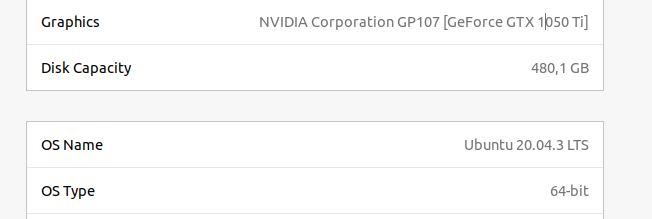
Ppablohenriquemg 2021-10-11 github

Hello @pablohenriquemg, what video card are you using?

Does any 32 bit OpenGL application like glxinfo from a 32 bit build of mesa-utils work? Unfortunately, Ubuntu doesn't provide a 32 bit build of this package on 20.04, so maybe try unpacking https://packages.ubuntu.com/bionic/i386/mesa-utils/download with an archive utility and using the utility without installing it to the system.
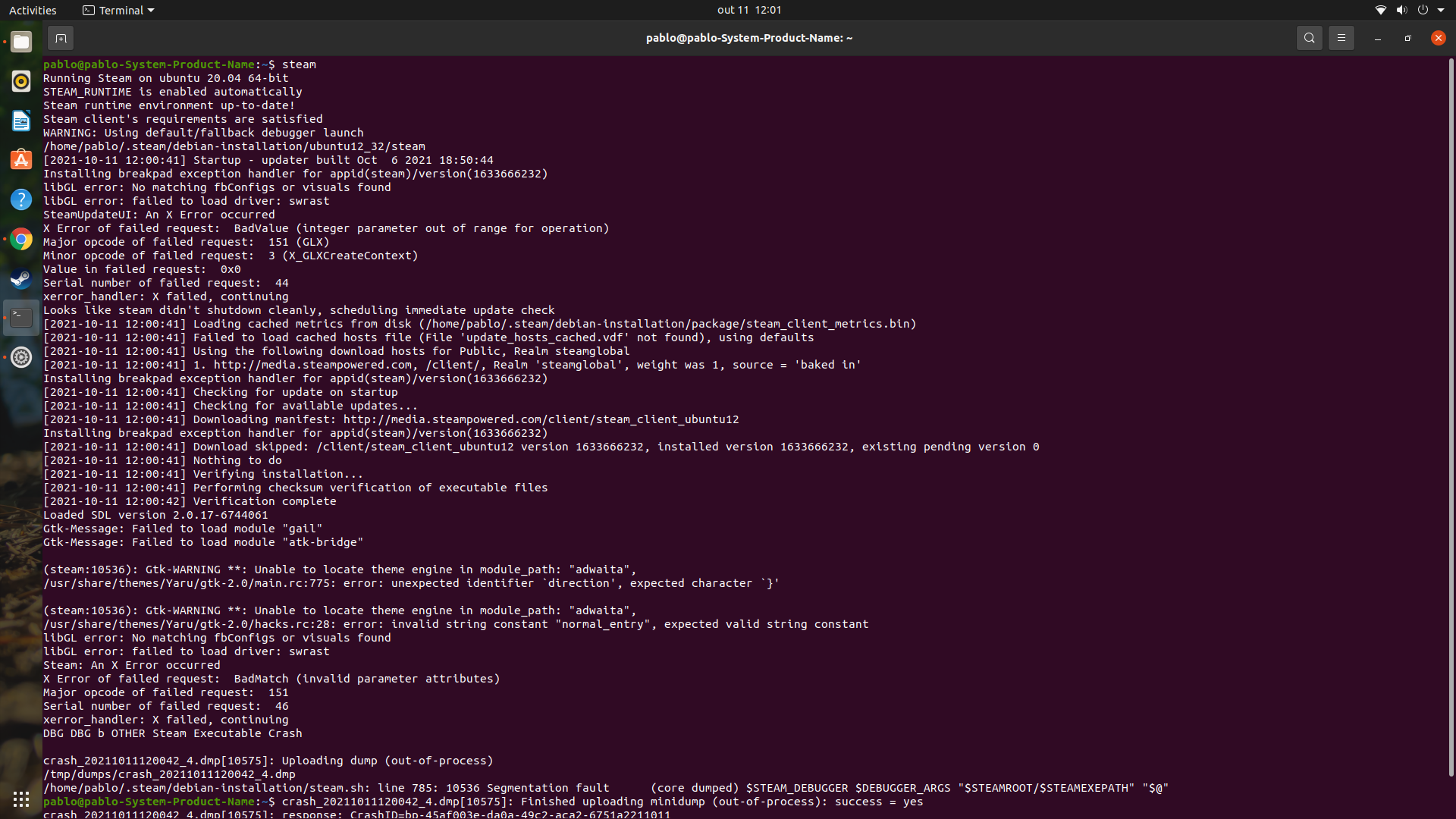
Screenshot from 2021-10-11 11-59-11

Ppablohenriquemg 2021-10-11 github

Hello @pablohenriquemg, what video card are you using?

Does any 32 bit OpenGL application like glxinfo from a 32 bit build of mesa-utils work? Unfortunately, Ubuntu doesn't provide a 32 bit build of this package on 20.04, so maybe try unpacking https://packages.ubuntu.com/bionic/i386/mesa-utils/download with an archive utility and using the utility without installing it to the system.
Screenshot from 2021-10-11 12-01-16

Kkisak-valve maintainer 2021-10-11 github

Thanks, swrast is mesa's slower cpu renderer. The fact that Steam is trying to use it hints that you're using the nVidia proprietary driver and are missing the driver's 32 bit userspace libraries. Figure out which driver series you're using, and add the 32 bit userspace libraries with something similar to sudo apt install libnvidia-gl-470:i386 (replace 470 with the driver series you're using).

Ppablohenriquemg 2021-10-11 github

its solved, but my network drivers don't work now, wifi and network adapter :(

Nothing extracted yet.