Steam get stucks in uninterruptible I/O (state `D`) when exiting, and cannot be re-opened
p.s. I think this is slightly different than #8152 since this is specifically about being unable to re-open steam again if steam is requested to exit during this process
Today I found the same problem occurring with a stuck download for Receiver 2 (id 1129310) as evidenced by the dead processes open files, added another LSOF listing to the gist: https://gist.github.com/robobenklein/a646ea5afcb03453c546dc4966d1a9b6#file-steam2-lsof
Notably this time I was unable to exit steam at all, even after waiting for multiple days, during which time I was unable to stop or pause the download. (As killing the processes does nothing since they're stuck in I/O, I have to reboot to update other games and play them.)
Still not really sure what causes the process to get stuck in state D, but since it's now occurred for multiple appids I am pretty sure it's a Steam bug.
Additional problems I noticed this causes:
- Attempting to download a new app freezes all of Steam entirely
- System shutdown (systemd init) is blocked waiting for the steam process, so a hardware reset is required
The "solution" I've found to prevent this from happening is just to hard reboot and rm -rf the game's folder before re-launching steam. Had to do this for both Receiver 2 and Payday 2 to get back normal Steam functionality.
Seems to be potentially related: attempting to install a new app while one of these frozen downloads is blocking I/O causes all of steam to freeze:
Excerpt of steam's ouput:
GameAction [AppID 1118310, ActionID 1] : LaunchApp changed task to RequestingLicense with ""
BRefreshApplicationsInLibrary 1: 0ms
GameAction [AppID 1118310, ActionID 1] : LaunchApp changed task to UpdatingAppTicket with ""
GameAction [AppID 1118310, ActionID 1] : LaunchApp failed with AppError_18 with ""
GameAction [AppID 1118310, ActionID 1] : LaunchApp changed task to Failed with ""
Could not connect to X session manager: None of the authentication protocols specified are supported
Could not connect to X session manager: None of the authentication protocols specified are supported
Could not connect to X session manager: None of the authentication protocols specified are supported
Could not connect to X session manager: None of the authentication protocols specified are supported
Couldn't write /.steam_exec_test.sh: Permission denied
Couldn't write /run/user/1000/keybase/kbfs/.steam_exec_test.sh: No such file or directory
Couldn't write /recovery/.steam_exec_test.sh: Permission denied
statvfs64: ret -1 errno 13
  f_bsize : 0
  f_frsize: 0
  f_blocks: 0
  f_bfree : 0
  f_bavail: 0
src/tier1/fileio.cpp (3797) : Assertion Failed: statvfs64 failed for /boot/efi, errno 13
src/tier1/fileio.cpp (3797) : Assertion Failed: statvfs64 failed for /boot/efi, errno 13
Installing breakpad exception handler for appid(steam)/version(1634158817)
DBG DBG ffffffff DUMP_REQUESTED Assert( Assertion Failed: statvfs64 failed for /boot/efi, errno 13 ):/data/src/tier1/fileio.cpp:3797
At this point steam is frozen, cannot be killed by any means, the steam windows still exist, and the system can't shutdown cleanly because of the stuck process.
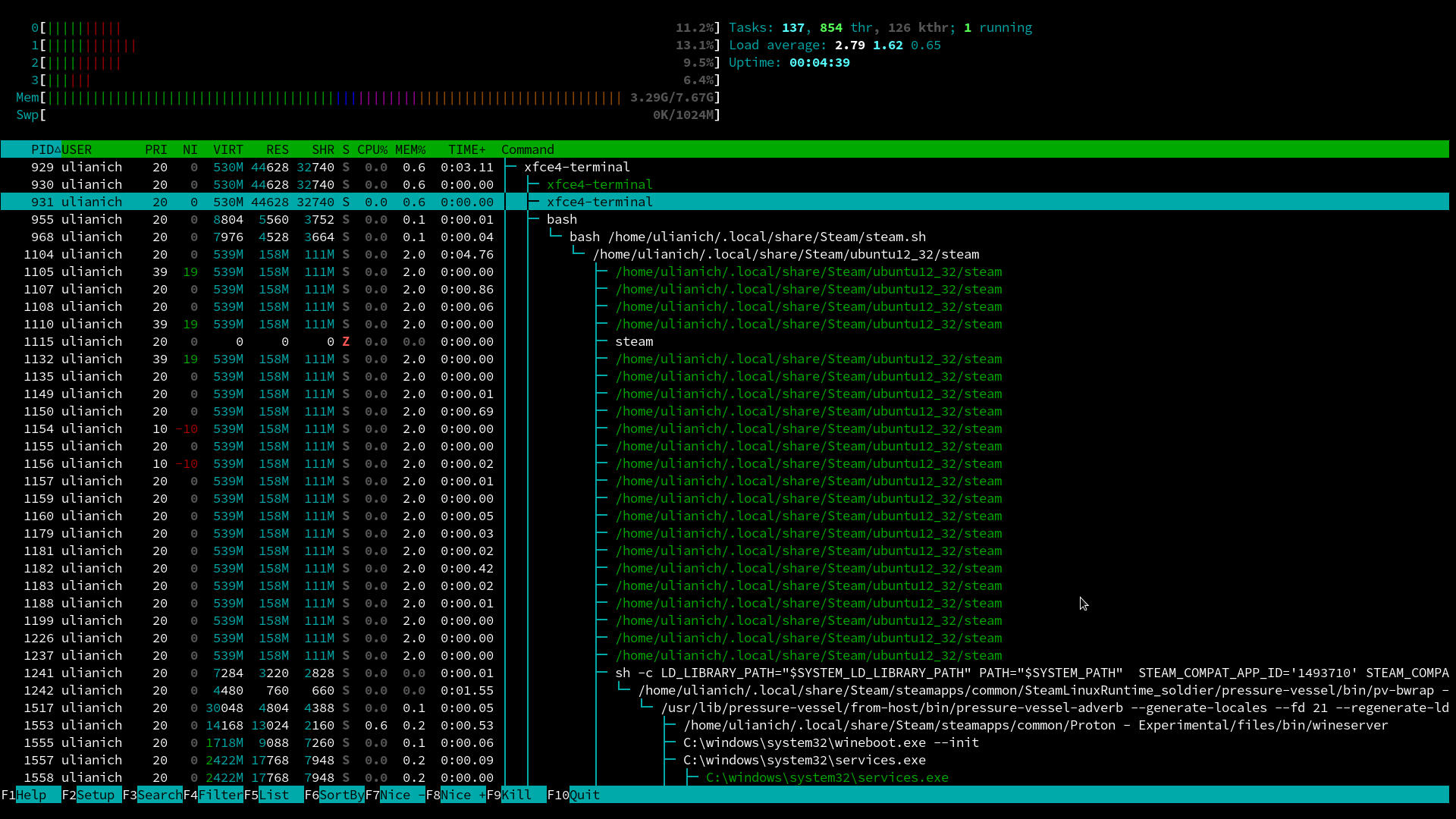
Similar behavior on Arch Linux, although htop shows state "S" for steam processes and steam continues to write a
Thread "CJobMgr::m_WorkThreadPool:0" (ID 2072) failed to shut down
log. I have just reinstalled currently newest steam 1.0.0.73-1 and removed my ~/.local/share/Steam as well as ~/.steam.
Unlike described in original post, killall steam sometimes does help.
UPD:
Right now I have stared and immediately exited steam and I've got a "Z" steam process. killall steam does not help :(
https://gist.github.com/belkka/a0b910a5d87dc60ab2c708285b013eed
@kisak-valve wow, thanks for a quick response!
#6811 — I don't run any games to reproduce the problem, just open and close steam
#8113 — Indeed, I had turned on steam beta participation today while trying to resolve some problems (you can see it's turned on in my log above), but I feel this had been happening without "beta participation" as well. Going to turn it off right now, remove .local/share/Steam, reinstall Steam and reproduce...
I don't run any games to reproduce the problem, just open and close steam
Actually, I have tried to run a proton game once. After that opening and exiting steam (without running any game) leads to the issue.
@kisak-valve
I have reproduced the problem without "beta participation". Do you think it's anyway relevant to #8113?
Video:
Nothing extracted yet.
Your system information
Please describe your issue in as much detail as possible:
Steam ends up in process state
D, is hence unable to be killed, and results in being unable to open steam again. (Presumably due to the check for an existing steam process.)Steps for reproducing this issue:
This appears to happen when I tell steam to exit while a download (probably write to disk or patch stage) is in progress.
This ends up with the process hanging:
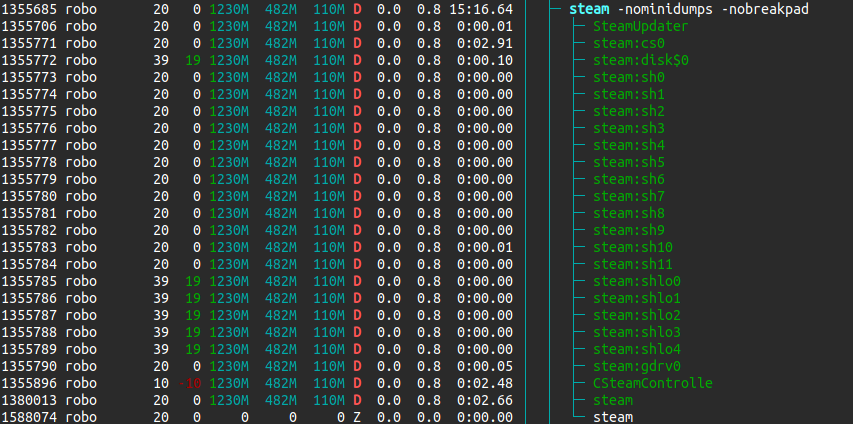
The process tree to the zombie process is:
systemd(1)───systemd(3946,robo)───steam(1355685)───steam(1588074)Workaround
Opening steam within a process jail (firejail) where it can't see the stalled steam process at least allows me to open it again without needing to reboot the whole system. This is obviously temporary since the old steam processes still take up system resources.
Related info
The app being downloaded was Payday 2 (
218620) but I don't think it's specific to any game. It is installed to an external drive (SSD) mounted at/mnt/stor/z4twhich is a 4TB ZFS single-drive pool. I can not unmount the drive while steam is in this state since it claims "target is busy" even though no read/writes are happenning.I can verify that steam is the one keeping the open files: https://gist.github.com/robobenklein/a646ea5afcb03453c546dc4966d1a9b6
It's not a question of waiting for a slow drive either, the process has been in this state for days at a time and has happened a few times before. The drive itself is not bad, and no data errors are reported by ZFS.