Thank you kisak-valve for the helpful formatting assistance and labels!
Hello @swickrotation, no OpenGL application including Crusader Kings II should be capable of taking down the entire system which hints that you're seeing a video driver or kernel issue of some kind.
In general, issues with linux native third party games should be reported to the game's dev(s) to ponder, and feedback for games run with Proton including The Witcher 3 should be mentioned in Proton's issue tracker. For the latter, we're using one issue per unofficially supported game title, so feel free to also add a note to https://github.com/ValveSoftware/Proton/issues/607.
Crusader Kings II would be an OpenGL game, which is being rendered by mesa/radeonsi, while The Witcher 3 would be translated to Vulkan by DXVK in Proton and handed off to mesa/RADV. I wouldn't summary combine these two games because they stress the video driver in very different ways.
I would check dmesg for any relevant hints after the system goes into the quirk state.
Hello!
I meant only to use those games as exmaples of a broader issue --- almost all of my games completely brick my computer now. My video hardware is old enough that I'd suspected it was not a driver issue as I do not believe new drivers have been released for it in some time (though that might be untrue.)
I reported this issue using the help process before posting here, but this happens both with games that require the use of proton and games with native linux ports (for example, Civ 5).
I noticed this issue when using kernel version 5.10, and it has not been resolved as of 5.14 which I run now.
It seems that AMD has made some new drivers called FirePro W2100 that are compatible with these old Radeon HD7800 cards, and these drivers were updated as recently as June. I will try these out and report back!
It should be noted that mesa has continuously supported your video card, even if your particular distribution release has lagged behind.
As far as I can tell now I'm getting errors installing the new driver because it expects that I am running linux kernel 4.19 or below. I don't think I can easily roll back stable to that version of the kernel and still keep everything else working.
What a pain. I'm not sure what Mesa can do for me now that it hasn't already been doing, but am grateful for the work. It seems to me now that I can either shell out hundreds of dollars for a new graphics card or simply dedicate part of the machine to an older operating system (or perhaps a windows install). Neither seem like nice options. I think perhaps I'll simply not play anything for quite some time.
Thanks for the help. I'll leave this open for now in case you have anything else to suggest.
Have you tried using the AMDGPU driver from mesa? By default mesa will use the radeonsi driver for your old card.
sudo lshw -c video
It should tell you if it's using radeonsi or amdgpu
If you are using the official amd drivers it will prob report that back.
So you have to force mesa to use the amdgpu driver.
To test:
At your bootup highlight your default entry, type "e" to edit the entry and type all the code below into the entry at the end:
radeon.cik_support=0 radeon.si_support=0 amdgpu.cik_support=1 amdgpu.si_support=1 amdgpu.dpm=1 amdgpu.dc=1
Then boot up and run the command again to confirm amdgpu is the driver in use then test.
That change is not permanent, so if it doesn't work just reboot.
If it works great, here is how to make it permanent:
echo "blacklist radeon" | sudo tee --append /etc/modprobe.d/blacklist.conf
echo "options amdgpu si_support=1 cik_support=1" | sudo tee --append /etc/modprobe.d/amdgpu.conf
sudo update-initramfs -u
Your system information
System Information
Please describe your issue in as much detail as possible:
Describe what you expected should happen and what did happen. Please link any large code pastes as a Github Gist
What I expect to happen is to be able to play games normally on moderate to low settings, depending on the game. What I instead experience is the ability to play the games for a few minutes before the screen goes completely black and my computer stops responding to anything short of a hard reboot. This happens for any sufficiently complicated game, but generally 2D games are able to be played without issue.
I should note I am still able to SSH into the machine from my laptop when this freezing happens, but there is no interfacing from the desktop itself. I have used top to see what's going on in close to real time when this happens, and from what I can tell it seems to be overheating. I cannot determine why, as I clean my machine regularly. I have been able to run things very smoothly for years, and much of the hardware is on the new side --- if not in manufacture, at least in usage. I have attached a picture showing just how much CPU is being taken simply by opening a game of CK2 and letting it run.
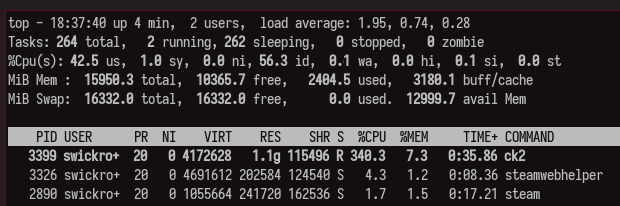
I have tried uninstalling and re-installing steam, many of the games in question, disabling steam overlay, playing in offline mode, disabling all external processes, and reducing graphics settings to the minimum. Nothing has worked so far.
I started getting this issue with The Witcher 3 around April of 2021. Not sure if it's the same problem but the symptoms are similar.
Steps for reproducing this issue: