Multiple non-steam-games all using AppID 0 can't be closed cleanly
If it matters, I'm also experiencing this issue while on the beta version of SteamOS 3. For example, I have appimages of Discord and Telegram. Opening both is fine, and so is closing 1 of them. When you try to close the other one though, it'll hang forever and can't be reopened from Steam until you exit to desktop mode and then reload game mode.
Can reproduce in latest stable also
Seeing this on Steam Deck. Killing or kill-9-ing the app also does nothing. The process will disappear but the app in the UI remains and can't be used / relaunched untill the client is restarted. Have seen the same issue with flatpak and appimage apps.
This happens the same with 'native' installed apps. Add non-steam firefox & pavucontrol, launch both in game mode & try to quit one, both show a grayed out 'Exiting game...' and neither quit, or can be closed.
If you then close the last tab on firefox you get a spinning steam logo but it remains in the list of open apps on the Steam menu and is not able to be closed or launched again
Seeing this on latest beta too. Makes multitasking almost completely useless.
Encountered this issue the other day while trying to get lutris and protonup-qt to working as complimentary software. Really hoping we get a response soon.
Also been experiencing this issue on the Deck. Would really love a solution to this! Not having to restart Steam every time I want to close an app would be amazing.
Also still experiencing this issue in the latest preview build. While running an Emulator and Chrome in game mode then trying to close Chrome it locks the system up. Chrome gets stuck in a "closing app" loop, reboot seems to be the only way to resolve. Not specific to Chrome, whatever app is closed seems to get stuck in this manner
Yep iv also noticed this. Was running discord in gaming mode & running an emulator & hitting quit game made both try to quit but instead the Deck just gets stuck in a infinite loop! Needs a fix!
Seems like closing from within apps works fairly consistently, but killing it from outside of it (whether by the Steam menu or via System Monitor) seems to cause the hanging issue.
Seems like closing from within apps works fairly consistently, but killing it from outside of it (whether by the Steam menu or via System Monitor) seems to cause the hanging issue.
I have to disagree with this having just tested it again. Opened 2 non-steam games, and closed one using an in-app exit choice has caused the hang. Both as the most-recent and least-recent run non-steam game.
Got the same problem with
Guildwars 2 + Firefox + Discord
Can't close any of them. Only hard reboot/poweroff works.
Observations with Two Non-Steam Games via the Steam Console (on Windows 11, but it could help explain people's Non-Steam games failing to close issues on the Steam Deck)
apps_running after first game launch:
 - AppID 0, GameID 17989158382581317632, ProcessID 10556, IP:Port 0.0.0.0:0
   commandline ""C:\Program Files\Audacity\Audacity.exe""
   extra info "Audacity"
   associated PIDs (  10556, )
   dwLastIsRunningCheck 1355434
apps_running after second game launch:
 - AppID 0, GameID 18082849065464233984, ProcessID 8024, IP:Port 0.0.0.0:0
   commandline ""D:/Portable Programs/Game Stuff/GlosSI-0.0.7.0/GlosSITarget.exe" Notepad.json"
   extra info "Notepad"
   associated PIDs (  10556,8024, )
   dwLastIsRunningCheck 1389797
Game ID is correct, however, it would appear the games get merged due to the AppID being the same (theoretically)
Is there any way to force the AppID to be something different to test? I know you can using an environment variable, if that works generally it might be a temporary workaround to set the AppID to some random value (maybe the process' PID?) + some extra digits to make sure it doesn't clash with any existing AppIDs
Seems to be working much better now (I am on beta channel). Majority of non steam apps close for me now (haven't had the stuck app for a while now)
EDIT: nevermind, issues still exists when having multiple apps open
@stansz what did you do exactly?
Beta channel
I'm on the beta channel on my Steam Deck and still having the same issue in game mode (having multiple apps open results in a permanent exiting screen until restarting Steam/rebooting) - @stansz are you on a desktop/using desktop mode on a deck?
I am on Preview and nothing changed.
Example is GW2 (non steam) + Firefox or Discord
Is there any way to force the AppID to be something different to test? I know you can using an environment variable, if that works generally it might be a temporary workaround to set the AppID to some random value (maybe the process' PID?) + some extra digits to make sure it doesn't clash with any existing AppIDs
I've tried many works around for this, but none of them would be as good as Valve actually fixing the issue. Sadly it looks like unless we starting being more clear about what the issue actually is... it might be a bit....
Sorry guys, was super busy and didnt' have my deck with me the past week or so.
Did some further testing and can confirm issue still exists when multitasking/having more apps open and then trying to close out.
Having single apps open, and then closing seems to work for me, but as soon as I open another app, it hangs on closing (example I tested was RetroArch + Chrome, as well as Spotify + VLC + Chrome ... all hung when they were open at same time, but when open individually, I seemed to be able to close out without issues).
Sorry guys, was super busy and didnt' have my deck with me the past week or so.
Did some further testing and can confirm issue still exists when multitasking/having more apps open and then trying to close out.
Having single apps open, and then closing seems to work for me, but as soon as I open another app, it hangs on closing (example I tested was RetroArch + Chrome, as well as Spotify + VLC + Chrome ... all hung when they were open at same time, but when open individually, I seemed to be able to close out without issues).
This is in line with my observations as well...
and fits in really nicely with the technical explanation for why this happens!
https://github.com/ValveSoftware/steam-for-linux/issues/8474#issuecomment-1242212810
I think we have a suitable explanation for Valve for why this happens now!
The same for me, on stable and beta channel.
I'm also having issues with this, this is definitely a flatpack issue. It seems like the steamOS gaming mode tries to terminate all flatpack instances when exiting from the menu. There must be a way, or some kind of flag for steamOS to identify each process or instance. I'll take a look at it further tomorrow and report back.
on the stable channel.
I'm also having issues with this, this is definitely a flatpack issue. It seems like the steamOS gaming mode tries to terminate all flatpack instances when exiting from the menu. There must be a way, or some kind of flag for steamOS to identify each process or instance. I'll take a look at it further tomorrow and report back.
on the stable channel.
if this was a flatpak issue... then wouldn't this be a non-issue on Windows as well... where the same issue is happening there too?
I'm also having issues with this, this is definitely a flatpack issue. It seems like the steamOS gaming mode tries to terminate all flatpack instances when exiting from the menu. There must be a way, or some kind of flag for steamOS to identify each process or instance. I'll take a look at it further tomorrow and report back.
on the stable channel.if this was a flatpak issue... then wouldn't this be a non-issue on Windows as well... where the same issue is happening there too?
you're right, it's not exclusively a flatpak issue after looking into it more. definitely not so definitely.
Here is a dump of my content_log.txt within /home/deck/.local/share/Steam/logs
it seems like that the steam client is loosing track of the PIDs or the mapping between the gameID and PID is erroneous.
2022-09-28 18:35:07] Game 16344590979463905280 adding PID 64508 as a tracked process "/home/deck/.local/share/Steam/ubuntu12_32/reaper SteamLaunch AppId=2630048210 -- /home/deck/.local/share/Steam/ubuntu12_32/steam-launch-wrapper -- "/usr/bin/flatpak" run --branch=stable --verbose --arch=x86_64 --command=/app/bin/chrome --file-forwarding com.google.Chrome @@u @@ --window-size=1024,640 --force-device-scale-factor=1.25 --device-scale-factor=1.25"
[2022-09-28 18:35:07] Game 16344590979463905280 adding PID 64509 as a tracked process
[2022-09-28 18:35:07] Game 16344590979463905280 adding PID 64521 as a tracked process
[2022-09-28 18:35:25] Game 16344590979463905280 no longer tracking PID 64521, exit code -1
[2022-09-28 18:35:25] Game 16344590979463905280 no longer tracking PID 64509, exit code -1
[2022-09-28 18:35:25] Game 16344590979463905280 no longer tracking PID 64508, exit code 0
[2022-09-28 18:35:52] Game 16344590979463905280 adding PID 64937 as a tracked process "/home/deck/.local/share/Steam/ubuntu12_32/reaper SteamLaunch AppId=2630048210 -- /home/deck/.local/share/Steam/ubuntu12_32/steam-launch-wrapper -- "/usr/bin/flatpak" run --branch=stable --verbose --arch=x86_64 --command=/app/bin/chrome --file-forwarding com.google.Chrome @@u @@ --window-size=1024,640 --force-device-scale-factor=1.25 --device-scale-factor=1.25"
[2022-09-28 18:35:53] Game 16344590979463905280 adding PID 64938 as a tracked process
[2022-09-28 18:35:53] Game 16344590979463905280 adding PID 64945 as a tracked process
[2022-09-28 18:36:02] Game 16344590979463905280 no longer tracking PID 64945, exit code -1
[2022-09-28 18:36:02] Game 16344590979463905280 no longer tracking PID 64938, exit code -1
[2022-09-28 18:36:02] Game 16344590979463905280 no longer tracking PID 64937, exit code 0
[2022-09-28 18:36:07] Game 16344590979463905280 adding PID 65329 as a tracked process "/home/deck/.local/share/Steam/ubuntu12_32/reaper SteamLaunch AppId=2630048210 -- /home/deck/.local/share/Steam/ubuntu12_32/steam-launch-wrapper -- "/usr/bin/flatpak" run --branch=stable --verbose --arch=x86_64 --command=/app/bin/chrome --file-forwarding com.google.Chrome @@u @@ --window-size=1024,640 --force-device-scale-factor=1.25 --device-scale-factor=1.25"
[2022-09-28 18:36:07] Game 16344590979463905280 adding PID 65330 as a tracked process
[2022-09-28 18:36:07] Game 16344590979463905280 adding PID 65335 as a tracked process
[2022-09-28 18:36:19] Game 17224870614410461184 adding PID 65733 as a tracked process "/home/deck/.local/share/Steam/ubuntu12_32/reaper SteamLaunch AppId=3242867109 -- /home/deck/.local/share/Steam/ubuntu12_32/steam-launch-wrapper -- "konsole" --fullscreen"
[2022-09-28 18:36:19] Game 17224870614410461184 adding PID 65734 as a tracked process
[2022-09-28 18:36:19] Game 17224870614410461184 adding PID 65755 as a tracked process
[2022-09-28 18:36:19] Game 17224870614410461184 adding PID 65757 as a tracked process
[2022-09-28 18:36:19] Game 17224870614410461184 adding PID 65758 as a tracked process
[2022-09-28 18:37:45] Game 17224870614410461184 no longer tracking PID 65758, exit code -1
[2022-09-28 18:37:45] Game 17224870614410461184 no longer tracking PID 65757, exit code -1
[2022-09-28 18:37:45] Game 17224870614410461184 no longer tracking PID 65755, exit code -1
[2022-09-28 18:37:45] Game 17224870614410461184 no longer tracking PID 65734, exit code -1
[2022-09-28 18:37:45] Game 17224870614410461184 no longer tracking PID 65733, exit code 0
[2022-09-28 18:37:45] Game 17224870614410461184 no longer tracking PID 65335, exit code -1
[2022-09-28 18:37:45] Game 17224870614410461184 no longer tracking PID 65330, exit code -1
[2022-09-28 18:37:45] Game 17224870614410461184 no longer tracking PID 65329, exit code 0
confirmed that this issue hasn't been fixed as of 3.3.2
It indeed seems to be very random, if there is any way I can help out I'd glady do so.
Edit: could it perhaps be that the game that I start, spawns another pid and steamos lost track in this case?
Linking these as they are possibly loosely related:
Flatpak apps do not get focused in steamcompmgr
SteamOS requires "STEAM_GAME" X property to display Flatpak windows
Game ID is correct, however, it would appear the games get merged due to the AppID being the same (theoretically)
Looking back over this and I think this has hit the nail on the head. In desktop Linux running any non-steam game causes an App with AppID of 0 to show in console. Running a second without closing first and the 2nd will show in apps_running but the first is gone. Both apps are still running on system and still show as running on library, but not in apps_running. None of these can be stopped successfully from Library and enter a similar limbo as in gamemode.
On version 3.3.2, I have this issue also! I just want to use discord and a non steam game together. It makes it so every time I swap what game I'm playing with my friends I have to restart.
I’m also having this issue. Running multiple non steam games in game mode causes them to hang and become inaccessible. I just want to listen to spotify whilst playing an emulator but it can’t be done!
valve plz fix
What exactly is the hold up on this issue? It's a pretty glaring bug and has been around for a long time.. makes multitasking a bit useless. Is anyone having a hard time reproducing this issue? Is it not considered as important? Would love to see this fixed. I can reproduce it reliably and share any logs if needed to fix this issue.
It's not even hard to replicate, since it happens every time I want to run a non Steam game with Discord on the background on my Steam Deck.
On version 3.3.2, I have this issue also! I just want to use discord and a non steam game together. It makes it so every time I swap what game I'm playing with my friends I have to restart.
This bug is making the steamdeck look 💩
@kisak-valve
March 11th. Fella. some emails need to be sent.
I just want to be able to close discord... 🤦♂️
Decided to finally come find the report and thread for this bug, and since it looks like nobody mentioned it yet, my workaround for this when I absolutely need to be able to close and reopen apps without completely restarting the Steam Deck has been to launch a single Terminal Emulator as a non-steam game, then launch apps using commands and the & Bash Operator to launch multiple from the same parent shell. This results in the X Button turning into a "Close Window" button for the "Switch Windows" menu that appears when multiple xwayland windows are spawned by the same non-steam game, and as far as I can tell, this "Close Window" button works extremely more reliably for its purpose than the "Exit game" button ever does. One downside is that I end up manually switching between different Steam Input profiles for each window I switch to, but this is what I have to do if I don't want to trigger this bug.
Really embarassing
9 months with no fix or word from valve on the status of the bug. How has nobody from the deck team looked at this in 9 months!
Been having the issue since day one, multitasking is currently entirely broken
I've created a petition to get steam's attention, please share this with all your friends and family who are affected by this bug! We need Valve to get some eyes on this critical bug.
also if you would like to help me write a better summary or include some pictures, please dm me.
Please look at this issue Valve
This is still not fixed? oof.
Bump
Bump
Bump
I think there was an attempt to fix this issue with Steam Client update on December 8th:
Fixed a case where the UI would think that a game is running when it's not, leaving games in an "exiting forever' state
https://steamcommunity.com/app/1675200/eventcomments/3716062978734693785
But this is was not actually fixed. Please fix this Valve
Latest current preview and its still not fixed...
This will be fixed in the next update.
This will be fixed in the next update.
Amazing to hear!
I think the new (at least steam deck) beta should have fixed it. Can someone try? I don't have the time. 😅
I think the new (at least steam deck) beta should have fixed it. Can someone try? I don't have the time. 😅
This beta does appear to have fixed the issue! 😄
Edit: Tested on latest Steam Deck beta
Fixed! Thanks so much Steam Contributors!!
Confirming that it's fixed. I did a torture test with 10 applications and was able to exit out of all of them.
This legitimately marks a new era for me in Steam Deck multitasking.
Is steam input also working for each individual app/game? Before the exit was fixed, only the input from last app that you open was responding/accepted. No idea how to explain that better. 😅
@1basti1 Does this involve you needing to reorder controllers if you use a Bluetooth connected one? (Happens to me with an Xbox Elite Core 2 with Prism Launcher.)
I only experienced it with the steam deck controls. I only use the deck as a handheld. No idea about other Controllers. Sorry.
Is steam input also working for each individual app/game? Before the exit was fixed, only the input from last app that you open was responding/accepted. No idea how to explain that better. 😅
The controller mapping switches as expected between multiple non steam apps!
I switched to the Beta Channel and the controller mapping switches as expected. Unfortunately the app closing still does not work for me.
Awesome! Thanks Valve for fixing this.
I can confirm that on my end this seems to be fixed in the latest Steam Beta Client update.
Tested and works as expected now
This legitimately marks a new era for me in Steam Deck multitasking.
Now I will be using the gamepadui on every gaming device. This was the final piece of the puzzle for me.
Thanks to everyone who helped bring this to attention and those who fixed it too
Hmm... When I have 2 non-steam apps open (maybe also 1 steam game + flatpak, but didn't tried it yet) it only shows the last one I opened as "playing right now" status. But it should show the thing I have in focus right now, as status.
Hmm... When I have 2 non-steam apps open (maybe also 1 steam game + flatpak, but didn't tried it yet) it only shows the last one I opened as "playing right now" status. But it should show the thing I have in focus right now, as status.
Please open a separate issue for that.
Most likely not OS-specific behavior as well.
@kisak-valve it seems that the SteamClient API still reports appid as 0:
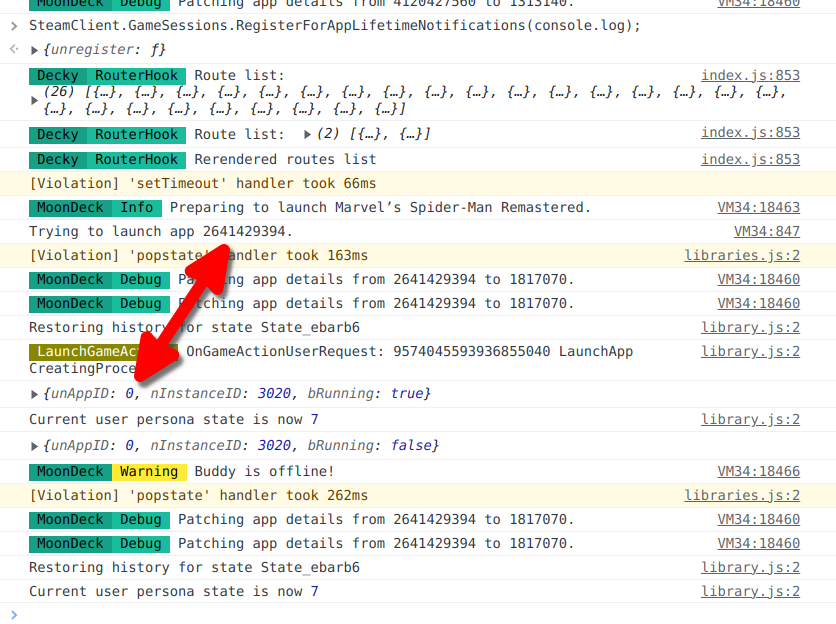
Would be useful for some of the decky plugins if this is fixed, but I guess I'll just leave it at that.
Please open separate issues for remaining problems. It's very possible the Steam client has other spots where it fails to correctly handle shortcuts.
Hmm... When I have 2 non-steam apps open (maybe also 1 steam game + flatpak, but didn't tried it yet) it only shows the last one I opened as "playing right now" status. But it should show the thing I have in focus right now, as status.
Did you report this already? Got the same problem with spotify and any game.... Spotify flatpak app just start completely stopping to play music as soon as i start a game in gamemode and if i get to start it again after quitting it the music is way too fast and really sounds like giberrish...
Since the latest Steam Client build, this bug is unfortunately back for me. Can anyone else confirm this to me?
Hello @RodoMa92, please open a new issue report.
Upstream links
- ValveSoftware/SteamOS/issues/612x1 2022-10
- ValveSoftware/steam-for-linux/issues/8474x1 2022-09
Your system information
Steam client version (build number or date):
1646795571
Wed Mar 9 2:07 AM UTC
Distribution (e.g. Ubuntu):
SteamOS 3
Opted into Steam client beta?: [Yes/No]
Yes
Have you checked for system updates?: [Yes/No]
Yes
Please describe your issue in as much detail as possible:
Running two different non-steam-games and closing one (either with "Exit Game" option or any in-game/in-app quit prompt) will cause it to return to a spinning steam logo.
The non-steam-game will remain in the list of running game in the 'Steam' menu and in library will have the option 'Resume' not 'Play' on the play button. Pressing 'Resume' returns the user to the spinning waiting screen.
The Steam client needs to be restarted to return the 'Play' option
Steps for reproducing this issue:
Other
For clarity this is an issue in the latest Deck beta. Uncertain if it is important but the reaper process for the app that is closed goes 'defunct' at the point this is triggered.
I've tested this with a handful of different games, utilities etc with no variation.