Steam freezes after running for a while
Hello @Searchstars, for clarity, are there Steam processes still running after using killall? Maybe try killall -9 steam to be more forceful? By default, kill commands send SIGTERM, which is a polite way of asking a process to finish what it's doing and exit gracefully. Adding the -9 option tells the kill command to send SIGKILL, which tells the process to exit immediately.
As a side note, Steam runs as the regular user, sudo is not needed or beneficial for anything related to normal use of Steam.
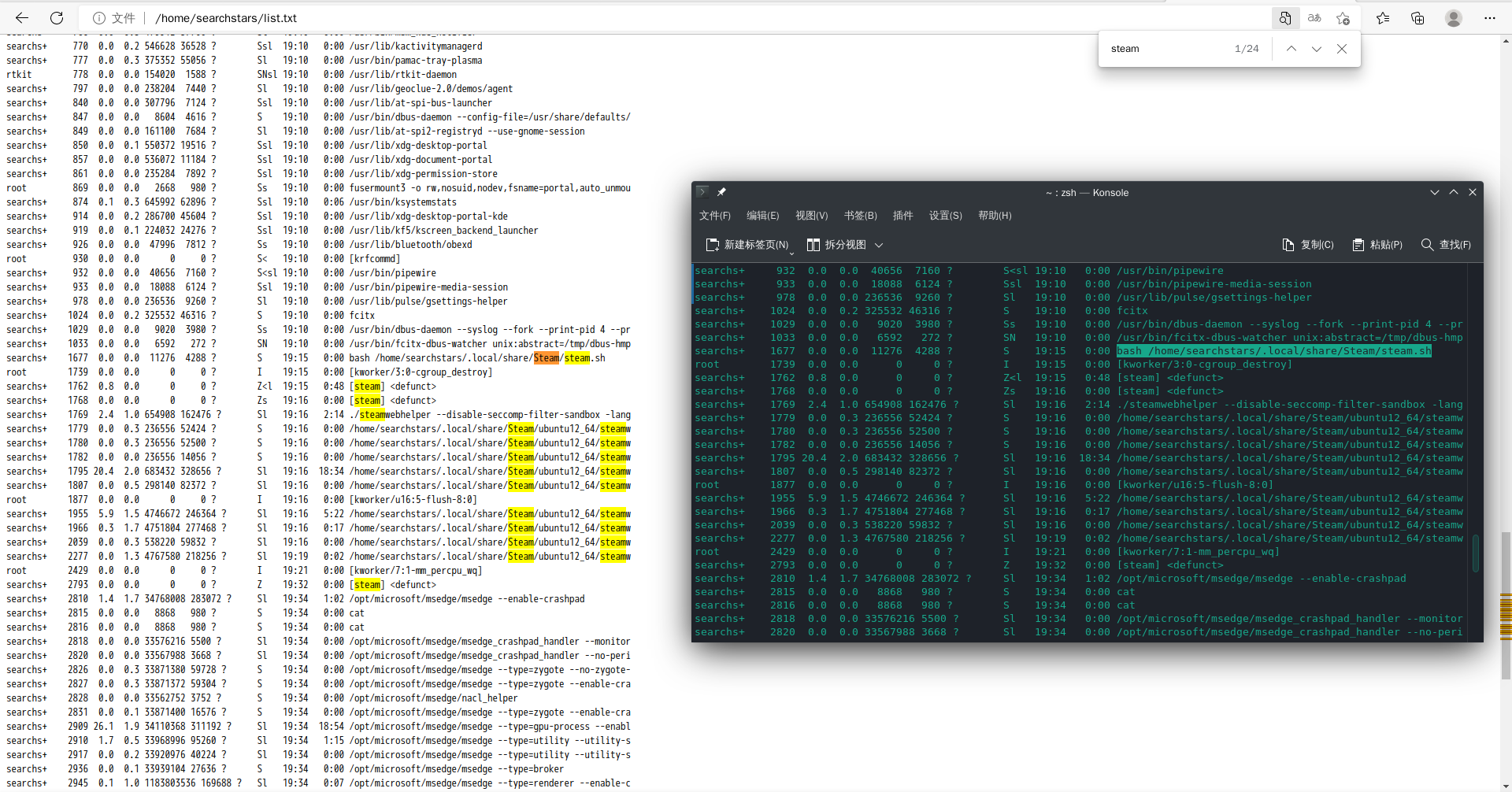
After using killall -9 steam, steam‘s window is still not closed and the process still exists in the list
In my experience, the most likely scenario for a process to stick around as a zombie when SIGKILL'd is because it's waiting on device I/O. I would check dmesg for any storage-related errors and otherwise make sure the drive is healthy.
Well, given that the system has other SSD-related issues while it's running, I'd consider replacing the SSD
I've also had this issue before though it was automagically fixed after doing a reinstall after switching to a AMD graphics card, nevermind the fact if the reinstall was really necessary.
Seeing as this issue is still open, and I'm facing the same problem, having tried the exact same steps. The only device I/O issues I'm facing are related to a CD-ROM drive. It does not stick around after a killall -9 steam
Steam client version (build number or date): 1660960119
Distribution (e.g. Ubuntu): Arch
Opted into Steam client beta?: No
Have you checked for system updates?: Yes
Specs for good measure:
OS: Arch Linux x86_64
Kernel: 5.19.4-arch1-1
DE: Plasma 5.25.4
WM: kwin
CPU: AMD Ryzen 5 3600X (12) @ 3.800GHz
GPU: NVIDIA GeForce RTX 3070 Ti
Memory: 16 Gigs of DDR4 at 2400 MHz
After I unplug my pcie wireless network card and plug in the Internet cable, steam can work normally. This surprised me
Nothing extracted yet.
Your system information
Please describe your issue in as much detail as possible:
The Steam client freezes after running for a period of time. The main performance is that all windows of Steam cannot be dragged, and this problem cannot be solved by ending the Steam process. After entering
sudo killall steamin Konsole, the Steam window still exists and It's stuck and can't start a second Steam process. Steam will freeze together with the running game, which makes my game experience very bad. If I want to completely exit Steam in the stuck state, I can only restart the desktop environment. Usually, I typesudo systemctl restart sddmin Konsole.Steps for reproducing this issue:
Launch the Steam client and run a large game, then wait for a while (it may also trigger without the game running)