Steam client version (build number or date): Aug 20 2022 (API: v020, package versions: 1661825435)
Distribution (e.g. Ubuntu): Fedora 35
Opted into Steam client beta?: No
Have you checked for system updates?: Yes
Please describe your issue in as much detail as possible:
This is actually 2 issues, but I suspect they are probably related to the same/similar problem, which I believe is "Cloud Sync".
The most important issue. Unable to start ANY game if steam client was started in Offline mode. This started to happen after the Aug 20 2022 update.
Secondary issue that's mainly just very annoying. "Unable to sync" warning message. This started to happen after the Jul 26 2022 update.
This problem initially started with the Jul 26 2022 update, but at that point it was just the annoying "Unable to sync" warning message. This message is received if the steam client is in Offline mode, just after starting a game.
This problem happens even when "Cloud Sync" is disabled globally and per game. If Cloud Sync is disabled, there should be no reason for the steam client to even try to sync and therefore no reason it should generate an "Unable to sync" warning. This did NOT happen before the Jul 26 2022 update. I suspect code was added that assumes "Cloud Sync" is enabled. The code should check to see if "Cloud Sync" is enabled globally and per game before attempting a sync.
The problem became worse after the Aug 20 2022 update. After receiving the "Unable to sync" message, I now receive a "compatibility tool configuration failed" error message that can't be ignored and prevents the game from starting in Offline mode.
To add insult to injury, clicking on the "See the Steam support site for more information" link doesn't work because I'm in Offline mode. It appears to me, some code was added that assumes Online mode and doesn't consider what happens in Offline mode.
The only way around this issue (as far as I've found) is to go Online then Offline, which temporarily "fixes" this problem, as long as the steam client isn't restarted. If the steam client is restarted, then I need to go Online/Offline again. The obvious problem with this "workaround" is it only works if an Internet connection is available. If I do not have an Internet connection, there's no way to start any game.
Steps for reproducing this issue:
Please note, it's very important to START the steam client in Offine mode. If the client is started in Online mode and switched to Offline mode, the "Unable to Sync" warning will happen, but the "compatibility tool configuration failed" error doesn't occur.
Start steam client.
Verify "Steam Cloud" is disabled - globally and per game.
Verify steam client is currently in OFFLINE mode - if not, Steam->Go Offline...
Exit steam client. Steam->Exit
Start steam client and select "START IN OFFLINE MODE" in the startup dialog.
Select a game and "Play".
See "Unable to Sync" warning and select "Play anyway".
See "compatibility tool configuration failed" error message.
If no Internet connection is available, then go watch TV, cause you can't play any Steam games.
If Internet connection is available, go Online, then Offline and then game can be started.
Your system information
Please describe your issue in as much detail as possible:
This is actually 2 issues, but I suspect they are probably related to the same/similar problem, which I believe is "Cloud Sync".
The most important issue. Unable to start ANY game if steam client was started in Offline mode. This started to happen after the Aug 20 2022 update.
Secondary issue that's mainly just very annoying. "Unable to sync" warning message. This started to happen after the Jul 26 2022 update.
This problem initially started with the Jul 26 2022 update, but at that point it was just the annoying "Unable to sync" warning message. This message is received if the steam client is in Offline mode, just after starting a game.

This problem happens even when "Cloud Sync" is disabled globally and per game. If Cloud Sync is disabled, there should be no reason for the steam client to even try to sync and therefore no reason it should generate an "Unable to sync" warning. This did NOT happen before the Jul 26 2022 update. I suspect code was added that assumes "Cloud Sync" is enabled. The code should check to see if "Cloud Sync" is enabled globally and per game before attempting a sync.
The problem became worse after the Aug 20 2022 update. After receiving the "Unable to sync" message, I now receive a "compatibility tool configuration failed" error message that can't be ignored and prevents the game from starting in Offline mode.
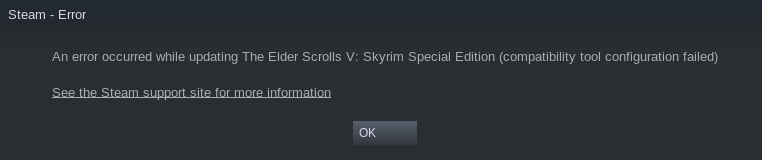
To add insult to injury, clicking on the "See the Steam support site for more information" link doesn't work because I'm in Offline mode. It appears to me, some code was added that assumes Online mode and doesn't consider what happens in Offline mode.
The only way around this issue (as far as I've found) is to go Online then Offline, which temporarily "fixes" this problem, as long as the steam client isn't restarted. If the steam client is restarted, then I need to go Online/Offline again. The obvious problem with this "workaround" is it only works if an Internet connection is available. If I do not have an Internet connection, there's no way to start any game.
Steps for reproducing this issue:
Please note, it's very important to START the steam client in Offine mode. If the client is started in Online mode and switched to Offline mode, the "Unable to Sync" warning will happen, but the "compatibility tool configuration failed" error doesn't occur.