Hello @Windgott1910, downloads and updates to game content is handled by the Steam client before Proton itself is run. This particular dialog is part of the Steam client.
Proton 5.13 and newer is run inside the Steam Linux Runtime - Soldier container environment, and that should automatically get downloaded and installed by the Steam client when you tell a game to use Proton, but for some reason that hasn't happened (https://gist.github.com/Windgott1910/d1baca0948fbd2bc0379406ae64b6232#file-system_information-txt-L800). Did you bring this Steam install over from another system or use some other uncommon installation method which might have confused the Steam client into already having Proton installed without the container environment?
I would go to the Library view of Steam, search for Steam Linux Runtime - Soldier, note if it is already installed, and if it isn't then test if manually telling Steam to install it has an effect.
Works after installing Steam Linux Runtime - Soldier
proton 5.13x1 2022-12
Compatibility Report
probaby more, but I haven't tested any more as the first two didn't work
System Information
I confirm:
Proton does not create a log.
Symptoms
Game doesn't start
Steam log of trying to play: https://gist.github.com/Windgott1910/1e986d845f1d3f92a930a62815c7b133
when I press "Backup Game Files, it says the Game has to update fully, log: https://gist.github.com/Windgott1910/0e093fca608eb7fe95d4f3e428df27ca
Reproduction
install Steam
force Compability of your liking
install Game
try to play Game / try to backup Games Files
##more detailed Symptoms of
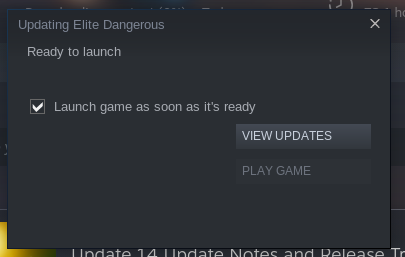
1 trying to play Game / 2 trying to backup Game Files
1: the "Updating Screen flickers to life, showing its bar for a fraction of a second, then this:
the "Show Updates" button doesn't work, and, obviously as it is greyed out, the "Play Game" button neither.
2: well, a window pops up, "[Game] cannot be backed up until it has finushed updating"